
Agent Factory Recipe
Get a fleet of specialized agents productive on Day 1, not Day 90. A repeatable 7-step recipe.
Audience: Platform leads onboarding 12+ "Virtual Squad" agent personas across product teams in the first weeks of a Plan Forge rollout.
Goal: One work day for the first squad, one hour per additional squad thereafter.
What "Agent Factory" means in Plan Forge
Plan Forge ships a fleet of ~21 agent personas per preset out of the box: 6 stack-specific reviewers, 8 cross-stack reviewers (shared across presets), 5 pipeline agents, and 2 meta / audit agents. (The site-wide counter says 12, which reflects an editorial rollup where cross-stack reviewers are conceptually folded into stack lanes; the actual files on disk total more.) Each is a Markdown file under .github/agents/ with a YAML frontmatter description and a body that defines the persona's expertise, tone, and lane. Agents are invoked from chat (agent picker dropdown) or referenced from a plan slice (agent: security-reviewer). They cannot edit files, they audit and report.
The "Agent Factory" is the configuration plus convention layer that makes those personas productive against a customer's specific stack on Day 1, instead of generic-but-vague.
The recipe in one page
1. SUBSTRATE    , confirm GitHub-native primitives are in place
2. CONFIGURE    , write project profile + project principles (one hour each)
3. ROUTE        , assign agents to lanes (which agents own which kinds of work)
4. SHARED CONTEXT, populate AGENTS.md, copilot-instructions.md, instruction files
5. SHARED TOOLS , point at MCP servers (Plan Forge MCP, github-mcp-server, optional Foundry Toolbox)
6. PILOT        , run one real plan with the full agent fleet, capture friction
7. ITERATE      , encode lessons in instruction files; re-run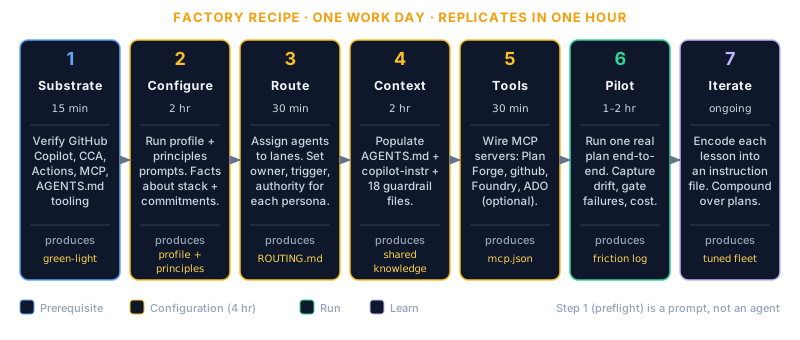
Each step below is one to two hours for a platform lead familiar with the codebase. The whole recipe is achievable in one work day for the first squad and replicates in one hour per additional squad thereafter.
Step 1 — Substrate check (15 min)
Verify the GitHub-native primitives Plan Forge depends on are enabled in the org:
| Primitive | Check | If missing |
|---|---|---|
| GitHub Copilot Enterprise | Org admin → Copilot tab → "Copilot Enterprise" enabled | Provision before continuing |
| Copilot Cloud Agent | Org admin → Copilot tab → Cloud Agent toggle ON for target repos (or via custom properties) | Enable per GitHub docs |
| GitHub Actions enabled per repo | Repo settings → Actions → "Allow all actions" or specific allowlist | Enable per repo |
| MCP support in IDE | VS Code 1.95+ with chat.mcp.enabled setting on, or Copilot CLI 1.x | Update IDE / install CLI |
| AGENTS.md aware tooling | At least one of: Claude Code, Cursor, Codex, Amp, Aider, Gemini CLI, Goose, Windsurf | Pick at least one, they're Plan Forge's worker options for non-CCA paths |
If any are missing, fix before moving on. The factory recipe assumes the substrate is in place.
Step 2 — Configure project profile and principles (2 hr)
Plan Forge ships two prompts that, run once, produce the configuration that downstream agents inherit:
project-profile.prompt.md — what your stack is
A guided interview that produces .github/instructions/project-profile.instructions.md. Captures:
- Languages, frameworks, ORM, test framework
- Build / test / lint / dev commands
- Compliance frameworks (SOC2, HIPAA, PCI-DSS, GDPR, FedRAMP)
- Coding standards (naming, file organization, import ordering)
- Database conventions, API patterns, error handling preferences
This file auto-loads (via applyTo: '**' in frontmatter) for every agent session in the repo. Run it once per repo. It's the foundation everything else assumes.
project-principles.prompt.md — what your team commits to
A second interview that produces docs/plans/PROJECT-PRINCIPLES.md plus a companion .github/instructions/project-principles.instructions.md. Captures:
- Architectural commitments (what you will and won't build)
- Forbidden patterns (anti-patterns specific to your codebase)
- Boundaries (what's in scope for AI-driven work, what isn't)
This file is loaded by the SessionStart hook and pinned in agent context for the duration of every session.
Why both
Profile = facts about the stack. Principles = commitments about how the team works. Confusing the two is a common mistake. Profile is descriptive; principles is prescriptive. Both feed every agent every session.
Step 3 — Route agents to lanes (30 min)
Plan Forge ships these personas. Decide who owns what for your team:
Stack-specific reviewers (6 per preset)
| Agent | Owns |
|---|---|
architecture-reviewer | Layer separation, pattern adherence, refactor proposals |
database-reviewer | Schema, migrations, query performance, ORM patterns |
deploy-helper | Dockerfiles, CI/CD config, deployment scripts |
performance-analyzer | Hot/cold path analysis, allocation, profiling |
security-reviewer | Input validation, secret handling, OWASP, auth |
test-runner | Test coverage, test quality, fixture sanity |
The dotnet preset ships an extra blazor-reviewer; the azure-iac preset swaps the language-specific reviewers for bicep-reviewer, terraform-reviewer, and azure-sweeper; the playwright preset adds playwright-test-generator, -healer, and -planner.
Cross-stack reviewers (8 from presets/shared)
| Agent | Owns |
|---|---|
api-contract-reviewer | OpenAPI consistency, breaking change detection |
accessibility-reviewer | WCAG, ARIA, keyboard navigation |
multi-tenancy-reviewer | Tenant isolation, row-level security, cross-tenant query risk |
cicd-reviewer | Pipeline correctness, runner sanity, gate completeness |
observability-reviewer | Trace coverage, log quality, metric meaningfulness |
dependency-reviewer | Vulnerability scanning, license compliance, version hygiene |
compliance-reviewer | GDPR / CCPA / SOC2 / HIPAA / PCI-DSS conformance |
error-handling-reviewer | Exception hierarchy, ProblemDetails, error boundaries |
Pipeline agents (5) — these have handoff buttons
| Agent | Stage |
|---|---|
specifier | Step 0: define what & why |
plan-hardener | Step 2: harden plan into execution contract |
executor | Step 3: execute slices with validation gates |
reviewer-gate | Step 5: independent review and drift detection |
shipper | Step 6: commit, deploy, close |
Step 1 (preflight) ships as a prompt, not an agent, see .github/prompts/step1-preflight-check.prompt.md. It runs inline rather than as a separate persona.
Meta / audit (2)
| Agent | Role |
|---|---|
audit-classifier-reviewer | Reviews changes to the audit classifier itself; enforces before/after finding counts |
plan-health-auditor | Read-only auditor over run history, failure modes, gate portability, slice retry rates; proposes patches |
Skills are a parallel surface (slash-commands)
Some review work ships as a skill, not an agent. Skills are multi-step procedures invoked by typing / in chat (or via forge_run_skill). They can read, execute, and report — unlike agents, which only audit. The repo ships these out of the box under .github/skills/ and the per-preset .github/skills/ directories:
| Slash command | What it does | Surface |
|---|---|---|
/clean-code-review | Audit module size, function complexity, parameter lists, TODO/FIXME, ESLint violations | Repo-level |
/code-review | Comprehensive multi-axis review (architecture, security, testing, patterns); supports --quorum | Repo-level |
/bug-fix | End-to-end bug-fix workflow: load → pre-fix review → failing test → fix → validate → close | Repo-level |
/stakeholder-briefing | Generate a per-organisation Plan Forge briefing from the canonical template | Repo-level |
/test-sweep | Run all test suites and aggregate results | Per-preset |
/staging-deploy | Build, push, migrate, deploy, verify on staging | Per-preset |
/security-audit | OWASP scan, dependency audit, secrets detection, severity report | Per-preset |
/forge-quench | Plan-Forge-specific cooldown / drift verification after a slice | Per-preset |
/health-check | Forge diagnostic: forge_smith → forge_validate → forge_sweep | Per-preset |
/release-notes · /onboarding · /api-doc-gen · /database-migration · /dependency-audit | Specialty per-preset skills | Per-preset |
When routing, treat each skill the same way you treat an agent: pick an owner, a trigger (auto on PR, scheduled, manual), and the authority it carries (advisory comment vs. blocking gate). Skills are ideal for work that needs to execute commands (test runs, dependency scans, deploys); agents are ideal for work that should only review and report.
Routing decisions to make
For each agent, pick:
- Owner, which team member (or rotation) is the human reviewer when this agent fires?
- Trigger, automatic on PR? Manual via slash command? Plan-slice-bound?
- Authority, advisory (commenter), gating (blocks merge), or escalation-only (raises an issue)?
Document the routing in .github/agents/ROUTING.md (you may need to create this, it's not yet a Plan Forge default but the convention is clean and we recommend adopting it).
Step 4 — Shared context: AGENTS.md and instruction files (2 hr)
Plan Forge generates these on setup.ps1 / setup.sh. The factory step is to populate them with project-specific content beyond the templated defaults.
AGENTS.md (repo root)
The Linux Foundation-stewarded standard read by Claude Code, Cursor, Codex, Amp, Aider, Gemini CLI, Goose, Windsurf, and others. Contents:
- Project overview (one paragraph)
- Build / test / lint / dev commands (the substantive ones, not generic placeholders)
- Code style conventions
- Testing conventions
- Security considerations
- PR conventions
Plan Forge keeps this in sync with the project-profile output, but review the generated content, generic phrasing here costs you on every agent run.
.github/copilot-instructions.md
The GitHub-native equivalent. Contains:
- Architecture principles link
- Quick commands
- Coding standards summary
- Pipeline overview
- Skill / agent / hook references
Plan Forge generates a strong default. Customize the "Project Overview" section with your team's specifics.
.github/instructions/*.instructions.md
Plan Forge ships 18 of these per preset (the dotnet/typescript/python/etc. preset directories under presets/, each with its own .github/instructions/). Each has an applyTo glob that controls when it auto-loads:
| File | Loads on |
|---|---|
architecture-principles.instructions.md | ** (always, universal baseline) |
project-profile.instructions.md | ** (always, your stack) |
project-principles.instructions.md | ** if PROJECT-PRINCIPLES.md exists |
git-workflow.instructions.md | ** |
api-patterns.instructions.md | ** |
auth.instructions.md | ** |
database.instructions.md | ** |
security.instructions.md | ** |
testing.instructions.md | ** |
errorhandling.instructions.md | ** |
deploy.instructions.md | ** |
observability.instructions.md | ** |
caching.instructions.md | ** |
messaging.instructions.md | ** |
multi-environment.instructions.md | ** |
performance.instructions.md | ** |
version.instructions.md | ** |
status-reporting.instructions.md | docs/plans/**, pforge-mcp/**, .forge/** |
context-fuel.instructions.md | ** |
self-repair-reporting.instructions.md | ** |
These are templated. Read each one. Add team-specific guidance where the template is generic.
Step 5 — Shared tools: MCP server selection (30 min)
Configure .vscode/mcp.json (Plan Forge generates this; you augment) with the MCP servers the fleet should share:
Required
{
  "mcpServers": {
    "plan-forge": {
      "command": "node",
      "args": ["./pforge-mcp/server.mjs"]
    }
  }
}
Strongly recommended
{
  "github": {
    "url": "https://api.githubcopilot.com/mcp/",
    "auth": "oauth"
  }
}
The github-mcp-server gives every agent in the fleet first-class access to GitHub Issues, PRs, repos, code-scanning alerts, and 19 other toolsets. 29.5k stars, MIT, official.
For Microsoft-shop fleets
{
  "foundry-toolbox": {
    "url": "https://YOUR-FOUNDRY-TOOLBOX-ENDPOINT/mcp",
    "auth": {
      "type": "bearer",
      "tokenSource": "azure-keyvault://your-vault/foundry-toolbox-pat"
    }
  }
}
Foundry Toolboxes are MCP-compatible endpoints that bundle Web Search, Code Interpreter, File Search, Azure AI Search, OpenAPI tools, and Agent-to-Agent connections behind a single endpoint with versioning, auth, and policy enforcement. Single source of truth for the org's tools, consumed identically by Plan Forge agents in worker sessions and by Foundry agents in production.
For Azure DevOps shops
{
  "azure-devops": {
    "url": "https://YOUR-FOUNDRY-CATALOG/mcp/azuredevops",
    "auth": "oauth"
  }
}
Microsoft ships an Azure DevOps MCP Server (preview) as a Foundry catalog entry.
Step 6 — Pilot run (1–2 hr including observation)
Pick a real, small feature for the pilot. Not a toy. Not a refactor. A tangible feature with a clear acceptance criterion.
Run the full pipeline:
step0-specify-feature.prompt.md, define what & whystep1-preflight-check.prompt.md, verify prerequisitesstep2-harden-plan.prompt.md, harden the plan into an execution contractpforge run-plan --estimate <plan>, see projected cost under each quorum modepforge run-plan <plan>, execute (or--assistedfor human-in-the-loop)step5-review-gate.prompt.md, independent review
Watch for:
- Drift between plan and PR,
pforge diffshould be clean. If it's not, the plan was too vague. - Gate failures, count them. Each gate failure is a lesson. Capture it as an instruction-file edit so future agents don't repeat.
- Cost surprises, the estimate vs. actual delta tells you whether your plan complexity scoring is accurate.
- Reviewer-agent noise, too quiet means the agent isn't loaded with enough context; too loud means the lanes are wrong.
Step 7 — Iterate: encode lessons in instruction files (ongoing)
Every Plan Forge project should be doing this constantly:
- Friction point in a plan → update the relevant instruction file
- Gate failure → tighten the gate or update plan-hardener prompt
- Reviewer false positive → adjust the agent persona definition
- Cost overrun → revise complexity threshold or quorum routing
The factory's value compounds. The first plan teaches you 5 things. The fifth plan teaches you 1. By the tenth plan, the agents are productive against your specific codebase, not generic.
Scaling the factory
After the first squad is productive, replicate to additional teams:
- Fork the project profile for each team's repos (their stack may differ slightly)
- Reuse the principles when teams share architectural commitments
- Reuse the agent routing as a starting point; customize per team's review culture
- Share the AGENTS.md content discipline, every team should be reading and refining their AGENTS.md monthly
For a 5-team / 1000-dev rollout, the factory typically takes:
- Team 1: 2–3 days (figuring out the patterns)
- Team 2: 1 day (with the patterns in hand)
- Teams 3–5: 4 hours each (mostly project-profile customization)
Common mistakes
| Mistake | Symptom | Fix |
|---|---|---|
| Generic project profile | Agents give generic advice; reviewers ignore them | Re-run project-profile.prompt.md with thoughtful answers, not defaults |
| No project principles | Agents drift outside scope; PRs widen unexpectedly | Run project-principles.prompt.md; document forbidden patterns explicitly |
| Default agent routing | Reviewers fire on irrelevant changes; humans tune them out | Document routing in .github/agents/ROUTING.md per team |
| Skip AGENTS.md customization | AGENTS.md-aware agents (Cursor, Claude Code) give weak suggestions | Read the generated AGENTS.md; add team-specific build/test/style content |
| One MCP server forever | Agents lack access to org-specific tools; humans bridge manually | Add Foundry Toolbox or in-house MCP servers as fleet matures |
| First plan is a toy | Lessons don't scale to real work | Pilot a real, small feature, never a hello-world |
| No iteration loop | Same friction in plan 2, plan 3, plan 4 | After every plan, ask "what would make plan N+1 better?", encode the answer in instruction files |
What success looks like
After 30 days with the factory in place:
- Time from "feature spec" to "PR open" drops 50–70% for in-scope work
- Plan Forge plans pass review with
pforge diffclean ≥ 80% of the time - Per-team cost-per-merged-PR is tracked and trending stable or down
- Reviewer agents catch 30–50% of issues before human review (depending on team and codebase)
- Onboarding new engineers takes hours not weeks (the agents are the institutional knowledge)
These are real numbers from dogfooding. They scale linearly with the discipline applied to the factory configuration.