
The Knowledge Graph
Plan Forge writes structured events on every action, slice starts, gate failures, commits, bug filings, cost samples. The knowledge graph stitches those events into a queryable graph, then runs four pattern detectors and a daily digest aggregator across it. The result: you find recurring failures before the failures find you.
forge_graph_query introduced the graph itself; forge_patterns_list added the four detectors; pforge digest ships the daily roll-up that surfaces the most actionable findings into the dashboard's Yesterday's Digest tile.
Why a graph?
Every Plan Forge subsystem already writes its own structured log: .forge/runs/*.jsonl, .forge/trajectories/*.jsonl, .forge/bugs/*.json, .forge/cost/*.json, .forge/team-activity.jsonl. Individually, each file answers one question, "what did this run cost?", "what bugs are open?". The interesting questions are cross-file:
- "Which file gets touched most often by failing slices?"
- "Which model has the highest failure rate on slices in the
integrationdomain?" - "Has slice 4 of any plan ever shipped on the first try?"
- "How does this week's cost-per-slice compare to last month's median?"
Answering any of these requires joining at least three logs. The knowledge graph builds an in-memory representation of those joins so the answer is a millisecond traversal, not a five-file grep.
The node + edge model
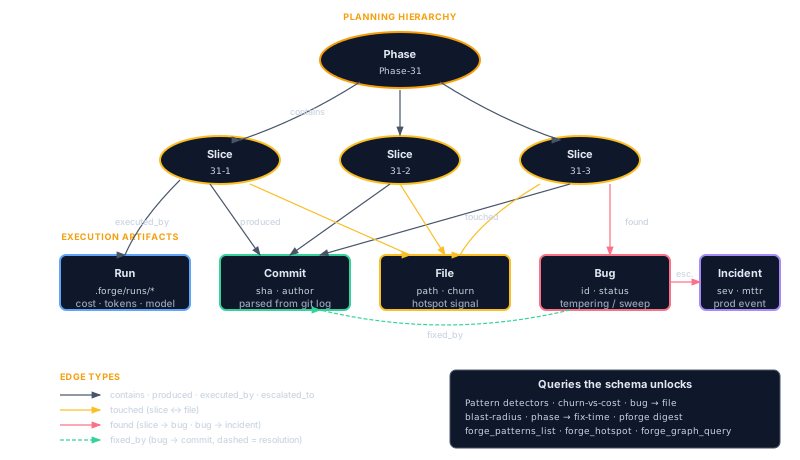
Seven node types: Phase, Slice, Commit, File, Run, Bug, CostSample. Six edge types. The whole graph for a year of plans on a medium-sized repo fits in <30 MB of memory and serializes to .forge/graph/snapshot.json in under a second.
The graph is derived, not authoritative. If snapshot.json is deleted, pforge graph rebuild recomputes it from the underlying logs. The logs are the source of truth; the graph is the index.
forge_graph_query — the query surface
Queries take a starting node selector and a traversal expression. The tool is intentionally not a general-purpose graph query language, it ships with a small, opinionated set of canned queries that answer the questions teams actually ask:
forge_graph_query({ query: "hot-files", windowDays: 30 })
// → files touched by the most failed slices in the last 30 days

forge_graph_query({ query: "bug-clusters", windowDays: 90 })
// → bugs grouped by shared file/symbol

forge_graph_query({ query: "model-leaderboard", domain: "integration" })
// → success rate per model on slices tagged with the integration domain

forge_graph_query({ query: "slice-history", slice: "4", windowDays: 180 })
// → every Phase that had a slice 4, with success/cost/duration

forge_graph_query({ query: "phase-roi", phase: "Phase-31" })
// → cost, duration, file churn, bugs raised, bugs closed for one phase
Custom traversals are also accepted via the lower-level traverse form (advanced):
forge_graph_query({
  start:   { type: "File", path: "src/orders/repository.ts" },
  follow:  ["touches<-Commit", "produced<-Slice", "raised->Bug"],
  filter:  { "Bug.status": "open" },
  return:  ["Bug.id", "Bug.title", "Slice.id", "Phase.id"],
  limit:   25
})
forge_patterns_list — the four detectors
forge_patterns_list runs four detector heuristics across the graph and returns ranked findings. Each detector is implemented as a deterministic graph traversal, no ML, no embeddings, just structural pattern matching.
| Detector | Looks for | Signal |
|---|---|---|
gate-failure-recurrence |
Same gate failing across ≥3 slices in different plans within 30 days | "The validation is broken, not the code" |
model-failure-rate-by-complexity |
Models whose failure rate climbs steeply with slice complexity | "Use a flagship model for the hard slices, fast model for the easy ones" |
slice-flap-pattern |
Slices that succeed-then-fail-then-succeed on retry (non-monotonic outcomes) | "Flaky gate or non-deterministic test in this slice" |
cost-anomaly |
Runs whose cost-per-slice exceeds the 90-day median by ≥2.5× | "Token blow-up, investigate retry logic or context bloat" |
Response shape
forge_patterns_list({ windowDays: 30, limit: 10 })

// Response:
{
  generatedAt: "2026-05-17T14:00:00Z",
  windowDays: 30,
  patterns: [
    {
      detector: "gate-failure-recurrence",
      severity: "high",
      title:    "Gate 'tsc --noEmit' failed in 5 slices across 3 plans",
      evidence: { slices: ["Phase-29:3", "Phase-30:1", "Phase-30:4", "Phase-31:2", "Phase-31:5"], commonError: "TS2307: Cannot find module ..." },
      suggestedAction: "Investigate tsconfig path mapping; consider widening gate or fixing build config."
    },
    {
      detector: "cost-anomaly",
      severity: "medium",
      title:    "Phase-31 cost/slice 3.1× over 90-day median",
      evidence: { phase: "Phase-31", medianUsd: 0.42, observedUsd: 1.31, primarySuspect: "long-context-retries" }
    }
    // ...
  ],
  total: 7
}
The Recurring Patterns dashboard panel is a thin renderer over this tool's output, sorted by severity descending. Each finding has a "Suppress for 7 days" button (the suppression list lives in .forge/patterns-suppressions.json, see Conventions for the format).
pforge digest — Yesterday's Digest
The graph and the detectors give you raw findings. pforge digest compresses them into a single human-readable summary intended to be the first thing you read each morning.
pforge digest
pforge digest --since=24h         # default
pforge digest --since=7d          # weekly roll-up
pforge digest --format=json       # machine-readable
pforge digest --post              # post to configured notification channel
A typical digest collects six categories of finding:
- Plans shipped, count, total cost, success-rate-on-first-try
- Aging meta-bugs, open self-repair issues older than 14 days
- Stalled phases, plans started but no slice committed in 48 hours
- Probe-lane deltas, model availability changes since yesterday (from
forge_doctor_quorum) - Drift score changes, environment/config drift exceeding threshold (from
forge_drift_report) - Cost anomalies, the top finding from the
cost-anomalydetector
The Yesterday's Digest dashboard tile is the same content, rendered in HTML. The CLI form is useful in a daily Slack post or as the body of a forge_notify_send message.
pforge digest --post at 09:00 every weekday with a Slack notifier configured (notify-slack extension) gives a free daily standup grounded in actual run data, not vibes.
Where the data lives
| Path | Purpose | Rebuildable |
|---|---|---|
.forge/graph/snapshot.json |
Serialized graph index | Yes, pforge graph rebuild |
.forge/patterns-suppressions.json |
User-suppressed pattern findings + expiry | No (state) |
.forge/digests/YYYY-MM-DD.json |
Cached daily digest output | Yes, pforge digest --rebuild |
.forge/runs/, .forge/trajectories/, .forge/bugs/, .forge/cost/ |
Source logs (graph is derived from these) | Authoritative |
CLI summary
pforge graph stats               # node/edge counts, last-rebuild timestamp
pforge graph rebuild             # full rebuild from logs
pforge graph query hot-files     # run a canned query
pforge patterns                  # list current findings from all four detectors
pforge patterns --since=7d
pforge digest                    # the morning summary
pforge digest --post             # send via configured notifier