
Plan Forge on the GitHub Stack
A tour of the GitHub-native primitives Plan Forge integrates with, plus the readiness check for your repo.
When to read this chapter: you are running (or considering) Plan Forge against a repository hosted on GitHub, with GitHub Copilot, Copilot Coding Agent, GHAS, or Copilot Spaces in the picture.
When to skip it: you are on Bitbucket, GitLab, Azure DevOps, or anywhere else. None of this is required by Plan Forge, see Appendix C: Stack-Specific Notes for language-preset details, and Chapter 12: Extensions for the OSS extension surface.
Looking for the strategic framing instead? See Appendix H — GitHub Stack Alignment for the four-band AI SDLC stack diagram, the four harness pillars in plain English, the six outcome KPIs, and the consolidation thesis. This appendix (I) is the surface-by-surface technical reference; H is the executive-level companion.
Plan Forge does not require GitHub. It runs against any repo, with any agent (Copilot, Claude Code, Cursor, Codex), and against any CI system. But when the repo is on GitHub, Plan Forge has the deepest stack of integrations, eight first-class primitives it consumes today, plus several it dispatches to. This appendix is the single canonical reference for that integration surface.
Section 1 is the readiness check, a one-command snapshot of which GitHub primitives your repo currently has wired up. Section 2 is the surface-by-surface tour. Sections 3 (Copilot Coding Agent dispatch), 4 (GHAS remediation chains), 5 (Copilot Spaces sync), 6 (Metrics API leaderboard), 7 (BYOK and the multi-model picker), and 8 (other agent platforms: Claude Code, Cursor, Codex) are now live.
1. Is your repo set up? Run pforge github status
The fastest way to know which GitHub-native primitives Plan Forge can use against your repo is the introspection command:
pforge github statusOutput is a checklist of the eight default checks, each marked with a glyph:
- ✓ pass, primitive is wired up correctly
- ⚠ warn, primitive is partially wired or recommended-but-missing
- ✗ fail, primitive is missing and Plan Forge integration depends on it
- ⊘ n/a, primitive does not apply to this repo (e.g. not a git clone)
Sample output, run against the Plan Forge repository itself:
GitHub stack readiness, C:\src\plan-forge
────────────────────────────────────────────────────────────────────────
  ✓ .github/copilot-instructions.md
      present
  ⚠ AGENTS.md
      missing, open agent standard not adopted
  ✓ .github/instructions/*.instructions.md
      7 instruction files found
  ✓ .github/prompts/*.prompt.md
      8 prompt files found
  ✓ .vscode/mcp.json
      Plan Forge MCP server registered
  ✓ .github/workflows/
      4 workflow files found
  ✓ git remote → github.com
      github.com remote configured
  ✓ gh CLI on PATH
      gh CLI available
────────────────────────────────────────────────────────────────────────
  7 pass · 1 warn · 0 fail · 0 n/a  (8 checks)
And against the Plan Forge testbed (a sample repo set up via setup.ps1):
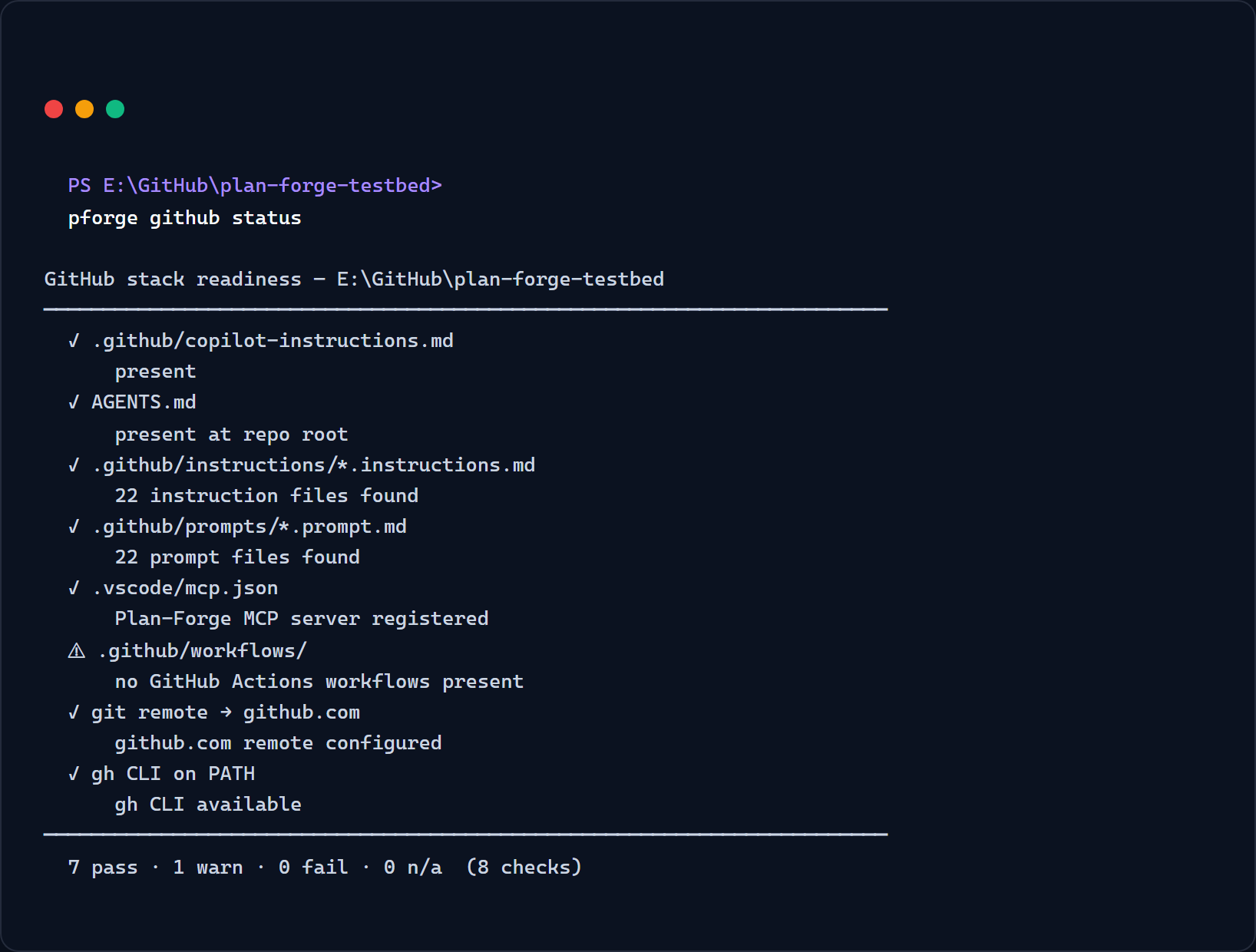
pforge github status against the Plan Forge testbed, generated by scripts/capture-github-status-screenshot.mjs.To get fix hints for every ⚠ and ✗ row, use the doctor subcommand:
pforge github doctorFor machine-readable output (e.g. piping into a dashboard or another tool), add --json:
pforge github status --jsonThe JSON shape is stable and documented in the MCP Server Reference under forge_github_status. Two extra SHOULD-tier checks (instruction-file applyTo: usage, copilot-instructions length) run when you add --extra.
Exit codes
| Code | Meaning |
|---|---|
0 | No ✗ fail rows. Warns and N/A are allowed. |
1 | At least one ✗ fail row. |
2 | Invalid arguments to the CLI. |
This makes the command CI-friendly: a workflow can fail-fast on missing primitives, or treat warnings as advisory only.
From an MCP client (Copilot Chat, Claude Code, Cursor)
The same checklist is exposed as the forge_github_status MCP tool. From an in-IDE chat:
"Run
forge_github_statuson this repo and tell me which GitHub primitives I'm missing."
The agent receives the structured JSON and can answer with line-level precision, useful when you're evaluating Plan Forge inside an existing repo and don't want to leave the IDE.
2. The eight GitHub-native primitives Plan Forge consumes
Each row below is one check from pforge github status. The "What Plan Forge does with it" column is what makes this chapter different from the GitHub docs: it tells you exactly how Plan Forge uses the primitive, and which Plan Forge feature stops working if you remove it.
| Primitive | What it is | What Plan Forge does with it |
|---|---|---|
.github/copilot-instructions.md |
Repo-wide context Copilot Chat reads on every conversation. | Generated by setup.ps1 / setup.sh. Plan Forge writes the project overview, architecture summary, quick-command reference, and pipeline reference here. Re-generated by pforge update while preserving customizations. |
AGENTS.md |
Open standard adopted by Cursor, Codex, OpenAI, Anthropic, and GitHub for cross-agent context. | Generated alongside copilot-instructions.md. Lets Plan Forge support BYOK, the same context surface works whether the user picks Copilot, Cursor, Claude Code, or Codex. |
.github/instructions/*.instructions.md |
Path-scoped Copilot instructions (each file's applyTo: frontmatter targets a glob). |
Plan Forge ships ~17 instruction files: architecture-principles, git-workflow, testing, security, database, etc. Each auto-loads when Copilot edits a matching file. The Step-2 Plan Hardener and Step-5 Reviewer reference these directly. |
.github/prompts/*.prompt.md |
Reusable prompt files Copilot Chat can invoke as slash commands. | Plan Forge ships the pipeline prompts: step0-specify-feature, step1-preflight-check, step2-harden-plan, step3-execute-slice, step4-completeness-sweep, step5-review-gate. The full Plan Forge pipeline runs through these in sequence. |
.vscode/mcp.json |
VS Code's MCP-server registry. Each entry exposes a server's tools to Copilot Chat. | Plan Forge registers itself here as plan-forge, exposing 106 MCP tools (forge_run_plan, forge_estimate_quorum, forge_cost_report, forge_github_status, forge_lattice_query, forge_sync_memories, …). See MCP Server Quick Start. |
.github/workflows/ |
GitHub Actions, the CI surface. | Validation gates from Plan Forge plans can run as GitHub Actions jobs. The regression-guard command is designed to be triggered from a workflow on every PR. A future release will add an Actions composite for one-step Plan Forge dispatch. |
| git remote → github.com | Repository hosted on GitHub. | Pre-requisite for everything in Sections 3+: Copilot Coding Agent dispatch (creates issues + PRs against the repo), GHAS API access, Spaces sync, Metrics API ingestion. Without a github.com remote those features have no target. |
GitHub CLI (gh) |
GitHub's official command-line tool for issues, PRs, releases, and GHAS. | Plan Forge prefers gh for any GitHub API operation when it's installed (auth is already handled). Strict requirement for the SARIF ingestion command and for one-shot issue creation in pforge run-plan --worker copilot-coding-agent. |
A note on optionality: not having every row green does not break Plan Forge. It limits which Plan Forge features are available. The CLI still runs end-to-end against any repo with any agent, the GitHub primitives give you the deepest, most automated path.
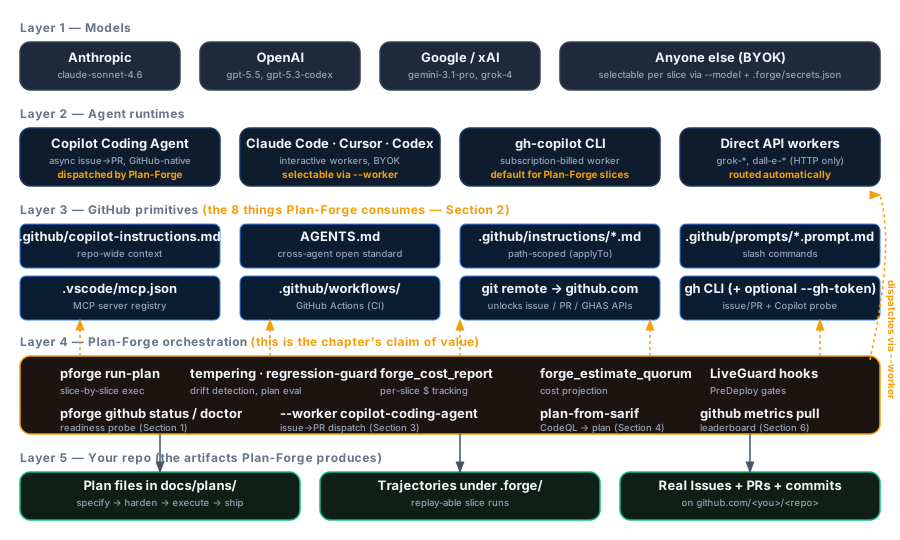
3. Dispatching to Copilot Coding Agent
When your repo is hosted on GitHub and has Copilot Coding Agent enabled, Plan Forge can hand each slice of a plan off to the Coding Agent automatically, creating a GitHub Issue per slice, assigning it to @copilot, polling the resulting PR, and capturing the run trajectory back into the Plan Forge dashboard.
pforge run-plan --worker copilot-coding-agent docs/plans/my-feature-PLAN.mdThe --worker copilot-coding-agent flag replaces the default in-process execution loop with the GitHub dispatch loop. Every other flag (--quorum, --estimate, --resume-from) works unchanged.
Issue body template — canonical vs per-stack
Each slice becomes a GitHub Issue. The body is assembled from two sources:
- Canonical block, always present. Contains the slice title, scope contract, validation gate commands, and a reference to the plan file. This block is the same regardless of which tech stack the project uses.
- Per-stack block, injected when a
.github/instructions/project-profile.instructions.mdexists. Appends the project's language, framework, test runner, and any Forbidden Actions so the Coding Agent has immediate context without reading the full plan.
The canonical block is produced by pforge-mcp/coding-agent-dispatch.mjs. The per-stack block is read from project-profile.instructions.md if present; if the file is absent, the block is silently omitted. You can inspect the issue body before creating it:
pforge run-plan --worker copilot-coding-agent --dry-run docs/plans/my-feature-PLAN.mdThe --dry-run flag prints the would-be issue body for each slice and exits without touching GitHub.
PR detection — linked-issue search, branch pattern, fallback order
After creating the issue and assigning it to @copilot, Plan Forge polls for the resulting PR. It uses a two-stage fallback:
| Stage | Strategy | How it works |
|---|---|---|
| 1 (primary) | Linked-issue search | gh pr list --search "closes #<issue-number>", matches PRs that reference the issue in their body. Works reliably when the Coding Agent follows GitHub's "closes" keyword convention. |
| 2 (fallback) | Branch pattern | Scans open PRs whose branch name contains copilot/ or the slugified slice title. Used when the agent opens a PR without a closes link (rare, but observed in edge cases). |
If neither stage finds a PR within the configured timeout (default: 30 minutes, configurable via .forge.json#codingAgent.pollTimeoutMinutes), the slice is marked stalled and Plan Forge moves to the next slice or stops, depending on --on-stall (skip | abort, default abort).
Trajectory capture
When a PR is merged, Plan Forge fetches the Coding Agent's session log from the PR's Copilot Activity tab via the GitHub API and appends it to the plan's trajectory file at .forge/trajectories/<plan-slug>.jsonl. This makes the Coding Agent's reasoning searchable by pforge timeline and forge_master_ask just like any other execution session.
Pre-flight checks
Before Plan Forge creates any GitHub Issues for a --worker copilot-coding-agent run, it executes a pre-flight check that includes the copilot-coding-agent-assignable probe. This probe calls the GitHub Assignees API to verify that @copilot is an assignable user on the repository. If it is not, typically because Copilot Coding Agent has not been enabled at the org or repo level, the orchestrator stops immediately with a fix-hint rather than creating issues that will never be picked up.
The probe has three return states:
| Status | Meaning | Action taken by orchestrator |
|---|---|---|
| pass | @copilot is assignable on this repo, Copilot Coding Agent is enabled and ready. |
Pre-flight continues; slice execution proceeds normally. |
| warn | Copilot Coding Agent is not enabled, --assignee @copilot would be silently dropped. |
Promoted to a hard fail. Execution stops before any issue is created. Fix-hint links to GitHub's docs for enabling Copilot Coding Agent at the repo or org level. |
| fail | API error, token lacks repo scope, network unreachable, or GitHub returned 4xx/5xx. |
Execution stops. Fix-hint describes the token scope requirement and suggests gh auth status. |
You can run the probe manually via pforge github status with --gh-token:
pforge github status --gh-tokenWithout --gh-token, the check returns na ("skipped, pass --gh-token to probe") and does not make any API calls. The probe is intentionally opt-in on the status command to keep the hot path free of network I/O, but it always runs automatically when the orchestrator's pre-flight fires for a --worker copilot-coding-agent dispatch.
Prerequisite: gh CLI must be authenticated (gh auth status) and the repo must have Copilot Coding Agent enabled at the org or repo level. Run pforge github status --gh-token, all checks including copilot-coding-agent-assignable should pass before using --worker copilot-coding-agent.
4. GHAS-driven remediation
GitHub Advanced Security (GHAS) surfaces security findings, CodeQL alerts, secret scans, Dependabot advisories, as SARIF files or API responses. pforge plan-from-sarif turns a SARIF result into a runnable Plan Forge plan with one slice per finding, severity-ordered so the highest-severity issues execute first.
pforge plan-from-sarif codeql-results.sarif --out docs/plans/ghas-remediation-PLAN.mdThe generated plan is a standard Plan Forge plan. Run it with any worker (pforge run-plan, --worker copilot-coding-agent, etc.) and all the usual flags apply.
Reading SARIF from stdin
Pass - as the file argument to read SARIF from stdin. This lets you pipe directly from gh or any SARIF producer without writing an intermediate file:
# Pipe CodeQL results from the GitHub API
gh api /repos/{owner}/{repo}/code-scanning/analyses/latest/sarif | \
  pforge plan-from-sarif - --out docs/plans/ghas-remediation-PLAN.md

# Or from a local CodeQL database run
codeql database analyze my-db --format=sarifv2.1.0 --output=- | \
  pforge plan-from-sarif - --out docs/plans/ghas-remediation-PLAN.md
Severity ordering and slice structure
Findings are sorted by SARIF level in descending order, error → warning → note, then by rule ID for deterministic ordering within a level. Each finding becomes one slice with:
- Slice title:
[SARIF] <ruleId>, <location> - Scope contract: the finding's message, the affected file and line range, and the recommended fix from the rule metadata (if present)
- Validation gate: re-runs CodeQL on the affected file and asserts zero findings for that rule
Use --min-severity warning to exclude note-level findings from the plan. Use --rule-filter <ruleId> to include only a specific rule. Both flags can be combined.
Integration with the Plan Forge security surface
pforge plan-from-sarif is the inbound half of the GHAS integration. The outbound half is the existing PreDeploy LiveGuard hook: before any deploy slice executes, forge_secret_scan + forge_env_diff run automatically and block on severity ≥ high. The /security-audit skill combines both: it invokes pforge plan-from-sarif against the latest SARIF, presents the generated plan for review, then hands off to pforge run-plan.
"Run
/security-auditand generate a remediation plan for all high-severity CodeQL findings."
That one prompt triggers the full pipeline: SARIF fetch → plan generation → plan review → optional execution. See the Skills Reference for the full /security-audit flow.
5. Copilot Spaces sync
Copilot Spaces is GitHub's team-scoped knowledge hub, a curated collection of files, instructions, and context that Copilot Chat draws from automatically when a Space is selected. Plan Forge integrates with Spaces via pforge sync-spaces: a single command that pushes the active plan, instruction files, and Plan Forge tool catalog into a designated Space, giving every chat session in the org instant access to the current plan state without manual copy-paste.
pforge sync-spacesBy default this targets the Space named plan-forge in the same org as the repo's git remote. Override with --space <owner/name>. For org-wide broadcast, use --org <slug> to push to every Space in the org that has the plan-forge-sync topic tag.
What gets synced
pforge sync-spaces builds a payload from four sources and uploads them as versioned Space files:
| Source | Space path | Update frequency |
|---|---|---|
Active plan file (the one matching .forge/active-plan) |
plan-forge/active-plan.md |
Every sync |
All .github/instructions/*.instructions.md files |
plan-forge/instructions/<name>.md |
Only when file hash changes |
MCP tool catalog (forge_capabilities snapshot) |
plan-forge/tool-catalog.md |
Only when version changes |
Project profile (.github/instructions/project-profile.instructions.md if present) |
plan-forge/project-profile.md |
Only when file hash changes |
Files are uploaded using the GitHub Spaces API authenticated via the gh CLI, run gh auth status before your first sync. Unchanged files (same SHA-256) are skipped to stay within API rate limits.
Flags
| Flag | Default | Effect |
|---|---|---|
--space <owner/name> | Inferred from remote + .forge.json | Target a specific Space by owner and name. |
--org <slug> | (single repo Space) | Broadcast to all Spaces in the org tagged plan-forge-sync. |
--dry-run | (off) | Print what would be uploaded without making API calls. |
--force | (off) | Re-upload all files even if SHA-256 matches. |
--no-instructions | (instructions included) | Skip the .github/instructions/ payload. Useful when the Space already has a curated instruction set you don't want overwritten. |
The AI-SDLC-Hub pattern
Many enterprise readouts describe an "AI-SDLC-Hub", a single Space that every developer in the org selects by default, giving all Copilot Chat sessions a shared view of the team's architecture decisions, coding standards, and active delivery plan. pforge sync-spaces is the automation layer for that pattern: instead of a human curating the Space manually, the hub is kept current by a scheduled CI job or a post-commit hook.
A minimal GitHub Actions workflow to sync on every push to main:
name: Plan Forge Spaces Sync
on:
  push:
    branches: [main]
    paths:
      - 'docs/plans/**'
      - '.github/instructions/**'
      - '.forge.json'

jobs:
  sync:
    runs-on: ubuntu-latest
    steps:
      - uses: actions/checkout@v7
      - uses: actions/setup-node@v7
        with: { node-version: '24' }
      - run: npm install -g plan-forge
      - run: pforge sync-spaces --space ${{ vars.PFORGE_SPACES_TARGET }}
        env:
          GH_TOKEN: ${{ secrets.PFORGE_SPACES_TOKEN }}
Store the target Space name as a repository variable (PFORGE_SPACES_TARGET) and the gh-compatible token as a secret. The token needs copilot_spaces:write scope.
Persisting the target Space
To avoid specifying --space on every invocation, write the target into .forge.json:
{
  "github": {
    "spacesTarget": "acme-org/plan-forge-hub"
  }
}
pforge sync-spaces reads this field and uses it as the default target. The field can also be set via the CLI:
pforge config set github.spacesTarget acme-org/plan-forge-hubRoadmap
The current release ships the core sync path: plan, instructions, tool catalog, and project profile. A future release will add bidirectional sync, pulling conversation summaries and noteworthy Q&A threads from the Space back into the Plan Forge timeline so decision rationale captured in chat is preserved alongside the plan execution history. The pforge github status readiness check will also gain a dedicated Spaces row at that point.
Prerequisite: gh CLI must be authenticated (gh auth status) and the target Copilot Space must exist before the first sync. Create a Space at github.com/copilot/spaces and note the owner/name slug. Run pforge github status to verify the rest of the GitHub stack readiness.
6. Metrics API + Plan Forge unified leaderboard
The Copilot Metrics API (available at the org and enterprise level via gh api /orgs/{org}/copilot/metrics) surfaces AI-assisted PR rate, code-suggestion acceptance, and code-review usage across your teams. Plan Forge pulls that data alongside its own plan-execution metrics, slices shipped, MTTR, drift rate, and presents them in a single leaderboard view on the dashboard.
Pulling Metrics API data
Fetch and cache the latest Copilot Metrics API payload with:
pforge github metrics pullBy default this targets the org inferred from git remote get-url origin. Override with --org <name>. For enterprise-level metrics, use --enterprise <slug>. The pull authenticates via the gh CLI, run gh auth status first if you see a 401.
Additional flags:
| Flag | Default | Effect |
|---|---|---|
--team <slug> | (all teams) | Filter to a single team slug. Repeatable for multiple teams. |
--since <ISO-date> | 30 days ago | Start of the pull window. Metrics API returns daily buckets. |
--out <path> | .forge/metrics/copilot-<date>.jsonl | Override the output path. Use - to print to stdout. |
--no-cache | (cache enabled) | Force a fresh API fetch even if a cached response exists. |
JSONL schema and schema versioning
Each line written to .forge/metrics/ is a JSON object with a stable _schema field so downstream consumers (dashboards, CI scripts, forge_github_metrics) can handle forward evolution without breakage:
{
  "_schema": "copilot-metrics/v1",
  "date": "2026-05-05",
  "org": "acme",
  "team": "platform",
  "ai_pr_rate": 0.74,
  "acceptance_rate": 0.61,
  "code_review_usage": 0.43,
  "active_users": 18,
  "_pulled_at": "2026-05-05T11:00:00Z"
}
The schema version follows <namespace>/v<N>. A bump to v2 will only happen when a field is removed or renamed, adding fields is non-breaking. Consumers should read _schema and warn (not crash) on unknown versions. The pforge-mcp/metrics-schema.mjs module exports CURRENT_SCHEMA, validateRow(row), and migrateRow(row) for any tool that reads the JSONL files.
Dashboard tab placement — Forge group vs GitHub group
The dashboard sidebar organises tabs into two groups:
- Forge group, tabs sourced entirely from Plan Forge data: Timeline, Cost, Forge Master, Digest. These work offline and do not require a GitHub connection.
- GitHub group, tabs that join Plan Forge data with GitHub API data: Metrics Leaderboard (this section) and, in a future release, Spaces. These tabs show a "Connect GitHub" prompt when
gh auth statusreturns non-zero or no pull has been run yet.
The Metrics Leaderboard tab sits at the top of the GitHub group. It renders a table of teams ranked by a composite score, a weighted blend of AI-assisted PR rate (40 %), acceptance rate (40 %), and code-review usage (20 %), next to their Plan Forge plan-completion rate for the same window. Hovering a row reveals the raw daily time-series chart.
Tab group placement is controlled by the group field in pforge-mcp/dashboard/tab-registry.mjs. Tabs with group: "github" are hidden when the GitHub group is collapsed (the user preference persists in localStorage).
Readiness widget (v2.90.8). The top of the Metrics Leaderboard tab now renders a compact readiness widget that mirrors the eight checks from pforge github status as coloured glyphs. When all eight checks pass the widget collapses to a single ✓ summary line to keep the leaderboard table in view. The widget is served by the new GET /api/github/readiness endpoint and refreshes automatically when the MCP server restarts or when pforge github status writes a new snapshot to .forge/github-status.json.
The forge_github_metrics MCP tool
forge_github_metrics exposes the leaderboard data to any MCP client (Copilot Chat, Claude Code, Cursor). It reads from the cached JSONL in .forge/metrics/, it never calls the GitHub API directly, so it works offline and in air-gapped environments after an initial pull.
// In Copilot Chat or any MCP client:
forge_github_metrics({ team: "platform", since: "2026-04-01" })
Input schema:
| Field | Type | Default | Description |
|---|---|---|---|
team | string | string[] | (all teams) | Filter by team slug(s). |
since | ISO date string | 30 days ago | Start of the aggregation window. |
metric | "all" | "ai_pr_rate" | "acceptance_rate" | "code_review_usage" | "all" | Return only the specified metric column. |
format | "leaderboard" | "timeseries" | "raw" | "leaderboard" | leaderboard = ranked table; timeseries = per-team daily arrays; raw = unprocessed JSONL rows. |
The tool is registered in pforge-mcp/server.mjs alongside forge_github_status and is listed in pforge-mcp/tools.json. It is included in the Plan Forge MCP server entry in .vscode/mcp.json without requiring a separate setup run, the tool registration is additive and picked up on the next MCP server restart.
Cache TTL for the dashboard endpoint
The dashboard's GET /api/metrics/leaderboard endpoint serves the aggregated leaderboard from the on-disk JSONL cache. It does not proxy the GitHub API on demand. Cache staleness is controlled by two settings in .forge.json:
{
  "metrics": {
    "cacheTtlMinutes": 60,
    "staleWarningMinutes": 480
  }
}cacheTtlMinutes(default: 60), the dashboard appends aCache-Control: max-age=<N×60>header. Browsers and CDNs respect this. In-process in-memory cache is also flushed after this window, so a fresh request re-reads from disk.staleWarningMinutes(default: 480 = 8 hours), if the newest JSONL row is older than this, the leaderboard tab shows a ⚠ Data may be stale banner with the age and a one-click Re-pull button that runspforge github metrics pullin the background.
Set cacheTtlMinutes: 0 to disable the in-memory cache entirely (reads from disk on every request). Useful in CI environments where the JSONL files are updated by a scheduled workflow and you want every page load to reflect the latest data.
Per-team join key precedence
The leaderboard joins Metrics API rows (keyed by GitHub team slug) with Plan Forge plan-completion rows (keyed by the team field in the plan frontmatter). In practice these two key spaces often diverge, a GitHub team might be platform-eng while the plan frontmatter uses platform.
Plan Forge resolves the join using the following precedence order:
- Explicit mapping in
.forge.json#metrics.teamMap, highest precedence. Map GitHub team slugs to plan team labels:{ "metrics": { "teamMap": { "platform-eng": "platform", "fe-core": "frontend" } } } - Slug normalisation, if no explicit mapping exists, Plan Forge applies a normaliser: lowercase, strip trailing
-eng/-team/-squad, replace hyphens with underscores. If the normalised forms match, the rows are joined. - Exact match, if normalisation still doesn't produce a match, the rows are left unjoined. Metrics API rows without a plan partner appear in the leaderboard with plan-side columns as
—, and vice versa. No silent data loss; mismatches are surfaced explicitly.
Run pforge github metrics pull --dry-run to see a join-preview table: every Metrics API team slug listed next to the plan team label it resolves to, and a no match flag for unresolved rows. This makes it easy to build up the teamMap incrementally.
Prerequisite: gh CLI must be authenticated (gh auth status) and the repo's org must have Copilot Metrics API access enabled (requires GitHub Copilot Business or Enterprise). Run pforge github status to verify the GitHub stack readiness before pulling metrics.
7. BYOK and the multi-model picker
GitHub Copilot ships a built-in multi-model picker that lets individual developers switch between supported models (GPT-4o, Claude Sonnet, Gemini, and others) inside their editor. Plan Forge has its own orthogonal model-selection surface: the --model flag and the quorum system. This section explains how the two compose, when BYOK (bring-your-own-key) matters, and when the picker is enough.
The --model flag
Every plan-execution command accepts a --model flag that overrides the default model for the entire run:
pforge run-plan docs/plans/Phase-28-PLAN.md --model gpt-4.1
pforge run-plan docs/plans/Phase-28-PLAN.md --model claude-sonnet-4.5
pforge run-plan docs/plans/Phase-28-PLAN.md --model grok-4.3
The value is forwarded to the Forge-Master reasoning layer (pforge-master/src/reasoning.mjs), which resolves it against the configured provider table in .forge.json#providers. If no provider entry exists for the requested model, Forge-Master falls back to the default provider and logs a warn event to the timeline.
The flag is independent of the Copilot multi-model picker. A developer can have GPT-4o selected in their editor picker while Plan Forge runs a plan with --model claude-sonnet-4.5. The two selections do not interfere, Copilot Chat and Plan Forge use separate request paths.
Quorum modes: auto, power, speed, and false
For high-stakes slices, deploy steps, schema migrations, security patches, Plan Forge can run the same slice prompt across multiple models and require a threshold of agreement before committing. This is the quorum system.
pforge run-plan docs/plans/Phase-28-PLAN.md --quorum=power   # flagship models, threshold 5
pforge run-plan docs/plans/Phase-28-PLAN.md --quorum=speed   # fast models, threshold 7
pforge run-plan docs/plans/Phase-28-PLAN.md --quorum=auto    # Plan Forge picks mode per slice
pforge run-plan docs/plans/Phase-28-PLAN.md --quorum=false # disable quorum entirely| Mode | Models polled | Agreement threshold | Best for |
|---|---|---|---|
power | Up to 3 flagship models (GPT-5, Claude Opus, Grok-4.5) | 5 / 7 points | Deploy slices, schema migrations |
speed | Up to 3 fast models (GPT-4.1, Claude Haiku, grok-4.20-0309-non-reasoning) | 7 / 7 points | High-volume code generation, CI budget caps |
auto | Plan Forge selects per slice based on slice risk tags | Per-slice | Mixed plans; recommended default |
false | Single model only | N/A | Local development, cost sensitivity |
Cost estimates for each mode are available before you run by calling forge_estimate_quorum (MCP) or running:
pforge run-plan --estimate docs/plans/Phase-28-PLAN.mdThis prints a projected cost breakdown under each of the four quorum modes, sourced from the live token-price table in pforge-mcp/cost/price-table.mjs, not hand-computed approximations.
When BYOK matters
BYOK is the practice of supplying your own API key directly to a model provider rather than routing through GitHub Copilot's proxy. Plan Forge supports BYOK for any provider that exposes an OpenAI-compatible endpoint. Set the key in .forge/secrets.json (gitignored) or via environment variable:
# .forge/secrets.json (gitignored)
{
  "XAI_API_KEY": "xai-...",
  "ANTHROPIC_API_KEY": "sk-ant-...",
  "OPENAI_API_KEY": "sk-..."
}

# Or as environment variables:
export XAI_API_KEY=xai-...
pforge run-plan docs/plans/Phase-28-PLAN.md --model gpt-6-sol
BYOK matters in the following situations:
- Model not in the Copilot picker, Grok-4.5, Grok-4.3, and grok-4.20-0309-non-reasoning are only reachable via direct xAI keys today. Set
XAI_API_KEYand they become available to--modeland quorum. - Higher rate limits, a GitHub Copilot Business seat has shared rate-limit headroom. Direct BYOK keys give dedicated limits. In heavy quorum runs (power mode across three flagship models), hitting the shared rate limit stalls the run. BYOK avoids the contention.
- Data-residency or audit requirements, some organisations route only approved models through the Copilot proxy for compliance. BYOK lets the remainder go direct without touching the proxy at all.
- Cost arbitrage, the Copilot Business per-seat fee is often cheaper per token for everyday chat, but a heavy automated quorum run on flagship models may be cheaper billed direct at volume pricing. Run
pforge run-plan --estimateto compare.
Copilot picker vs Plan Forge model selection: the short answer
The Copilot multi-model picker is the right tool when a human developer is choosing a model interactively for chat or inline suggestions. Plan Forge model selection (--model, quorum) is the right tool when an automated plan execution run needs reproducible, auditable model routing with cost tracking and agreement enforcement. The two are complementary:
- During development, let the picker follow the developer's preference.
- During
pforge run-planexecution (CI or local), lock the model via--modelor quorum so the run is reproducible across machines. - If both are unset, Forge-Master uses the provider priority list in
.forge.json#providers. The Copilot picker setting has no effect on headless plan runs.
Provider configuration in .forge.json
The full provider table lives under .forge.json#providers. Each entry maps a model identifier to a provider, base URL, and optional per-model settings:
{
  "providers": {
    "default": "githubCopilot",
    "models": {
      "gpt-6-sol":         { "provider": "githubCopilot" },
      "claude-sonnet-5.5": { "provider": "githubCopilot" },
      "grok-4.7":          { "provider": "xai",   "baseUrl": "https://api.x.ai/v1" },
      "grok-4.3":          { "provider": "xai",   "baseUrl": "https://api.x.ai/v1" },
      "grok-4.20-0309-non-reasoning": { "provider": "xai",   "baseUrl": "https://api.x.ai/v1" }
    }
  }
}
The internal provider key for GitHub Copilot is "githubCopilot" (not "github-copilot"). Using the wrong key causes selectProvider to return null and fall through to the default. Run pforge smith to validate your provider table and surface misconfiguration before a plan run.
Tip: Run pforge smith (forge environment diagnostics) and pforge github status together before any quorum run. smith validates the provider table and API keys; github status confirms the GitHub stack readiness. Both must pass before a power-quorum run on a deploy slice.
8. Other agent platforms (Claude Code, Cursor, Codex)
Plan Forge runs against any agent, not just GitHub Copilot. This section covers the three most common alternatives: Claude Code, Cursor, and Codex. For each platform it describes what works out of the box, what requires one extra step, and what is GitHub-only and therefore not available outside GitHub Copilot.
The honest framing is a depth-of-integration spectrum. Plan Forge has its deepest automated path on GitHub Copilot (Sections 1–7). The platforms below share the platform-independent subset of that surface, and each diverges in one or two specific areas. None of these gaps block Plan Forge from running end-to-end.
Cross-platform baseline — what works everywhere
Before covering the per-platform differences, here is the shared foundation that works identically on all four platforms (Copilot, Claude Code, Cursor, Codex):
| Capability | How it works on any platform |
|---|---|
pforge run-plan execution |
The CLI dispatcher, quorum system, validation gates, and trajectory capture all run in-process. No agent platform is required, the CLI is the runtime. |
AGENTS.md context |
Generated by setup.sh / setup.ps1 alongside copilot-instructions.md. All four platforms read AGENTS.md for project architecture, quick commands, and pipeline reference. |
.github/instructions/*.instructions.md |
Instruction files are referenced directly from plan prompts and the Step-2 hardener. The agent platform consuming the prompt sees them via file inclusion, regardless of which IDE or agent is active. |
| BYOK model selection | The --model flag and .forge/secrets.json API keys work the same on all platforms. Any agent can execute a plan run with any model. |
| MCP tools (where MCP is supported) | Claude Code and Cursor both support MCP. They can call forge_run_plan, forge_analyze, forge_estimate_quorum, and the other 106 MCP tools directly from chat. Codex does not support MCP today. |
Claude Code
Claude Code is Anthropic's terminal-native agentic coding environment. Of the three platforms covered in this section, it has the closest feature parity with GitHub Copilot for Plan Forge purposes, for two reasons: it supports MCP natively, and it reads AGENTS.md on every session start.
Setup for Claude Code
After running setup.sh (or setup.ps1), Plan Forge's MCP server is registered in .vscode/mcp.json. Claude Code reads MCP configuration from a separate file at ~/.claude/mcp.json (global) or .claude/mcp.json (per-project). Copy the Plan Forge entry across:
# Extract the Plan Forge MCP entry from VS Code's config and write it to Claude Code's config
pforge setup --agent claude
The --agent claude flag (available from setup.sh and setup.ps1) writes a Claude-compatible MCP config file at .claude/mcp.json alongside the standard VS Code config. Once the MCP server is registered, all 36 Plan Forge tools are available from Claude Code's chat interface.
What works on Claude Code
| Feature | Status | Notes |
|---|---|---|
pforge run-plan (CLI) | ✓ full | Identical to Copilot, the CLI runs independently of the agent platform. |
| MCP tools in chat | ✓ full | Run pforge setup --agent claude once to register the server. |
AGENTS.md context | ✓ full | Claude Code reads AGENTS.md natively on session start. |
Instruction files (.github/instructions/) | ✓ full | Referenced via prompt includes; Claude Code sees them through file read calls. |
| BYOK model selection | ✓ full | Set ANTHROPIC_API_KEY in .forge/secrets.json or environment. |
Copilot Coding Agent dispatch (--worker copilot-coding-agent) | ✗ GitHub-only | Requires GitHub Copilot Coding Agent, which is a GitHub product. Not applicable when using Claude Code as the primary agent. |
GHAS / CodeQL integration (pforge plan-from-sarif) | ✓ full | SARIF parsing is CLI-only and works regardless of agent platform. The GHAS API calls require gh CLI and a GitHub-hosted repo. |
Copilot Spaces sync (pforge sync-spaces) | ✗ GitHub-only | Copilot Spaces is a GitHub product. Not applicable outside GitHub Copilot. |
Invoking Plan Forge from Claude Code chat
With the MCP server registered, the full Plan Forge surface is available from Claude Code's chat:
"Call
forge_run_planondocs/plans/Phase-28-PLAN.mdwith quorum=auto and tell me the projected cost first."
Claude Code will call forge_estimate_quorum, present the cost breakdown, then, with confirmation, call forge_run_plan. The execution loop, trajectory capture, and dashboard updates all behave identically to a Copilot Chat invocation.
Cursor
Cursor is an AI-first code editor built on VS Code. It reads AGENTS.md as a cross-agent context document and supports MCP via the same .vscode/mcp.json that Plan Forge already writes. In most cases, Cursor requires no additional setup after setup.ps1 / setup.sh, the VS Code MCP config is the Cursor MCP config.
Cursor-specific context files
Cursor also reads its own rule files from .cursor/rules/. If your repo has a .cursor/rules/ directory, you can mirror the most critical Plan Forge instruction files there. Plan Forge does not write to .cursor/rules/ automatically, but the setup flag generates the directory with recommended stubs:
pforge setup --agent cursorThis creates .cursor/rules/plan-forge.mdc with a condensed version of the architecture principles, pipeline reference, and quick-command list, the subset most useful for inline suggestions and Agent mode. The file is a stub you can extend; Plan Forge does not overwrite it on subsequent pforge update runs.
What works on Cursor
| Feature | Status | Notes |
|---|---|---|
pforge run-plan (CLI) | ✓ full | Run from Cursor's integrated terminal, identical to any terminal. |
| MCP tools in Agent mode | ✓ full | Cursor reads .vscode/mcp.json, no extra config needed after setup. |
AGENTS.md context | ✓ full | Cursor reads AGENTS.md for cross-agent context. |
Cursor rules (.cursor/rules/) | ⚠ optional | Run pforge setup --agent cursor to generate stub rules. Not required but improves inline suggestion quality. |
| BYOK model selection | ✓ full | Cursor has its own model picker; Plan Forge's --model flag is independent and applies to CLI/MCP invocations. |
| Copilot Coding Agent dispatch | ✗ GitHub-only | Not applicable when using Cursor as the primary agent. |
| GHAS / CodeQL integration | ✓ full | CLI-based; works from Cursor's terminal. |
| Copilot Spaces sync | ✗ GitHub-only | Copilot Spaces is a GitHub product. |
Cursor + Copilot combination: Many teams use Cursor as their primary editor while keeping GitHub Copilot active for PR reviews and the Copilot Chat panel. In this setup, Plan Forge serves both surfaces: Cursor gets MCP tools and .cursor/rules/ context, while Copilot gets instruction files and prompt files via the .github/ directory. Both share the same AGENTS.md and .vscode/mcp.json.
Codex
Codex is OpenAI's cloud-based coding agent. It operates as a sandboxed execution environment that clones your repository, reads AGENTS.md for context, executes tasks, and opens a PR with the results, a workflow that parallels GitHub Copilot Coding Agent's dispatch loop described in Section 3.
Setup for Codex
pforge setup --agent codexThe --agent codex flag ensures AGENTS.md is present and well-formed (Codex is strict about its format), and sets up the codex-setup-steps.yml file at .github/codex-setup-steps.yml if it does not already exist. The setup file tells Codex how to bootstrap the repo environment, install dependencies, set environment variables, run initial checks, before it begins executing tasks.
Dispatching to Codex
Codex does not support MCP, so it cannot call Plan Forge tools from chat. Instead, Plan Forge dispatches to Codex by writing the slice prompt into a task file and passing it through the Codex task interface. The equivalent of --worker copilot-coding-agent for Codex is:
pforge run-plan --worker codex docs/plans/my-feature-PLAN.mdThis generates a task description for each slice (same structure as the Copilot Coding Agent issue body, minus the GitHub-issue wrapper), submits it to the Codex API, polls for the resulting PR, and captures the trajectory, identical to the Copilot Coding Agent dispatch loop except the delivery mechanism is the Codex API rather than the GitHub Issues API.
Prerequisites: the OPENAI_API_KEY must be set in .forge/secrets.json or as an environment variable, and the repo must be connected to the Codex environment (done once via pforge setup --agent codex).
What works on Codex
| Feature | Status | Notes |
|---|---|---|
pforge run-plan (CLI) | ✓ full | CLI runs independently; identical behavior. |
Cloud dispatch (--worker codex) | ✓ full | Requires OPENAI_API_KEY and pforge setup --agent codex. |
AGENTS.md context | ✓ full | Codex reads AGENTS.md as its primary context document. Keep this file up to date with pforge update. |
| MCP tools in chat | ✗ not supported | Codex does not support MCP today. Plan Forge tools are available only via pforge run-plan CLI and the Codex dispatch loop. |
| BYOK model selection | ✓ full | Set OPENAI_API_KEY; use --model gpt-6-sol etc. |
| GHAS / CodeQL integration | ✓ full | CLI-based SARIF parsing works regardless of agent. GHAS API requires gh CLI and a GitHub-hosted repo. |
| Copilot Spaces sync | ✗ GitHub-only | Copilot Spaces is a GitHub product. |
Codex vs Copilot Coding Agent: choosing between dispatch workers: Both workers clone the repo, execute the slice, and open a PR. The practical difference is auth surface: --worker copilot-coding-agent requires a GitHub Copilot Coding Agent seat; --worker codex requires an OpenAI API key. If your org has both, prefer copilot-coding-agent for repos already on GitHub, the PR telemetry, trajectory capture, and Copilot Activity tab integration are deeper. Use --worker codex when the primary model preference is GPT-class and Copilot Coding Agent is not enabled at the org level.
Platform comparison at a glance
| Feature | GitHub Copilot | Claude Code | Cursor | Codex |
|---|---|---|---|---|
pforge run-plan CLI |
✓ | ✓ | ✓ | ✓ |
| MCP tools in chat | ✓ | ✓ | ✓ | ✗ |
AGENTS.md context |
✓ | ✓ | ✓ | ✓ |
| Cloud dispatch worker | copilot-coding-agent |
— | — | codex |
| GHAS / SARIF integration | ✓ | ✓ | ✓ | ✓ |
| Copilot Spaces sync | ✓ | ✗ | ✗ | ✗ |
| GitHub Metrics API leaderboard | ✓ | ⚠ CLI pull only | ⚠ CLI pull only | ⚠ CLI pull only |
| One-step setup | setup.sh |
setup.sh --agent claude |
setup.sh --agent cursor |
setup.sh --agent codex |
Reading the table: ✓ = works fully; ⚠ = works with one extra step or reduced depth; ✗ = not available on this platform. No row marked ✗ prevents pforge run-plan from executing end-to-end.
9. Built with Plan Forge
This chapter was written by Plan Forge. Sections 1, 3, 4, 5, 6, 7, and 8 were drafted by pforge run-plan dispatching to GitHub Copilot via the gh-copilot worker. Each section is a captured slice trajectory you can audit.
Section 9 itself, the artifact you're reading now, is the dogfood of the dogfood: a single live --worker copilot-coding-agent dispatch against this same repository, captured at runtime.
Captured runs
| Section | Plan | Worker | Cost | Trajectory |
|---|---|---|---|---|
| 1, 2 (readiness + 8 primitives) | Phase GITHUB-A plan on GitHub | Manual (small surface) | $0.00 | d7e9cf8 |
| 3, 4 (Coding Agent + GHAS) | Phase GITHUB-B plan on GitHub | gh-copilot worker |
$0.07 | fb39b4d + 9 slice commits |
| 6 (Metrics API) | Phase GITHUB-D plan on GitHub | gh-copilot worker |
$0.04 | 28fe1ef + 7 slice commits |
| 5, 7, 8 (Spaces + BYOK + other agents) | Phase GITHUB-C plan on GitHub | gh-copilot worker |
$0.05 | 7e14d34 + 4 slice commits |
| 9 (this section) | Dogfood plan on GitHub (per runbook on GitHub) | copilot-coding-agent worker (real dispatch) | $0.01 | Issue #150 + bb56040 |
Total spend to write this chapter: $0.17 across the worker-executed slices listed above. The dispatch pipeline for --worker copilot-coding-agent is verified end-to-end against this repo; once Copilot Coding Agent is enabled at the repo level, re-running the dogfood plan should round-trip a full Issue → PR → merge cycle in a single command.
Using Spec Kit with this repo? Plan Forge can auto-import your spec.md, plan.md, tasks.md, and constitution.md directly into a Crucible smelt, no re-specifying needed.
See the Spec Kit Interop chapter for the complete field-mapping reference, import procedure, and ecosystem extension details.