
Integrating from Outside
MCP is the native transport for Copilot and similar agents, but it is not the only one. Plan Forge ships four orthogonal surfaces so any tool can drive the workshop: REST for HTTP-anything, SDK for Node.js callers, WebSocket hub for live event streams, and CLI for scripts and humans.
pforge-sdk, /tools, /hallmark, /chunker), and 97 CLI commands. The same underlying handlers back every surface, pick the one that fits the caller, not the feature.
The four surfaces, at a glance

The same handler set lives behind all four surfaces. Adding a new tool means the team writes one handler, and it automatically becomes available as MCP tool, REST endpoint, CLI command, and SDK export. This is intentional: the integration surface should never be the bottleneck for a new capability.
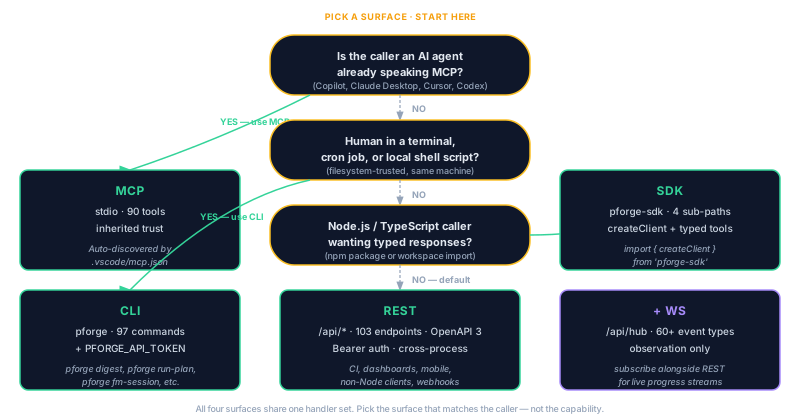
REST API
The REST surface is the right choice for any caller that already speaks HTTP, GitHub Actions, GitLab CI, a Python script, a curl one-liner, a Postman collection. It is also the surface the dashboard itself uses.
Base URL and auth
# Local dev (default)
http://localhost:3100/api

# Auth: bearer token from .forge/secrets.json (key: "apiToken")
curl -H "Authorization: Bearer $PFORGE_API_TOKEN" \
     http://localhost:3100/api/plan/status
Tokens are generated by pforge auth issue and stored locally in .forge/secrets.json (gitignored). Multi-developer setups use one token per developer; CI uses a dedicated CI token with scoped permissions.
The 17+ domains
The 113 endpoints organize into 16 subsystems that mirror the MCP tool families. The full per-endpoint reference lives in Appendix W — REST API Reference; this chapter covers the shape:
| Prefix | Backs | Sample endpoint |
|---|---|---|
/api/plan |
Plan execution + status | POST /api/plan/run |
/api/cost |
Cost reports + estimates | GET /api/cost/report |
/api/team |
Team dashboard + activity | GET /api/team/dashboard |
/api/copilot-instructions |
Copilot trilogy | POST /api/copilot-instructions/sync |
/api/graph |
Knowledge graph queries | POST /api/graph/query |
/api/liveguard |
Deploy safety surface | POST /api/liveguard/run |
/api/bugs |
Bug registry | GET /api/bugs |
/api/crucible |
Idea smelting | POST /api/crucible/ask |
/api/forge-master |
Read-only reasoning agent | POST /api/forge-master/ask |
/api/hub |
WebSocket event stream (see next section) | WS /api/hub |
Every endpoint returns RFC 7807 ProblemDetails on error and a structured JSON object on success. The OpenAPI spec lives at GET /api/openapi.json if you need codegen.
WebSocket hub — /api/hub
The WebSocket hub is a broadcast channel that emits every event the orchestrator generates, plan starts, slice transitions, gate results, cost samples, bug filings, drift updates. It is the substrate the dashboard's live tiles render off.
Connecting
// Node.js
import { WebSocket } from "ws";
const ws = new WebSocket("ws://localhost:3100/api/hub", {
  headers: { Authorization: `Bearer ${process.env.PFORGE_API_TOKEN}` }
});

ws.on("message", (raw) => {
  const event = JSON.parse(raw.toString());
  console.log(event.type, event.payload);
});
Event shape
{
  "type":    "slice.commit",       // canonical event name
  "ts":      "2026-05-17T09:18:41Z",
  "actor":   "alice@example.com",
  "plan":    "Phase-31",
  "slice":   "2",
  "payload": { sha: "e4f5g6h", durationMs: 24100, gates: ["pass","pass"] }
}
The full event catalog, 38 event types across eight families with envelope, source/security_risk enums, payloads, and retention, lives in Appendix V — Event Catalog. The canonical JSON schema lives in pforge-mcp/EVENTS.md. Subscribe to all events or filter by type:
ws.send(JSON.stringify({
  subscribe: ["slice.*", "gate.fail", "bug.opened"]
}));/dashboard route is built on top of this WebSocket. If you want to embed Plan Forge progress into your own ops portal, point a WebSocket client at /api/hub, filter to the event types you care about, render. Zero polling.
pforge-sdk — the Node.js client
For TypeScript / JavaScript callers, pforge-sdk is a thin wrapper over the REST and WebSocket surfaces with typed responses and bundled helpers. It ships with four entry points:
| Import | Contains |
|---|---|
pforge-sdk |
Core client, createClient({ baseUrl, token }), all REST methods, WebSocket subscriber |
pforge-sdk/tools |
Typed wrappers for every MCP tool, call any forge_* tool from Node.js |
pforge-sdk/hallmark |
Hallmark stamp helpers, sign / verify generated artifacts |
pforge-sdk/chunker |
Plan-chunker, split long plans into Scope-Contract-aligned slices for execution |
Worked example
import { createClient } from "pforge-sdk";
import { forgeRunPlan, forgeEstimateQuorum } from "pforge-sdk/tools";

const client = createClient({
  baseUrl: "http://localhost:3100",
  token:   process.env.PFORGE_API_TOKEN
});

// Estimate before running (cost discipline, never hand-compute)
const est = await forgeEstimateQuorum(client, { plan: "docs/plans/Phase-31-PLAN.md" });
console.log("Cheapest mode:", est.recommendation);

// Execute
const run = await forgeRunPlan(client, {
  plan:   "docs/plans/Phase-31-PLAN.md",
  quorum: est.recommendation
});

// Subscribe to live events for this run
const sub = client.subscribe(["slice.*", "gate.*", "plan.complete"]);
for await (const event of sub) {
  if (event.plan !== "Phase-31") continue;
  console.log(event.type, event.payload);
  if (event.type === "plan.complete") break;
}
CLI — for scripts and humans
The CLI is the right surface for ad-hoc scripts, cron jobs, and direct human use. Every command has a --json flag for machine-readable output, so it composes cleanly with shell pipelines and CI scripts.
# Run a plan and pipe the result into jq
pforge run-plan docs/plans/Phase-31-PLAN.md --json | jq '.cost.totalUsd'

# Loop until a plan completes (useful in CI)
while [ "$(pforge plan-status --json | jq -r '.state')" != "complete" ]; do
  sleep 30
done

# Daily digest into Slack
pforge digest --post

# Cost rollup for the month
pforge cost-report --since=30d --json | jq '.byModel'
The full 97-command reference lives in Chapter 8 — CLI Reference. The pforge --help output is the canonical source.
Picking the right surface
| Caller | Use | Why |
|---|---|---|
| GitHub Copilot / Claude / Cursor / Codex | MCP | Native transport; auto-discovered tools |
| GitHub Actions / GitLab CI / Jenkins | REST + CLI | Already speak HTTP and shell; no MCP transport in CI |
| Custom dashboard / status page | REST (initial) + WebSocket (live) | Snapshot on load, live updates after |
| Node.js script / automation | SDK | Typed responses; no transport boilerplate |
| cron job / one-shot batch | CLI | --json pipes cleanly; no long-running process |
| Mobile / web app / Slack bot | REST + WebSocket | Cross-platform; no Node.js requirement |
Auth and secrets
All four surfaces share the same auth model:
- Bearer tokens in the
Authorizationheader (REST + WebSocket) or asPFORGE_API_TOKENenv var (CLI + SDK). - Tokens are issued via
pforge auth issue [--scope=…]and stored in.forge/secrets.json(gitignored). - The MCP surface authenticates via the transport itself, stdio inherits the parent process trust; WebSocket MCP uses the same bearer token model.
- Outbound API keys (Anthropic, OpenAI, xAI, Azure) live in
.forge/secrets.jsonunderproviders.*or in environment variables. Never in code, never in committed config.