
The Copilot Integration Trilogy
How Plan Forge teaches GitHub Copilot about your project, three tools, two generated files, one dashboard tab, zero manual setup after the first run.
forge_sync_memories, forge_sync_instructions, and the Settings → Copilot dashboard tab. Together they make every new Copilot conversation start with full project context, no manual context-paste, no copy-and-rebuild instruction files.
Why a trilogy?
GitHub Copilot reads two files automatically when you open a workspace:
.github/copilot-instructions.md, "what you must always know about this project". Architectural rules, naming conventions, build commands, security commitments..github/copilot-memory-hints.md, "what we've learned from doing this work". Trajectories from prior plans, recurring patterns, auto-skills extracted from successful slices.
Both files exist before Plan Forge, you can hand-author them. But hand-authoring means: (a) they go stale the moment you ship the next plan, (b) every team member writes a slightly different one, and (c) when the underlying decisions change in .forge.json or PROJECT-PRINCIPLES.md, nothing reminds you to regenerate.
The trilogy solves all three problems by making both files build outputs, not human-authored sources:
| Tool | Writes | Reads from | Run when |
|---|---|---|---|
forge_sync_instructions |
.github/copilot-instructions.md |
project profile, principles, extra .instructions.md files, .forge.json |
Architectural rules change |
forge_sync_memories |
.github/copilot-memory-hints.md |
trajectories (.forge/trajectories/), auto-skills, brain entries |
After each plan ships |
| Settings → Copilot tab | — (preview + apply both above) | live state from the two tools | Anytime you want to inspect before applying |
forge_sync_instructions handles the "always true" facts; forge_sync_memories handles the "we learned this last week" facts. The dashboard tab handles "let me look before I commit".
The data flow
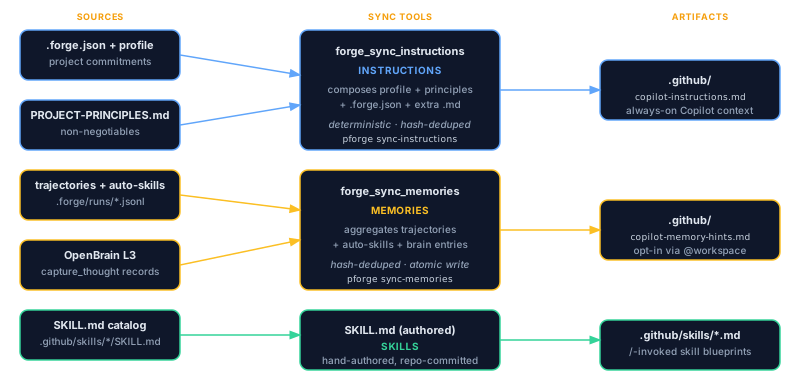
Both tools are idempotent and additive. They use content-hash deduplication, so running the same sync twice in a row produces zero file changes. They also use atomic write (temp file + rename), so a crash mid-write never leaves a half-baked file.
forge_sync_instructions — the "always true" file
forge_sync_instructions generates .github/copilot-instructions.md by composing four sources, in this order:
- Project Profile (
docs/plans/PROJECT-PROFILE.md), the tech stack, build commands, key paths. Generated once via theproject-profile.prompt.mdin Session 1. - Project Principles (
docs/plans/PROJECT-PRINCIPLES.md), non-negotiable architectural and engineering commitments. Generated viaproject-principles.prompt.md. - Extra instruction files (
.github/instructions/*.instructions.md), auto-loaded by Copilot via theirapplyTofrontmatter. The trilogy stitches the relevant ones into the master file so Copilot sees them as a single context. .forge.jsoncommitments, tech choices that the project has locked in (e.g."database": "postgres","frontend": "react").
The output is a single Markdown file ~150–400 lines (depends on profile complexity) with a deterministic structure: Identity → Stack → Build commands → Architectural rules → Forbidden patterns → Cost guardrails → Talking to Plan Forge tools.
Running it
# Generate (preview only, does not write)
pforge sync-instructions --preview

# Generate and write
pforge sync-instructions

# Force overwrite even if file is identical (skips hash check)
pforge sync-instructions --forceforge_sync_instructions({ preview: true })
// → { ok: true, written: false, diff: "...", contentHash: "sha256:..." }
forge_sync_instructions({ preview: false })
// → { ok: true, written: true, path: ".github/copilot-instructions.md", contentHash: "..." }What the output looks like
The generated file follows a canonical template so that Copilot Chat's prompt-injection logic finds the same anchors every time:
# Instructions for Copilot

> **Project**: <name>
> **Stack**: <stack summary>
> **Generated by**: forge_sync_instructions @ v3.x

## Architecture Principles
<merged from architecture-principles.instructions.md + project-principles>

## Project Overview
<merged from PROJECT-PROFILE.md>

## Quick Commands
<merged from project profile + .forge.json>

## Coding Standards
<stack-specific from instructions/>

## Planning & Execution
<pipeline + prompts overview>

## Cost Estimates
<always-included; mandates forge_estimate_quorum>

## Talking to Forge-Master
<always-included; mandates forge_master_ask for open-ended reasoning>
forge_sync_memories — the "we learned this" file
forge_sync_memories generates .github/copilot-memory-hints.md by harvesting three runtime sources:
- Trajectories (
.forge/trajectories/*.jsonl), per-slice notes the worker left for itself: "I tried X, it failed because Y, so I switched to Z". These are the gold for "don't repeat this mistake" guidance. - Auto-skills (
.forge/auto-skills/*.md), reusable patterns extracted by the Inner Loop. If three slices all needed the same shape of repository test, the fourth slice gets it for free as a skill, and Copilot Chat should know it exists too. - OpenBrain entries (L3, if configured), long-form lessons captured via
forge_memory_captureor auto-stamped by tools likeforge_run_plan.
Each source is filtered, hashed, deduped, and ranked by recency × signal strength. The output is bounded to ~80–120 lines so Copilot's context budget stays healthy.
<!-- pforge:custom --> / <!-- /pforge:custom --> markers, the sync tool preserves it verbatim. Only the <!-- pforge:auto --> region is regenerated.
Running it
# After every plan ships
pforge sync-memories

# Limit to last N trajectories (default: 50)
pforge sync-memories --since=14d

# Verbose: show which entries were included/excluded and why
pforge sync-memories --explain
What the output looks like
# Copilot Memory Hints

> **Generated by**: forge_sync_memories @ v3.x
> **Last sync**: 2026-05-17T14:22:11Z · 47 trajectories, 12 auto-skills, 8 brain entries

<!-- pforge:auto -->

## Recently learned patterns
- **Snapshot pop** uses `git stash apply` + explicit drop, not blind `git stash pop` (lesson from #201)
- **Vitest output parser** ignores subagent hallucination markers (lesson from #198)
- ...

## Auto-skills available
- `repository-vitest-pattern`, generated 2026-05-12 from 4 slices
- `bicep-rbac-scaffold`, generated 2026-05-10 from 3 slices

<!-- /pforge:auto -->

<!-- pforge:custom -->
<!-- Anything you write here is preserved across syncs -->
<!-- /pforge:custom -->
The Settings → Copilot dashboard tab
If you'd rather see the diff before it lands, open the dashboard and navigate to Settings → Copilot. The tab gives you four panels:
| Panel | Shows | Actions |
|---|---|---|
| Current file | Live content of .github/copilot-instructions.md |
Read-only viewer with syntax highlighting |
| Preview regenerated | What forge_sync_instructions would write right now |
Inline diff vs the current file |
| Memory hints | Live content of copilot-memory-hints.md + count of entries by source |
"Regenerate now" button → calls forge_sync_memories |
| Apply | Confirmation banner with the hash of what's about to be written | "Sync instructions" / "Sync memories" / "Sync both" buttons |
Backed by three REST endpoints (full reference: Appendix W — Copilot integration):
GET  /api/copilot-instructions         # read current file
POST /api/copilot-instructions/preview # generate without writing
POST /api/copilot-instructions/sync    # generate + write atomically
When to run what
| Event | Run | Why |
|---|---|---|
| Initial project setup | sync-instructions |
Bootstraps Copilot with stack + commands |
After edits to PROJECT-PROFILE.md or PROJECT-PRINCIPLES.md |
sync-instructions |
Architectural facts changed |
| After a plan ships | sync-memories |
New trajectories, possibly new auto-skills |
| Weekly maintenance | Both | Catch drift; safe even if nothing changed (hash dedup skips no-op writes) |
CI on main push |
Both, with --preview + fail-on-diff |
Catches "developer forgot to sync after editing PRINCIPLES" |
pforge sync-memories into the PostSlice hook (already shipped in templates/.github/hooks/PostSlice.md). Every successful slice now feeds the next Copilot conversation. Zero manual upkeep.
Capability summary
For the full tool-by-tool reference, see docs/capabilities.md on GitHub. The three trilogy surfaces, at a glance:
| Surface | MCP tool | CLI | REST | Since |
|---|---|---|---|---|
| Memory hints | forge_sync_memories |
pforge sync-memories |
— (CLI-only) | v2.99 |
| Instructions | forge_sync_instructions |
pforge sync-instructions |
POST /api/copilot-instructions/sync |
v3.0 |
| Dashboard tab | — (UI) | — (UI) | GET /api/copilot-instructionsPOST /api/copilot-instructions/preview |
v3.1 |